Binance Referral Code After Registration: How to Add It, Check Your Referrer, Change It, Bybit
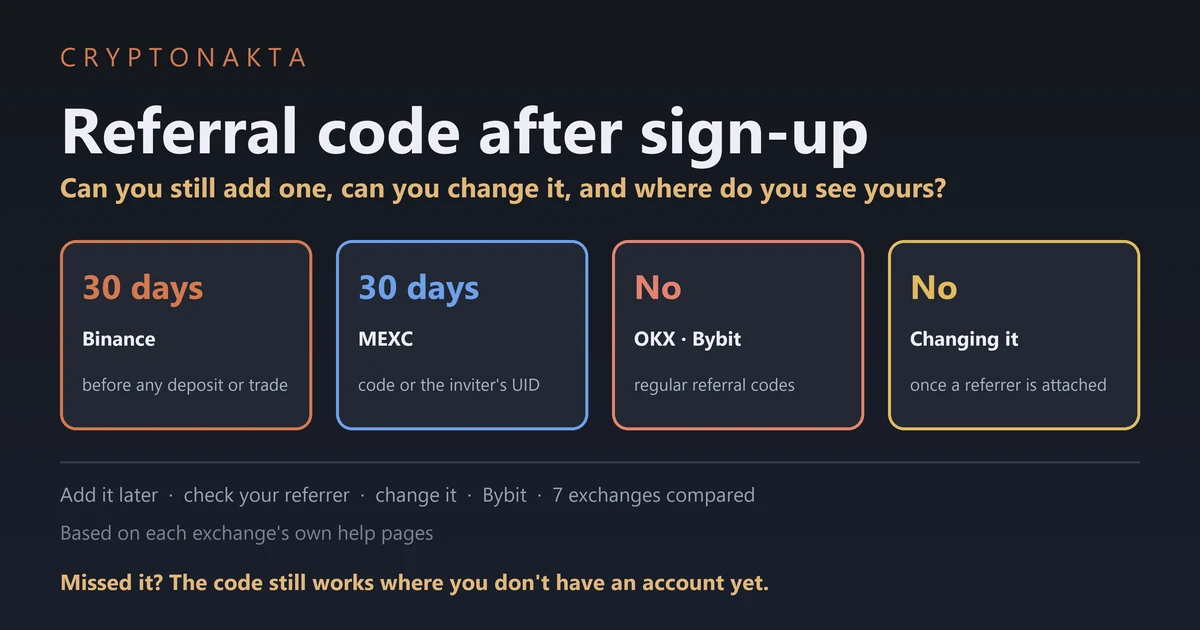
Whether you can add a referral code after registration depends on the exchange. On Binance you still can while the account is new and has no deposit or trade yet. MEXC has a similar option, while OKX and Bybit say no for regular referral codes.
I read the official help pages, FAQs and terms of seven exchanges and compared them line by line. I also opened our own sign-up links on each one to see where the code ends up. Where an exchange publishes nothing, this guide says so.
In this guide (13)
Can you still add a Binance referral code after registration?Who referred me? How to check the referrer on your accountHow to add a Binance referral code after signing up, condition by conditionCan you add a Bybit referral code after registration?Can you add an OKX referral code after registration?How to link a MEXC referrer within 30 days of sign-upBitget, Gate and KuCoin: can you add a referral code after sign up?Referral code after sign-up: 7 exchanges side by sideCan you change your referrer later, and when do perks start?Referral code box missing or invalid? What our 7 sign-up links showedHow much does a missing Binance referral code cost you in a year?Past the 30 days? What to do instead, and what to skipMy take on adding a referral code late
Can you still add a Binance referral code after registration?
Yes. On Binance you can still add a referral code after registration if your account is under 30 days old and has no deposit or trade yet. A few more account checks apply.
A referral code is a short code that ties your new account to whoever invited you. You normally type it on the sign-up screen.
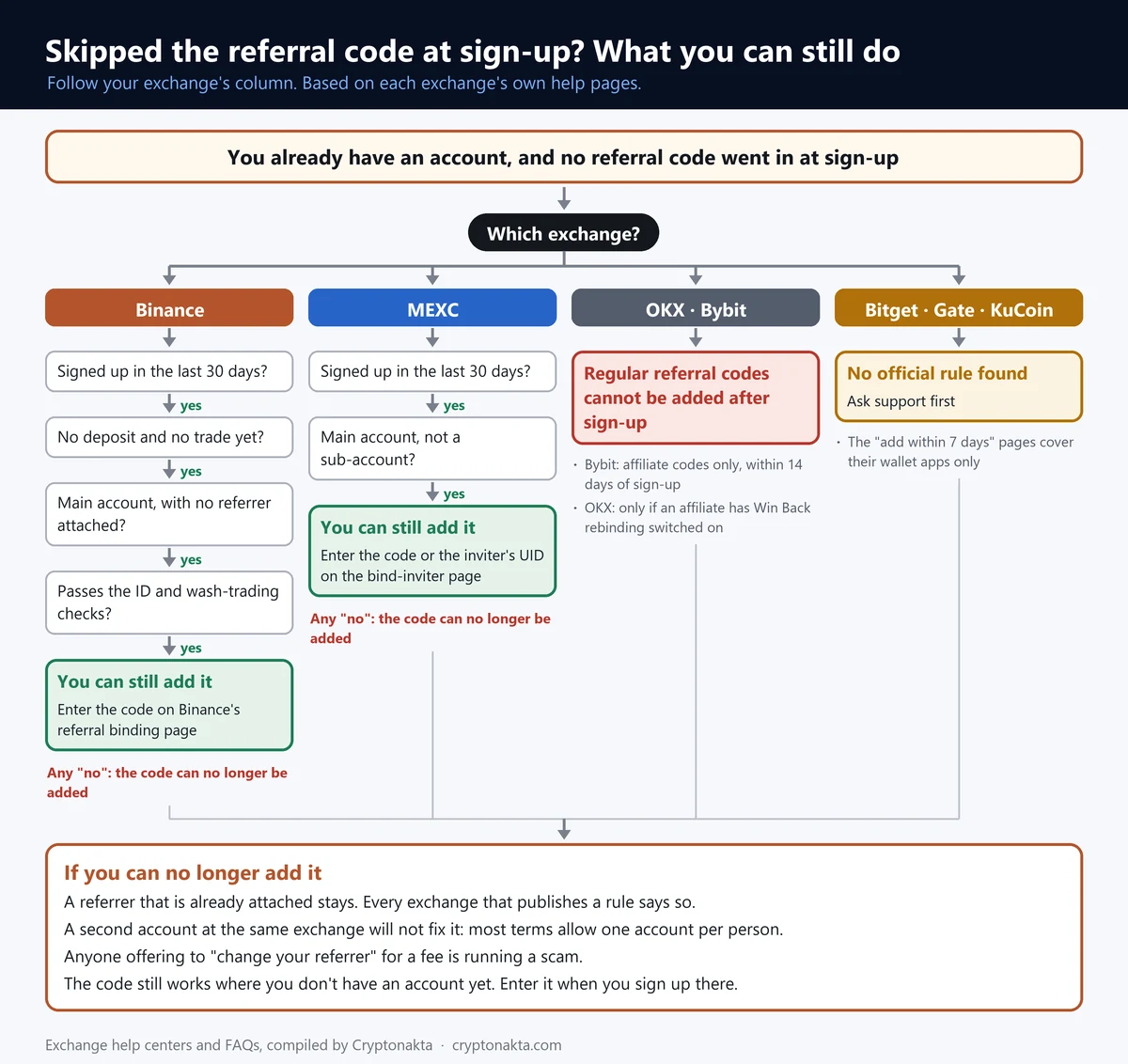
Binance and MEXC let you link a code later, within 30 days of sign-up. OKX does not, and neither does Bybit for regular referral codes. Bitget, Gate and KuCoin publish no rule on it that we could find.
 View full size ↗
In this guide, the binding page is our name for the Binance page titled “Bind Referral Pro Code”. To bind a code means to link it to an account that already exists. The conditions are strict. One deposit or one trade is enough to rule it out, even on day two. So if your account is still empty, sort this out before you fund it.
Binance
Affiliate disclosure: some links are partner links. We may earn a commission at no extra cost to you. This is not investment advice.
If your account is under 30 days old with no deposit or trade yet, copy the code on the card above and paste it on Binance’s official binding page, and 10% of the spot fees you pay from then on comes back in USDC. Log in first with the account you want to link.
If someone’s link was used when you signed up, a referrer may already be attached, and the page cannot add another.
Who referred me? How to check the referrer on your account
To see who referred you, open the account menu of your exchange. OKX, MEXC and Bybit each name a screen for it in their help pages. Binance does not. Its official FAQ only describes the screen for the person who invites.
Your referrer is the person or partner whose code your account is linked to. Their code earns them a share of your fees. Some referrers pass part of that share back to you.
| Exchange | Where to look | What it tells you |
|---|---|---|
| Binance | No screen for this in the official FAQ | Work from the clues below, or ask support in the app |
| Bybit | Account Info page (search summary of its help pages) | The affiliate code on your account. Some affiliate IDs stay hidden |
| OKX | Menu › Account settings › Profile › Referral rewards | If the entry is there, you have a referrer |
| OKX (affiliates) | User Center › Account information › Invite perks | The invite code, not the affiliate behind it |
| MEXC | My Invites › My Referrer | The referrer your account is linked to |
| Bitget, Gate, KuCoin | Not found in official docs | Ask support inside the official app |
On Binance you have to work from clues. This part is our reading, not Binance’s wording. If USDC lands in your spot wallet after spot trades, a referrer who shares fees is attached.
No USDC does not prove the opposite. A referrer can set your share to zero, and then nothing arrives. Our Binance fees guide explains how that rebate is paid.
If you are still unsure, ask in the support chat inside the Binance app.
Your own referral code is a different thing. It is the code you hand out so friends join under you. Exchanges show it on their invite or referral page, and it says nothing about who invited you.
How to add a Binance referral code after signing up, condition by condition
Binance lets you link a code later only if your account meets every condition on its list. The account must be under 30 days old, with no deposit and no trade. It must have no referrer yet. Three more checks cover the account type, your ID and how you trade.
| Binance condition | What it means for you |
|---|---|
| Signed up within the last 30 days | Count from the day you created the account |
| No deposit or trade yet | One deposit or one trade ends the option |
| No referrer attached | If a code went in at sign-up, it stays |
| Main account | Sub-accounts cannot bind a code |
| ID details not used on another account in the last 180 days | Your KYC must not be tied to another recent account |
| Not flagged for wash trading | Accounts marked for fake volume are out |
A main account is the account you registered with your own email or phone. A sub-account is an extra account created under it, and it cannot bind a code. KYC is the identity check where you upload your ID.
The 180-day rule is about your ID. If the same ID details were used on another Binance account in that time, the binding fails. The last check is wash trading, which means trading with yourself to fake volume.
If your identity check itself is stuck, see our guide to failed Binance verification.
- Log in on the Binance website with the account you want to link.
- Open the binding page, titled “Bind Referral Pro Code”.
- Paste the referral code and submit it on that page. Ours is right below, with a copy button.
CRYPTONAKTA
Binance’s help pages do not name the buttons on that page, so we do not either. If the page refuses the code, check it for typos first, then the conditions above.
The FAQ describes this for Referral Pro codes, Binance’s standard referral mode, and our code is one. Once it links, it stays: a referral relationship “cannot be changed or removed” after it is set up.
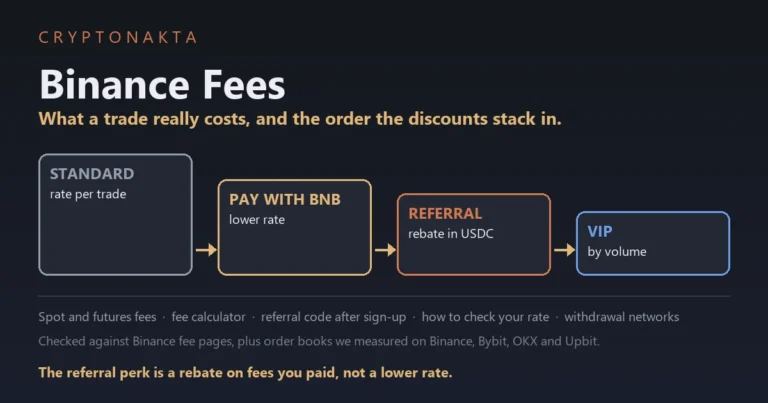
The Binance referral perk is a rebate, not a lower fee rate. A rebate is money paid back after you pay the normal fee. With our code, 10% of the spot fees you pay on Binance comes back in USDC.
Futures fees get no rebate, and it stops once your account reaches VIP 3, so it is not a lifetime perk. New to Binance? Our Binance sign-up guide covers the sign-up screen.
Binance
Affiliate disclosure: some links are partner links. We may earn a commission at no extra cost to you. This is not investment advice.
Can you add a Bybit referral code after registration?
Bybit’s help pages say you cannot add a regular referral code once the account exists. The one exception is an affiliate code, added within 14 days of sign-up. Those pages would not open for us, so we went by search-result summaries of them.
Bybit does not let you add a regular referral code after sign-up, and the 14-day option applies only to affiliate codes. A regular referral code comes from another Bybit user. An affiliate code comes from a partner in Bybit’s Affiliate Program, such as a website or a video creator.
For an affiliate code, the conditions are short. It has to be your main account. The account must not be under any affiliate or referrer yet. Market maker and institutional accounts are excluded.
You add it under Account › Account Info › “Join an Affiliate’s Community”. If you do not see that option, Bybit says you do not meet the criteria. Once an affiliate code is added, you cannot cancel or change it. We have not confirmed the path in the app.
To check what is on your Bybit account, open the Account Info page. Some affiliate IDs stay hidden there because of the partner’s privacy settings. In that case, think back to where you got the code.
Which kind is our Bybit code? We have not confirmed it, so plan on the regular rule. If you have no Bybit account yet, enter it on the sign-up screen with the #0 at the end. Our Bybit sign-up guide shows that screen.
5ZGKX#0 Type it in full, including the #0 at the end.
Bybit
Affiliate disclosure: some links are partner links. We may earn a commission at no extra cost to you. This is not investment advice.
Can you add an OKX referral code after registration?
No. OKX’s referral FAQ says referral codes must be added before the account is created. After that, nobody can add or change one, and OKX support cannot do it by hand either.
OKX does not let you add a referral code after sign-up, and affiliate rebinding is a separate program that the affiliate has to open.
That program is called Win Back. An OKX affiliate creates a Win Back link in their own partner portal. If the affiliate has not switched it on, nothing you do on your side will work.
OKX does not publish who qualifies. Requests are normally handled within 24 hours. A 30-day cooling-off period starts on the day you submit, and a request cannot be cancelled once sent.
| Regular referral code | Affiliate rebinding (Win Back) | |
|---|---|---|
| Who starts it | You, on the sign-up screen | The affiliate, with a Win Back link |
| Works on an existing account | No | Only if you pass OKX’s check |
| Published conditions | The code must go in before sign-up | Not published |
| Timing | At sign-up only | Normally within 24 hours, then a 30-day cooling-off period |
| New-user task clock | Starts at sign-up | Still counted from sign-up |
To check your OKX account, open the app Menu › Account settings › Profile › Referral rewards. If that entry is there, your account has a referrer. Affiliate links show under User Center › Account information › Invite perks. That page shows the invite code, not who is behind it.
OKX also tells users not to delete the account or create another one to change the code. If you have no OKX account yet, the code belongs on the sign-up screen, as our OKX sign-up guide shows.
OKX
Affiliate disclosure: some links are partner links. We may earn a commission at no extra cost to you. This is not investment advice.
How to link a MEXC referrer within 30 days of sign-up
MEXC lets you link a referrer yourself within 30 days of sign-up. You open its self-service linking page, enter the referrer’s code or UID and confirm. MEXC support can also do it for you within the same 30 days.
A UID is the user ID number that each account gets. On MEXC you can link with either the referral code or the referrer’s UID.
- Log in on the MEXC website.
- Open the self-service linking page.
- Enter the referrer’s code or UID and press “Confirm Linking”.
Only main accounts can link a referrer. Search summaries of the same MEXC guide add two more rules. The referrer must have signed up before you. Your account must not share identity details with theirs.
MEXC’s guide says nothing about deposits or trades. We do not know whether that means they do not matter. To be safe, link the referrer before your first deposit.
The link is final. MEXC says it “cannot be changed later.” To check it, open My Invites and look under My Referrer.
MEXC’s terms allow a maximum of two accounts per person. They also ban bulk sign-ups made to collect extra perks. We could not confirm whether a second account can use a new code.
Our MEXC code is below if you want to paste it on the linking page.
43zJH
MEXC
Affiliate disclosure: some links are partner links. We may earn a commission at no extra cost to you. This is not investment advice.
Bitget, Gate and KuCoin: can you add a referral code after sign up?
We could not find an official rule on adding a code later for Bitget, Gate or KuCoin, and that is not the same as a no. Their help pages simply do not cover it. Ask their support before you deposit.
KuCoin’s current sign-up guide only covers the sign-up itself. If the code does not fill in from an invite link, the link may have expired, and you type the code in yourself.
Gate’s own explainer warns that a referral “may not be recorded” if you sign up without the invite link or code. It does not say whether a code can be added afterwards.
You may find pages about adding a code within 7 days for Bitget Wallet and Gate’s Web3 wallet. Those rules are for the wallet apps, not the exchanges.
Before you open the support chat in the official app, have these questions ready.
- Can a referral code still be linked to my account after sign-up?
- Is there a deadline, and from which date does it count?
- Does a deposit or a trade rule it out?
- Can the link be changed later?
If you have not signed up on Bitget yet, its sign-up screen shows the current perks for new users. In our test, the Bitget link filled in the code and locked the box.
Bitget
Affiliate disclosure: some links are partner links. We may earn a commission at no extra cost to you. This is not investment advice.
Referral code after sign-up: 7 exchanges side by side
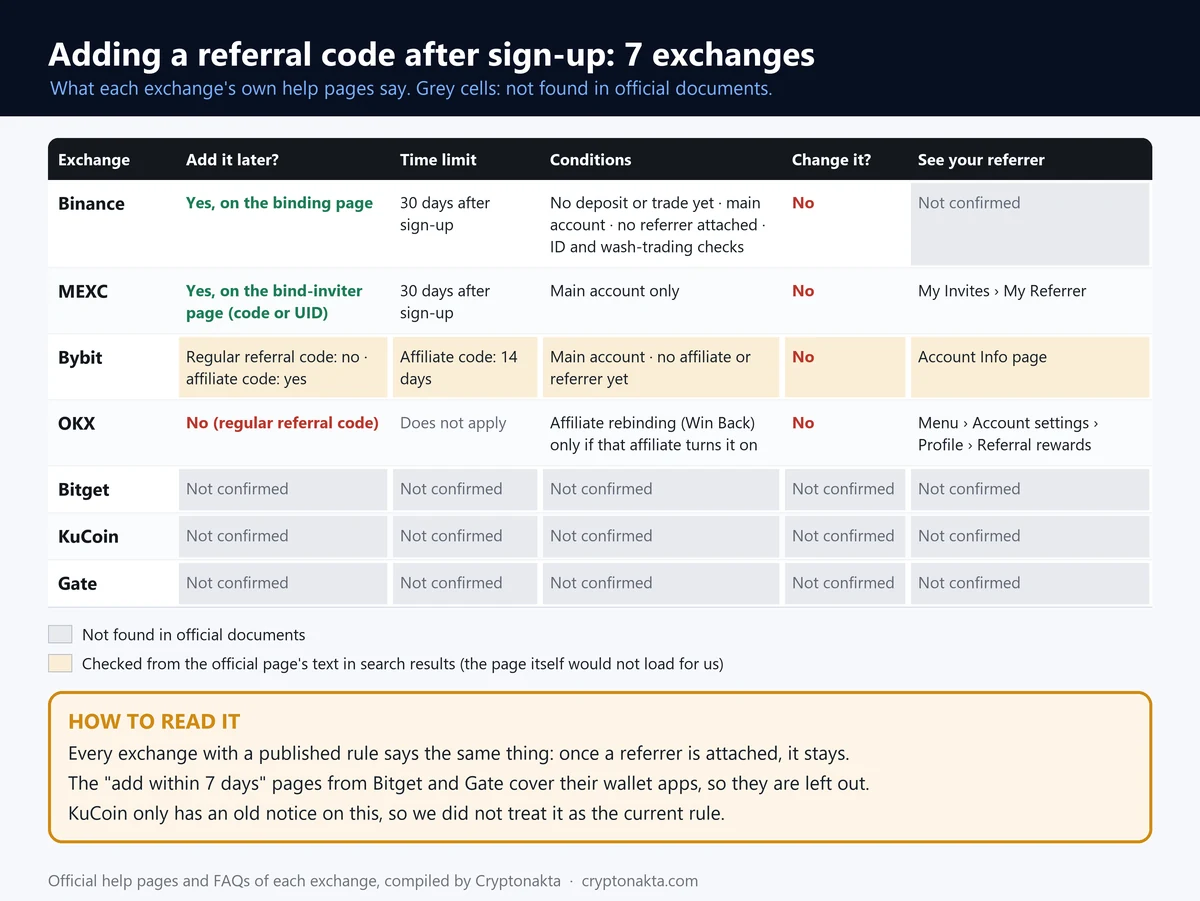
Of the seven exchanges we compared, only Binance and MEXC document a way to add a referral code after sign-up. Both allow 30 days. OKX says no, and so does Bybit for regular codes. Bitget, Gate and KuCoin have no rule we could find.
We checked each exchange’s official help pages, FAQs and terms in November 2026.
| Exchange | Add a code after sign-up | Time limit | Conditions | Change or remove later | Where to see your referrer |
|---|---|---|---|---|---|
| Binance | Yes | 30 days after sign-up | no deposit or trade yet; no referrer attached yet; main account, not a sub-account; ID details not used on another account in the last 180 days; not flagged for wash trading | No | Not found in official docs |
| Bybit | No for regular referral codes; only affiliate codes, within 14 days* | 14 days (affiliate codes only)* | main account, not a sub-account*; no referrer attached yet*; not a market-maker or institutional account* | No* | Account Info page (some affiliate IDs stay hidden)* |
| OKX | No (rebinding to an affiliate is a separate process) | n/a | n/a | No | Menu › Account settings › Profile › Referral rewards |
| Bitget | Not found in official docs | Not found in official docs | Not found in official docs | Not found in official docs | Not found in official docs |
| MEXC | Yes | 30 days after sign-up | main account, not a sub-account; referrer signed up before you*; no identity details shared with the referrer*; deposit or trade rule not mentioned | No | My Invites › My Referrer |
| KuCoin | Not found in official docs | Not found in official docs | Not found in official docs | Not found in official docs | Not found in official docs |
| Gate | Not found in official docs | Not found in official docs | Not found in official docs | Not found in official docs | Not found in official docs |
* Cells marked with an asterisk come from search-result summaries of the official pages, because the original pages did not open for us (Bybit help pages returned 403).
 View full size ↗
Two kinds of cells need care. Bybit’s “No” is about regular referral codes only. A “Not found in official docs” cell means exactly that. It is not a hidden no.
Can you change your referrer later, and when do perks start?
No. Binance, Bybit, OKX and MEXC all say a referrer cannot be changed or removed once it is attached. OKX adds that even its support team cannot reassign it.
Once a referrer is attached, none of the exchanges with a published rule let you change or remove it. For Bitget, Gate and KuCoin we found no rule either way.
OKX is the only exchange here with an official sentence on when perks start after a late link. Its affiliate FAQ says new-user tasks “are counted from your registration date, not your rebind date.” A late rebind does not restart that clock.
Binance and MEXC say nothing about timing. The safe assumption is that a late code counts from the moment it links. Do not expect anything for earlier trades. That is our reading, not a published rule.
A referral code does not always lower the fee rate, either. On Binance it is a rebate, while Gate and KuCoin codes do lower the fee itself.
Referral code box missing or invalid? What our 7 sign-up links showed
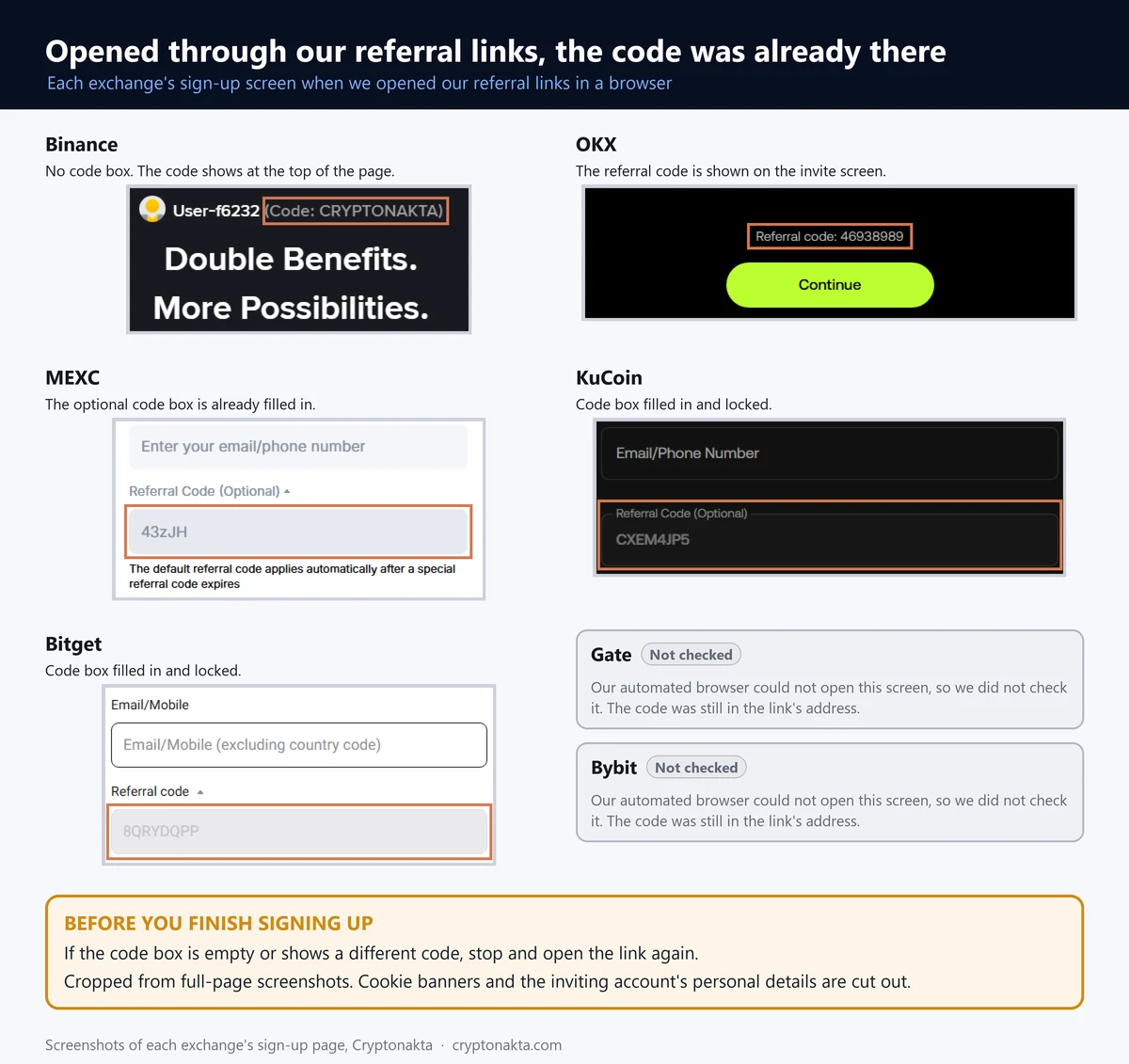
A referral code is usually rejected as invalid because of a typo, a cut-off code or an expired link. The other common cause is signing up in an app you installed on its own, because the link does not carry over.
| What you see | Likely cause | What to do |
|---|---|---|
| “Invalid code” | A typo, the wrong letter case or a missing part | Copy and paste the code. On Bybit, include the #0 |
| The code box is empty after opening a link | The link expired | Type the code by hand, as KuCoin’s guide advises |
| No code box in the app | The app was installed on its own, so the link was lost | Look for an optional “Referral code” line and open it |
| No code box on Binance | Binance shows the code at the top of the page instead | Check that the code shown is the one you meant |
| The screen looks different from a guide | Layouts differ by region | Go by your own screen |
On November 1, 2026, we opened our seven sign-up links and followed each redirect. 6 of 7 links carried our code all the way to the final sign-up address. The odd one out was Bitget.
Bitget’s share link had no code in its address at all. The code was attached on the sign-up screen itself. MEXC’s short link also started without a code, and the code appeared after the redirect.
 View full size ↗
| Exchange | Code in the final sign-up address | What the sign-up screen showed |
|---|---|---|
| Binance | Yes | No code box. Our code was shown at the top of the page |
| Bybit | Yes | Not seen. Our automated browser got a connection error |
| OKX | Yes | A “Referral code” line with our code |
| MEXC | Yes, after the redirect | Our code in the optional box, in grey |
| KuCoin | Yes | Code box filled in and locked |
| Bitget | No, added on the screen | Code box filled in and locked |
| Gate | Yes | Not seen. Our automated browser got an “Access Denied” page |
We did not try to get around the errors on Gate and Bybit, so we saw only their addresses. Before you tap the final sign-up button anywhere, check that the box shows the code you meant to use.
How much does a missing Binance referral code cost you in a year?
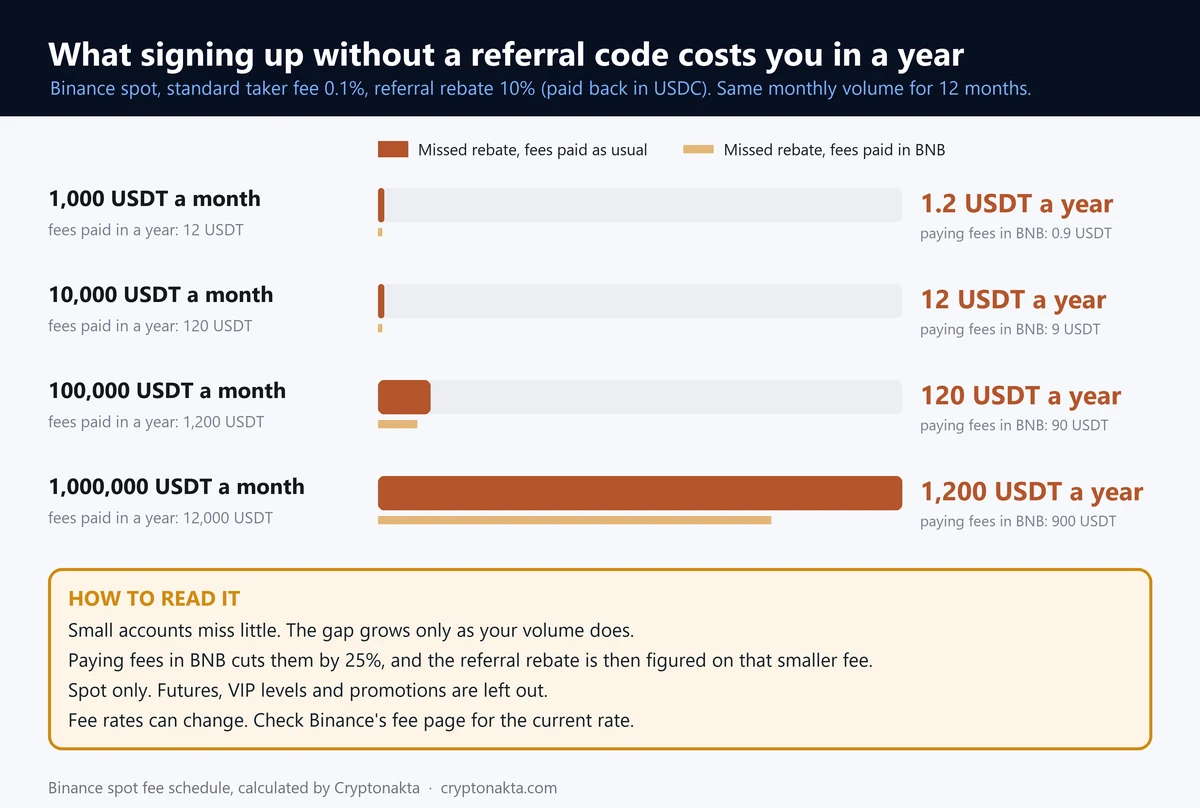
For most people the missed Binance referral rebate is small. With $10,000 of spot trading a month, it comes to about $12 a year. It only adds up at much higher volume.
The table uses example numbers, not your account. It assumes the standard 0.1% spot taker fee and our 10% rebate, over twelve months.
| Monthly spot volume (example) | Rebate missed in a year | If you pay fees in BNB |
|---|---|---|
| $1,000 | $1.2 | $0.9 |
| $10,000 | $12 | $9 |
| $100,000 | $120 | $90 |
 View full size ↗
Paying fees in BNB lowers the fee first, so the rebate on top is smaller too. Futures trades are left out.
So the honest answer for a small account is a few dollars a year. If you are inside the 30 days, linking the code now costs nothing. If you are past it, these sums are not worth a risky workaround.
Past the 30 days? What to do instead, and what to skip
If your Binance account is past 30 days or already funded, keep using it as it is. Binance will not bind a code now, but you can still lower your fees in other ways. On an exchange you have not joined yet, the code still works at sign-up.
On Binance, paying spot fees in BNB cuts them by 25%, and higher VIP levels lower the rate as volume grows. Our exchange fee comparison shows how other exchanges price trades.
If you plan to open a second exchange anyway, put the code in on the sign-up screen. Gate’s code gives a 10% trading fee discount for life. KuCoin’s gives 5% for life. Our Gate and KuCoin guides walk through the sign-up.
Gate.io
KuCoin
Affiliate disclosure: some links are partner links. We may earn a commission at no extra cost to you. This is not investment advice.
What not to do
Opening a new account just to attach a code is not a normal route under these exchanges’ terms. Binance can end referral commissions on a new account made with the same ID. OKX tells users not to delete an account and sign up again for this.
Most of these exchanges allow one verified account per person. MEXC allows two, but it bans bulk sign-ups for extra perks.
Ignore anyone who offers to change your referrer or add a code for a fee. The official routes are the exchange screens in this guide and the support chat inside the official app.
Fake support accounts also message people first on Telegram or X. A message that asks for your password or a 2FA code is a scam on its own. See our guides to common crypto scams, what a lost 2FA locks and what to do after an account hack.
My take on adding a referral code late
My advice is simple. Check what is on your account first. Link a code if you are still inside the limits, and leave it alone if you are not.
What surprised me in our test was how well the links work. Most carried the code right into the sign-up form. The weak spot is the app. Install it on its own and the link is gone, so the code box is your only backup. And on Binance, the 30 days end early with your first deposit.
The claims I trust least come in three kinds. First, paid offers to “change your referrer.” Second, posts claiming a code can never be added after sign-up, when Binance and MEXC allow it. Third, advice to open another account, which is not a normal route anywhere.
The other side has a fair point. A small trader misses about $1.2 a year on Binance. Paying fees in BNB saves more than that. A referral code is one way to cut fees, and not the only one.
You should also know how this site earns money. We use referral (affiliate) codes, and when you sign up with one, we earn a commission. On Binance we set part of our commission aside for you. That is why 10% of the spot fees you pay comes back in USDC. It is 10% of your fees, not 10% of our commission.
Referral code questions people ask
- Binance · Referral Pro FAQ (linking a code after sign-up) · checked 2026-11-01
- Binance · Bind Referral Pro Code page · checked 2026-11-01
- Bybit · How to Add and Check Registered Affiliate Code · checked 2026-11-01
- Bybit · FAQ Account Settings · checked 2026-11-01
- OKX · Referral Program FAQ · checked 2026-11-01
- OKX · OKX Referral Program FAQ · checked 2026-11-01
- OKX · Affiliate FAQ (rebinding, Invite perks) · checked 2026-11-01
- OKX · Multiple accounts FAQ · checked 2026-11-01
- MEXC · Self-Service Referrer Linking Guide · checked 2026-11-01
- MEXC · Affiliate FAQ · checked 2026-11-01
- MEXC · User Agreement · checked 2026-11-01
- Bitget · Terms of Use · checked 2026-11-01
- KuCoin · Sign Up and Login Help Guide · checked 2026-11-01
- Gate Learn · Gate Crypto Referral Program · checked 2026-11-01
Not investment advice. Exchanges change their referral rules and screens, so check the official page before you act.
Not on Binance yet? Read our Binance sign-up guide with the referral code