Lost Seed Phrase: Recover a Wallet Without It, MetaMask, Trust Wallet, Ledger, Missing Words
If your wallet app still opens and you know the password, you can usually see your seed phrase again today. If there is no app, no backup and no remembered words, nobody can recover it. Everything in between depends on your wallet and how much you remember.
I read the official help pages of the main wallets for this guide. I also timed how long a home PC needs to find missing words, using practice phrases made for the test. Where a wallet’s own page would not open, the guide says so.
In this guide (13)
Lost my seed phrase but the wallet still opens: what now?Where to find your MetaMask Secret Recovery Phrase again, and in other walletsLost seed phrase on a Ledger or Trezor? The device won’t show it againHow to recover a wallet without the seed phrase: backups you may already haveForgot one or two seed words? How long recovery takes on a home PCInvalid mnemonic checksum, or a wallet that opens emptyRestored the seed phrase but the balance is zero?Can you recover a lost seed phrase from an address?Seed phrase recovery services, fake support and other trapsDo Binance and Bybit accounts have a seed phrase?Can you change your seed phrase? Move to a new wallet insteadHow to store a new seed phrase so this does not happen twiceMy take on a lost seed phrase
Lost my seed phrase but the wallet still opens: what now?
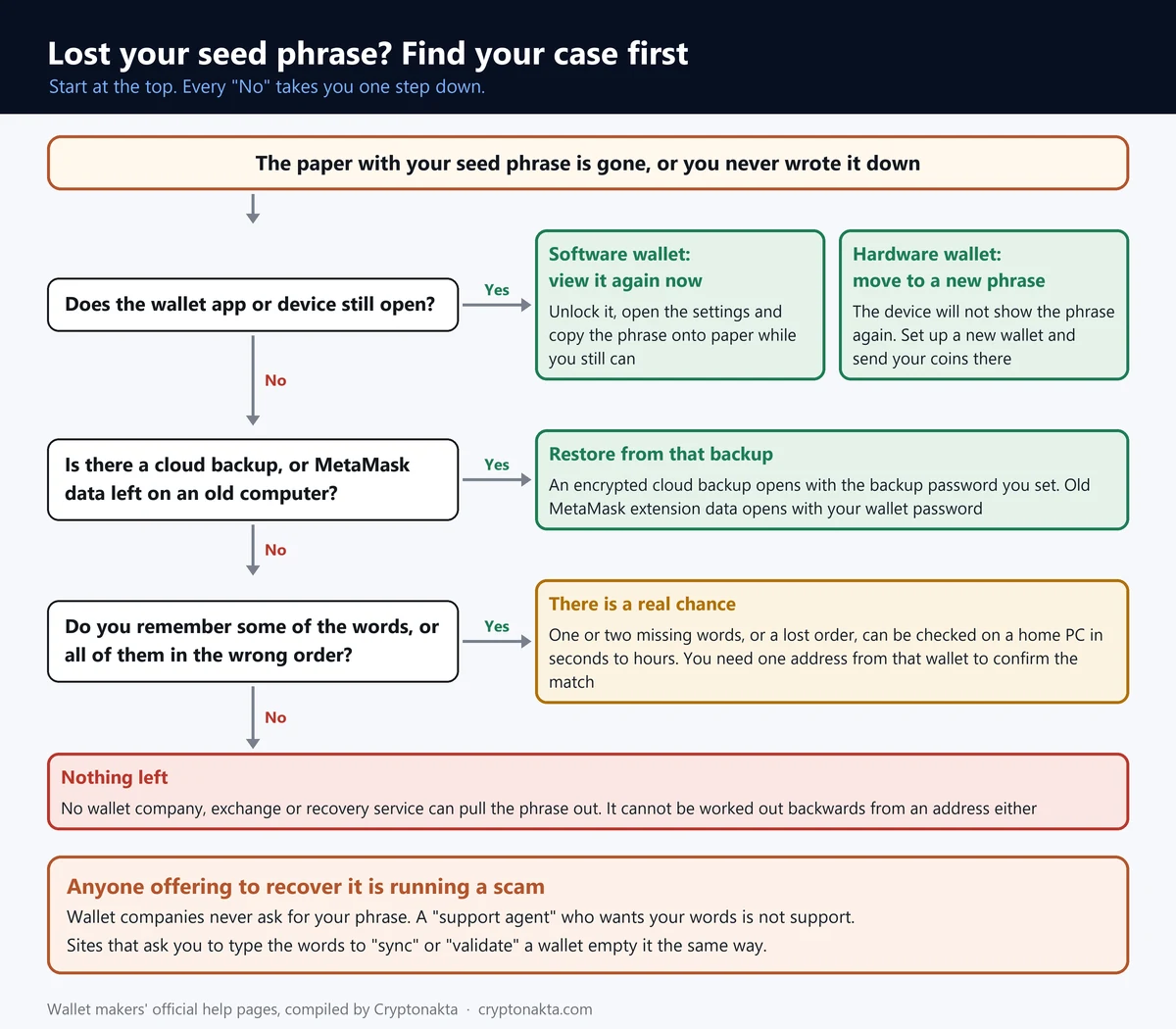
If your wallet app or extension still opens and you know its password, you can usually see your seed phrase again today and copy it down. If it is a hardware wallet, move your coins to a new phrase while the device works. If nothing is left at all, nobody can recover it.
Check in this order. Does the app still open on any phone or computer? Is there a cloud backup, a Google or Apple sign-in, or MetaMask on an old computer? Do you remember most of the words? If all three answers are no, the wallet is gone.
A seed phrase is the 12 or 24 words your wallet showed you at setup. MetaMask calls it the Secret Recovery Phrase. Anyone who types those words into a wallet app controls the coins. In a self-custody wallet, you alone hold them, and the wallet company can’t hand them back to you.
If minding a phrase sounds like too much work, an exchange account doesn’t use one. You get back in with a password and two-factor codes, and the exchange holds the coins for you.
Binance

Affiliate disclosure: some links are partner links. We may earn a commission at no extra cost to you. This is not investment advice.
 View full size ↗
Where to find your MetaMask Secret Recovery Phrase again, and in other wallets
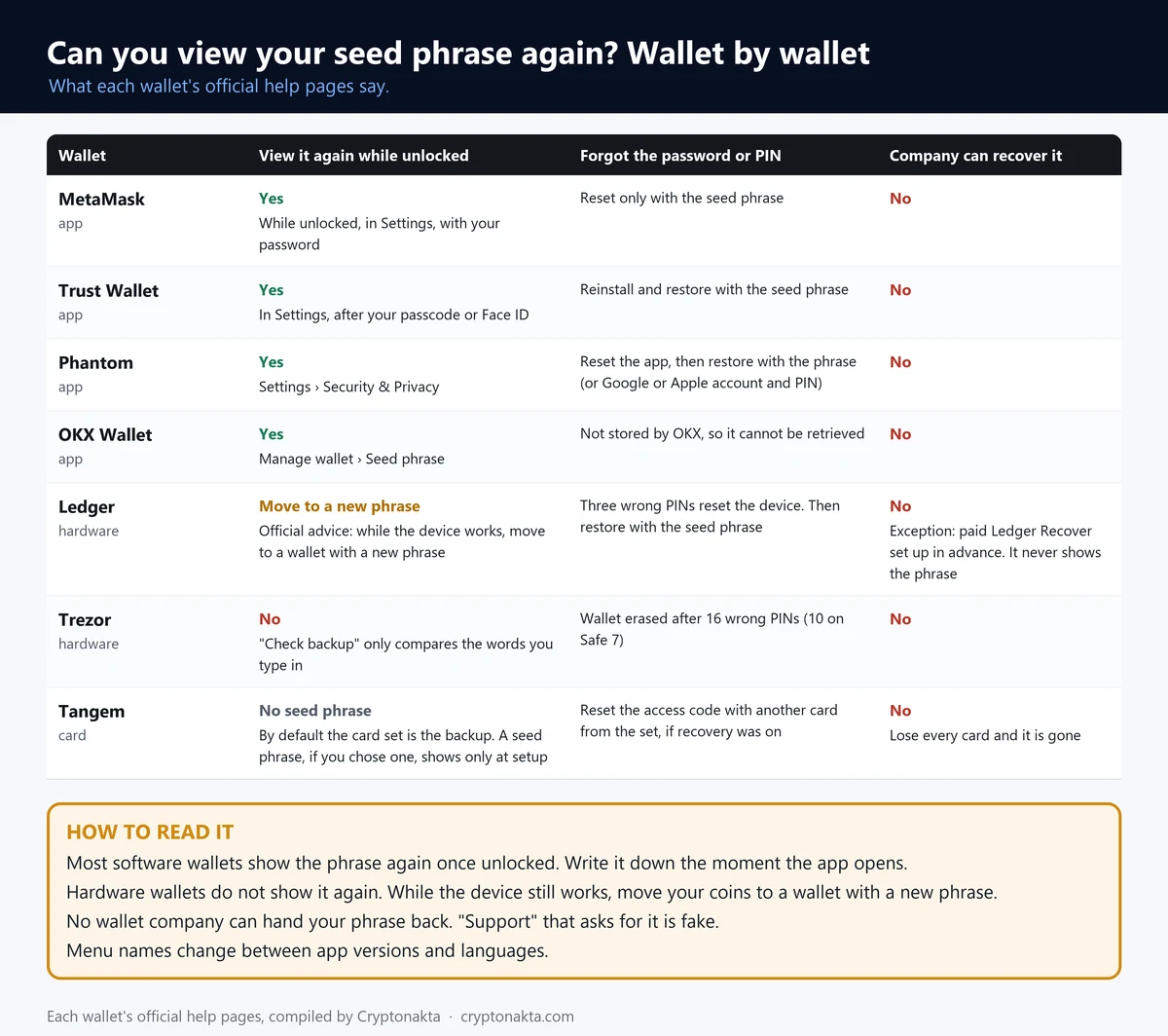
MetaMask shows your Secret Recovery Phrase again as long as it is unlocked and you know its password. Trust Wallet, Phantom and OKX Wallet work much the same way once you are signed in. Open the settings, confirm your password, and copy the words onto paper.
In the MetaMask extension, go to Settings › Security and password › Manage wallet recovery. Pick the phrase, click Reveal, then hold the button that says “Hold to reveal SRP”. On the phone app the path is Settings › Security and privacy › Reveal Secret Recovery Phrase. Older versions of the extension call that menu Security & privacy.
In Trust Wallet, tap the gear icon and your wallet, then Manual back up and Back up now. Phantom keeps it behind your profile picture, under Security & Privacy › Show Recovery Phrase. In OKX Wallet it sits under Manage wallet › Seed phrase, behind an eye icon.
Write the words on paper with a number next to each, then read them back against the screen once. If the phrase ever sat in a screenshot or a chat, someone may have seen it. In that case, follow our guide on what to do when a seed phrase is exposed.
Most software wallets show the phrase again as long as the app still opens and you know the password. A forgotten password is the harder case, because MetaMask needs the phrase to reset it. So copy the phrase first and deal with the password later.
We checked each wallet’s official help pages in November 2026. Menu names change between app versions, so look for Security or Backup in settings if yours looks different.
| Wallet | Shows the phrase again? | Where it is (menu names as in the app) | Forgot the password or PIN | Can the company recover it? |
|---|---|---|---|---|
| MetaMask | Yes, while it is unlocked and you know the password | Extension: Settings › Security and password › Manage wallet recovery · Mobile: Settings › Security and privacy › Reveal Secret Recovery Phrase | Reset needs the recovery phrase; without it, no reset | No |
| Trust Wallet | Yes, after the app passcode or Face ID | Settings (gear icon) › [your wallet] › Manual back up › Back up now | Too many wrong passcodes lock the app; reinstall and restore with the phrase* | No |
| Phantom | Yes, after you enter the app password or PIN | Profile avatar › Settings › Security & Privacy › Show Recovery Phrase | Forgot password › Reset & wipe app, then restore with the phrase or the Google/Apple login + PIN | No |
| OKX Wallet | Yes, after you enter the app password or PIN | Home › wallet name › Manage wallet › [your wallet] › Seed phrase › eye icon | Wallet password is not stored and cannot be retrieved | No |
| Binance Wallet | No phrase exists (MPC, key shares instead) | Not applicable | Lose the recovery password and the device, and access is gone | No |
| Ledger | Official advice is to move funds and make a new phrase | Recovery Check app (compares the words you wrote down; does not show them)* | Three wrong PINs reset the device | No; paid Ledger Recover, set up in advance, restores keys but never shows the phrase |
| Trezor | No: a lost backup cannot be regenerated; move funds to a new wallet | Trezor Suite gear › Device › Wallet backup › Check backup (compares the words you type) | Wrong PIN 16 times (Safe 7: 10) wipes the wallet | No |
| Tangem | Default card set has no phrase to show; phrase-based setup shows it only at creation* | Not applicable | Access code reset needs another card from the set, with recovery turned on | No |
* Cells marked with an asterisk come from search-result summaries of the official pages, because the original pages did not open for us (403 errors, time-outs or pages drawn by script).
 View full size ↗
Lost seed phrase on a Ledger or Trezor? The device won’t show it again
Hardware wallets don’t show the phrase again, so the official advice is to move your coins to a wallet with a new phrase while the device still works. Do it now, before a forgotten PIN or a reset wipes the device.
A hardware wallet is a small device that keeps the keys offline. It shows you the words once, at setup.
Trezor says “the missing wallet backup cannot be re-generated in any way”. If you still have access to the wallet, its guide tells you to move your funds elsewhere immediately.
Ledger’s advice is to send your crypto to a different address and then create a new recovery phrase. We found no Ledger page that describes a way to display the words again.
Trezor’s Check backup and Ledger’s Recovery Check only compare the words you type with the device. Neither one shows them.
| Device | Wrong PINs allowed | What happens next |
|---|---|---|
| Ledger | Three | The device resets and wipes its recovery phrase |
| Trezor Safe 5, Safe 3, Model T, Model One | Sixteen | The device resets and the wallet is erased |
| Trezor Safe 7 | Ten | The device resets and the wallet is erased |
| D’CENT biometric wallet | Ten | All key data in the wallet is deleted |
So the PIN matters right now. If the paper is gone and the device wipes itself, the coins go with it.
Ledger Recover is a paid service you join in advance, with ID. If you signed up before losing the paper, it can restore your keys to a device. Ledger says it “can’t provide you with your Secret Recovery Phrase”, though.
Tangem’s default card set has no seed phrase at all, and each card holds a copy of the key. Lost the device rather than the paper? See our guide on what a hardware wallet protects.
How to recover a wallet without the seed phrase: backups you may already have
You can sometimes recover a wallet without the seed phrase if the app made a backup for you. Look for an encrypted cloud backup or a Google or Apple sign-in wallet. Old MetaMask data on a computer you used before also counts. Each one still needs a password or PIN you set.
A cloud backup here is the app’s own encrypted copy in your iCloud or Google Drive. Trust Wallet says its copy “can only be decrypted with a password you set”. It cannot reset that password for you. OKX Wallet’s cloud backup works the same way, with a backup password of at least 6 characters.
MetaMask wallets created with Google, Apple or Telegram open with that account and your MetaMask password. Phantom wallets created with Google or Apple use that account and a four-digit PIN. Seven wrong PINs delete the backup on that device.
Old MetaMask data is the backup people forget. If an old computer still has the extension data and you know the password you used back then, there is a way in. MetaMask’s official Vault Decryptor can show the phrase from that file. It does not work on Android or iOS, and an uninstalled extension has likely lost its data.
Walt’s DeFi Account in Telegram has an email backup, but the code only works while you are logged in to Telegram. A screenshot in your gallery is not one of these backups, because nothing encrypts it.
| Wallet | Backup that works without the paper |
|---|---|
| MetaMask | Google, Apple or Telegram login wallets open with that account and password; old PC extension data + password → Vault Decryptor |
| Trust Wallet | Encrypted Cloud Backup (iCloud or Google Drive), opened only with your own password |
| Phantom | Google or Apple login wallet with a 4-digit PIN; 7 wrong PINs delete the device backup |
| OKX Wallet | Cloud backup (iCloud, Google Drive, Huawei Cloud) locked by a backup password |
| Binance Wallet | Key shares in the cloud and on the device, cloud share locked by the recovery password |
| Tangem | Backup cards in the same set |
Forgot one or two seed words? How long recovery takes on a home PC
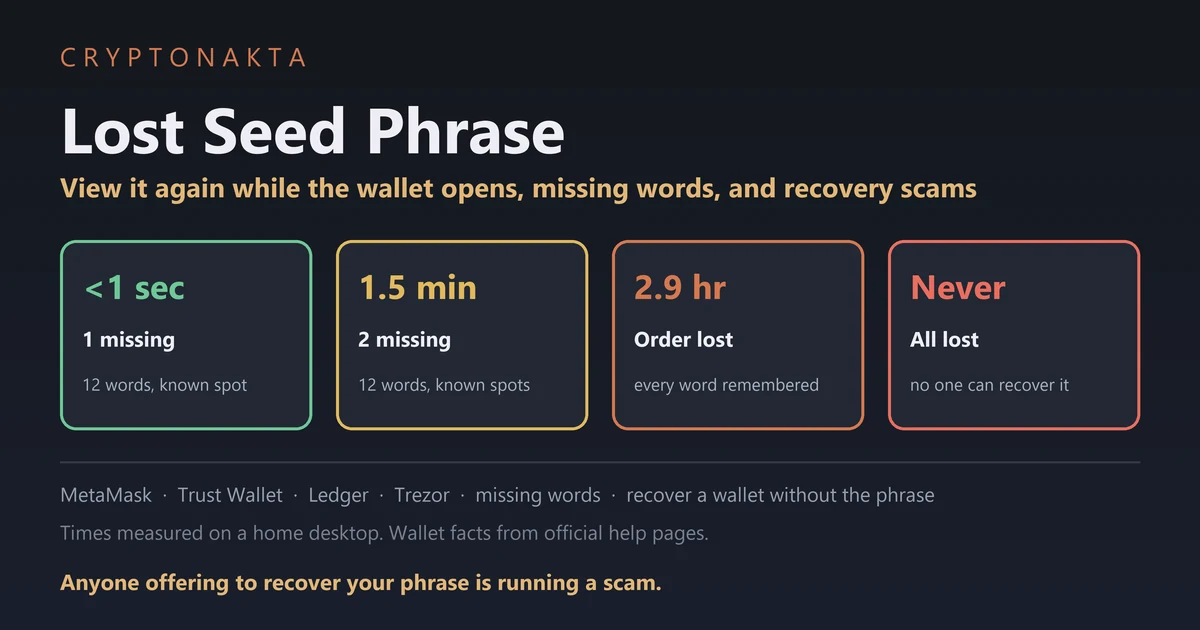
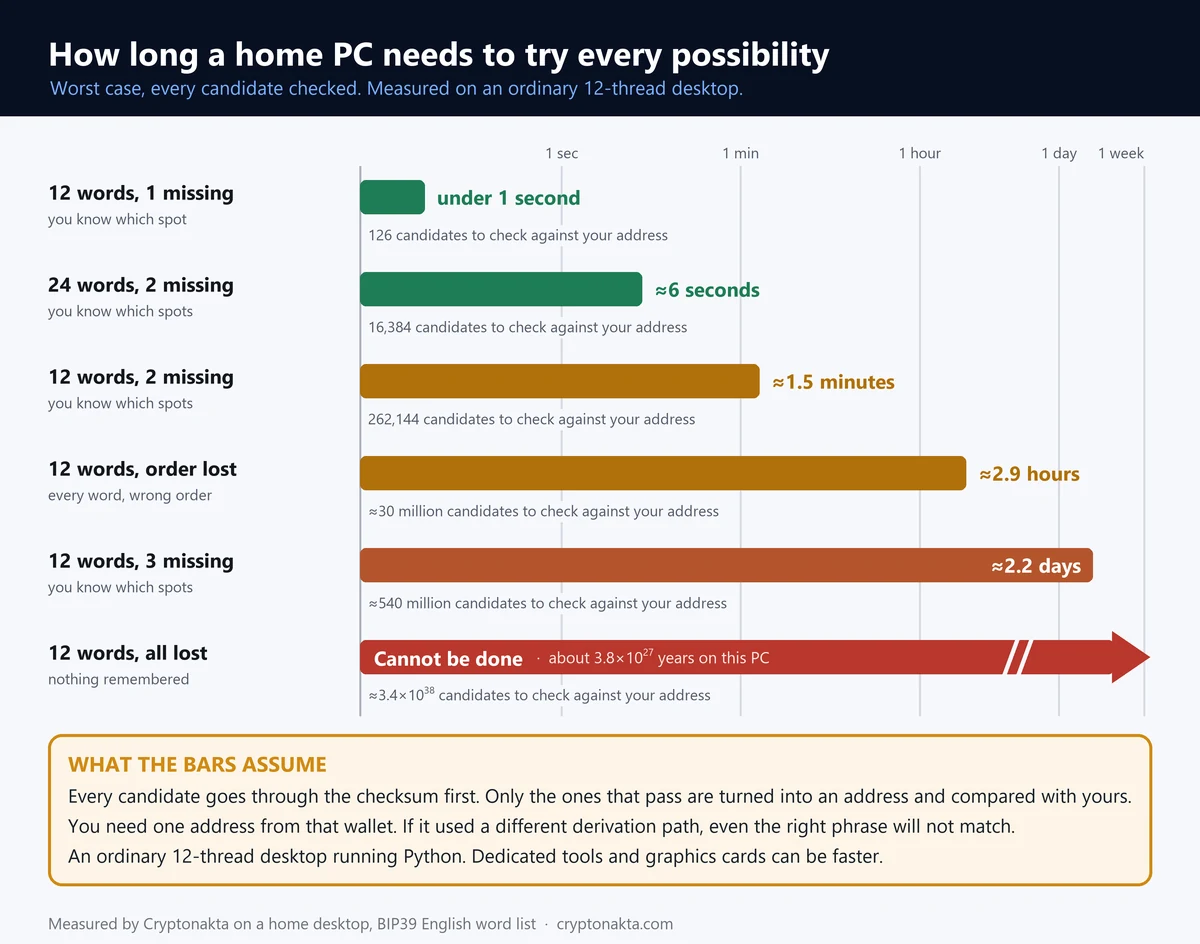
If you remember all but one or two words, the full phrase can often be found on an ordinary PC. In our test, one missing word out of twelve took under 1 second, and two missing words in known spots took 1.5 minutes. You also need one address from that wallet to confirm the match.
We ran this ourselves on November 3, 2026, on a 12-thread desktop PC running Python. We used random practice phrases. Each candidate goes through the checksum first. Each one that passes is turned into an Ethereum address on the default path and compared with the real one. Our PC turned about 2,869 candidates per second into addresses, and dedicated tools run faster.
| Situation | Candidates to try | Pass the checksum | Worst case on our PC |
|---|---|---|---|
| 12 words, one missing, you know where | 2,048 | about 126 | under 1 second |
| 12 words, one missing, position unknown | 24,576 | about 1,524 | under 1 second |
| 24 words, one missing, you know where | 2,048 | about 8 | under 1 second |
| 12 words, two neighbours swapped | 11 | 1 | under 1 second |
| 24 words, two missing, you know where | 4.19 million | about 16,384 | 6.3 seconds |
| 12 words, two missing, you know where | 4.19 million | about 262,144 | 1.5 minutes |
| 12 words, all known, order unknown | 479 million | about 29.7 million | 2.9 hours |
| 12 words, three missing, you know where | 8.59 billion | about 536.9 million | 2.2 days |
| 12 words, none remembered | 2132 | 2128 | Impossible in practice |
All twelve words in an unknown order take 2.9 hours. Three missing words take 2.2 days, even when you know where they go. With nothing remembered there are 2128 valid phrases, which no computer can search.
Even if you remember most of the words, you need one address from that wallet to check the candidates against. Passing the checksum is not proof the phrase is yours. Find your old address in an exchange withdrawal record or an old transaction.
The derivation path, the route a wallet follows from the phrase to your addresses, has to match too. MetaMask imports only its default path, m/44’/60’/0’/0.
Run any search offline, on your own computer. Open-source tools exist, and MetaMask’s help pages mention one for password guesses. We don’t name any, because fakes with look-alike names circulate too. Keep the words you remember away from firms, forums and AI chats.
 View full size ↗
Invalid mnemonic checksum, or a wallet that opens empty
“Invalid mnemonic checksum” means the words you typed fail the phrase’s built-in check. Usually one word is misspelled, missing or out of place. The check won’t tell you which one, so go word by word against your paper.
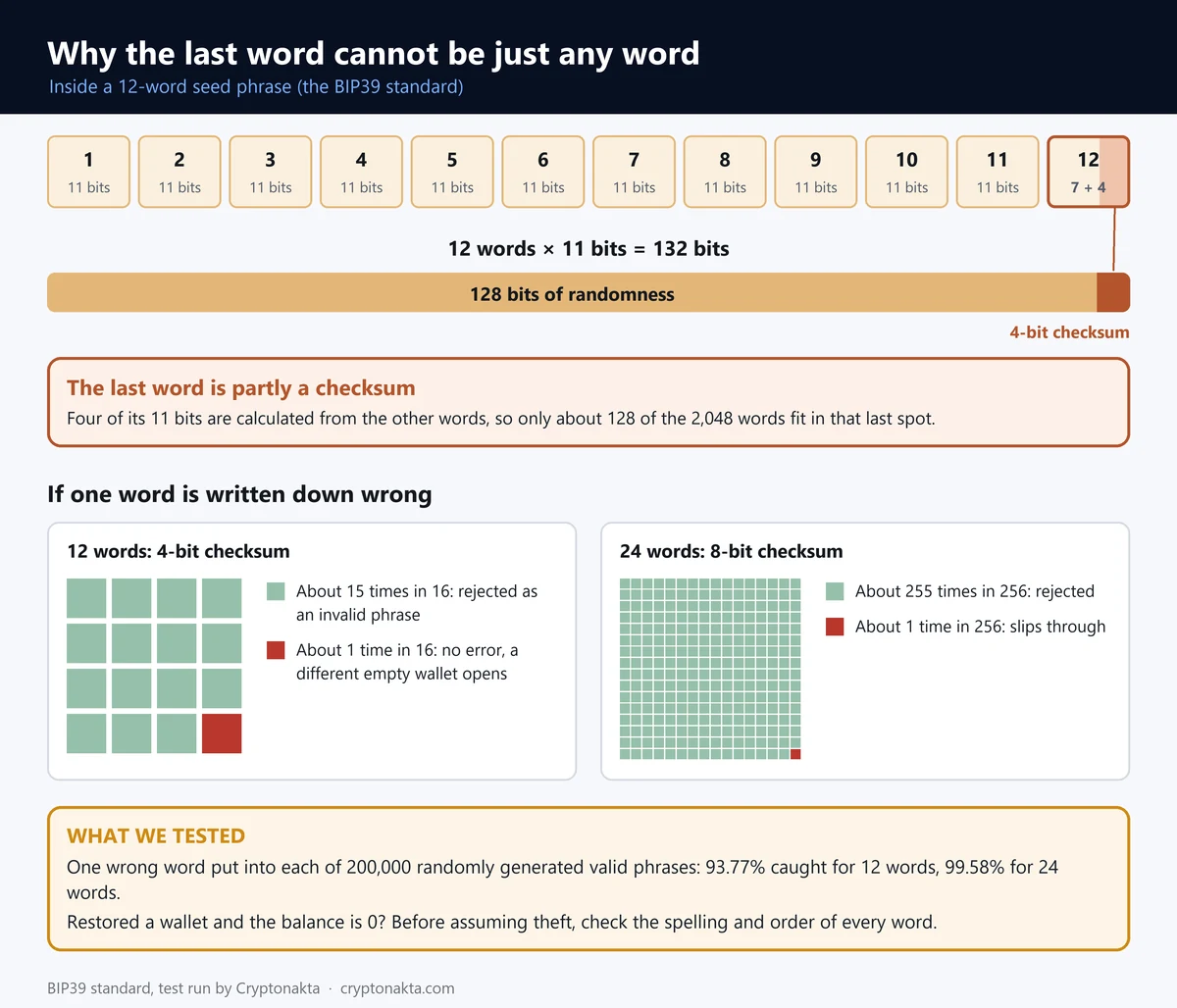
BIP39 is the standard behind most wallets, with a fixed list of 2,048 words. Its checksum is a few bits worked out from the other words and stored in the last one.
We put one wrong word into each of 200,000 valid phrases. With 12 words, the checksum caught 93.77% of them. The checksum catches most wrong words, but with 12 words about 1 in 16 still gets through and opens a different, empty wallet. With 24 words the odds drop to about 1 in 256 (1 in 238 in our test).
Every English word in the list can be told apart by its first four letters. So a half-remembered word often narrows down to one choice.
A passphrase, the optional 25th word, gives no error at all when it is wrong. Trezor says a mistyped one opens a different wallet, “most likely empty”. Pi Network uses the word for its own 24 words, which our Pi Network guide covers.
If your phrase came from the Korean or Chinese word list, translating it into English gives a completely different seed.
 View full size ↗
Restored the seed phrase but the balance is zero?
If you restored your seed phrase and the balance shows zero, don’t assume theft yet. The wallet may be reading a different path, or a passphrase or typo may have opened another wallet. First check whether your old address appears.
Trezor’s test is simple: “If you do not see your receiving address, you are using different private keys”. A private key is the secret behind one address, and the phrase produces all of them.
| Likely cause | What you notice | What to try |
|---|---|---|
| Different derivation path | The address is not your old one | Use the wallet you used before |
| Accounts not added back | Only the first account shows | Add accounts again in the app |
| Wrong or missing passphrase | An empty wallet, no error | Re-enter it with the same case and spaces |
| A typo that passed the checksum | A valid phrase, unknown address | Compare every word with your paper |
| TON wallet version | Same phrase, different TON address | Try the other versions the app offers |
Phantom says the derivation path is usually the reason when accounts go missing after an import. A real theft shows an outgoing transfer you didn’t make. If tokens left through an old approval, see how to revoke token approvals.
Can you recover a lost seed phrase from an address?
No, you cannot work out a lost seed phrase from a wallet address. An address is made from the key in one direction only, and there are 2128 possible 12-word phrases. If there is no app, no backup and no phrase, nobody can get the wallet back, the wallet company included.
Trust Wallet says that if you lose the phrase, “there is no way to recover your wallet”. MetaMask says “no one will be able to help you get them back”. Phantom, D’CENT and OKX Wallet say the same in their help pages.
So anyone who offers to find your phrase from an address wants a fee or your remaining words. If the balance was small, the sensible move is to start a new wallet and write its phrase down twice.
Seed phrase recovery services, fake support and other traps
Seed phrase recovery services that promise to find a lost phrase are not legit, and neither is anyone posing as support. Never give your seed words to a recovery service or to anyone calling themselves support. Real support never asks for them.
MetaMask says: “We will never ask for your Secret Recovery Phrase”. It has no phone number and does not DM users. Trust Wallet warns about fake agents on Telegram, Discord and X.
| What you see | What actually happens |
|---|---|
| A recovery firm that promises to find your phrase | An upfront fee, then silence or more fees |
| A support agent who messages you first | A link to a form that asks for your words |
| A wallet helpline number in search results | The person who answers asks for your words |
| A site that asks you to sync or validate your wallet | What you type goes to whoever empties the wallet |
| A seed phrase with a balance posted in a comment | Bait: the TRX you send for the fee is taken at once |
In the last row, the coins are real, but control of the account sits with another address. Some firms also publish long scam warnings that end at their own form.
Already lost coins? Read whether you can recover scammed crypto, and see our list of common crypto scams.
Do Binance and Bybit accounts have a seed phrase?
No. Exchange accounts have no seed phrase, and you recover them with your password and two-factor authentication. That goes for Binance, Bybit and OKX alike. A phrase you lost belonged to a separate wallet app.
2FA is the second code you enter after your password, from an app, a text or an email. An exchange account is custodial, which means the exchange holds the coins and keys for you.
On Binance, choose Forgot password? at log-in. If your 2FA is gone too, choose Security verification unavailable? and submit a reset.
Binance
Affiliate disclosure: some links are partner links. We may earn a commission at no extra cost to you. This is not investment advice.
CRYPTONAKTA
Binance Wallet, the Web3 wallet inside the Binance app, says: “There are no seed phrases for Binance Wallet”. It is an MPC wallet, which splits the key into shares on your device and in your cloud. Our Binance Wallet guide covers that recovery.
Bybit’s Recovery Key Phrase is only for restoring your Google Authenticator codes. We took that from search summaries, because its help page would not load for us. OKX Wallet is separate from your OKX exchange account: a self-custody wallet with its own seed phrase.
| Account | How you get back in | Hold after a reset |
|---|---|---|
| Binance | Password and 2FA reset, reviewed within 24 hours | Withdrawals, P2P selling, internal transfers and payments, up to 48 hours |
| OKX | Reset two-factor authentication | Withdrawals, transfers and P2P selling, 24 hours |
| Bybit | Email and phone codes (search summary) | Withdrawals, 24 hours (search summary) |
| Binance Wallet | Recovery password plus your device | Lose both and access is gone |
Bybit
OKX

Affiliate disclosure: some links are partner links. We may earn a commission at no extra cost to you. This is not investment advice.
An exchange account swaps one risk for another. You depend on the exchange letting you withdraw. Read what happens when an exchange pauses withdrawals and what a lost 2FA locks. To sign up with our code, see the Binance sign-up guide.
Can you change your seed phrase? Move to a new wallet instead
No. A seed phrase can’t be changed. To get a new one, you create a new wallet and move your assets to it. Do it if the old phrase may have been seen, or if a hardware wallet has no backup left.
| Step | What to watch |
|---|---|
| Create a new wallet | Use the official app or device |
| Write the new phrase down | Numbered, in order, two copies |
| Send a small test amount | Check that it arrives |
| Move the rest | Each network needs its own coin for gas |
| Staking, NFTs and approvals | Unstake first, move NFTs one by one |
Leave enough ETH, SOL or BNB in the old wallet to pay for the last transfers. MetaMask accounts imported with a private key are not part of the phrase. Move them separately.
If you plan to sell anyway, sending the coins to an exchange is also a way to move them. Gate takes 10% off trading fees for life when our code goes in at sign-up. KuCoin takes 5% off for life.
Gate.io
KuCoin
Affiliate disclosure: some links are partner links. We may earn a commission at no extra cost to you. This is not investment advice.
How to store a new seed phrase so this does not happen twice
To store a new seed phrase safely, write it on paper in two separate places and test it once. A metal plate adds protection against fire and water. Keep it off phones, cloud notes and chats.
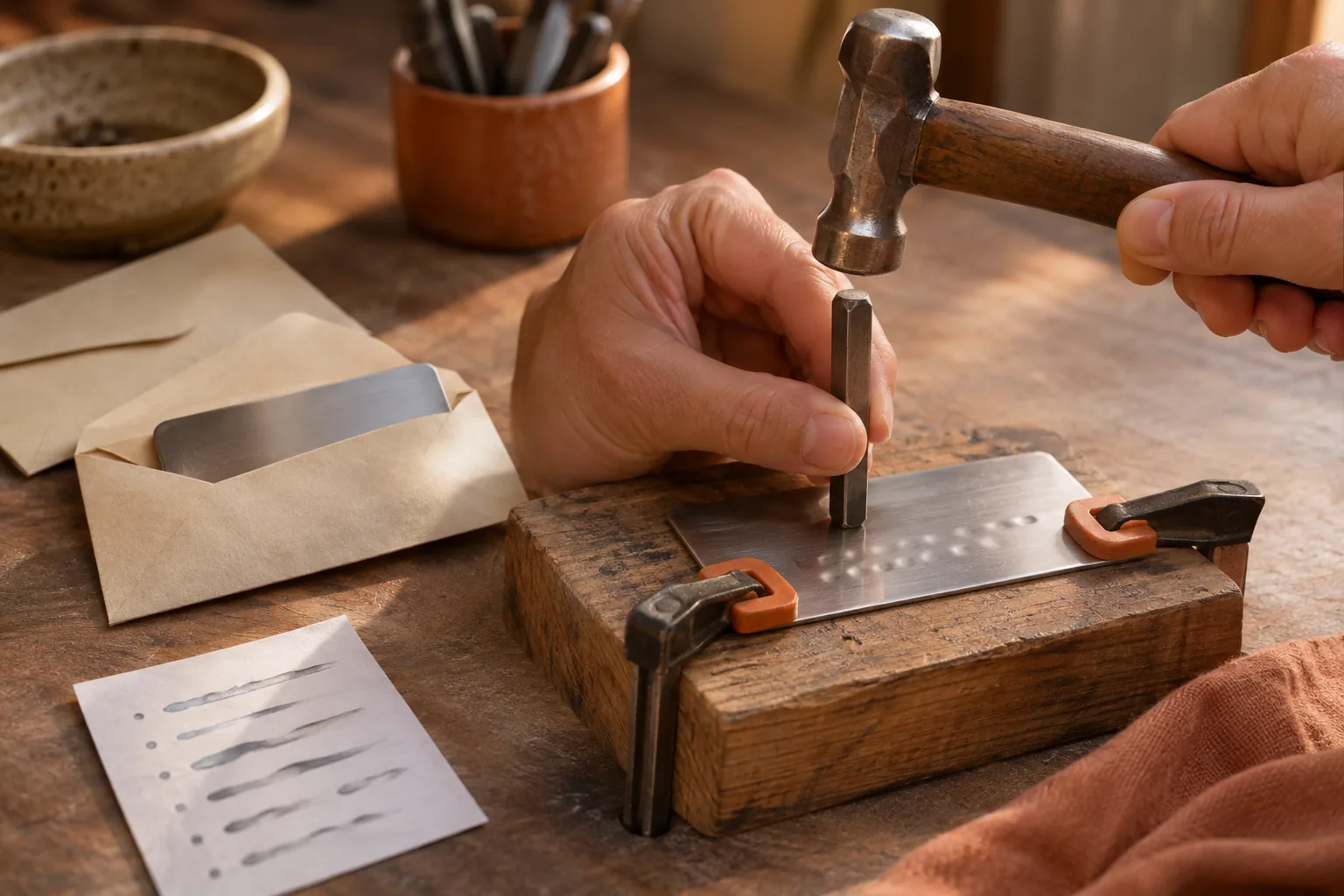
Number each word and copy the spelling from the app letter for letter. Keep the two copies in different buildings if you can.
Photos, notes apps and messages to yourself all sync to servers. A wallet’s encrypted cloud backup is a different thing, because it needs your own password.
Never create a phrase on a website that generates mnemonics, since whoever runs it can keep a copy. Let the wallet app or device create it.
Then rehearse a recovery once. Trezor’s Check backup and Ledger’s Recovery Check do this on a device. With an app, restore the phrase on a second phone or a fresh install while the wallet holds only a small amount. If you use a passphrase, write it down separately.
For the basics of wallet types, see our crypto wallet guide.
My take on a lost seed phrase
My take: a lost seed phrase is usually less final than it feels, as long as you check things in order. If the app still opens and you know the password, you can usually fix it today. The real risk starts when you go looking for outside help.
Measuring this taught me that one or two missing words are quick to find on an ordinary PC. The hard parts are having your own address and keeping the words to yourself. I also didn’t expect a typo to slip past the checksum as often as 1 in 16.
Hardware wallets that refuse to show the words again are working as designed. In your shoes, I would check the app first, then backups, then try an offline search.
What I trust least is anyone promising recovery. Next come scam warnings that end at a firm’s form. After that, phrases with coins posted in comments, and online seed search tools.
There is a fair case for the other side. If keeping a phrase safe stresses you out, an exchange account or an MPC wallet is easier. You accept that the company can lock the account or pause withdrawals.
Full disclosure: this site uses exchange referral codes. We earn a commission when you sign up with ours. On Binance, 10% of the spot fees you pay comes back to you in USDC.
Lost seed phrase questions people ask
- MetaMask Support · How to reveal your Secret Recovery Phrase safely · checked 2026-11-03
- MetaMask Support · How to recover your Secret Recovery Phrase (vault data, Vault Decryptor) · checked 2026-11-03
- MetaMask Support · MetaMask’s official support channels · checked 2026-11-03
- Trust Wallet Support · Lost Recovery Phrase or Private Key · checked 2026-11-03
- Trust Wallet Blog · Is Trust Wallet safe? (Encrypted Cloud Backup) · checked 2026-11-03
- Phantom Help · What if I lost my recovery phrase, private key, or PIN? · checked 2026-11-03
- Binance · Frequently Asked Questions on Binance Web3 Wallet (no seed phrases) · checked 2026-11-03
- Ledger Academy · Keep my crypto safe: 6 essential rules · checked 2026-11-03
- Ledger · Ledger Recover · checked 2026-11-03
- Trezor Blog · What to do if your Trezor or wallet backup goes missing · checked 2026-11-03
- Trezor Support · I don’t see my crypto · checked 2026-11-03
- Binance · How to reset 2FA when I can’t access my Binance account · checked 2026-11-03
- Bitcoin BIPs · BIP-0039 Mnemonic code for generating deterministic keys · checked 2026-11-03
- FTC Consumer Alert · Watch for scammers who say they can help · checked 2026-11-03
Not financial advice. Wallet apps change their menus and policies, so check the official page before you act.
Next step: what a hardware wallet protects, and what it does not