Your Seed Phrase Got Exposed? Do This in the Next 5 Minutes
A two-branch emergency plan for a leaked seed or private key — race the sweeper bot if funds remain, report it if they’re gone. And why “just revoke approvals” won’t save you.
| Answer this first | Then do this |
|---|---|
| Is money still in the wallet? (check the balance on a block explorer) | — |
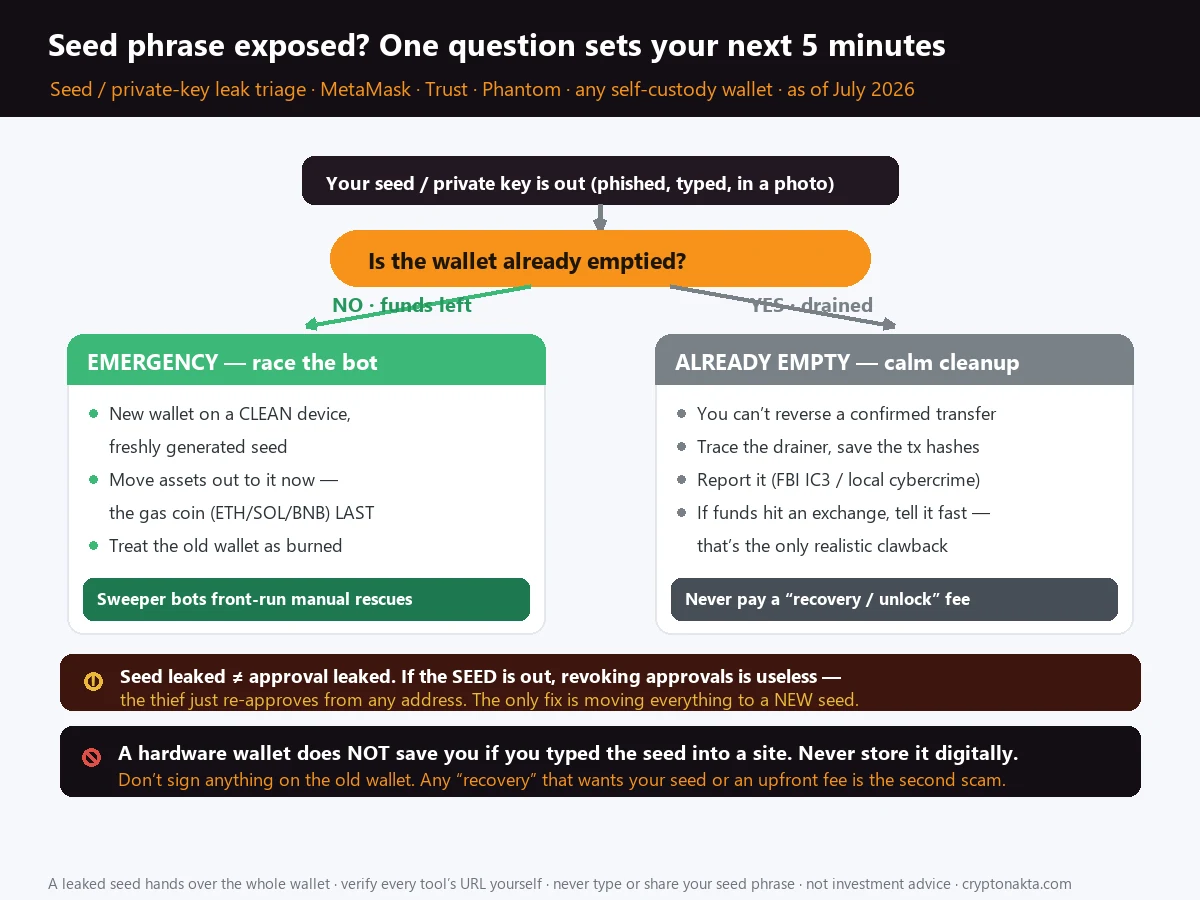
| ✅ Yes, funds remain | Branch A: new seed on a clean device, then sweep everything to it — native gas coin last. Race the sweeper bot. Old wallet is burned. |
| ❌ No, already drained | Branch B: you can’t reverse it. Trace the drainer, file with IC3.gov + FTC, notify the exchange if funds hit a CEX. |
| Both branches | Revoking approvals does nothing when the seed itself leaked — the thief can re-approve forever. Only a new seed fixes it. Never pay a “recovery service.” |
1. Stop — first answer one question: is the money still in the wallet?
2. Branch A: funds still there — you’re racing a sweeper bot
3. Why hardware wallets and “revoke all approvals” won’t save you here
4. The clean-device rescue, step by step: new seed first, gas coin last
5. Tokens stuck behind gas: private RPC / whitehat sweeps (and when it’s not worth it)
6. Branch B: already drained — what’s actually recoverable and what isn’t
7. Tracing the drainer and filing with IC3.gov, the FTC, and the exchange
8. How your seed got out: the six exposure paths
9. The second scam: “recovery services” that want your seed or a fee
10. Rebuild: never store a seed digitally again, and cash out safely
11. Quick-reference tables and where to go next
If your seed phrase, recovery phrase, or private key was phished, typed into a fake site, grabbed by malware, or your wallet is draining right now — this is the emergency guide. It splits into two branches depending on whether your money is still there, and it keeps hammering one point most “help” gets wrong: once the seed itself is out, revoking approvals is useless, because the thief can just re-approve and drain again. This is about self-custody wallets (MetaMask, Phantom, Trust, Ledger, Trezor), not custodial exchange accounts. Not legal, tax, or investment advice.
1. Stop — first answer one question: is the money still in the wallet?
Take one breath, because the next few minutes actually matter. Before you Google anything else, before you post in a Discord, before you DM “support,” you need to answer a single question that splits everything you do next into two completely different playbooks.
Is there still money in the wallet right now?
Open a block explorer (Etherscan for Ethereum, Solscan for Solana, BscScan for BNB Chain, and so on), paste your wallet’s public address, and look at the current balance. Not what the wallet app shows — the app can lag. Look at the on-chain balance and the most recent transactions.
- Balance is still there, no outgoing transfers yet → you’re in Branch A. This is an emergency race. Skip straight to the rescue steps; every second counts.
- Balance is zero (or the good stuff is gone) and you see outgoing transfers you didn’t make → you’re in Branch B. The race is already lost. Your job now is evidence, reporting, and not getting scammed a second time.
Here’s the decision tree in one glance. Find your row, then jump to that section.
| Your state | What to do right now | Does “revoke” help? |
|---|---|---|
| A · Funds still there | On a clean device, create a brand-new wallet with a freshly generated seed. Then move every asset out of the compromised wallet into the new one — native gas coin last. Tokens may need a private RPC / whitehat sweep. Treat the old wallet as permanently burned. | No — useless |
| B · Already drained | You cannot reverse an on-chain transfer. Trace the drainer address, file with IC3.gov and the FTC, and notify the exchange if funds landed on a CEX deposit address (the only realistic clawback). | No — pointless |
| Both | Do not sign anything on the old wallet, do not deposit “gas to rescue it,” never reuse the seed, and do not contact any “recovery service.” | — |
Quick scope check before you go further: this article is about self-custody wallets — MetaMask, Phantom, Trust Wallet, Rabby, a Ledger or Trezor, anything where you hold the seed. If your problem is a hacked Coinbase, Binance, or Kraken account, that’s a different situation entirely: those are custodial, there is no user seed, and you recover through the exchange’s account-security and support flow, not through anything below.
2. Branch A: funds still there — you’re racing a sweeper bot
If the money is still sitting there, understand what you’re actually racing. The moment your seed leaked, there’s a very good chance it didn’t leak to a human watching a screen. It leaked to a sweeper bot — an automated script that has already imported your wallet and is watching it around the clock.
Sweeper bots are patient and merciless. They monitor the compromised address and the instant anything of value lands — or the instant you send in gas to try to rescue a token — they fire off a transfer in the same block, often with a higher fee than yours, and take it. People deposit “just a little ETH to pay for the rescue” and watch that ETH vanish in seconds before their own transaction even confirms. That’s the bot front-running you.
Two things decide whether you win this race:
- Speed. A new wallet has to already exist to receive funds. Don’t start creating it after you begin the transfers — set up the destination first (next sections), then sweep.
- Gas positioning. Simple sends (stablecoins, most tokens, native coin) you can do by hand. But if a token is stranded because the wallet has no gas and any gas you add gets instantly stolen, a normal manual rescue will fail. That’s the case that needs a private RPC or a whitehat “sponsored transaction” bundle — covered below.
If your assets are simple — some USDC and some ETH on one address — you can often just send them out fast by hand and be done. The complexity only appears when tokens are locked behind gas the bot keeps eating.
3. Why hardware wallets and “revoke all approvals” won’t save you here
This is the section that saves people from wasting the only minutes they have, so read it even if you think you know it.
When a wallet gets drained, the advice you’ll get on Reddit and X within thirty seconds is: “Go to revoke.cash and revoke all your approvals.” For one specific kind of hack, that advice is correct and it’s exactly what our revoke token approvals guide walks through. For your situation, if the seed itself is exposed, it does nothing at all. Here’s the difference, because it’s the whole ballgame.
| What went wrong | What the attacker actually holds | The correct response |
|---|---|---|
| You signed a malicious approval (a “connect + approve” on a scam site) | Permission to spend one specific token from your address — nothing more | Revoking that approval works. Kill the allowance, keep the wallet. This is the revoke-approvals scenario. |
| Your seed phrase or private key leaked | Full control of the wallet — every token, every chain, and the ability to re-approve anything, forever | Revoking is useless. The only fix is moving everything to a brand-new seed. |
Sit with the second row for a second. If the thief has your seed, and you revoke an approval, they just sign a fresh approval from your own keys and drain it again. You’d be paying gas to lock a door while the burglar holds the master key to the whole building. You can revoke all day; they re-approve all day. It’s not a race you can win by revoking — the wallet has to be abandoned.
So: no revoking, no password changing, no “disconnecting” the old wallet to feel safer. None of that touches the actual problem. The plan is a clean new wallet and a fast, careful sweep. Let’s do it.
4. The clean-device rescue, step by step: new seed first, gas coin last
The single most important rule here: the new wallet and its seed must be created somewhere the compromise can’t reach. If the reason your seed leaked was malware on your laptop, generating a new seed on that same laptop just hands the attacker your new wallet too.
Step 1 — Get a clean device
Best option: a hardware wallet (Ledger, Trezor) set up fresh, where the seed is generated on the device and never touches a keyboard or screen. Good option: a phone or computer you trust, ideally one that was not involved in the incident, fully updated, with no sketchy browser extensions or sideloaded apps. If you suspect malware, don’t use the infected machine at all.
Step 2 — Create a brand-new wallet with a fresh seed
Install the official wallet app (download only from the official site or the real app store — fake wallet apps are themselves a leak vector), and let it generate a new seed phrase. Write it on paper. Do not screenshot it, do not save it to Notes, do not email it to yourself. This is the wallet your rescued money is going to live in, so it has to be clean from birth.
Step 3 — Sweep, highest value first, native gas coin last
Now empty the compromised wallet into the new address, in this order:
- NFTs and unique / high-value items — send them out first.
- Stablecoins and liquid tokens — USDC, USDT, and any token you can just transfer.
- The native gas coin last — ETH, BNB, SOL, MATIC, etc. Once it’s gone you can’t pay fees, so it’s the final move.
Each transfer costs a little gas, which is why you can’t move the gas coin first. If everything is simple sends and the balance is meaningful, do it as fast as you safely can and don’t stop to double-check the destination five times — but do paste the new address carefully at least once (clipboard hijackers, covered later, swap addresses).
When you’re done, the old wallet is empty and stays empty. Never send anything to it again. Never reuse that seed for anything. It’s burned.
5. Tokens stuck behind gas: private RPC / whitehat sweeps (and when it’s not worth it)
Here’s the ugly case. You have a valuable token sitting in the compromised wallet, but no gas to move it. You add a little ETH to pay the fee — and a sweeper bot steals the ETH in the same block, before your transfer runs. You add more; it steals that too. Manually, you will lose this fight, because the bot reacts in milliseconds and outbids your fee.
The way out is to not let the gas sit in the mempool where the bot can see it. Two related techniques:
- Private RPC. Instead of broadcasting your transaction to the public mempool (where bots watch), you submit it through a private relay (Flashbots Protect RPC and similar). The sweeper never sees the gas deposit until it’s already spent, so it can’t front-run it.
- Sponsored / whitehat bundle. A “searcher” builds a bundle where one transaction pays the gas and, in the same block, a second transaction moves your token to safety — atomically, so the bot can’t slip in between. Flashbots’ whitehat flow and several rescue tools (for example, dedicated sweeper-rescue services) do exactly this.
When it is worth it: a genuinely valuable token, an NFT, or an LP position frozen in a wallet the bot is guarding. In that case, using a reputable whitehat/rescue tool with a private RPC is often the only way to get it out. Just go in knowing the tradeoffs, and never share your new seed with any such service — a legitimate sweep only needs a signed transaction or the old compromised key, never the keys to your fresh wallet.
6. Branch B: already drained — what’s actually recoverable and what isn’t
If Branch B is your reality — the wallet’s already empty and there are outgoing transfers you didn’t authorize — the first thing to accept is the part nobody wants to hear.
So what is actually recoverable? Honestly, in most self-custody drains: little to nothing directly. The realistic paths are narrow, and they all run off-chain:
- If the funds hit a centralized exchange. Drainers usually try to cash out through a CEX eventually. Exchanges are regulated, run KYC, and can freeze accounts when law enforcement asks. If you (or a tracing tool) can show the stolen funds landed on a specific exchange’s deposit address, a report to that exchange plus a law-enforcement case is the one realistic clawback path. It’s not guaranteed, and it’s slow — but it exists.
- Insurance or platform coverage. Rare for self-custody, but check: some wallets/cards or your own crypto-theft coverage might apply.
What is not recoverable: funds already swapped, bridged, and mixed across chains, which is what competent drainers do within minutes. Chasing those is what the fake “recovery services” prey on.
And to close the loop on revoking: in Branch B, revoking approvals is pointless — the money’s already gone and the keys are already leaked. Don’t spend gas on it. Spend your energy on evidence and reporting instead.
7. Tracing the drainer and filing with IC3.gov, the FTC, and the exchange
Even when recovery is a long shot, report it. Reports feed the databases that get exchange accounts frozen and, occasionally, funds returned — and they build the paper trail you’ll need for taxes, insurance, or any future case. In the US there are two channels, and you should use both.
| Where | Channel |
|---|---|
| FBI — cyber/financial crime | IC3.gov (Internet Crime Complaint Center) — file a detailed complaint |
| FTC — consumer fraud | reportfraud.ftc.gov |
| The exchange | If funds hit a CEX deposit address, report to that exchange’s security/compliance team and reference your IC3 complaint number |
| Outside the US | File with your national cybercrime unit (e.g., Action Fraud, local police cybercrime division). The steps below still apply. |
What to gather before you file
- Your wallet address and the drainer’s address (the address your funds were sent to).
- Transaction hashes of the theft — copy them straight from the block explorer.
- A rough timeline and how it happened (the phishing site URL, the fake “support” handle, the app you installed — whatever you can reconstruct).
- USD value at the time of the theft.
Trace the drainer yourself, at least a little
On the block explorer, follow the outgoing transactions from the drainer address. If the trail ends at an address labeled as a known exchange’s deposit wallet, that’s your clawback lead — name that exchange in your IC3 report and contact them directly. Free tools (Etherscan’s labels, and public trackers) can help you see whether funds went to an exchange, a mixer, or a bridge.
For scale, this isn’t a niche problem. The FBI’s IC3 logged $9.3 billion in digital-asset-related losses in 2024 across roughly 150,000 complaints — up about 66% year over year. The drainer economy behind a lot of these is industrialized:
| Drainer / metric | Figure |
|---|---|
| Inferno Drainer | ~$87M stolen · ~130,000 victims · 16,000+ malicious domains |
| Pink Drainer | ~$85M stolen · 21,000+ victims · retired May 2024 |
| Drainer-as-a-service kits | Subscribed for $300–$900 · affiliate keeps ~80%, operator ~20% |
| FBI IC3 2024, digital assets | $9.3B in losses (+66% YoY) |
8. How your seed got out: the six exposure paths
Once you’re safe, it’s worth knowing how the words got out, because the fix (never let it happen again) depends on the path. There are six common ones, and most people get hit by exactly one of them.
| How the seed leaked | How it works |
|---|---|
| Phishing sites | A fake wallet/”validation”/”claim” page shows a form that asks you to “connect” by typing your seed. Real wallets never ask for your seed on a website. |
| Fake support | Someone posing as MetaMask/Ledger/exchange support (in a DM, a reply, a Google-ad “helpline”) walks you through “verifying” your wallet by revealing the seed. |
| Malware / clipboard hijack | Software on your device reads your seed, or silently swaps a copied wallet address for the attacker’s (matching first/last characters so it looks right). |
| Cloud photo / screenshot of the seed | You photographed or screenshotted your seed; it synced to iCloud/Google Photos and was exposed in a breach or account takeover. |
| Fake wallet / airdrop apps | A malicious app or extension collects the seed the moment you enter or import it. |
| Signing a malicious transaction | You approved a request (Permit2, setApprovalForAll) that handed over control. Strictly this is an approval leak, not a seed leak — see the revoke guide — but it belongs on the list because it feels identical from the victim’s chair. |
The clipboard one deserves a callout because it’s quietly getting worse. In June 2026, Check Point reported a Rust-based clipboard clipper hitting both Windows and macOS, disguised as fake crypto “sniper bot” and “unlocker” tools. It swaps the address you copy for the attacker’s and harvests seeds. If you download random trading bots and “token unlockers,” this is how you get hit.
9. The second scam: “recovery services” that want your seed or a fee
Here’s the cruelest part of getting drained: the wolves smell blood. Within hours of posting “I got hacked” anywhere public, you’ll get replies and DMs from “recovery experts,” “certified blockchain investigators,” and “white-hat teams” who promise they can get your money back. Almost all of them are the second scam, hunting people who are desperate enough to try anything.
1) They ask for your seed phrase or private key (to “access and restore” the wallet). Never give it. That’s just handing your new funds to a new thief.
2) They ask for an upfront fee to “release,” “unlock,” or “cover gas for” the recovery. Real anything doesn’t work like this. Both the FBI and FTC have specifically warned about these recovery-scam operations, many of which target victims a second time.
Reason it through: no private company can reverse a confirmed on-chain transfer (see Branch B). So a “recovery service” is selling something that doesn’t exist. The tell is the ask — a seed, or money up front. The only legitimate actors in the aftermath are law enforcement (IC3, FTC, police) and the exchanges where stolen funds might land — and none of them charge you an advance fee or want your seed.
If a whitehat sweep to rescue stranded tokens on your still-funded wallet is what you need (Branch A, private-RPC section), that’s a different, legitimate service — but even then it only ever needs a signed transaction or the old compromised key, and it takes its cut from what it saves, not as an upfront wire. It never, ever needs the seed to your new wallet.
10. Rebuild: never store a seed digitally again, and cash out safely
Once the emergency is over, the job is making sure the next seed lives longer than this one. The rules are boring and they work.
- Never store a seed digitally. Ever. No screenshots, no Notes app, no Google Doc, no email, no password manager note, no cloud photo. A seed that touches the internet is a seed that can leak.
- Write it on paper (or steel), store it offline, and consider two copies in two physical places. Steel plates survive fire and water; paper in a safe is fine for most people.
- Use a hardware wallet for meaningful amounts, and — this is the lesson from earlier — never type its seed into any website, no matter how official the popup looks.
- Bookmark the real sites (your wallet, revoke.cash, the explorers) and reach them only from bookmarks, never from search ads or DMs.
- Assume every “connect + sign” is hostile until you’ve read what you’re signing. When in doubt, our revoke token approvals guide covers checking and killing approvals.
Cashing rescued (or new) funds out to USD
If you rescued assets and want part of them in dollars, or you’re rebuilding from scratch, the clean path is: hold long-term savings on your new self-custody wallet or hardware wallet, and use a regulated US exchange as the on/off-ramp to your bank. Coinbase and Kraken both cash out to a US bank via ACH in USD, and they’re custodial — meaning there’s no user seed for you to leak in the first place, which is exactly why an exchange is a fine place to park cash even if it’s the wrong place to store your keys. The exchanges below are common global venues for moving and converting; pick whatever’s licensed and available where you live.
Binance

Bybit

KuCoin

Gate.io

Affiliate disclosure: some links are partner links. We may earn a commission at no extra cost to you. This is not investment advice.
11. Quick-reference tables and where to go next
Keep this section for the version of you who’s calm again and wants the short answers.
The two-branch cheat sheet
| Situation | First move | Revoke? |
|---|---|---|
| Seed exposed, funds still there | New seed on a clean device → sweep everything → gas coin last | No |
| Seed exposed, already drained | Trace drainer → IC3.gov + FTC → notify exchange if funds hit a CEX | No |
| You only signed a bad approval, seed is safe | Revoke that approval, keep the wallet | Yes — see the revoke guide |
Never-do list
- Never sign, approve, or deposit anything on the old wallet.
- Never reuse the leaked seed for a new wallet.
- Never give your seed or an upfront fee to a “recovery service.”
- Never store any seed digitally.
Where to go next
- How to revoke token approvals — the right fix when the attacker has an approval (not your seed). Read this if you’re not sure which situation you’re in.
- Sent crypto to the wrong network — funds aren’t stolen, they’re stuck; whether you recover them depends on the chain.
- Crypto deposit not credited — money left one side but never showed up on the other.
Frequently asked questions
Not sure it’s a seed leak? Read: How to revoke token approvals →