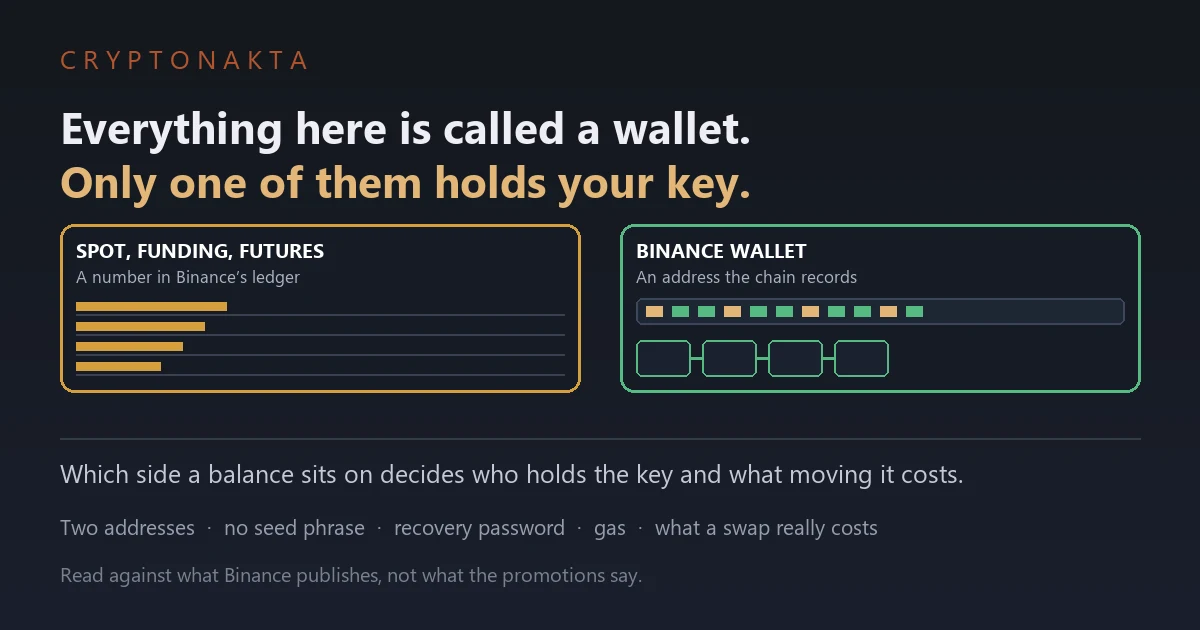
Binance Wallet Explained: Custody, No Seed Phrase, Gas Costs and the Address Confusion
Binance’s own documentation says a third party holds your assets until you upgrade. That, and the missing twelve words, are what this guide is about.
| Question | Short answer |
|---|---|
| What is Binance Wallet? | A wallet that lives inside the Binance app. It gives you an address on the blockchain, separate from the balances in your exchange account. |
| Is it self-custody? | Only after you upgrade it. Binance’s own documentation says a third party holds your assets until you complete the self-custody upgrade. |
| Where is the seed phrase? | There isn’t one. The key is split into three MPC key-shares, so no twelve words are ever shown to you. |
| What do I have to keep safe instead? | The recovery password. Binance states it cannot restore that for you if you forget it. |
| Can I set it up on desktop? | Creation happens in the app only. The browser extension signs you into a wallet you already made. |
| What does it cost to use? | Swap rates vary by token group, and network gas is charged separately on top. The breakdown is in the table below. |
1. Whether it is self-custody depends on one setting
2. There is no seed phrase, and that is deliberate
3. The recovery password is the thing you can actually lose
4. How it fails, case by case
5. Backing it up: cloud or QR code
6. Coming from MetaMask, here is what changes
7. Two different kinds of wallet share the same app
8. Which is why ‘your wallet address’ means two things
9. Moving between the exchange and the wallet costs gas
10. What a swap actually costs you
11. The wallet referral is a separate programme
12. When this is the wrong wallet
13. A five-minute check, in order
Binance Wallet gets described as a self-custody wallet almost everywhere, and Binance’s own support pages are more precise than that. Until you complete a step called the self-custody upgrade, the documentation says a third party is holding your assets for you. There is also no seed phrase anywhere in the product, which sends a steady stream of people hunting through settings for twelve words that do not exist. Both of those follow from one design decision, and once it is clear, the questions about addresses, gas and what a swap really costs answer themselves.
1. Whether it is self-custody depends on one setting
Most articles call Binance Wallet a self-custody wallet and stop there. Binance’s own support pages are more careful than that, and the difference matters to anyone who opened the wallet because they wanted to hold their own keys.
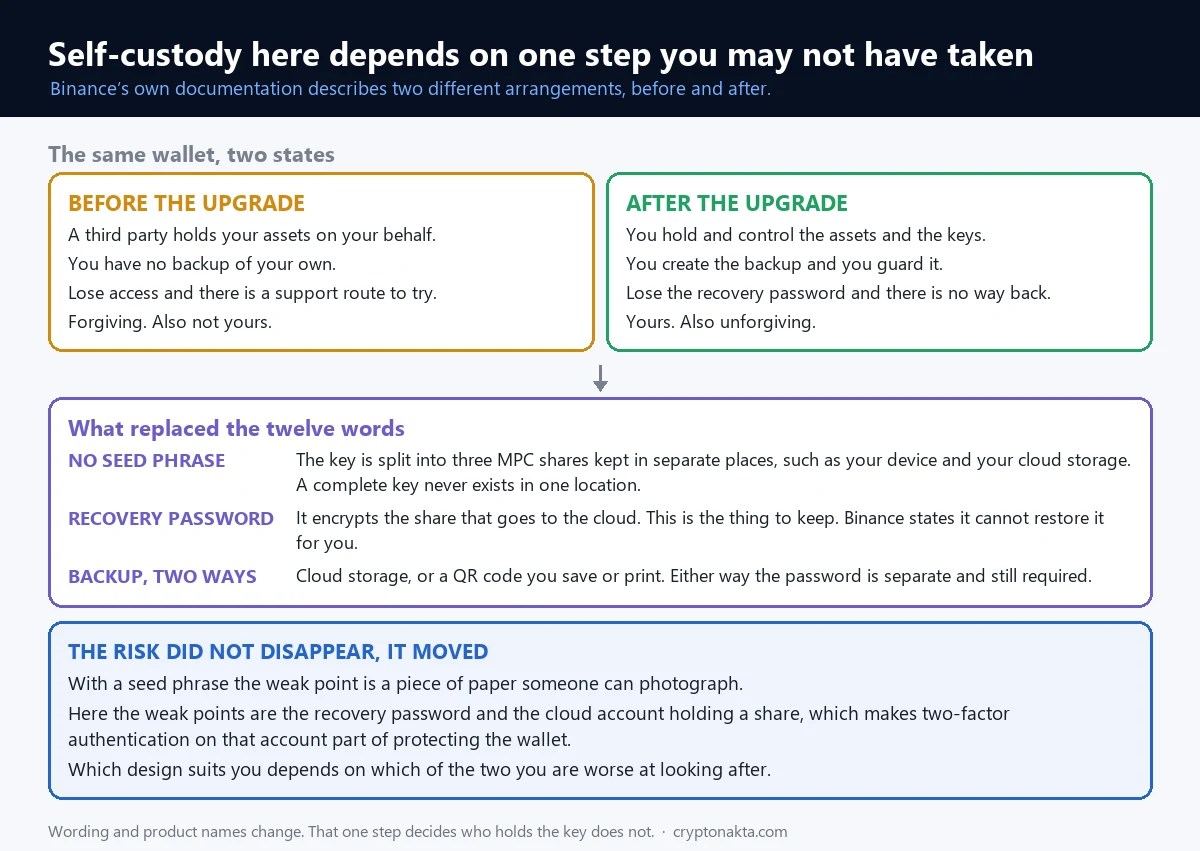
The wallet exists in two states. Before you complete what Binance calls the self-custody upgrade, the documentation describes the arrangement plainly: a third party holds your assets on your behalf. After the upgrade, the same documentation says you hold and fully control your assets and private keys.
| Before the upgrade | After the upgrade | |
|---|---|---|
| Who holds the key | Binance holds it for you | You do |
| Backup | None of your own | You create it and you guard it |
| If you lose access | There is a support route | No recovery password means no way back |
| Who carries the risk | The custodian | You, entirely |
How to tell which state you are in
If the wallet screen is still showing you an upgrade prompt, you have not upgraded yet. Once the prompt is gone and you have created a backup with a recovery password, the keys are yours.
Neither state is automatically better. The custodial one is forgiving; the self-custody one is not, which is the point of it.
The upgrade is one-directional
Going through the upgrade means creating a backup and setting a recovery password, and from that moment the responsibility sits with you. This is not a setting you flip back and forth while you make up your mind.
So decide where the recovery password will live before you tap the button, not during the flow. The screen asks you to invent one mid-sequence, and passwords invented that way are the ones people cannot produce a year later.
If the whole idea of holding your own keys is new, what a crypto wallet actually is covers the groundwork this section assumes.
CRYPTONAKTAGet the wallet perk →Affiliate link2. There is no seed phrase, and that is deliberate
Open the wallet expecting twelve words to write down and you will not find them. Nothing is hidden in a submenu. The wallet does not work that way.
Three shares instead of one key
It uses MPC, which stands for multi-party computation. Rather than generating a single private key and handing it to you, the system splits the key into three shares and stores them in different places, such as your device and your cloud storage. When something needs signing, the shares each compute their part and the results combine. At no point does a complete key sit in one location.
That is why there is nothing to write on paper. No moment exists where the full key sits somewhere it could be copied down.
You can convert to an ordinary key wallet
If you specifically want a private key in your hands, Binance offers a conversion. You go through an identity check and come out with a conventional private-key wallet, which you can then use the way you would use any other.
Whether it is worth doing depends on you. People who have managed private keys before and prefer that should convert. People who never have gain little and pick up new ways to lose everything.
Does splitting the key make it safer
Safer is the wrong frame. What changed is which thing you can lose.
With a seed phrase, the risk concentrates on a piece of paper. Someone photographs it, or you lose it in a move, and that is the failure. With key-shares, the paper problem disappears and two new dependencies appear: the recovery password, and the cloud account holding one of the shares. If that cloud account is weakly protected, it becomes the soft spot.
Which is better depends on which one you are worse at. If you are bad at keeping paper, this design suits you. If your cloud account uses a password you have reused elsewhere, it does not.
Turning on app-based two-factor authentication for that cloud account is, in this wallet, part of protecting the wallet itself. What actually gets locked when you lose 2FA is worth reading before you need it rather than after.
For the seed-phrase side of the comparison, what happens when a seed phrase is exposed lays out that scenario. Here the equivalent scenario moves to the recovery password.
3. The recovery password is the thing you can actually lose
Since there is no phrase to write down, people conclude there is nothing to keep. There is one thing.
The share that goes to cloud storage does not go up in the clear. It is encrypted with a password you choose. That is what stops the cloud provider, or anyone who reaches that account, from doing anything useful with the file.
Binance’s documentation is direct about the consequence: if you lose or forget that recovery password, Binance cannot restore it for you, and the backup goes with it. The encrypted file survives and the thing that opens it does not.
You now have several passwords and only one is final
This is where people get tangled. A Binance account accumulates credentials, and they do not behave the same way.
- Account login password. Gets you into Binance. Resettable.
- Two-factor authentication. A second check on logins and withdrawals. Recoverable through a process.
- Fund password, where you have set one. An extra confirmation on movements. Resettable.
- Wallet recovery password. Opens your backup share. This one has no reset.
The first three can be restored after identity checks, because Binance holds enough to restore them. The last one cannot, because Binance does not hold it at all. Forgetting the first three is inconvenient. Forgetting the last one locks the money.
If you are not certain right now
Anyone thinking “I set one, but what was it” should treat today as the day to fix it. While you can still open the wallet, you can create a fresh backup. Once you cannot open it, nothing is available to you.
Go to the backup section in the wallet settings, create the backup again, and this time decide where the password will live before you invent it. Choosing the storage first and the password second is far more stable than the other way round.
Some people resist writing it down. In practice far more crypto is lost to nobody writing anything down than to written passwords being stolen. Write it down, and keep it somewhere other than the backup share.
4. How it fails, case by case
Abstract descriptions of custody are hard to act on. What follows is the same information as a set of specific situations.
| If this happens | With a seed-phrase wallet | With split key-shares |
|---|---|---|
| You lose the phone | Restore on another device with the phrase | Restore with the backup and recovery password |
| Someone sees your paper backup | Funds can leave immediately | There is no paper to see |
| Your cloud account is breached | Irrelevant to the wallet | One share is exposed; dangerous if the password also leaks |
| You forget the recovery password | Not applicable | The backup cannot be opened |
| You delete and reinstall the app | Restore from the phrase | Restore from the backup |
| You change phones | Enter the phrase on the new device | Sign in, restore, enter the password |
Read down the table and the pattern is clear enough. Risk did not disappear. It moved from a physical object to an account and a password.
Moving to a new phone
This is the most common recovery anyone actually performs. Install the Binance app on the new device, sign into your account, choose to restore in the wallet section, point it at your backup, and enter the recovery password.
Two things trip people up. The first is signing into a different cloud account on the new phone, leaving the backup in the old one. The second is the recovery password, and that has no workaround.
So while your current phone still works, confirm that the password you think you have is the one that opens the backup. After the old device is gone there is no way to test it.
Deleting the app
Removing the app does not remove your assets. They are recorded against an address on the chain, not inside the app. Reinstall, restore, and the same address comes back.
It only fails if there was no backup, or the password is gone. So checking the backup state before you uninstall anything is a thirty-second habit.
5. Backing it up: cloud or QR code
Two backup routes are offered: upload the encrypted share to cloud storage, or export it as a QR code.
| Cloud backup | QR code backup | |
|---|---|---|
| Where it ends up | Your cloud storage account | An image you save or print |
| Main advantage | Survives losing the device | Nothing goes online |
| Weak point | A breached cloud account exposes the share | Lose the image and it is gone |
| Also required | Recovery password | Recovery password |
Either way the recovery password is separate and still required. A backup file alone opens nothing.
If you choose QR specifically to keep the share offline, check whether that image lands in a photo library that syncs to the cloud automatically. Plenty of people pick QR for privacy and then have their phone upload it within the minute, which undoes the reason they chose it.
Printing works and fails the way paper fails: fire, water, accidental binning. Still better than no backup, which is the state most wallets are actually in.
6. Coming from MetaMask, here is what changes
Readers arriving from MetaMask ask what changes. Several things do, and they are not all improvements.
The setup is simpler. There is no phrase ceremony, no writing, no re-entering words to prove you copied them correctly. Everything happens inside an app you already have, which is the reason a lot of people who never got past the seed-phrase step have a wallet now.
The tradeoff is that the wallet is tied to a Binance account. Signing into the extension goes through that account. If you value a wallet that has nothing to do with any company account, this design is not that, and no amount of upgrading changes it.
Portability differs too. A seed phrase can be carried to a different wallet application whenever you like. Key-shares are not portable in the same way. The conversion to a private-key wallet exists for exactly that reason, and it is a deliberate step rather than something you do casually.
One thing does not change at all. Neither design protects you from approving a bad transaction, and most losses happen there rather than in the cryptography.
7. Two different kinds of wallet share the same app
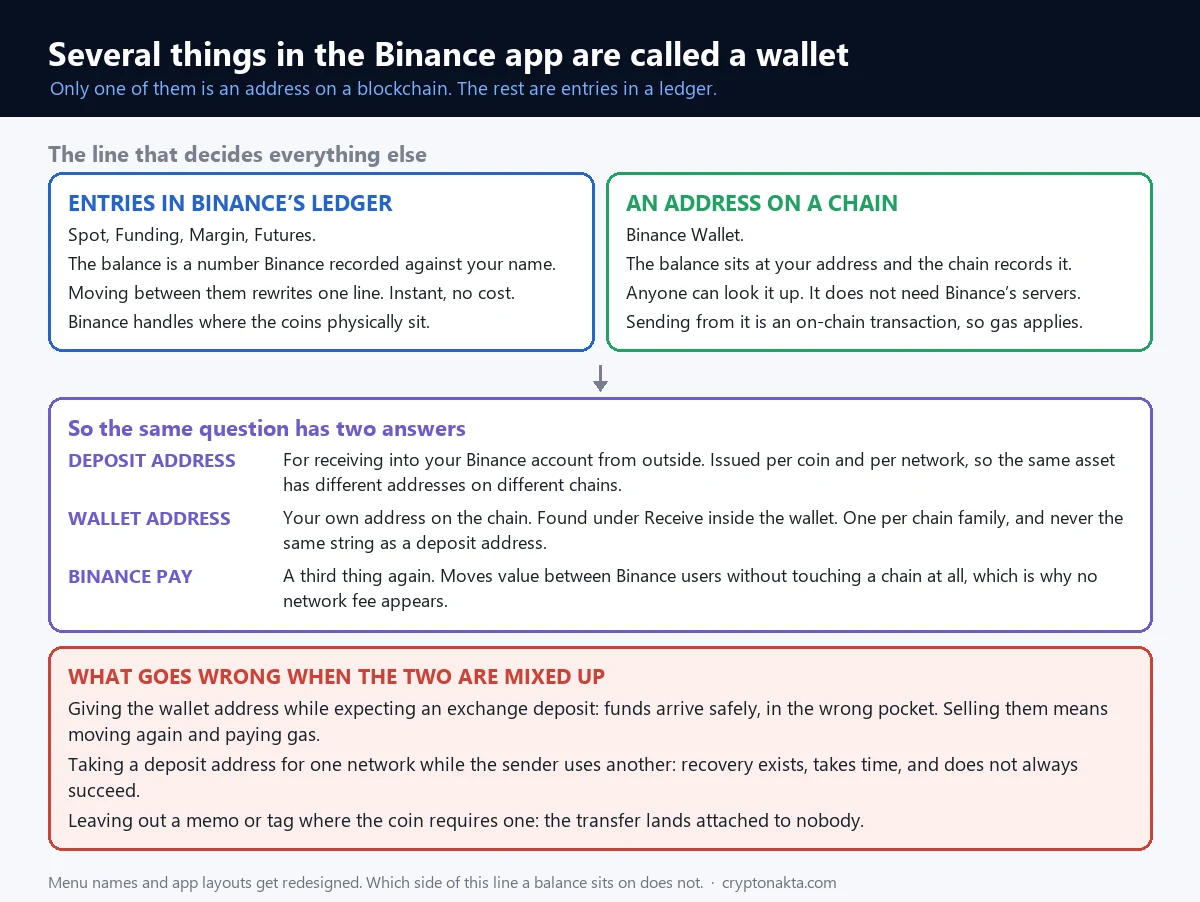
The Binance app shows several things called wallets, and they are not the same kind of object. Sorting them out solves most of the confusion around this product.
Ledger entries
Spot, Funding, Margin and Futures are compartments inside your Binance account. A balance there is a number Binance has recorded against your name in its own books. Moving between those compartments rewrites a line in that ledger, which is why it is instant and free.
Each compartment has a job. Spot is where trading happens, Funding is what P2P and Pay touch, Futures holds collateral. This is why people who bought something and cannot find it are usually looking at the wrong tab.
An address on a chain
Binance Wallet is not a compartment. It is an address on a blockchain, and the balance at that address is recorded by the chain rather than by Binance. Anyone can look it up. It does not depend on Binance’s servers being reachable.
What you also give up is everything Binance was quietly handling. There is no support desk for a transaction you sent to the wrong place from your own address.
And Binance Pay is a third thing
Pay moves value between Binance users without touching a chain. The name sits close enough to the others that people merge them mentally, but it does a different job.
| Screen | What the balance is | Who holds the key | Leaving costs |
|---|---|---|---|
| Spot | A number in Binance’s ledger | Binance | Withdrawal plus network fee |
| Funding | A number in Binance’s ledger | Binance | Withdrawal plus network fee |
| Binance Wallet | Balance at your chain address | You, once upgraded | You send it and pay gas |
| Binance Pay | Transfers between Binance users | Binance | Does not touch a chain |
8. Which is why ‘your wallet address’ means two things
Because of that split, asking for “your Binance wallet address” is ambiguous. Two different strings answer it.
A deposit address for the exchange
This is what you use to send coins into your Binance account from somewhere else. It is issued per coin and per network. The same USDT has a different address depending on whether it arrives over Tron or Ethereum. The deposit screen generates the address after you pick both.
Picking the wrong network here sends value down a path the account is not watching. Gas and network fees covers why networks are not interchangeable.
The wallet’s own address
Create the wallet and you get an address on-chain. On EVM chains that is one string starting with 0x, shared across those chains. It appears under Receive in the wallet. It is not the same as a deposit address and it never will be.
| Exchange deposit address | Wallet address | |
|---|---|---|
| Where you find it | Deposit screen of the account | Receive, inside the wallet |
| How many exist | One per coin and network pair | One per chain family |
| Who records arrivals | Binance’s ledger | The blockchain |
| Can Binance freeze it | At the account level, yes | After upgrading, the key is yours |
Three ways this goes wrong
Handing out the wallet address while expecting an exchange deposit. The funds arrive safely, they simply arrive in the wallet. To sell them you move them again and pay gas for the privilege. Nothing is lost except a fee you did not plan on.
Taking a deposit address for one network while the sender uses another. This one hurts more. Recovery processes exist, they take time, and they do not always succeed.
Omitting a memo or tag where a coin requires one. Some assets share a single address and identify recipients by memo, so leaving it out lands the transfer with nobody attached to it.
All three are prevented by looking at the receiving screen once more before sending. On large amounts, send a small test first. That one fee buys a lot of certainty.
A habit for copying addresses
Addresses are too long to verify by eye, so everyone copies and pastes, and there is malware that swaps clipboard contents for exactly that reason. Checking the first four and last four characters after pasting catches it without checking all of them. Where an address book is available, saving the addresses you reuse removes the copying step entirely.
9. Moving between the exchange and the wallet costs gas
Moving between Spot and Funding is free. Moving between the exchange account and the wallet is not, because that crosses out of the ledger and onto a chain.
Gas is charged per transaction, not as a percentage. Sending ten dollars and sending ten thousand cost roughly the same. The fee pays for processing one transaction, so the proportion it represents changes enormously with the size of what you send.
A transfer costing four dollars is 0.04% of a ten thousand dollar move and 13% of a thirty dollar one. Same fee, completely different experience.
Failed transactions are still charged
Chains price the attempt, not the outcome. Set slippage tightly enough that a swap reverts and you have paid gas for a trade that did not happen. This is normal behaviour rather than a malfunction.
Batch the moves
Using the wallet tends to produce a lot of small transfers, each one charged. Deciding what you need and moving it once is visibly cheaper than five separate trips. Where an asset exists on several chains, the network selector is a real choice and cheaper chains are much cheaper.
Transfer fees between exchanges works through the same arithmetic in a different setting, and the wallet obeys the same rules.
Turning wallet holdings back into currency
Nothing converts directly to cash from the wallet. The route runs through several steps: swap into something an exchange lists, send it to the exchange account, sell it there, then withdraw. Each step has a cost, which is why small balances shrink a lot on the way out.
Worth thinking about on the way in, not on the way out. Filling a wallet with tokens no exchange lists means an extra swap before you can sell anything.
10. What a swap actually costs you
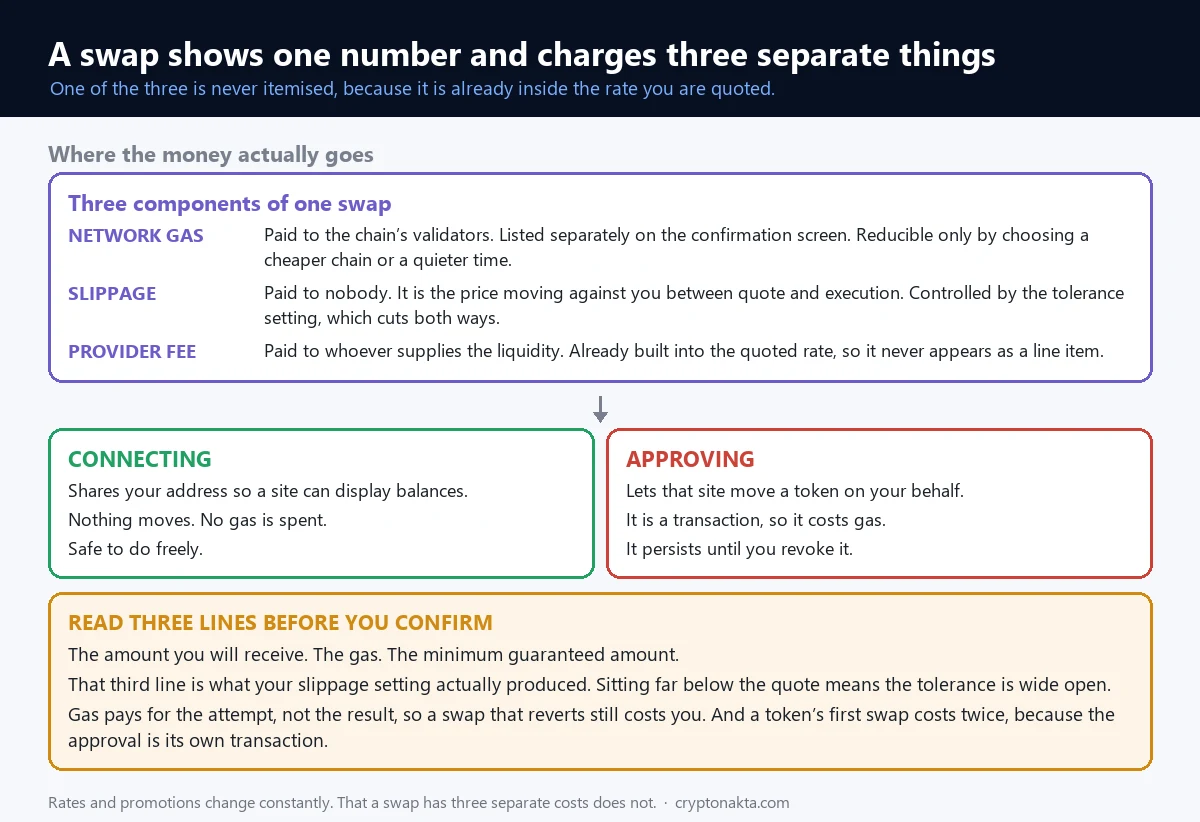
A swap inside the wallet shows one number and charges three separate things.
| Component | Who receives it | Where it appears | Can you reduce it |
|---|---|---|---|
| Network gas | The chain’s validators | Listed separately on the confirmation | Only by chain and timing |
| Slippage | Nobody. It is the price moving against you | Gap between quoted and executed | Yes, through the tolerance setting |
| Provider fee | The liquidity provider | Already inside the quoted rate | Not visible as a line |
The third one is the quiet one. It is not itemised anywhere, it is baked into the rate you are shown. A screen advertising zero fees can still be moving value away from you through the rate itself.
The base swap rate varies by token group as well. Some groups are charged 0%, some 0.01%, some 0.5%. Which group your token falls into makes a noticeable difference to what a trade costs.
Connecting and approving are different acts
On-chain applications ask for two things and people treat them as one.
Connecting shares your address so a site can display your balances. Nothing moves and no gas is spent.
Approving gives that site permission to move a token on your behalf. It is a transaction, it costs gas, and it persists until you revoke it.
So connect freely and read approvals properly. Approval screens often let you cap the amount rather than granting unlimited access, and unlimited leaves more exposure lying around.
The first swap of any token costs twice
A token you have never swapped needs that approval transaction first, then the swap itself. Both hit the chain and both cost gas. Subsequent swaps of the same token are single transactions.
Old approvals accumulate. How to revoke token approvals covers clearing them out.
Three lines to read before confirming
Everything is on the confirmation screen and almost nobody reads it. Three lines are enough: the amount you will receive, the gas, and the minimum guaranteed amount.
That third line is what your slippage setting actually produced. If it sits far below the quoted amount, your tolerance is wide. On anything sizeable, that is the line to check.
The free-swaps promotion you read about has ended
Guides describing Binance Wallet swaps as fee-free are describing a promotion that ran from 17 March 2025 to 26 November 2025. Conditions applied while it was live: the address had to be a backed-up keyless one, imported wallets were excluded, and what was waived was the trading fee, never the gas.
Worth saying so that arriving with the wrong expectation does not read as a mistake on your part. The numbers on your screen are correct; the promotion is simply over. Promotions come and go, which is why the specifics of whichever one is running are not written into this article. Anything printed here would be wrong within months.
To see what a swap costs you today, open one for a trivial amount and read the confirmation without confirming. Those figures beat any published number, including the ones here.
11. The wallet referral is a separate programme
The wallet has a referral programme, and it is not the exchange referral programme. People lose money to this distinction, so it is worth being explicit.
The exchange code is entered when you register an account and applies to spot trading fees. The wallet code is entered on the wallet’s own referral page and applies to swap fees inside the wallet. Entering one does not apply the other.
Two details matter on the wallet side. First, it is a rebate rather than an automatic discount: it accrues the following day on the referral page and you have to claim it. Left unclaimed, it does not reach you. Second, an account binds one wallet referral code, once, and it cannot be changed afterwards.
Binance Wallet
Binance

Affiliate disclosure: some links are partner links. We may earn a commission at no extra cost to you. This is not investment advice.
If you have already bound a different code, that is settled and there is nothing to do. If you have not, the order is to create the wallet first and enter the code on the referral page after.
The account-level code and the registration sequence are covered separately in the Binance referral code guide. Both have to be entered individually for both to apply.
12. When this is the wrong wallet
There are situations where this is the wrong tool, and an article carrying affiliate links is exactly the place that should be stated.
Large amounts held for a long time
One key-share sits on your phone and another in cloud storage. Both are attached to the internet. That is the cost of the convenience, and it is a reasonable trade for money you are actively using.
It is not a reasonable trade for savings. Holdings you do not intend to touch for months belong somewhere the key never meets a network. What a hardware wallet actually protects against sets out what that does and does not solve.
If you only buy and sell
Trading on the exchange needs no wallet. Creating one mostly creates opportunities to move funds around and pay gas doing it. Make one when something requires it.
If another wallet already works for you
Someone comfortable with an existing wallet gains little by switching and picks up the usual cost of running two: forgetting which holds what. Fewer wallets means fewer mistakes.
Where it does fit
For anyone who wanted to try on-chain applications and stalled at the seed-phrase step, this is a genuinely low barrier. No phrase to record, nothing to set up outside an app already installed. Kept to amounts you can afford to learn with, it is a sensible way in.
One framing helps with sizing: keep here what could vanish today without changing your month. If the underlying question is which venue to use at all, comparing exchanges is the better starting point.
13. A five-minute check, in order
Open the app and work through these in order.
| Step | What to check | Where |
|---|---|---|
| 1 | Whether a balance sits in an account compartment or the wallet | Tab names on the wallet screen |
| 2 | Whether an upgrade prompt is still showing | Top of the wallet screen |
| 3 | Whether a backup exists, and which type | Backup section in wallet settings |
| 4 | Whether you can produce the recovery password right now | Memory, or wherever you stored it |
| 5 | Whether that cloud account has two-factor enabled | Cloud account security settings |
| 6 | What gas costs as a share of a transfer you would actually make | Send confirmation screen |
Failing step four makes everything else secondary. If you have upgraded and cannot produce the password, create a new backup while the wallet still opens for you.
If step two shows nothing
Two explanations. Either the upgrade is already done, or the wallet was created in that state. Either way the keys are yours now, which makes steps three and four more important rather than less.
No memory of making a backup and no prompt showing is worth investigating in the settings. Running without a backup works fine right up until the device is gone.
Then what
With those settled, decide the amount that lives here and where the rest goes. Made once, that removes most of the day-to-day uncertainty. And if you connect to on-chain applications, clear out old approvals occasionally, since permissions granted once stay granted. Watch for fake extensions too: a genuine one signs you in through your account and never asks for your backup file. Common crypto scams collects the patterns.