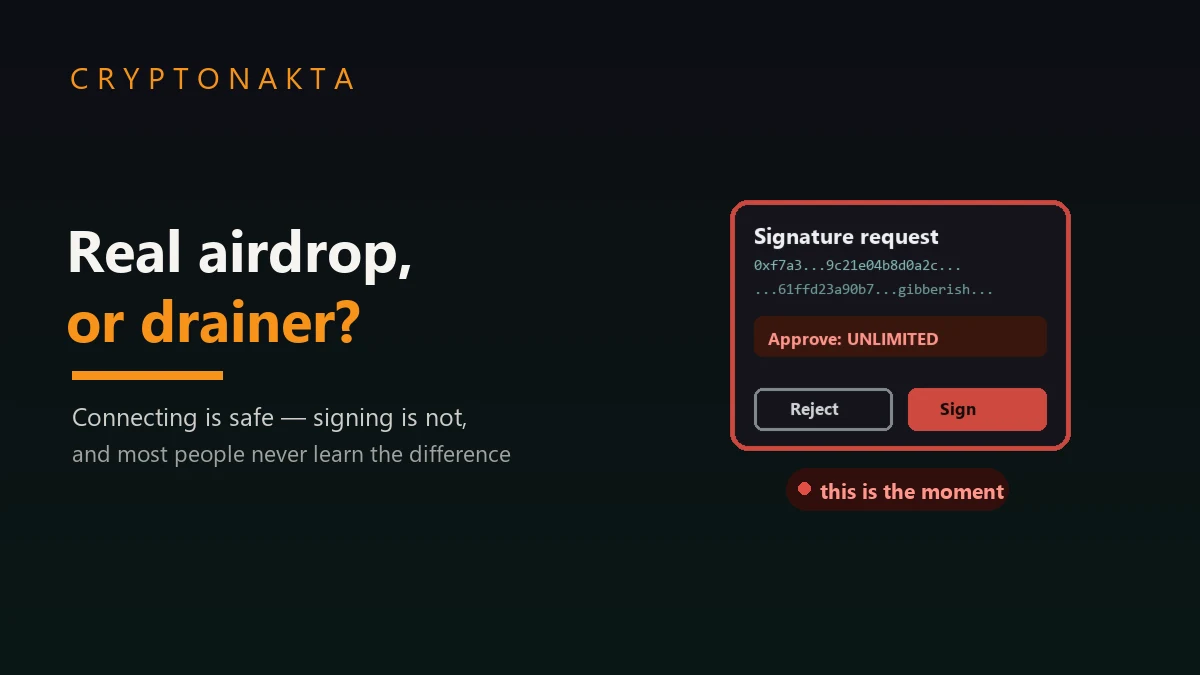
Fake Airdrop or Real One? The 5 Things a Real Claim Never Asks For
A $1.5 billion exchange hack and a $50 wallet drainer both trace back to one unread signature screen. Here’s how to actually read one, and how to claim your airdrop without losing your wallet.
| Question | Answer |
|---|---|
| How does a real airdrop work? | Your wallet’s past on-chain activity is checked against a snapshot taken before the airdrop was announced. You either qualified already or you didn’t, and nothing you do today changes that. |
| What’s the actual dangerous moment? | Signing a request is the dangerous moment, especially an unreadable eth_sign hash or an unlimited Permit2 approval signed without reading it. Connecting alone only reveals your address. |
| What does a real claim never ask for? | Your seed phrase, an upfront “gas” or “unlock” prepayment, a blanket approval through a third-party “checker,” or action within an artificial countdown. |
| Safer alternative? | Exchange programs like Binance HODLer Airdrops, Bybit Launchpool, or OKX Jumpstart pay out from your exchange balance with no wallet signature at all (US access caveat below). |
| After you claim? | Revoke the claim contract’s approval once your tokens have settled. See our revoke guide. |
1. The Quick Answer: What a Real Airdrop Looks Like, and the 5 Things It Never Asks For
2. How a Legitimate Airdrop Works: The Snapshot You Already Qualified For (or Didn’t)
3. Your Wallet Address Is Already Public. Your Signature Isn’t.
4. What Your Wallet Screen Is Telling You: eth_sign vs personal_sign vs EIP-712 vs Permit2
5. The $1.5 Billion Question: What the Bybit Hack Has to Do With Your $50 Airdrop Claim
6. Not Just Whales: A Fake Wallet in the Chrome Store, a Hijacked Update, and a Token Wearing the FBI’s Name
7. The Fake Airdrop Playbook: Every Pattern Scammers Are Running in 2025-2026
8. Is This Getting Better or Worse? What the 2025 Numbers Actually Say
9. The Safe Claim Checklist: How to Claim an Airdrop Without Getting Drained
10. The Safer Shortcut: Claiming Through Your Exchange Instead of Your Own Wallet
11. After You Claim: The One Step Almost Everyone Skips
12. Glossary: Airdrop Scam Terms, Plainly Explained
A wallet drainer doesn’t need your seed phrase and it doesn’t need to hack anything. It just needs you to sign one request you didn’t fully read. This guide walks through how a real airdrop claim works, what your wallet is doing when it “connects” to a site versus when it “signs” something for that site (that’s where the real danger lives), the actual 2025-2026 incidents, from a $1.5B exchange hack to a fake FBI-branded token the FBI itself had to warn people about, and a concrete checklist for claiming without losing your wallet. This is article four in our wallet-security series, and it’s the preventive one: the goal is making sure you never need the other three. Not legal, tax, or investment advice.
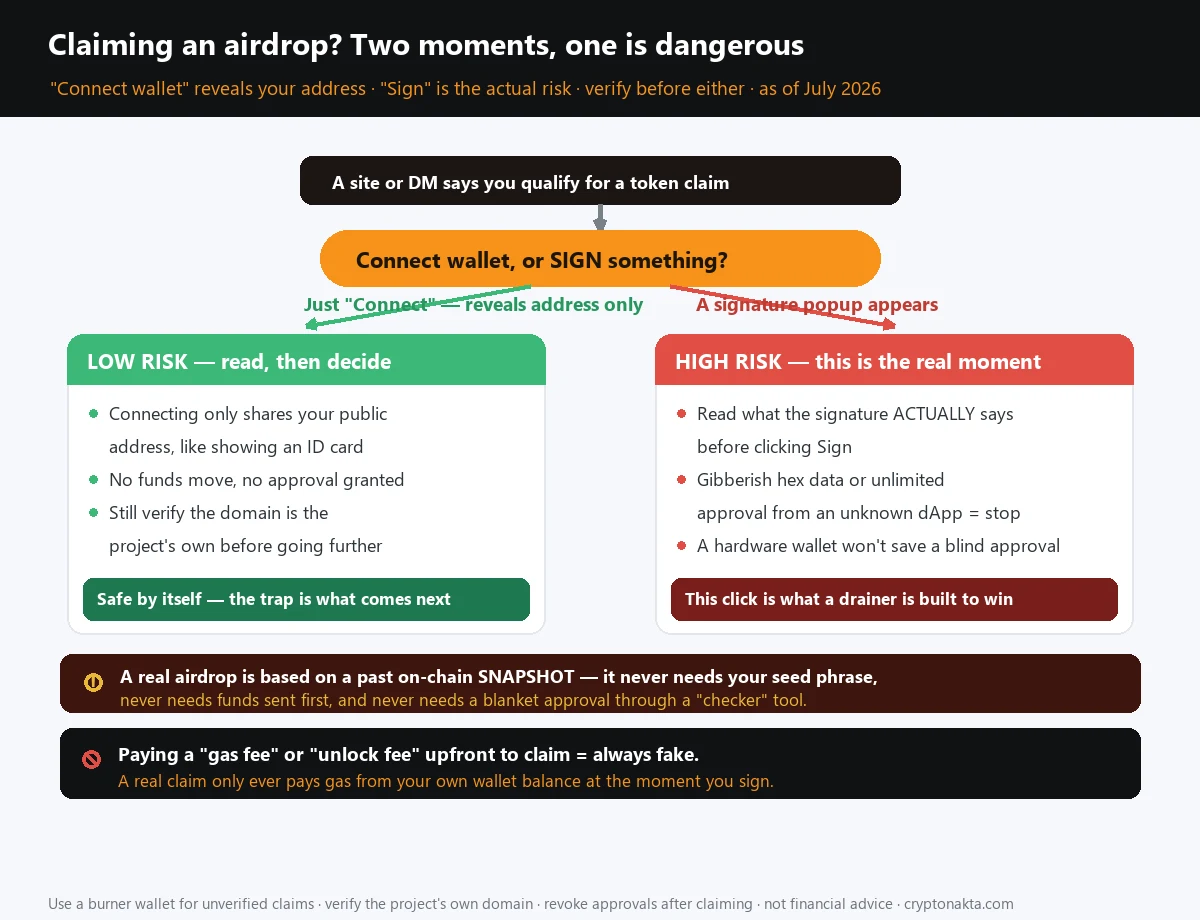
1. The Quick Answer: What a Real Airdrop Looks Like, and the 5 Things It Never Asks For
Somebody in your group chat just posted a link. New token, “eligibility check,” a countdown clock ticking down from two hours. Before you click “Connect Wallet,” give this thirty seconds first.
A real airdrop is boring on purpose. Your wallet already did, or didn’t do, whatever the project decided qualifies it, and that decision was locked in weeks before you ever heard the word “airdrop.” Nothing you do today changes whether you qualify. Claiming just means signing one specific transaction on the project’s own site, with a wallet you already control.
A legitimate airdrop will never ask you to do any of these five things. Memorize this table and you’ll catch nearly every scam in this article on sight:
| # | The ask | Why it’s always fake |
|---|---|---|
| 1 | Send funds first (“gas fee,” “unlock fee,” “activation fee”) to claim | Real claims pay their own gas from your wallet’s own balance, at the moment you sign. There is no separate prepayment to someone else’s address, ever. |
| 2 | Type in your seed phrase or private key | No claim function on earth needs your 12/24 words. Typing them into any site or app is how wallets get emptied, full stop. |
| 3 | “Connect and verify” through a third-party checker that asks for a blanket approval | Checking eligibility is a read-only lookup. It never needs permission to move your tokens. |
| 4 | Act in the next hour or lose it forever | Real claim windows run for weeks or months. Urgency is a pressure tactic, not a feature of tokenomics. |
| 5 | Sign something you can’t read (a wall of hex, or a “for security” pop-up with no plain-English summary) | This is the moment your wallet gets drained. This guide covers exactly what to check before you confirm anything. |
None of this is arbitrary. The mechanics behind a real claim explain the red flags better than any checklist can, and once you understand how a claim is supposed to work, a fake one starts sticking out on its own. Section five gets into the $1.5 billion Bybit heist itself, and it comes down to the same unread signature, just with a lot more zeros attached.
2. How a Legitimate Airdrop Works: The Snapshot You Already Qualified For (or Didn’t)
Calling this a “gift” is exactly what makes people careless about it. What really happened is narrower: your wallet did something, weeks or months ago, that met a rule the project wrote, and that rule got locked in at one frozen instant, the snapshot.
Picture a photograph of the entire blockchain taken at one block height. Every wallet’s balance, every trade it made, every protocol it touched, every governance vote it cast, all of it frozen in that single frame. The project then runs its eligibility formula against that photograph. Maybe the rule is “held at least 0.1 ETH of our token before block X.” Maybe it’s “bridged more than $500 through our protocol in the last six months.” Maybe it’s “voted in three or more governance proposals.” Whatever the rule is, it gets applied to a moment that had already passed by the time anyone hears an airdrop is coming.
That’s why claim-time urgency doesn’t hold up to scrutiny. Your eligibility was fixed weeks or months before the announcement. Connecting your wallet today, signing something right now, or beating a two-hour countdown does nothing to change whether you qualified back then. You did or you didn’t, and it already happened. “Today” only covers one mechanical step: pulling the reward out of a smart contract and into your address.
Here’s what that step involves:
- The project publishes eligibility on its own domain and its own verified social accounts, usually with a checker tool that queries the snapshot data. Read-only, no signature required just to look.
- You go to that domain yourself. Typed in, bookmarked, or reached from the project’s official, verified link. Never from a Discord DM or a Google ad.
- You connect your wallet, which reveals your public address and lets the site check it against the snapshot. Nothing has moved yet.
- You sign one claim transaction, which calls a specific function on the project’s audited claim contract, telling it “send my allocation to my address.” You pay the gas for that transaction from your own wallet balance.
- The tokens land in your wallet. Done.
Notice what’s missing: no separate payment to someone else’s address, no seed phrase, no blanket approval to a stranger’s contract. Any flow that adds one of those is running a different script entirely, one built to look like step 4 without being it.
3. Your Wallet Address Is Already Public. Your Signature Isn’t.
Two actions on a claim site look almost identical and mean completely different things for your wallet: connecting, and signing.
When a site asks your wallet to connect, your wallet extension shows a permission prompt, and approving it hands the site your public wallet address. That’s close to harmless. Your address is already semi-public the moment you’ve ever transacted on-chain, anyone can look it up on a block explorer regardless, so connecting a scam site to your wallet doesn’t move a single token. It only tells the site which address to build its next request around.
The danger starts one step later, when the site asks you to sign something. A signature is cryptographic proof that you, the holder of your private key, authorized a specific piece of data. Treating a sign request as basically the same thing as a connect request is how wallets get emptied. Depending on what that data says, a signature can do nothing at all, or it can hand a stranger’s contract standing permission to move every token you own, without ever touching your seed phrase.
Here’s the detail that catches even careful people: your wallet extension almost never shows a giant red “THIS WILL STEAL EVERYTHING” banner. It shows a routine pop-up that says something like “Signature Request,” with a button labeled Confirm. Whether that request is a harmless login proof or a full wallet takeover depends entirely on the data behind that button, and most people never read it.
4. What Your Wallet Screen Is Telling You: eth_sign vs personal_sign vs EIP-712 vs Permit2
Your wallet software talks to dApps through a handful of standardized request types. Each one asks your wallet to sign something different, and each one carries a very different risk profile. Learn to recognize which one you’re looking at, and you can spot a malicious request before you’ve clicked anything.
| Request type | What your wallet screen shows | Risk | The tell |
|---|---|---|---|
| Connect (no signature) | A permission dialog: “Allow this site to see your address” | Low | No funds can move. Worst case, the site now knows your address. |
eth_sign | An arbitrary 32-byte hash, literally unreadable, a wall of hex | Highest | Because the data is a raw hash, a malicious dApp can put anything behind it, including a full transaction, and you have no way to know what you’re approving. MetaMask flags this with a hard red warning for that reason. If you ever see this prompt, decline it. |
personal_sign | Readable text, like “Sign in to verify you own this wallet” | Medium | Looks harmless, and often is (this is how “Sign-In With Ethereum” works). But a malicious version can bury an actual authorization inside text formatted to look like a login message. Scroll through the whole thing before confirming; scammers are counting on you to skim just the first line. |
EIP-712 / eth_signTypedData_v4 | A structured, human-readable JSON-like breakdown: field names, values, contract addresses | Medium (low if you read it) | This format exists so you can verify what you’re signing: spender address, token, amount. Scammers count on the fact that almost nobody scrolls through the nested fields. Check the “spender” and “amount” fields specifically. |
| Permit / Permit2 | An EIP-712 request that grants a spender an allowance, often set to the max uint256 value (“unlimited”) | High | This is a pure off-chain signature. Once an attacker holds it, they can submit an on-chain transaction at any point in the future pulling that token out of your wallet, with no further approval needed from you. An unlimited Permit2 approval to a dApp you’ve never heard of, requested as part of “claiming an airdrop,” is close to the single most common drainer mechanism operating right now. |
If a claim site’s very first request is a Permit2 signature asking for unlimited access to your USDC or your top token holding, before it’s shown you a single line about the airdrop itself, you’re looking at a drainer testing whether you’ll sign without reading. Real claim flows explain what you’re claiming before they ever ask for token access.
claim(), but never a token-spending permit.A hardware wallet won’t save you from this particular mistake
A Ledger or Trezor is excellent at one job: keeping your private key inside a physical chip that malware on your laptop can never touch. That’s real, meaningful protection, and it’s entirely separate from whether the transaction you’re about to approve is itself malicious. Your hardware wallet will faithfully sign whatever you tell it to sign, including an unlimited Permit2 approval to a drainer contract, and it will do so securely and correctly. It stops your key from being stolen. It does nothing to stop you from authorizing theft with your own hand, on your own device, by not reading the screen in front of you.
5. The $1.5 Billion Question: What the Bybit Hack Has to Do With Your $50 Airdrop Claim
February 21, 2025. Bybit’s cold wallet lost roughly 401,347 ETH, plus a handful of other tokens sitting in the same wallet, together worth close to $1.5 billion at that day’s prices. Well over a year later, it’s still the largest crypto theft on record, and nothing in 2026 has come within reach of that number. Attribution points to Lazarus Group, the North Korea-linked hacking operation the FBI tracks under the name TraderTraitor. It’s tempting to read a number that size and file the whole story under nation-state hackers and nine-figure cold wallets, a world away from a Telegram link promising a $50 token. But look at what actually put the pen in the attackers’ hand: a signing screen that lied about what it was asking for. Strip away the zeros and that’s the identical blind spot a $50 airdrop drainer exploits, the gap between what your wallet shows you and what you’re actually authorizing.
The transfer ran through Safe{Wallet}, a widely used multisig infrastructure provider. On February 17, four days before the theft, attackers who had already compromised a Safe{Wallet} developer’s laptop quietly slipped malicious JavaScript into the front-end code that renders the signing screen. Nobody caught it for four days. When Bybit’s signers pulled up the transaction on the 21st, it looked like nothing worth a second glance: a routine top-up moving roughly 30,000 ETH from cold storage into a hot wallet, correct destination, correct amount, the kind of housekeeping an exchange runs all the time. The data actually sent to their hardware wallets for signing said something else entirely. Instead of a plain transfer, it carried a delegatecall, an instruction that rewrites a smart contract’s own storage rather than moving a token. Slot zero of that storage holds the address of the code that defines what the wallet is even allowed to do, and the delegatecall quietly overwrote that slot with an address Lazarus controlled. The 30,000 ETH on the screen was never the real target. The instant that signature landed, the attackers owned the logic behind Bybit’s entire ETH cold wallet, and they used that control to empty it: 401,347 ETH, not 30,000, walked out the door.
Bybit didn’t fold. CEO Ben Zhou posted publicly within hours confirming the exchange was still solvent and that every client asset remained backed one to one. Bybit lined up bridge loans from Binance, Bitget, and other exchanges the same day, and within about 72 hours it had recovered roughly 80% of the stolen ETH through those loans, OTC purchases, and whale deposits, enough to keep withdrawals running the whole time without a freeze. The theft itself moved fast in the other direction: roughly $160 million had already been laundered through mixers and cross-chain bridges within the first 48 hours, tracked in near real time by outside blockchain analysts who could see exactly where the funds were going and still couldn’t stop it. None of that changes the part that matters for this article: a team of professionals doing everything a security checklist would tell them to do still signed the wrong thing, because they trusted what their screen displayed instead of what the transaction actually said.
6. Not Just Whales: A Fake Wallet in the Chrome Store, a Hijacked Update, and a Token Wearing the FBI’s Name
The Bybit heist is a supply-chain compromise of signing infrastructure. On paper, it has nothing to do with a fake airdrop claim. It earns its place at the top of this list anyway: proof that the gap from the last section reaches professionals running a real security budget, hardware wallets, multisig, the works. Everything below hits closer to home: 2025-2026 incidents that map directly onto ordinary people, at every scale from a wallet extension in an official app store to a fake token wearing a federal badge.
A fake wallet sat in the real Chrome Web Store for nearly seven weeks
“Safery: Ethereum Wallet” went live on the official Chrome Web Store, the actual store Google runs, on September 29, 2025. No phishing domain, no sideloading, no warning banner, just a normal listing next to every other wallet extension. Security researchers at the supply-chain firm Socket didn’t catch it until mid-November, nearly seven weeks later, and traced the developer account behind it to an email address, kifagusertyna@gmail.com, that had no other footprint worth mentioning. In the meantime, the extension worked exactly like a real wallet on the surface. Underneath, the moment you generated or imported a seed phrase, it split those words into a wordlist index, rebuilt each one as a synthetic address, and quietly broadcast the whole set as a string of near-zero-value Sui blockchain transactions, amounts like 0.000001 SUI, sent from a wallet the attacker controlled. Nothing about that looks unusual on a block explorer. It’s just dust moving between addresses, and a paired decoder on the attacker’s side could reconstruct your seed phrase, word by word, from that public transaction data whenever they wanted. You didn’t have to click a bad link or fall for an airdrop pitch. Installing what looked like a normal wallet, from the normal store, was the entire attack.
A real wallet’s own official channel got weaponized
On December 24, 2025, attackers compromised GitHub secrets and Chrome Web Store API keys belonging to Trust Wallet, a real, established wallet with millions of users, and pushed a malicious version of the extension out through its legitimate auto-update channel. Somewhere between $7 million and $8.5 million was drained across more than 2,500 wallets before it was caught. The people affected didn’t visit a scam site or claim a fake airdrop. Their already-installed, already-trusted wallet updated itself into malware, through the one channel that’s supposed to be the safe one.
A fake token wore the FBI’s own name, and it wasn’t even offering anything
On March 19, 2026, the FBI’s New York Field Office, working through the Bureau’s own Internet Crime Complaint Center (IC3), warned about something that isn’t quite an airdrop scam at all, even though it rides in on the same rails. A wave of fake TRC-20 tokens on the Tron network, calling themselves something like “FBI Token,” started showing up uninvited in wallets, mostly ones already holding a visible USDT balance. Nobody claimed anything to get one. It just appeared. The trick is in the transfer data attached to that token, readable straight off a block explorer: a message accusing the wallet of anti-money-laundering violations and threatening a full asset freeze unless the owner clicks through to a “verification” link before some deadline. That link isn’t a claim page. It’s a phishing site built to harvest wallet credentials and personal information. By the time IC3 issued its alert, the campaign had already reached at least 728 wallets, some holding upward of $1 million in USDT. It’s a dusting attack wearing a federal badge, threatening you toward a phishing link with fear of a frozen account instead of tempting you toward one with a free token, the same mechanic covered in the dusting-attack entry in the playbook just ahead. The FBI’s own advice is the simplest version of the rule this whole article keeps repeating: don’t interact with the token, don’t click the link, and report it at ic3.gov instead. Bookmarking that page is a reasonable habit, since IC3 publishes new alerts like this one as patterns emerge.
When a real token launches, the copycats are ready within hours
Backpack’s TGE (token generation event) on March 23, 2026 allocated 25% of supply to the community as a claim. Within hours of the real claim page going live, multiple copycat phishing sites had already been built and were circulating through ads and search results, betting on people searching “Backpack airdrop claim” and clicking whatever came up first instead of typing the project’s own verified domain. Expect this around any high-profile, well-publicized TGE: the real claim opens, and the fakes are live the same day, sometimes the same hour.
7. The Fake Airdrop Playbook: Every Pattern Scammers Are Running in 2025-2026
Once you’ve seen the underlying mechanism, the scam sites stop looking mysterious. They’re all running one of a small number of well-worn plays. Here’s every version of this scam that’s actually landed in 2025 and 2026.
1. Ad-driven and search-driven copycat claim sites
The Backpack example above is the template: a real TGE gets announced, and within hours paid ads or SEO-optimized fake pages appear that mimic the real claim UI almost pixel-for-pixel, usually on a domain one character off from the real one (a swapped letter, an extra hyphen, a different TLD). People searching for the real thing click the fake because it ranks or advertises higher.
2. Compromised official accounts announcing a fake claim
A project’s real Discord, X, or Telegram account gets taken over, through a phished admin, a leaked API key, or a SIM-swap, and the compromised account posts an “airdrop is live, claim here” announcement with a malicious link. The scam rides on the project’s real follower base and real credibility. The account being genuine at every other point in its history is what makes people trust the one bad post.
3. Dusting attacks
An unsolicited, tiny amount of an unfamiliar token just shows up in your wallet. You never requested it, never interacted with anything. Curiosity is the usual hook: you open a block explorer or a DEX to check what it’s worth, or try to swap it, and that token’s contract is written specifically to trigger a malicious approval prompt the moment you attempt to interact with it. Sometimes the hook is fear instead of curiosity, which is exactly what the fake “FBI Token” case above ran: the dust itself carries a threatening message instead of a promise, pushing you toward a phishing link out of worry rather than greed. Either way, the dust itself has no meaningful value; it’s bait, meant to get you to click “connect,” open a link, or hit “confirm” on something dressed up as routine.
4. Fake browser extensions and fake mobile “airdrop checker” apps
Covered above with Safery, but it earns its own line item here too: apps and extensions that exist purely to impersonate either a real wallet or a real airdrop-eligibility checker, sometimes published on official stores, whose entire function is harvesting seed phrases or requesting drainer approvals the moment you use them.
5. Urgency and scarcity pressure
“Claim expires in 2 hours.” “Only 500 spots remaining.” “Snapshot closes tonight.” Real eligibility is locked in by a snapshot that already happened, so none of these countdown mechanics reflect anything real about the token. They exist purely to shorten how long you spend thinking before you click Confirm.
6. Upfront “gas fee” or “unlock fee” demands
This is the cleanest tell on the list, because it has zero legitimate exceptions. A real claim transaction pays its own gas automatically, from your connected wallet’s own balance, at the moment you sign. You never separately send ETH, USDT, or anything else to a different address first to “unlock” or “cover fees” before you’re allowed to claim. Any site asking for a prepayment to a wallet address, before the claim transaction itself, is running the entire scam right there in that one request.
8. Is This Getting Better or Worse? What the 2025 Numbers Actually Say
Every crypto news cycle seems to carry a scam headline, which makes it hard to tell whether the problem is growing or just getting louder. The two most-cited annual measurements give a more precise answer than either impression alone.
| Period | Metric | Figure | Source |
|---|---|---|---|
| 2024 | Total wallet-drainer losses | $494M | Scam Sniffer |
| 2025 | Signature-phishing / drainer losses | $83.85M across 106,106 victims | Scam Sniffer |
| 2025 | Total scam & fraud losses (all crypto crime, not just drainers) | $17B, average loss $2,764 (+253% YoY) | Chainalysis 2026 Crypto Crime Report |
| 2025 | Hacking & exploit losses (Chainalysis’s narrower category, sitting one tier below the $17B figure above: protocol hacks plus wallet compromises) | $3.4B | Chainalysis 2026 Crypto Crime Report |
| 2025 | Browser-extension & personal-wallet compromise losses (a slice of the $3.4B hacking figure directly above, not of the $17B figure) | $713M, ~20% of that $3.4B | Chainalysis |
| 2025 | Personal wallet compromises (incident count behind that same $713M) | 158,000 incidents, ~80,000 unique victims | Chainalysis |
| H1 2025 | Phishing losses | $410M across 132 incidents | CertiK |
| 2025 | Impersonation-scam growth | +1,400% YoY | Chainalysis |
Two of those 2025 rows look like they contradict each other until you separate what each one is actually counting, and the table above now stacks them in that order on purpose. The $17B row is Chainalysis’s broad, all-in scam-and-fraud total: every victim who lost money to any kind of crypto-related deception, romance scams and fake investment platforms included. The $3.4B row sitting directly beneath it is a different, narrower bucket in that same report, Chainalysis’s tally for hacking and exploit losses specifically, which covers protocol hacks (Bybit’s $1.5B is counted inside this bucket, not the $17B one), DeFi exploits, and the personal wallet compromises this whole article is about. The $713M browser-extension and wallet-compromise row underneath that is a slice of the $3.4B hacking bucket, roughly 20% of it, not a slice of the much bigger $17B scam-and-fraud total two rows up. Mix those two denominators up and you’d conclude wallet drainers are a rounding error; keep them straight and $713M turns out to be a fifth of everything hacking-related that got stolen in 2025.
Drainer losses fell hard in 2025: the Scam Sniffer figure dropped 83% year over year, and the number of $1M+ single incidents fell from 30 in 2024 to just 11, likely thanks to better wallet-side warnings, more public awareness, and law enforcement pressure on the biggest operators. But total scam and fraud losses across all of crypto climbed over the same stretch: average individual losses jumped 253%, and Chainalysis clocked impersonation-based scams (the fake-official-account, fake-authority-figure category fake airdrops live in) up +1,400% year over year, meaning that category is now running at roughly 15 times its 2024 volume. Criminals didn’t quit stealing. They moved from bulk drainer kits to more targeted impersonation, the category this article covers.
One more number matters for where this is headed rather than where it’s been. Permit and Permit2 approval abuse accounted for 38% of all $1M+ losses in 2025 (Scam Sniffer). That’s the same “unlimited approval disguised as an EIP-712 signature” pattern explained two sections up, and it isn’t shrinking the way overall drainer numbers are. A new attack surface also opened in 2025 with EIP-7702, part of Ethereum’s Pectra upgrade, which lets a single signature authorize a bundle of multiple transactions at once. One careless signature can now trigger far more than a single-token theft. The read-what-you-sign discipline this article keeps repeating hasn’t gone stale. If anything, Ethereum’s newest upgrade just raised the cost of skipping it.
9. The Safe Claim Checklist: How to Claim an Airdrop Without Getting Drained
This is the checklist: how to claim a real airdrop without becoming one of the numbers in the table above. Work through it in order, every time, with no exceptions for “this one looks legit.”
Step 1: Confirm the domain yourself, never through a link someone sent you
Never claim from a link in a DM, a Discord ping, a Telegram forward, or a search ad. Go to the project’s official X/Twitter account, verify it’s the real one by checking follower history, post history, and whether it’s linked from the project’s own site if you already know that, and get the claim domain from a pinned post or their own documentation. If you’re not sure the X account itself is genuine, cross-check against the project’s GitHub or an established source like the project’s listing page on a reputable data site.
Step 2: Check the claim contract address against a block explorer
A real project publishes its claim contract address in its own docs or GitHub. Paste that address into Etherscan (or the relevant chain’s explorer) and confirm it’s verified, has real transaction history matching the claim window, and isn’t a contract deployed an hour ago with zero prior activity.
Step 3: Use a burner wallet for anything you haven’t fully verified
A burner wallet is a separate wallet you create specifically for interacting with unfamiliar sites. Fund it with only the small amount of gas you need, keep no meaningful assets in it, and never connect it to your main holdings. If a claim site turns out to be malicious, the worst case is losing what’s in that burner, not your life savings. This one habit neutralizes almost every scenario in this article.
Step 4: Read the signature request before you sign
Go back to the table in the earlier section. If your wallet shows a wall of unreadable hex (eth_sign), decline. If it’s an EIP-712 structured request, find the spender address and the amount. If the amount says “unlimited” and the request is a Permit2 approval rather than a specific named claim function, decline. A real claim is a named function call, something like claim() or claimTokens(). An open-ended Permit2 approval is asking for something else entirely.
Step 5: Confirm there’s no prepayment step, ever
If at any point before your wallet’s own signature prompt, the site asks you to send funds to an address to “unlock,” “activate,” or “cover gas” for your claim, close the tab immediately. Dressed up as a formality or not, that request is the entire scam.
Step 6: After the claim lands, revoke the approval
Even a legitimate claim contract sometimes requests a scoped approval as part of its function. Once your tokens have landed, don’t leave that approval sitting open indefinitely. Go revoke it. This is important enough to get its own section next.
10. The Safer Shortcut: Claiming Through Your Exchange Instead of Your Own Wallet
One category of airdrop skips almost all of this.
Several major exchanges run their own airdrop and launch programs based on a snapshot of your exchange balance, not your self-custody wallet activity. Binance’s HODLer Airdrops, Bybit’s Launchpool, OKX’s Jumpstart, Gate’s Startup, MEXC’s Airdrop+, and KuCoin’s Spotlight all work this way. Because the eligibility check and the distribution both happen inside the exchange’s own custodial system, there’s no wallet to connect, no signature to approve, and no smart contract to interact with at all. You hold an eligible balance, the exchange checks its own database, and the tokens simply appear in your exchange account. Structurally, this removes the entire attack surface this article has spent nine sections on. There’s no signing screen for a drainer to exploit, because there’s no signing screen in the first place.
That safety advantage is real, and it comes with a tradeoff, plus a US-specific caveat if you’re reading this from the United States. Choosing the exchange path means trusting the exchange’s custody and internal controls instead of your own wallet’s signature hygiene. That’s a real risk of its own, and the Bybit incident above is exactly what it looks like when that risk goes wrong at nine-figure scale. If you’re a US resident, Binance’s global platform and Binance.US are two structurally separate entities. Binance.US runs a different, more restricted feature set for US users, and not every global promotion, including some airdrop programs, is available through it. Bybit, OKX, Gate, KuCoin, and MEXC each have their own jurisdictional availability, so check directly before assuming a program applies to your account as advertised.
Binance

Bybit
OKX

Gate.io
Affiliate disclosure: some links are partner links. We may earn a commission at no extra cost to you. This is not investment advice.
For most people, the realistic approach is to use the exchange-snapshot path when it’s available for a token you’d hold on that exchange anyway, and reserve the self-custody claim checklist above for tokens only distributed that way. That’s most of them, especially newer or smaller projects.
11. After You Claim: The One Step Almost Everyone Skips
You claimed it, the tokens showed up, and it’s tempting to consider the job finished. It isn’t quite. Even a completely legitimate claim transaction sometimes asks you to grant the claim contract a scoped token approval as part of how it delivers your tokens, and that approval doesn’t automatically expire the moment the claim completes. It sits there, live, until you revoke it or it’s used again.
Most of the time this is harmless: a well-audited project’s claim contract doing exactly what it says. But “most of the time” isn’t the same as “no reason to check,” especially given that Permit and Permit2 approval abuse is the single largest category of large losses in the 2025 data cited above. A five-minute habit closes this gap completely. After claiming, open a reputable approval-checker tool (revoke.cash and similar are standard), review what your wallet has approved recently, and revoke anything you don’t recognize or no longer need, including the claim contract itself, once you’re confident the claim has fully settled.
This is what our companion guide, how to revoke token approvals, walks through step by step: which token approvals matter, how to read what you’re revoking, and how to do it without breaking anything you still need. If you’ve claimed several airdrops over time, run this sweep periodically even outside of a specific new claim. Old approvals from projects you’ve forgotten about are exactly the kind of dormant risk that gets exploited months later.
12. Glossary: Airdrop Scam Terms, Plainly Explained
Airdrop scams come with their own vocabulary, and knowing it helps for more than just reading this article. It’s also what lets you actually parse the wallet warnings and security reports you’ll run into afterward.
| Term | What it means |
|---|---|
| Snapshot | A frozen record of on-chain activity and balances at one specific block. Airdrop eligibility is almost always calculated against a snapshot taken before the airdrop is ever announced, so your qualification is retroactive and already decided by the time you hear about it. |
| TGE (Token Generation Event) | The moment a new token’s contract is deployed and supply first becomes distributable. Often the trigger point for both a legitimate community claim and a wave of copycat phishing sites. |
| Blind signing | Approving a signature request without your wallet (or you) being able to read what it authorizes. Classically an eth_sign request showing raw hex instead of human-readable content, and the single riskiest thing you can do with a wallet. |
| Permit / Permit2 | A gasless, off-chain signature standard that grants a smart contract permission to move a specific token from your wallet, up to a set amount, at any future point, without needing a separate on-chain approval transaction. Extremely convenient for legitimate DeFi, and the mechanism behind the largest share of 2025’s biggest drainer losses when abused. |
| Drainer / Drainer-as-a-Service | Malicious code, or a rented kit sold by a developer group to lower-skilled operators for a cut of the take, built specifically to request maximum-value approvals or signatures from a connected wallet and then sweep the funds the instant a signature lands. |
| Dusting attack | Sending a tiny, unsolicited, unrequested token to a wallet, hoping curiosity drives the owner to interact with it, whether that’s checking its value or trying to swap it. That interaction is what triggers the malicious approval. |
| Burner wallet | A separate, minimally funded wallet created specifically for interacting with unverified sites or claim contracts, so the worst-case loss is capped at whatever small amount is inside it. |
| Address / wallet poisoning | An attacker sends a tiny transaction from an address deliberately crafted to share the first and last few characters of an address you commonly send to, hoping you’ll copy the wrong one from your transaction history later. |
eth_sign vs personal_sign vs EIP-712 | Three different wallet-signature request formats with very different readability and risk, covered in full detail in the earlier signature-types section of this article. |
Frequently asked questions
eth_sign shows your wallet an unreadable block of hex, so a malicious site can hide literally anything behind it, including a full asset transfer, which is why wallets flag it with a hard warning. A Permit2 approval looks safer because it’s readable, structured EIP-712 data, but it grants a smart contract standing permission to move a specific token from your wallet, sometimes an unlimited amount, at any point in the future, without a further signature. Almost nobody actually scrolls down to check the spender and amount fields before hitting Confirm, and that habit is what turns a perfectly readable request into a costly one.Already claimed something? Check what you approved: How to revoke token approvals →