Sent Crypto to the Wrong Network? Here’s Exactly When You Can Get It Back
A calm, situation-by-situation guide to recovering crypto sent on the wrong network — when it’s recoverable (same address on another EVM chain, missing memo/tag, exchange deposits), when it’s gone for good (contract or typo addresses), how to recover it yourself or via exchange support, and how to avoid the “recovery service” scam. As of June 2026.
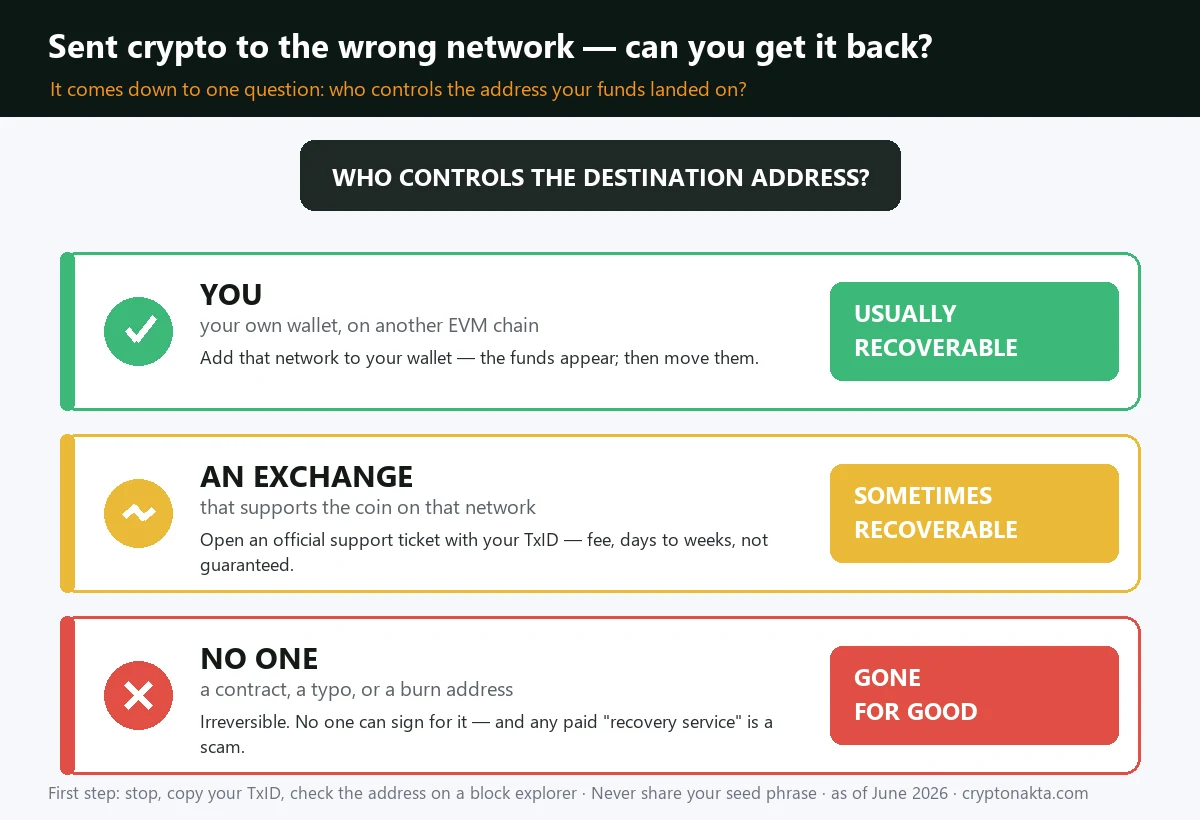
- It depends on one thing: does anyone control the address your funds landed on? If you do (your own wallet on another chain) or an exchange does (a coin it supports), recovery is often possible. If no one does (a contract, a typo, a burn address), it’s almost certainly permanent.
- Usually recoverable: same address on a different EVM chain (ETH↔BSC↔Polygon) when you hold the keys; a missing memo/tag on an exchange deposit (XRP, XLM, ATOM…); a wrong-network deposit to an exchange that supports that coin (via support, with a fee and some wait).
- Almost always lost: crypto sent to a smart-contract address, to a mistyped address nobody owns, or to a burn address — because no private key can move it and transactions can’t be reversed.
- Do this now: stop and send nothing else, copy your transaction hash (TxID), check the destination address on a block explorer, and — if it’s on an exchange — open an official support ticket.
- Never pay a “crypto recovery service,” share your seed phrase, or trust anyone who DMs you offering to get your funds back. That is a second scam targeting people who already lost money.
- This guide walks through all six situations, self-recovery steps, exchange recovery, the recovery-scam red flags, and how to never do it again. Not investment advice.
1. The short answer: can you get it back?
2. Do this in the first 5 minutes
3. Find your situation (the 6 cases)
4. How to recover via an exchange
5. How to recover it yourself (you hold the keys)
6. When it’s truly gone — and the recovery-service scam
7. How to never send to the wrong network again
8. Buy & withdraw on the right network
9. Next steps
1. The short answer: can you get it back?
First, breathe. Sending crypto on the wrong network is one of the most common mistakes in all of crypto, and whether you can get it back has a clear answer — it just depends on exactly what happened. The single biggest factor is simple: does anyone actually control the address your funds landed on? If you (or an exchange) control it, recovery is often possible. If no one does, it’s almost certainly gone.
Here is the honest, at-a-glance recovery map, as of June 2026:
| What happened | Recoverable? | How |
|---|---|---|
| Same address, different EVM chain (e.g. ETH address on BSC/Polygon) — and you hold the private key | ✅ Usually | Add the destination network to your wallet; the funds appear; move them out |
| Sent to an exchange on a network it supports, but the “wrong” one for that coin | 🟡 Sometimes | Contact support immediately with your TxID; may take weeks + a fee; not guaranteed |
| Missing memo/tag (XRP, XLM, ATOM, EOS, BNB Beacon) | 🟡 Often (on a CEX) | Open a support ticket with the TxID; exchanges can usually credit it manually |
| Sent to an exchange on a coin/network it does not support | 🔴 Rarely | Support may decline; no tooling exists to credit it |
| Sent to a smart-contract address (e.g. a token contract) | 🔴 Almost never | No private key controls it; funds are stuck |
| Wrong/typo address nobody holds the key to | 🔴 No | Irreversible — crypto transactions can’t be cancelled |
2. Do this in the first 5 minutes
Before anything else, in the first few minutes:
| Do this now | Why |
|---|---|
| 1. Stop. Send nothing else. | People panic and fire off a second “fix” transaction that makes things worse. There is no rush — the funds are not going anywhere. |
| 2. Copy your transaction hash (TxID). | This is the proof of exactly what you sent, from where, to where, on which network. You’ll need it for any recovery. Find it in your wallet/exchange history. |
| 3. Note the 4 facts. | (a) which coin/token, (b) which network you actually used, (c) the exact destination address, (d) where it was supposed to go. Write them down. |
| 4. Check the address on a block explorer. | Paste the destination address into the explorer for the network you used (e.g. a BSC explorer if you sent on BSC). It tells you whether it’s a normal wallet, an exchange, or a contract — which decides your odds. |
| 5. Do NOT search “crypto recovery service.” | The top results are scams that take an upfront fee and vanish. We cover this below. |
| Short answer | Sometimes recoverable, sometimes gone — it depends on exactly what happened |
| Best case | Same address, different EVM chain, and you hold the keys → usually recoverable |
| Exchange deposit, wrong network | Sometimes — contact support fast; fee + weeks; not guaranteed |
| Missing memo/tag (XRP, XLM…) | Often recoverable via the exchange with your TxID |
| Sent to a contract or typo address | Almost always permanent loss |
| Do NOT | Pay any “recovery service / hacker” — that is a second scam |
| First move | Stop. Send nothing else. Copy your transaction hash (TxID) |
3. Find your situation (the 6 cases)
Almost every “wrong network” case is really one of these six situations. Find yours.
1. Same address, different EVM chain — the good news case
Ethereum, BNB Smart Chain, Polygon, Arbitrum, Avalanche C-Chain and most “EVM” chains share the same address format. So if you sent USDT to your own wallet address but picked Polygon instead of Ethereum, the funds are sitting at your address — just on the Polygon network. Because you control the private key (or seed phrase), you can almost always get them: add the destination network to your wallet, and the balance appears. Full steps are in the self-recovery section below.
2. Sent to an exchange on the wrong network
You withdrew to a Binance/Bybit/OKX deposit address but chose a network that coin doesn’t normally use there. If the exchange supports that coin on that network, support can often credit it manually — expect a processing fee and anywhere from days to weeks, and no guarantee. If the exchange doesn’t support that network at all for that asset, they usually can’t help.
3. Missing memo / destination tag
XRP, XLM, ATOM, EOS, BNB (Beacon Chain) and a few others require a memo or tag in addition to the address. Leave it off when depositing to an exchange and the funds land in the exchange’s wallet but aren’t auto-credited to you. This is usually recoverable: open a support ticket with your TxID and they’ll match it to your account manually.
4. Sent to a smart-contract address
If you accidentally sent tokens to a token’s own contract address (a classic mistake — copying the contract instead of a wallet), there is no private key behind it, so no one can sign a transaction to move the funds out. These are almost always lost. A rare exception: a few projects have a recovery function, but assume it’s gone.
5. Wrong or mistyped address
If you fat-fingered the address or pasted the wrong one and it happens to be valid, the funds are now at an address someone else (or no one) controls. Crypto transactions can’t be reversed, so unless you can identify and contact the owner, this is a permanent loss. (Most wrong addresses simply have no owner at all.)
6. Bridged or swapped to the wrong chain
If you used a bridge and it completed to a chain you didn’t want, the funds are usually in your wallet on that chain (see case 1). If a bridge failed mid-way, check the bridge’s own “recover/refund” page with your TxID before doing anything else.
4. How to recover via an exchange
If the funds landed on an exchange (cases 2 and 3 above), the exchange — not you — controls the wallet, so recovery runs through their support team. The process is broadly the same everywhere:
| Step | Detail |
|---|---|
| 1. Open an official support ticket | Use only the exchange’s real website/app (bookmark it). Look for “wrong network deposit recovery” or “lost deposit.” Never DM anyone who contacts you — that’s an impersonation scam. |
| 2. Provide the TxID + details | Transaction hash, coin/token, network used, deposit address, amount, and the time. The TxID is the key piece. |
| 3. Wait — and expect a fee | Manual recovery is hands-on, so most exchanges charge a processing fee and take from several days to several weeks. Some set a minimum value below which they won’t attempt it. |
| 4. Understand it’s not guaranteed | If they support the coin on that network, odds are decent. If they don’t, they may not be able to help at all — and they’ll tell you. |
Major exchanges (Binance, Bybit, OKX, KuCoin and others) all run some version of this, though availability, fees and minimums differ and change over time. Search their help centre for the current policy rather than trusting any third party.
5. How to recover it yourself (you hold the keys)
If the funds are at your own address on the wrong (but supported) chain — the common case 1 — you can usually retrieve them yourself in minutes, because you hold the keys. Using MetaMask as the example:
| Step | What to do |
|---|---|
| 1. Confirm where it is | Paste your address into the block explorer for the network you actually sent on. See the balance there? Good — it’s yours to move. |
| 2. Add that network to your wallet | In MetaMask, add the destination chain (e.g. add “Polygon” or “BNB Smart Chain”). Use the official chain settings from a trusted source like the chain’s own docs — not a random pop-up. |
| 3. Add the token if needed | If it’s a token (not the native coin), “import token” using the correct contract address for that chain so the balance displays. |
| 4. Get a little gas | To move the funds off that chain you need a small amount of its native gas coin (e.g. POL on Polygon, BNB on BSC). Send yourself a tiny amount, or buy a few dollars’ worth and withdraw it to that chain. |
| 5. Move the funds where you want | Now send them to the right place — usually back to an exchange on the correct network, or keep them on that chain if that’s fine. |
6. When it’s truly gone — and the recovery-service scam
Some cases really are unrecoverable, and the honest thing is to say so plainly: funds sent to a smart-contract address, to a typo address nobody owns, or to a burn address are gone. Crypto’s core feature — that no one can reverse your transactions — is exactly what makes these mistakes permanent. No developer, no exchange and no “expert” can sign a transaction for an address they don’t hold the key to.
That hard truth is what fuels the second disaster: the recovery scam.
| Recovery scam red flag | Reality |
|---|---|
| “Crypto recovery expert / hacker can get it back for a fee” | They can’t. They take the upfront fee and disappear. Many target people who already lost funds — a second hit. |
| “Pay a small ‘unlock’ or ‘gas’ fee to release your funds” | Advance-fee fraud. Real recovery never requires sending money to a stranger first. |
| Someone DMs you offering help after you posted about it | Scammers monitor crypto forums and replies. Unsolicited help = scam, essentially always. |
| “Give me your seed phrase / connect your wallet to this site” | This steals everything you have left. Never share a seed phrase or sign blind approvals. |
7. How to never send to the wrong network again
This mistake is almost 100% preventable. Build these habits and you’ll likely never hit it again:
| Habit | Why it works |
|---|---|
| Match the network on both ends | The network you pick when sending must equal the network of the receiving address. Withdrawing USDT to a Binance address? Use the network Binance shows for that deposit address — not whichever is cheapest. |
| Send a tiny test first | For any new address or a large amount, send a small test transaction, confirm it arrives, then send the rest. The few cents of fees are cheap insurance. |
| Copy the memo/tag too | For XRP, XLM, ATOM, EOS and similar, the memo/tag is as important as the address. Never skip it on exchange deposits. |
| Use the exchange’s “withdraw to network” picker carefully | Good exchanges show the network and even warn if it looks mismatched. Read that screen instead of clicking through it. |
| Whitelist your own addresses | Saving and labelling addresses (with their network) removes the chance of pasting the wrong one under pressure. |
8. Buy & withdraw on the right network
Most “wrong network” disasters start at the withdrawal screen. Buying and withdrawing on an exchange that supports many networks — and clearly labels them — is the simplest way to avoid the mistake (and to bridge-free your way onto the chain you actually want). These are the exchanges we keep dashboard-verified sign-up guides for; entering a referral code at sign-up applies fee perks:
Binance

Bybit
OKX
Gate.io
KuCoin
Affiliate disclosure: some links are partner links. We may earn a commission at no extra cost to you. This is not investment advice.
9. Next steps
The honest summary: recovering crypto sent to the wrong network comes down to who controls the destination. If it’s your own address on another EVM chain, you can usually retrieve it yourself by adding that network to your wallet. If it’s an exchange and the coin is supported, their official support can often credit it for a fee. A missing memo or tag is usually fixable the same way. But funds sent to a contract address, a mistyped address, or a burn address are almost always gone — crypto’s irreversibility is exactly what makes those permanent. Above all, never pay a “recovery expert,” never share your seed phrase, and only ever deal with the real, bookmarked support of the exchange that holds the funds. Going forward, match the network on both ends, send a small test first, and whitelist your own labelled addresses. To keep learning: secure your holdings in a wallet you control, learn the fraud patterns in the crypto scams guide, compare safer places to buy and withdraw in the best exchanges guide, and if you’re brand new, start at the complete beginner’s guide.