Binance Fees Explained: Referral Discount, Futures Fee Calculator, How to Check Your Rate
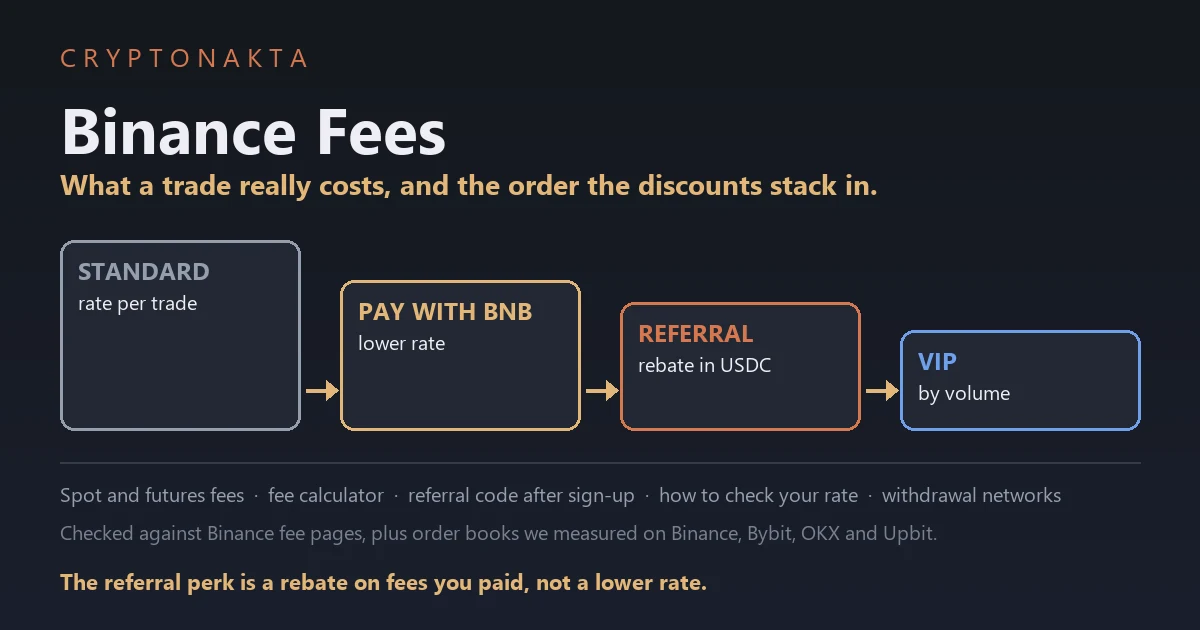
Binance takes its trading fee as a percentage of each trade, out of the asset you receive. On futures that percentage is charged on the full position, so leverage makes it weigh more against your money. You can lower it by paying in BNB, by signing up with a referral code and by reaching a VIP level.
People keep asking whether a Binance referral discount really makes trading cheaper, and by how much. So in October 2026 I read the Binance fee pages, FAQs and announcements on the same day. I also pulled order books from Binance, Bybit, OKX and Upbit at the same minute and priced the same orders on each. This guide is what I found, including the cases where Binance was not the lowest.
In this article (13)
How much does Binance charge per trade, and how do you pay less?Is Binance cheaper than Bybit, OKX or Upbit? We priced the same order at the same minuteHow do the Binance fee discounts stack? BNB first, then the referral rebate, then VIPBinance referral discount: what the code really gives you, and how to add it after sign-upHow to turn on Use BNB to pay fees, for spot and for futuresBinance futures fee calculator: spot and futures fees worked outWhy do Binance futures fees eat more at high leverage?Binance VIP levels: which fees go down at each tierAre Binance zero-fee pairs really free?How to check your Binance fee rate, the fees you paid and your USDC rebateHow much is the Binance withdrawal fee for USDT, and which network should you pick?Does Binance Convert charge a fee? P2P, card purchases and rebate vouchersMy take on cutting Binance fees
How much does Binance charge per trade, and how do you pay less?
Binance charges a regular account 0.1% on every spot trade, maker or taker. USDⓈ-M futures cost 0.02% for makers and 0.05% for takers, counted on the full position. Three things lower the bill. You can pay fees in BNB, sign up with a referral code, or reach a VIP level.
A maker order is a limit order that sits in the order book until someone trades against it. A taker order fills right away against orders already there. Every market order is a taker order. The fee rate is the percentage Binance keeps from each fill.
Not signed up yet? Put our referral code on the sign-up form, and 10% of the spot fees you pay comes back to you in USDC.
Binance

Affiliate disclosure: some links are partner links. We may earn a commission at no extra cost to you. This is not investment advice.
The fee comes out of the asset you receive. Binance’s own example is a buy of 10 ETH at 0.1%, which costs 0.01 ETH. When you sell ETH for USDC, the fee comes out of the USDC instead. So a buy often lands slightly below the amount you typed. The Est. Fee line on the order form is only an estimate made before the order fills.
These are the standard rates on the Binance fee pages, checked on October 21, 2026.
| Binance market | Maker | Taker | Maker, paid in BNB | Taker, paid in BNB |
|---|---|---|---|---|
| Spot (regular user) | 0.1% | 0.1% | 0.075% | 0.075% |
| USDⓈ-M futures | 0.02% | 0.05% | 0.018% | 0.045% |
| COIN-M futures | 0.02% | 0.05% | No BNB column shown | No BNB column shown |
The BNB columns are the standard rate minus 25% on spot and 10% on futures. COIN-M futures show no BNB column on the fee page. We found no official line saying the discount applies there. Rates can change, so treat these as values from that date. Your own Fee Level screen has the final word.
Futures differ from spot in one big way. The fee is a percentage of the whole position, so leverage changes how much it weighs against your money. If spot and futures are new to you, spot vs futures explains the difference. Everything else Binance offers is in our Binance features overview.
Is Binance cheaper than Bybit, OKX or Upbit? We priced the same order at the same minute
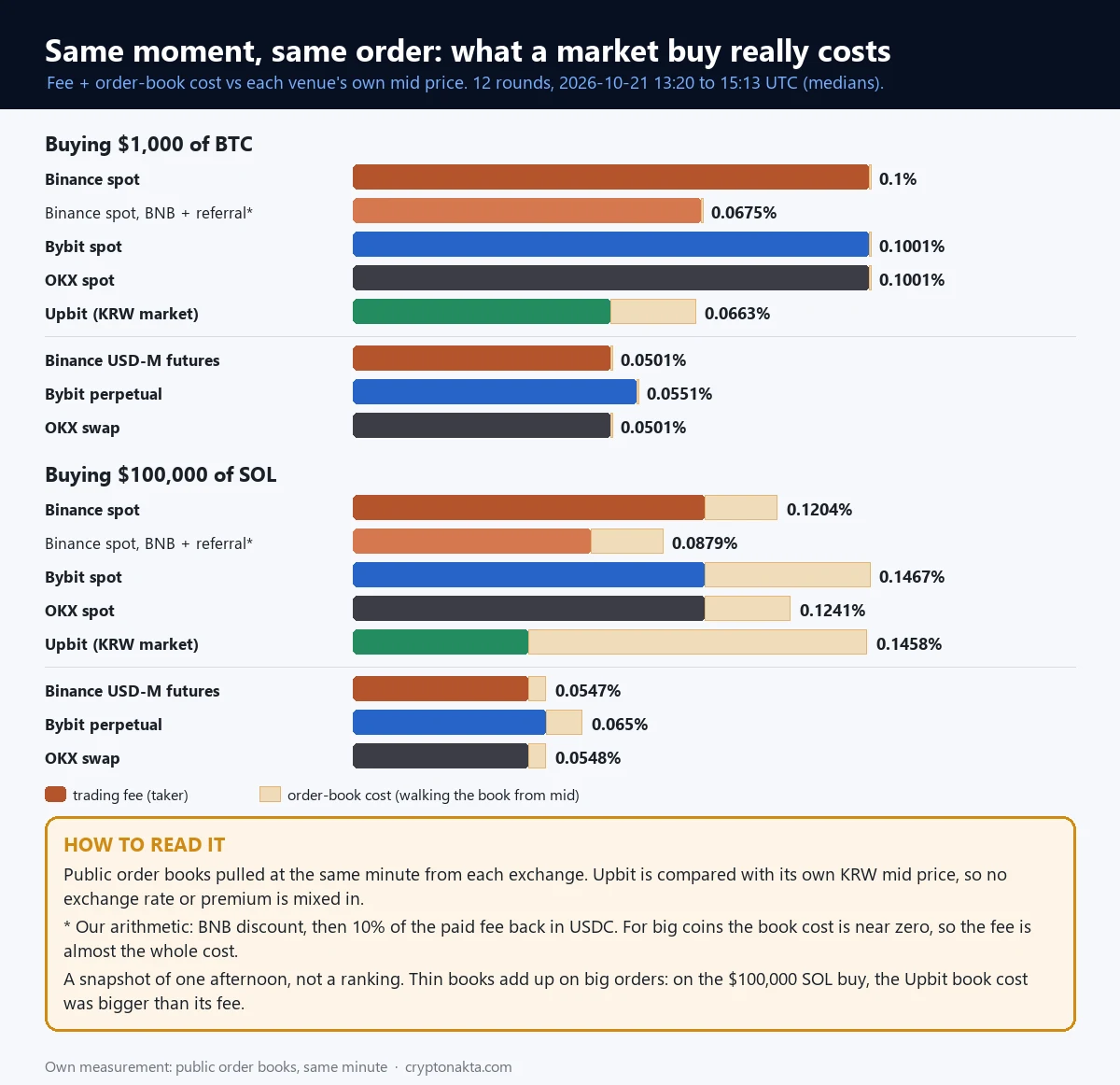
Binance was not the lowest-cost place for every order we priced on October 21, 2026. A $1,000 BTC market buy cost 0.1% in total on Binance spot at the standard rate. Bybit and OKX spot came to 0.1001%. Upbit came to 0.0663%. Binance with BNB and our referral rebate came to 0.0675%.
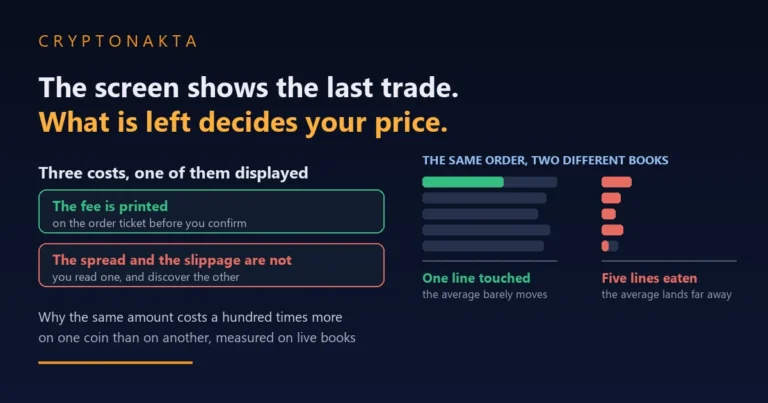
Here is what we did. On October 21, 2026, from 13:20 to 15:13 UTC, we pulled the public order books of all four exchanges at the same minute. We did it every 10 minutes, 12 times in all. For each book we worked out what a market buy of BTC, ETH, SOL or XRP would cost against that exchange’s own mid price.
That gap is the order-book cost, often called slippage. It is what you lose by eating through the sell orders before any fee is charged. We took the median of the 12 rounds. Then we added each exchange’s official taker fee to get the total.
These are values from one afternoon, measured at the same minute on each exchange. They are not a ranking and not a forecast.
 View full size ↗
| Market buy, total cost (fee + order-book cost) | BTC $1,000 | BTC $100,000 | ETH $10,000 | SOL $100,000 |
|---|---|---|---|---|
| Binance spot, standard rate | 0.1% | 0.1% | 0.1002% | 0.1204% |
| Binance spot, BNB + referral rebate (our arithmetic) | 0.0675% | 0.0675% | 0.0677% | 0.0879% |
| Bybit spot | 0.1001% | 0.1039% | 0.1016% | 0.1467% |
| OKX spot | 0.1001% | 0.1022% | 0.1002% | 0.1241% |
| Upbit (KRW market) | 0.0663% | 0.0949% | 0.093% | 0.1458% |
| Binance USDⓈ-M futures | 0.0501% | 0.0501% | 0.0502% | 0.0547% |
| Bybit perpetual | 0.0551% | 0.0551% | 0.0552% | 0.065% |
| OKX swap | 0.0501% | 0.0501% | 0.0502% | 0.0548% |
The surprise was Upbit. Upbit is a Korean exchange that trades against the won (KRW). At the same minute, a $1,000 BTC market buy cost less in total on Upbit than on Binance at the standard rate. Its won-market fee is 0.05%, half the Binance spot rate.
Upbit’s book cost on that order was 0.0163%, because won prices move in wider steps. Its best bid and best ask sat 0.0291% apart. On Binance the BTC book cost stayed at <0.0001%, even at $100,000. For big coins on the large global exchanges, the fee was almost the whole cost. Lowering the rate was the only real way to lower the cost.
Size changed the picture. On a $100,000 SOL buy, Upbit’s book cost reached 0.0958%. That was larger than its fee, and its total came to 0.1458%. Binance spot came to 0.1204% on the same order, and Bybit spot came to 0.1467%.
Two limits apply to the Upbit line. We compared Upbit with its own won mid price, so no exchange rate or Korean price premium is mixed in. Its public book also shows only 30 price levels, so a very large order may run past what we could see.
On futures, Binance USDⓈ-M and OKX swaps both came to 0.0501% on the small BTC order. Bybit perpetuals came to 0.0551%, because their taker rate is 0.055%.
The standard spot terms of the three global exchanges, as we read them that day:
Binance
Bybit

OKX

Affiliate disclosure: some links are partner links. We may earn a commission at no extra cost to you. This is not investment advice.
Our order book and slippage guide explains book cost. For the whole path from cash to BTC, see the cheapest way to buy bitcoin. Other fee types are in our crypto exchange fees guide.
How do the Binance fee discounts stack? BNB first, then the referral rebate, then VIP
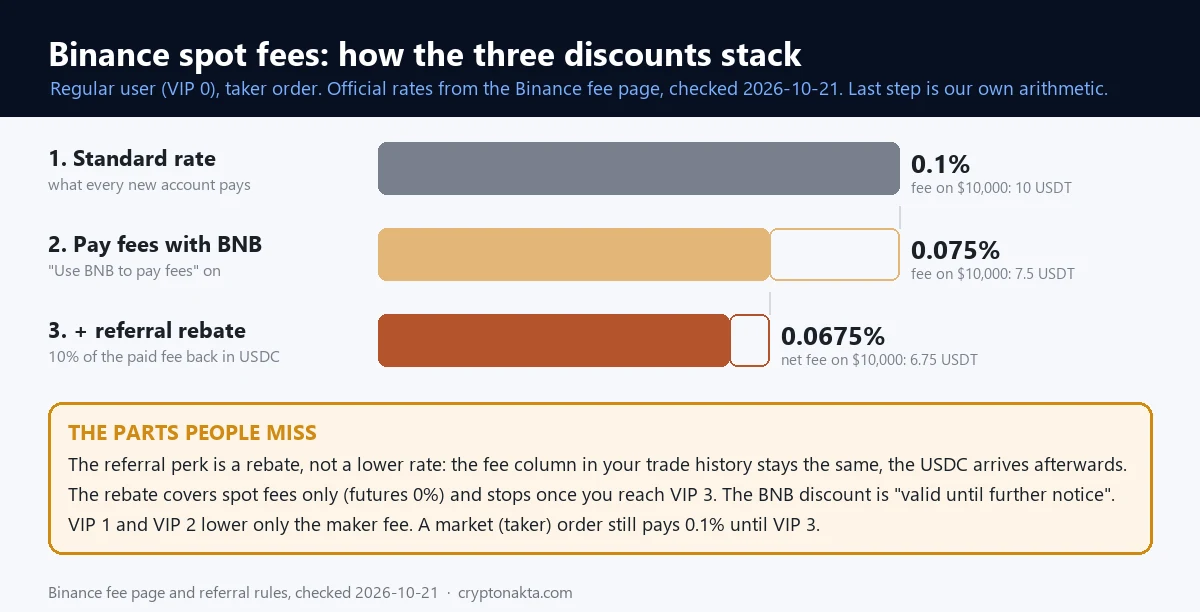
Binance fee discounts stack in a set order. BNB lowers the rate itself by 25% on spot. The referral rebate then returns 10% of the fee you actually paid, in USDC. VIP levels lower the rate further, yet VIP 1 and VIP 2 leave the spot taker fee where it was.
The BNB discount is the cut you get when Binance takes your fees in BNB. It is 25% on spot and margin and 10% on futures. The referral rebate is part of your fee sent back after the trade, because you signed up with a code. A VIP level is a fee tier based on your 30-day trading volume and, on spot, your BNB balance.
 View full size ↗
BNB and VIP stack by Binance’s own words. Its BNB FAQ says VIP users can get the discount “in addition to” their VIP discount. So a VIP rate paid in BNB is the VIP rate minus 25%.
BNB and the referral rebate are a different case. No single official sentence says you get both. Two rules point that way. The rebate is part of a commission that comes from the fee you actually paid. Binance’s voucher terms also count net fees after the VIP and BNB discounts. We read those together and did the arithmetic.
| Spot taker order, regular user | Rate you pay | Fee on $10,000 (USDT worth) | Where the number comes from |
|---|---|---|---|
| Standard rate | 0.1% | 10 | Binance fee page |
| Use BNB to pay fees on | 0.075% | 7.5 | BNB discount FAQ |
| Referral rebate only | 0.09% net | 9 | Our arithmetic |
| BNB + referral rebate | 0.0675% net | 6.75 | Our arithmetic (no single official sentence) |
| VIP 1, market order | 0.1% | 10 | Fee page: VIP 1 lowers only the maker fee |
So the standard 0.1% becomes 0.075% with BNB. Then 10% of that comes back, which leaves 0.0675% net. That last figure is our calculation, and the rebate reaches you as USDC a few hours later.
The VIP 1 row catches many people out. VIP 1 lowers only the spot maker fee, so a market order still pays 0.1%. Market orders get cheaper from VIP 3.
Binance referral discount: what the code really gives you, and how to add it after sign-up
The Binance referral discount is really a rebate. The referral code does not lower the rate on your order. It pays back part of the fee you already paid, later, in USDC. With our code that part equals 10% of your spot fees.
So your fee rate stays the same, and so does the fee in Trade History. People enter a code and then ask why nothing changed. Nothing changes on the order screen. The money arrives on its own as USDC in your Spot account.
Binance works the rebate out every hour and converts it to USDC. Its rule says the amount reaches your Spot account within 6 hours. In Binance’s own example, a trade between 14:00 and 15:00 is converted in the next hour and paid before 21:00. Whatever your time zone, that is up to about seven hours after the trade.
Our code’s rebate applies to spot trading fees only. Futures trades get nothing back from it. Expect the rebate to stop once your account reaches VIP 3. Binance’s FAQ says the referral commission ends at that level, and the rebate is a share of that commission. Pairs with zero maker and taker fees produce no commission, so nothing comes back on them either.
| With our Binance referral code | What happens | Detail |
|---|---|---|
| Spot trading fees | 10% comes back in USDC | Worked out hourly, paid to your Spot account within 6 hours |
| USDⓈ-M futures fees | 0% back | Our link shares nothing on futures |
| Rate on your screen | Unchanged | Est. Fee and Trade History show the full fee |
| Pairs with zero maker and taker fees | Nothing back | No fee is charged, so no commission exists |
| Your account reaches VIP 3 | Expect it to stop | The referral commission it comes from ends at VIP 3 |
| Use BNB to pay fees on | Still paid | Comes from the smaller BNB fee (our reading of the rules) |
You enter the code on the sign-up form, in the referral field. It works the same on the website and in the app. Paste it before you submit the form. Our Binance referral code guide walks through those screens one by one.
Forgot the code at sign-up? Binance lets you link one later on its official referral binding page. Every one of these six conditions has to hold.
- You registered within the last 30 days.
- The account has no deposit and no trade yet.
- The account has no referral link already.
- It is a main account, which Binance calls a parent account.
- Your identity details were not used on another account in the past 180 days.
- The account is not flagged for wash trading.
Binance says that once the link is made, it cannot be changed or removed. Check the six points before your first deposit.
Our Binance code is below. The copy button puts it on your clipboard for the sign-up form or the binding page.
CRYPTONAKTA
Binance
Affiliate disclosure: some links are partner links. We may earn a commission at no extra cost to you. This is not investment advice.
How to turn on Use BNB to pay fees, for spot and for futures
To pay Binance fees with BNB, turn on Use BNB to pay fees and keep BNB in the wallet that pays the fee. For spot, the switch is under Fee Level on the trading screen. For USDⓈ-M futures, the BNB has to sit in the futures wallet itself.
On the web there are two ways in. Click Fee Level on the spot trading screen and switch on the BNB toggle. Or open the Fees & Transactions Overview page and switch on BNB Discount. In the app, go to Account Center → Settings → BNB Discount → Use BNB to pay fees.
Binance’s FAQ also calls it Using BNB Deduction. It is the same setting.
Once it is on, Binance works out the fee in the asset you receive. Then it converts that amount to BNB and takes 25% less. The BNB has to be in your Spot account for spot trades. If your BNB balance is too small, you pay the original fee in the original asset.
Futures need one more step. You have to move BNB into the USDⓈ-M futures wallet. Binance says that otherwise “the system will automatically deduct USDT” and you get no discount. The futures discount is 10%, so the taker rate goes from 0.05% to 0.045%.
Binance says the BNB discount is valid until further notice. It also keeps the right to change the discount rate. So the 25% is a current policy with no end date given, and no promise that it lasts.
The BNB you hold for fees is a coin, and its price moves. Our guide to BNB covers the coin itself.
Binance futures fee calculator: spot and futures fees worked out
The Binance futures fee calculator below works out spot and futures fees from your own numbers. For spot, enter a monthly volume to see the fee and the USDC rebate. For futures, enter margin and leverage to see the position value, the round-trip fee and the break-even move.
The spot formula is trade value × fee rate. The futures formula is position value × fee rate, charged once when you open and again when you close. The position value, also called notional, is the full size of the trade. It equals your margin × leverage.
The table below does the same sums by hand, for screens where the calculator does not load. The volumes are example numbers, and every order is a market order.
| Spot market orders, example month | $10,000 traded | $100,000 traded |
|---|---|---|
| Fee at the standard rate | 10 USDT | 100 USDT |
| Fee with Use BNB to pay fees on | 7.5 USDT | 75 USDT |
| Net fee after the referral rebate (BNB on) | 6.75 USDT | 67.5 USDT |
| USDC back from the referral rebate, per month | 0.75 USDC | 7.5 USDC |
| USDC back from the referral rebate, per year | 9 USDC | 90 USDC |
The rebate rows use our arithmetic for BNB plus the referral rebate. Without BNB, $10,000 of monthly volume returns 1 USDC. With BNB on, the rebate comes from the smaller fee.
Futures, by hand, with example numbers. Put up $1,000 of margin at 10x and you open a $10,000 position. A market open costs $10,000 × 0.05%, which is $5. Closing with a market order costs the same again. The $10 round trip is 1% of your margin.
Now the same $1,000 at 100x. The position is $100,000, and the round trip costs $100. That is 10% of your margin, before the price has moved at all.
The break-even move is the price change you need just to pay the fees. For a taker round trip it is 0.1% of the price at any leverage. Leverage does not change that move. It changes how much of your margin the move represents.
Why do Binance futures fees eat more at high leverage?
Binance futures fees eat more at high leverage for one reason. Futures fees are charged on the position value, not on your margin. So a taker round trip costs 0.1% of your margin at 1x and 10% at 100x.
The official formula in the Binance futures FAQ is “Position Value × fee rate.” Margin and leverage do not appear in it. More leverage on the same margin means a bigger position and a bigger fee.
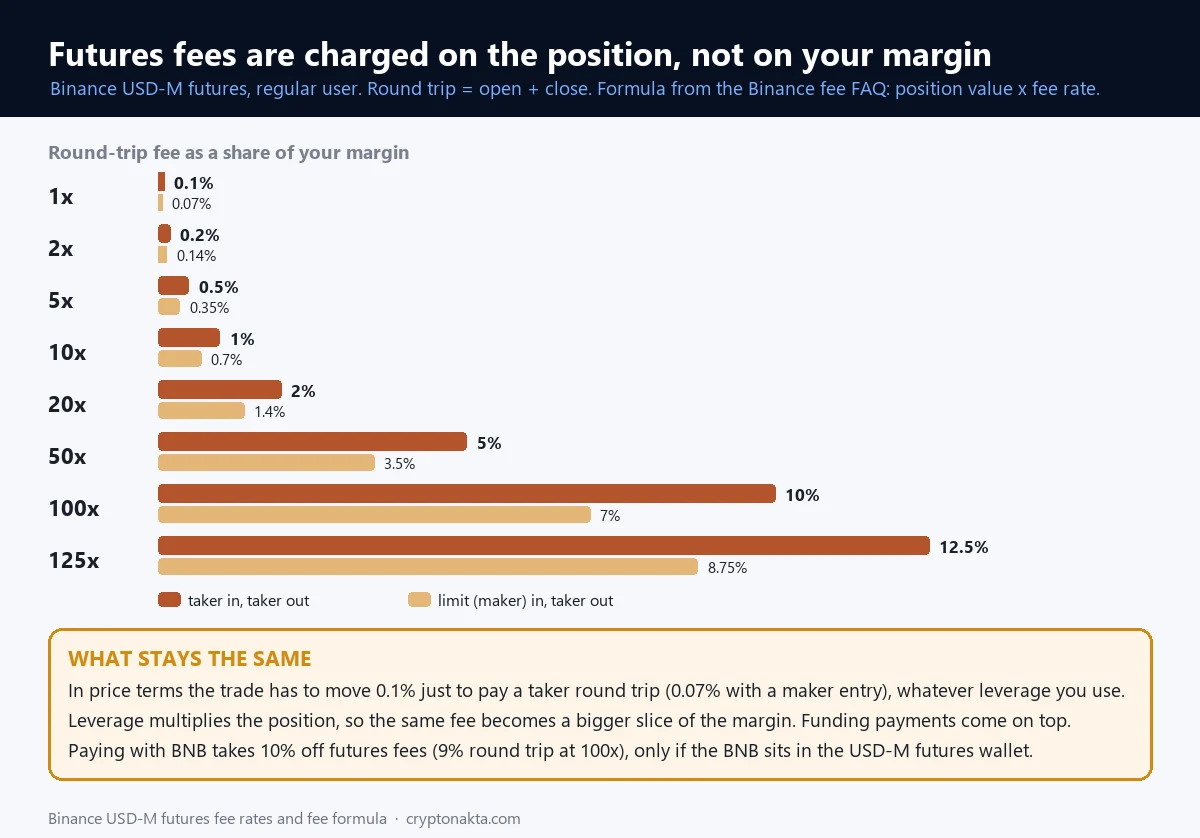 View full size ↗
Round-trip fee (open, then close) as a share of margin, USDⓈ-M, regular account, checked on October 21, 2026.
| Leverage | Taker in, taker out | Limit (maker) in, taker out | Taker both ways, BNB in futures wallet |
|---|---|---|---|
| 1x | 0.1% | 0.07% | 0.09% |
| 2x | 0.2% | 0.14% | 0.18% |
| 5x | 0.5% | 0.35% | 0.45% |
| 10x | 1% | 0.7% | 0.9% |
| 20x | 2% | 1.4% | 1.8% |
| 50x | 5% | 3.5% | 4.5% |
| 100x | 10% | 7% | 9% |
| 125x | 12.5% | 8.75% | 11.2% |
A limit entry helps. Opening as a maker at 0.02% and closing as a taker at 0.05% costs 0.7% of margin at 10x instead of 1%. At 100x that is 7%. BNB in the futures wallet takes 10% off, so a taker round trip at 100x drops to 9%.
The price-move view stays flat. A taker round trip needs a 0.1% move to break even. A maker entry with a taker exit needs 0.07%. Maker both ways needs 0.04%. Those numbers are the same at 2x and at 125x.
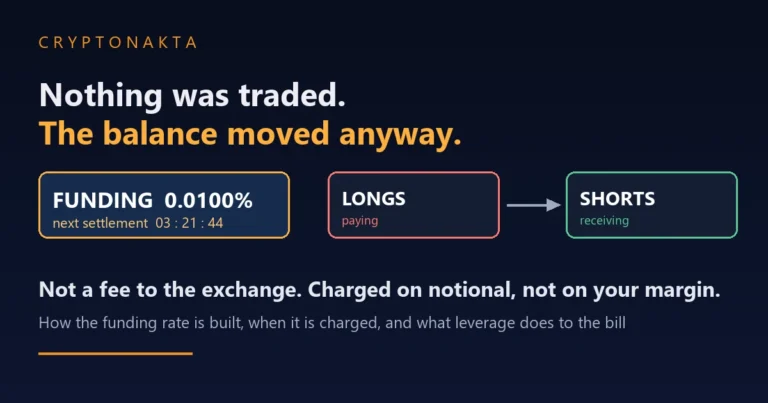
Trading fees are not the only futures cost. The funding fee is a payment between long and short traders at set intervals, and it comes on top. Our funding rate guide covers it. Forced closing is a separate topic, covered in why you got liquidated.
Our referral code shares 0% of futures fees, so futures get no rebate from it. USDC-margined contracts carried a promotional maker rate of 0% when we checked on October 21, 2026. Binance lists that promotion as running until further notice. Choosing a leverage level is a separate question, covered in what leverage to use.
Binance VIP levels: which fees go down at each tier
Binance VIP levels lower fees once your 30-day volume and BNB balance pass set thresholds. On spot, VIP 1 needs $1,000,000 in 30-day volume plus 5 BNB. It lowers only the maker fee, to 0.09%. The spot taker fee stays at 0.1% until VIP 3.
This is the public VIP table as we downloaded it on October 21, 2026. Binance changed its VIP thresholds in March 2026 and again in July 2026. Treat every number here as a value from that date.
| Level | Spot: 30-day volume and BNB held | Spot maker / taker | USDⓈ-M: 30-day volume | USDⓈ-M maker / taker |
|---|---|---|---|---|
| VIP 0 | $0 + 0 BNB | 0.1% / 0.1% | $0 | 0.02% / 0.05% |
| VIP 1 | $1,000,000 + 5 BNB | 0.09% / 0.1% | $5,000,000 | 0.018% / 0.05% |
| VIP 2 | $5,000,000 + 25 BNB | 0.08% / 0.1% | $10,000,000 | 0.016% / 0.04% |
| VIP 3 | $20,000,000 + 100 BNB | 0.04% / 0.06% | $50,000,000 | 0.012% / 0.032% |
| VIP 4 | $75,000,000 + 500 BNB | 0.04% / 0.052% | $600,000,000 | 0.01% / 0.03% |
| VIP 5 | $150,000,000 + 1,000 BNB | 0.025% / 0.031% | $1,000,000,000 | 0.008% / 0.027% |
| VIP 6 | $400,000,000 + 1,750 BNB | 0.02% / 0.029% | $2,500,000,000 | 0.006% / 0.025% |
| VIP 7 | $800,000,000 + 3,000 BNB | 0.019% / 0.028% | $5,000,000,000 | 0.004% / 0.022% |
| VIP 8 | $2,000,000,000 + 4,500 BNB | 0.016% / 0.025% | $12,500,000,000 | 0.002% / 0.02% |
| VIP 9 | $4,000,000,000 + 5,500 BNB | 0.011% / 0.023% | $25,000,000,000 | 0% / 0.017% |
On spot, both conditions have to be met. VIP 3 asks for $20,000,000 of 30-day volume and 100 BNB. That is the level where the taker fee first moves, down to 0.06%. On USDⓈ-M futures, VIP 1 starts at $5,000,000 of 30-day volume. Its taker fee stays at 0.05%, and VIP 2 brings it to 0.04%.
A VIP rate paid in BNB is that rate minus 25% on spot. The referral rebate, on the other hand, should end at VIP 3.
Some volume counts and some does not. Binance Convert volume is counted toward spot VIP volume, according to the fee page. Volume on pairs with zero maker and taker fees is left out.
Are Binance zero-fee pairs really free?
Binance zero-fee pairs are mostly zero for makers only. On October 21, 2026 the Spot Promotions list showed 208 pairs. Only 37 of them were zero for both maker and taker. The other 171 kept the normal taker fee, so a market order on them still paid.
Zero-fee pairs are spot pairs that Binance runs at 0% as a promotion. The list sits under the Spot Promotions tab on the fee page, split into Zero Fee and Zero Maker. It changes often, and the page shows no dates.
BTC/FDUSD is a good example. Since January 29, 2026 it has charged 0% to makers and the standard fee to takers. A limit order that rests in the book pays nothing. A market buy pays the normal taker rate. The pairs that were zero on both sides were mostly stablecoin-to-stablecoin pairs such as FDUSD/USDT, or pairs in the U and USD1 markets.
The fee page adds three rules for pairs that are zero on both sides. Their volume does not count toward VIP. The BNB discount does not apply. The referral rebate does not apply either. For maker-only pairs, the page says they are still included “where applicable.” We read that as their taker fees still earning the rebate.
How to check your Binance fee rate, the fees you paid and your USDC rebate
To check Binance fees, look in three places. Your current rate is under Fee Level on the spot trading screen. The fee charged on each trade is in Trade History. The referral rebate shows up as USDC credits in your Spot account, a few hours after the trade.
| What you want to see | Where on the web | Where in the app |
|---|---|---|
| Your current maker and taker rate | Fee Level on the spot trading screen, or the Fees & Transactions Overview page | Trade → Spot → […] → Fee |
| Whether BNB pays your fees | Fee Level toggle, or BNB Discount on Fees & Transactions Overview | Account Center → Settings → BNB Discount → Use BNB to pay fees |
| The fee charged on each trade, and in which coin | Trade History | Trade History |
| Whether the referral rebate arrived | USDC credits in your Spot account, and Share Commissions on the Referral Pro page | USDC credits in your Spot account |
| Rebate voucher payouts | Rewards Hub → My Vouchers, and Transaction History → Distribution in your wallet | Rewards Hub → My Vouchers |
| Rates by API (key needed) | GET /api/v3/account/commission · commission and commissionAsset in GET /api/v3/myTrades |
Trade History shows the fee for each fill and the coin it was taken in. With BNB on, that coin is BNB. With BNB off, it is the asset you received. We could not confirm the exact column name from Binance’s own text, so look for the fee amount next to each fill.
Here is how to check that your referral code was applied. Do not look at the fee column, because the rebate never changes it. Make a spot trade, then look for a small USDC credit in your Spot account within the next few hours. The Share Commissions section of the Referral Pro page also lists it.
With an API key, GET /api/v3/account/commission returns your standard rate and a discount block. A discount of 0.75 with BNB as the asset means you pay 75% of the standard fee.
How much is the Binance withdrawal fee for USDT, and which network should you pick?
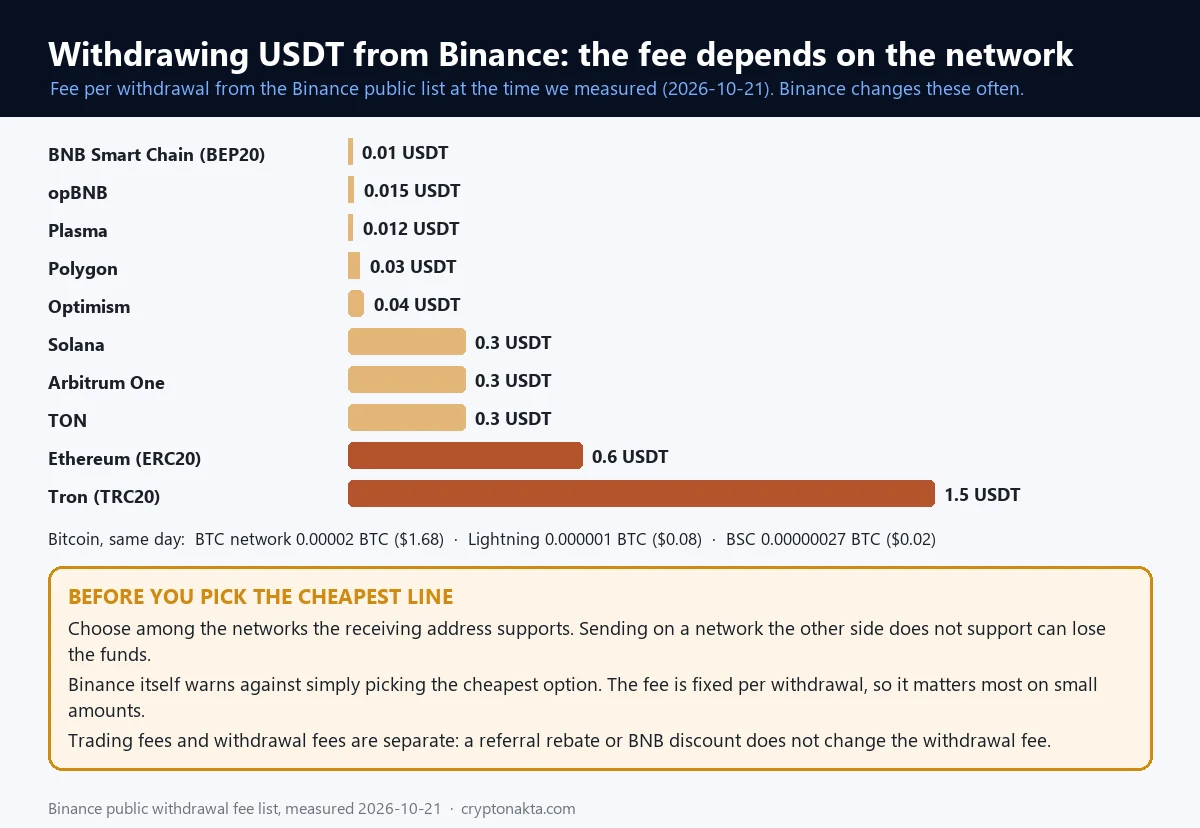
The Binance withdrawal fee is a flat amount per withdrawal, and it depends on the network. On October 21, 2026, USDT cost 0.01 USDT on BNB Smart Chain and 1.5 USDT on Tron. That is a 150x gap for the same coin. Bitcoin on its own network cost 0.00002 BTC, about $1.68.
A withdrawal fee is what Binance charges to send coins out to another address. Binance sets it per network to cover the cost of sending. The fee is the same for $50 and for $50,000, so it weighs most on small amounts.
 View full size ↗
This is the public list at the time we measured, on October 21, 2026. Binance changes these fees often.
| Coin and network | Binance withdrawal fee | About in dollars |
|---|---|---|
| USDT on BNB Smart Chain (BEP20) | 0.01 USDT | $0.01 |
| USDT on opBNB | 0.015 USDT | $0.01 |
| USDT on Plasma | 0.012 USDT | $0.01 |
| USDT on Polygon | 0.03 USDT | $0.03 |
| USDT on Optimism | 0.04 USDT | $0.04 |
| USDT on Solana | 0.3 USDT | $0.3 |
| USDT on Arbitrum One | 0.3 USDT | $0.3 |
| USDT on TON | 0.3 USDT | $0.3 |
| USDT on Ethereum (ERC20) | 0.6 USDT | $0.6 |
| USDT on Tron (TRC20) | 1.5 USDT | $1.5 |
| BTC on the Bitcoin network | 0.00002 BTC | $1.68 |
| BTC on Lightning | 0.000001 BTC | $0.08 |
| BTC on BNB Smart Chain | 0.00000027 BTC | $0.02 |
Pick the network before you pick the fee. Start from the networks the receiving address supports, then compare fees within that list. Binance itself warns users against simply choosing the cheapest option. Sending on a network the other side does not support can lose the funds. Our guide on sending crypto on the wrong network covers what can and cannot be undone.
Trading fees and withdrawal fees are separate. Neither the BNB discount nor the referral rebate lowers a withdrawal fee. For USDT, our ERC20 vs TRC20 guide compares the two most common networks. For moving coins between exchanges, see crypto transfer fees between exchanges.
Does Binance Convert charge a fee? P2P, card purchases and rebate vouchers
Binance Convert charges no separate trading fee. The cost sits inside the quoted price, which Binance sets for its own account. That quote can differ from the spot price. The amount in the preview is what you receive. P2P works differently, because maker and taker fees can apply and vary by market.
Binance’s Convert FAQ says there are “no additional fees beyond the quoted price.” Your cost is any gap between the quote and the spot price at that moment, which you can see by comparing the two.
P2P is a market between users. Binance’s P2P fee page says maker and taker fees vary per market, so check the page for your currency.
Card purchases carry their own fee, set by payment method and region. The Buy/Sell tab of the fee page shows yours.
A rebate voucher is a reward from Binance that pays back part of your trading fees the next day. To use one, go to Profile → Rewards Hub → My Vouchers and press Use. The payout lands in your Spot wallet as USDT, USDC or BNB.
The voucher pays a set percentage of your daily net fee, up to its face value. The net fee here leaves out the referral commission. Futures delivery and liquidation fees do not count. Nor do Alpha trades or some bots. Once a voucher expires, Binance says the remaining balance cannot be restored.
My take on cutting Binance fees
After measuring, my view is simple. On big coins, almost the whole cost of a Binance trade is the fee itself. So cutting the rate is the same as cutting the cost. The order book adds close to nothing on BTC and ETH.
Two results surprised me. On a small BTC buy, Upbit cost less than Binance at the standard rate. If you hold Korean won and plan to sell back to won, fees may not be a reason to move to Binance at all. On futures, leverage moved the cost far more than any discount did.
If I were opening Binance today, I would go in this order. Check the rate on Fee Level. Add a referral code if you have not signed up yet. Turn on Use BNB to pay fees. Use limit orders where waiting is fine, since makers pay less on futures and at VIP levels. Then run your own numbers through the calculator.
A few things make me suspicious. Ads that promise a “lifetime” discount ignore the VIP 3 cut-off. Claims of “zero fees” usually mean a maker-only promotion. Posts that sell a referral code as a lower rate describe something Binance does not do.
Third-party fee refund sites are a different setup. Our code’s rebate is paid by Binance itself, every hour. A third-party site collects the commission and then pays you under its own terms.
Here is how our own link works. This site uses affiliate (referral) links. If you sign up with our code, Binance pays us a commission out of your trading fees. We gave up part of that commission so that 10% of the spot fees you pay comes back to you in USDC. None of the numbers in this guide depend on it.
There is a fair case against bothering. At low volume, all three discounts together save a few dollars a month. A $10,000 month at market orders with BNB on returns 0.75 USDC from the rebate. If you need deposits and withdrawals in your own currency, a local exchange may cost less in total. And trading more just to reach a VIP level can lose more than the fees it saves.
Binance fee questions people ask
- Binance: Spot trading fee rates and VIP levels · checked 2026-10-21
- Binance: USDⓈ-M futures fee rates · checked 2026-10-21
- Binance: Futures trading fees and how they are calculated · checked 2026-10-21
- Binance: How to calculate spot trading fees · checked 2026-10-21
- Binance: Using BNB to pay fees and get a discount · checked 2026-10-21
- Binance: Referral Pro FAQ, including binding after sign-up · checked 2026-10-21
- Binance: Referral program update on USDC payouts · checked 2026-10-21
- Binance: How to redeem a trading fee rebate voucher · checked 2026-10-21
- Binance: Spot promotions and zero-fee pairs · checked 2026-10-21
- Binance: Deposit and withdrawal fees · checked 2026-10-21
- Binance: P2P fee rates · checked 2026-10-21
- Binance API: Account endpoints · checked 2026-10-21
- Bybit: Trading fee structure · checked 2026-10-21
- Bybit: Paying trading fees with MNT · checked 2026-10-21
- OKX: Fee rates · checked 2026-10-21
- Upbit: Fees · checked 2026-10-21
This guide explains how Binance fees work and what our own measurements showed. It is not investment advice. Rates, lists and screens change, so go by what your own Fee Level screen shows.