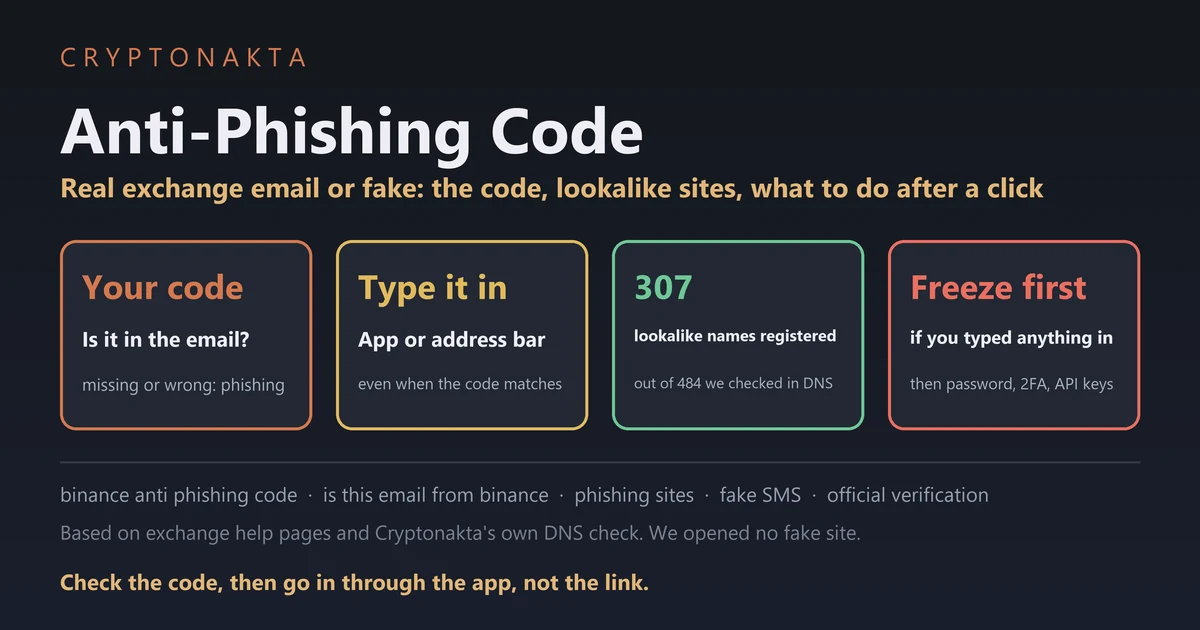
Anti-Phishing Code | Examples, Binance Setup, Is This Email Really From Binance, What to Do If You Clicked
If a Binance email shows your anti-phishing code exactly as you set it, it came from someone who knows your code. A fake website, a Telegram “agent” or a caller on the phone can’t be checked with that code at all. That gap is why a short checking order helps.
We compared the official help pages of seven exchanges. We also measured, in public DNS, how exchange mail is protected and how many lookalike addresses exist. Where a page would not open for us, we say so.
In this guide (12)
Is this email really from Binance? Three checksWhat is an anti-phishing code, and what does it prove?Anti-phishing code examples: good codes and bad codesHow to set an anti-phishing code on Binance and other exchangesWhere does the anti-phishing code show up on each exchange?Can a fake text land in the real Binance SMS thread?How to verify a Binance email, link or accountFake Binance support on Telegram: what real support never asks forHow to spot a fake Binance site: read the real domainClicked a phishing link? What to do depends on what you typedWhat we measured ourselves in public DNSMy take on anti-phishing codes
Is this email really from Binance? Three checks
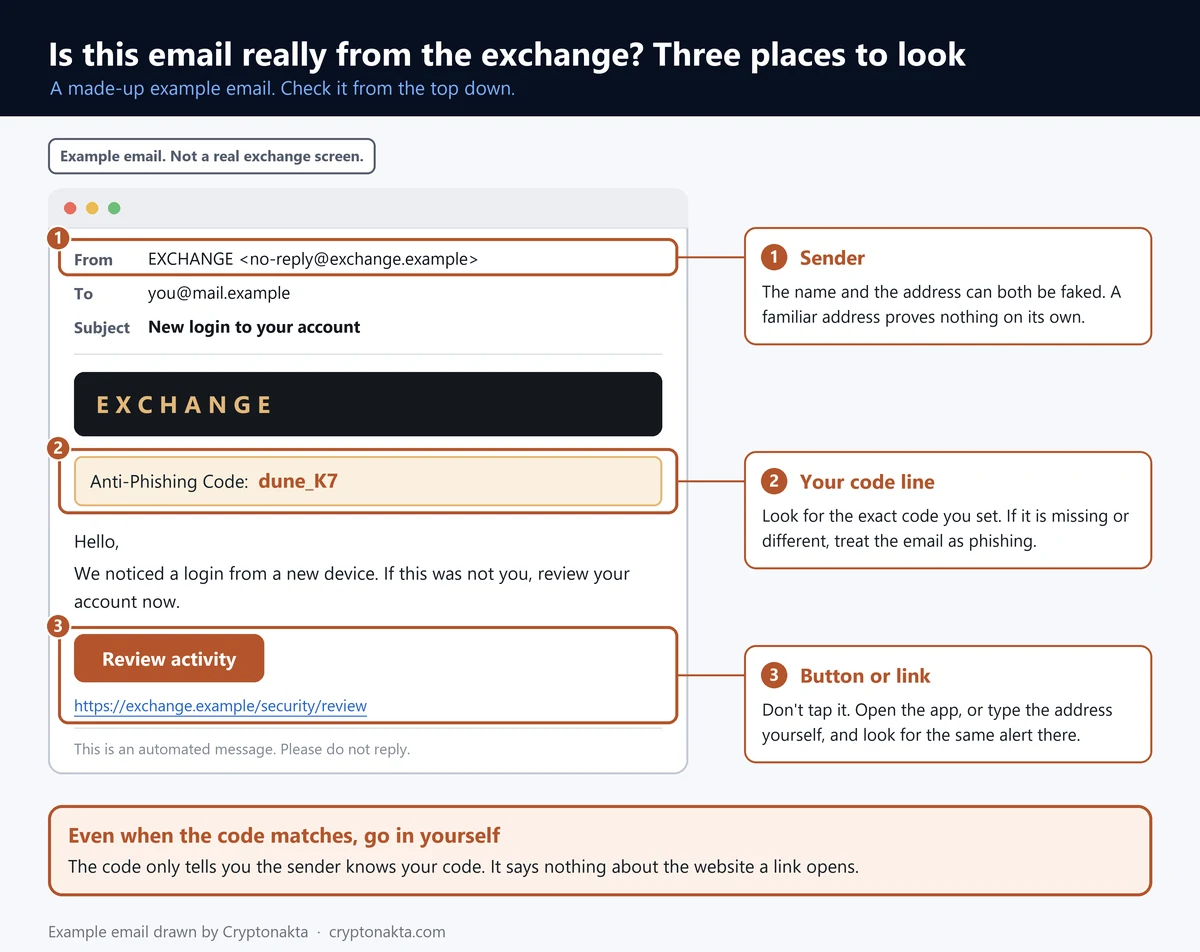
If the email shows your Binance anti-phishing code, spelled exactly the way you set it, it came from someone who knows that code. Normally that means Binance. If the code is missing or different, treat the email as phishing and don’t tap anything in it.
Your anti-phishing code is a short word you pick in your Binance security settings, and Binance prints it in the emails it sends you. It’s the first of three checks.
- Find the code. Compare it letter by letter with the one you set.
- Go in yourself. Skip the email’s button, even when the code matches. Open the Binance app or type binance.com, and look for the same alert there.
- Check the sender. Paste the sender address or a link into Binance Verify. It is Binance’s official verification tool, a page that confirms which addresses, numbers and accounts are really Binance’s.
 View full size ↗
Step two matters because codes can leak. Binance’s own blog warns that an attacker might already have yours.
Don’t judge by the sender address either. A spoofed sender is a fake “From” line that shows an address you’d trust. The sender address can be forged, and Binance’s FAQ says so plainly: “All emails can be spoofed.” Published sender lists don’t settle it either. Binance calls its own list “for reference only.”
To report a phishing email to Binance, send its support a screenshot and the original message saved as an EML file. That’s the raw email file, which most mail apps let you download. Bybit’s help asks for a .eml file too, going by search summaries of its pages. Bitget has a Report button in its verification tool. We only point to the reporting routes the exchanges publish themselves.
What is an anti-phishing code, and what does it prove?
An anti-phishing code is a word or number you set inside your exchange account. The exchange adds it to the messages it sends you. It proves one thing, that the sender knows your code. It can’t tell you whether a website, a chat or a phone call is real.
A scammer can copy a Binance email down to the logo. What they can’t copy is a word only you and the exchange know. OKX is blunt about it. No code in the email means “it’s a forged or fraudulent email.”
The code proves nothing on a website you opened from a link. Fake login pages don’t know your code, and most real ones don’t show it either. Bitget is the clear exception. Its help pages say the code also shows on its web and app login, while Gate’s pages contradict each other on this.
Telegram, WhatsApp, X direct messages and phone calls never carry your code, so check those with the exchange’s verification tool.
Keep the code private too. Anyone who knows your code can paste it into a fake email, and Binance says not to share it even with its own staff. All of this means turning the code on does not make phishing go away. It gives you one quick check for email.
Anti-phishing code examples: good codes and bad codes
A good anti-phishing code is something only you would recognize and nobody could guess, such as two unrelated words with a digit. A bad code is anything already tied to you, such as your password, your name, your birthday or the exchange’s name.
Don’t copy the examples below. A code printed on a public page isn’t private anymore.
| Code idea | Good or bad | Why |
|---|---|---|
Moth_42 | Good | Two things that don’t belong together. Fits Binance’s rules. |
kiwiR9 | Good | Short, odd, and means nothing to anyone else. |
| Your password, or part of it | Bad | If one leaks, the other goes with it. |
| Your name, birthday or phone digits | Bad | Easy to guess from your social media. |
| The exchange name | Bad | The first thing anyone would try. |
| One code for every exchange | Bad | One leak exposes all your accounts. |
You don’t need an “anti phishing code generator,” and using one works against you. The code doesn’t have to be strong. It has to be something nobody else knows, and a generator site has seen every code it makes.
KuCoin wants an 8-digit number and Bitget takes 8 to 32 digits. Pick digits with no meaning, never your PIN or birthday.
Some people get a message saying “your anti phishing code has not been activated.” We did not find that wording in any official help page we read. Ignore its button, open the app’s security page and check the status there.
How to set an anti-phishing code on Binance and other exchanges
To set an anti-phishing code on Binance, go to Profile › Account › Security › Advanced Security › Anti-Phishing Code and press Enable. You confirm with your 2FA or a passkey. From then on, your code appears in Binance emails.
- In the app, the path is Account Info › Security › Anti-Phishing Code.
- Press Enable, then Create Anti-Phishing Code.
- Type 6 to 8 characters. Use at least three of upper case, lower case, digits and underscore, and no special characters.
- Confirm with your 2FA code (the second login step, usually from an authenticator app) or with a passkey.
Other exchanges put the setting elsewhere, with different rules.
| Exchange | Where to set it (English screen names) | Code rules |
|---|---|---|
| Binance | Profile › Account › Security › Advanced Security › Anti-Phishing Code › Enable | 6–8 characters; at least 3 of: upper case, lower case, digits, underscore; no special characters |
| OKX | Menu › Security › Anti-phishing code | Not found in official sources |
| Bybit | Security › Advanced Protection › Anti-phishing Code › Settings* | Not found in official sources |
| Bitget | Profile › Security › Advanced Security › Anti-Phishing Code › Configure | 8–32 digits; only a number code shows up in SMS |
| KuCoin | Profile › Account Security › Security Code (Anti-Phishing Code) | 8-digit number (an older letter code still works in email, not in SMS) |
| Gate | Profile › Security verification › Password Management › Anti-Phishing Code | 4–20 letters and digits, no special characters; asks for your fund password |
| MEXC | Profile › Security › Advanced Security settings › Anti-Phishing Code › Set Up | 1–6 letters or digits; don’t reuse a password |
Menu names are the English web screens quoted from each exchange’s help page. The app and other languages may label them differently.
* Starred cells come from search summaries of official pages. Those pages would not open for us, mostly Bybit’s help center.
Gate asks for your fund password first. That’s a separate password Gate uses for withdrawals and security changes.
Lost your authenticator app? Our guide to a lost 2FA covers the reset.
Where does the anti-phishing code show up on each exchange?
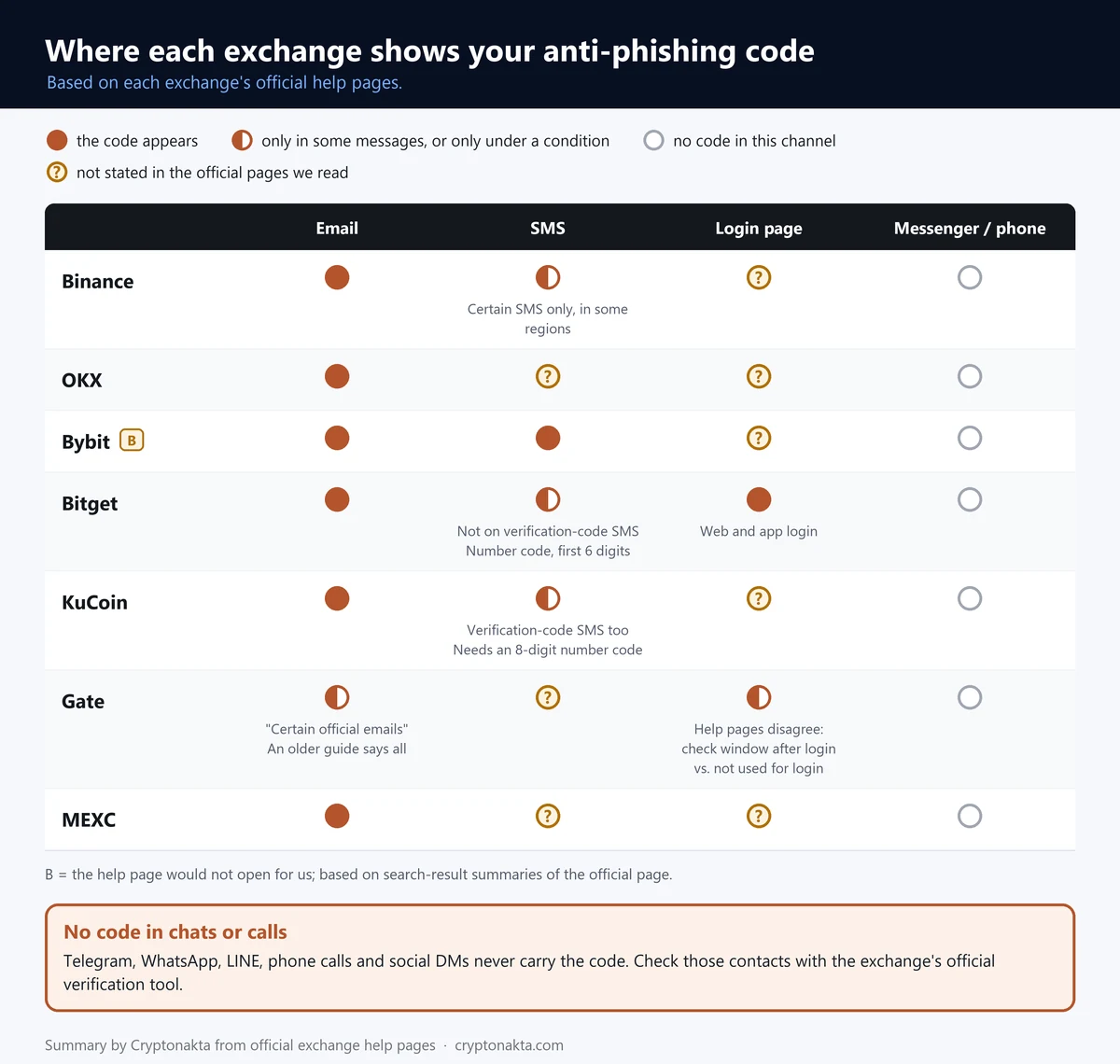
All seven exchanges in our table put your anti-phishing code in emails, though Gate says only certain official ones. Texts vary by exchange. Login pages rarely show the code, and chats and calls never do.
We opened each exchange’s official help pages on November 5, 2026 and compared them line by line. Bybit’s pages would not load for us, so its row rests on search summaries of its help center.
| Exchange | SMS | Login screen | Messenger · phone · DM | Evidence | |
|---|---|---|---|---|---|
| Binance | ● | ◐ some SMS, in some regions; ends with “Anti-Phishing: XXXX” | ? | ○ | A |
| OKX | ● | ? | ? | ○ | A/C |
| Bybit | ●* | ●* | ? | ○ | B* |
| Bitget | ● | ◐ number-only codes; first 6 digits shown; not on verification-code SMS | ● login page and app login | ○ | A/B |
| KuCoin | ● | ◐ 8-digit number codes only; also on verification-code SMS | ? | ○ | A/B |
| Gate | ◐ “certain official emails” (an older guide says all) | ? | ◐ one help page shows a check window after login; another says the code is not used for login | ○ | A/C |
| MEXC | ● | ? | ? | ○ | A/B |
●: the code appears. ◐: only in some messages, or only under a condition. ○: no code in this channel. ?: not stated in the official pages we read.
Exchanges name only email, SMS and login screens. They change this, so compare with the messages you get.
Evidence: A = we read the official page. B = we only saw a search summary of it. C = no official source found. A/B and A/C mix both in one row.
* Starred cells come from search summaries of official pages. Those pages would not open for us, mostly Bybit’s help center.
 View full size ↗
Texts are where people get caught out. KuCoin adds your code even to texts that carry a verification code. Bitget leaves it off those, and in other texts it shows only the first 6 digits of a number code.
Binance’s own pages disagree. Its Academy says all genuine emails and SMS carry the code. Its SMS help says only certain texts, in some regions. So go by your own phone. If your Binance texts used to show the code, one without it deserves a closer look.
Each exchange below offers a code and an official checking tool. Neither one makes an account phishing-proof.
OKX
Bybit
KuCoin
Gate.io
Bitget
Affiliate disclosure: some links are partner links. We may earn a commission at no extra cost to you. This is not investment advice.
Can a fake text land in the real Binance SMS thread?
Yes, a fake text can land in the same thread as your real Binance codes. Binance’s blog says scammers “exploit how SMS messages are displayed” to slip into existing threads. So the thread a text sits in proves nothing about who sent it.
Phishing by text is called smishing. The texts claim a withdrawal request, a new login or a frozen account, then hand you a link or a number to call.
A request to call is the clearest warning sign. Binance’s SMS help says that if such a message can’t be confirmed in the app, “it’s a scam.” Once you’re on the phone, a scammer can talk you into moving coins. Don’t call. Open the app instead.
Codes reach texts only at some exchanges and for some messages, so a text without your code isn’t automatically fake. A text with your code still doesn’t make its link worth tapping.
If one of these texts is on your phone now, take a breath. Receiving a fake email or text, on its own, does not mean anyone is in your account. The risk starts when you tap the link and type something in.
Right after a big incident or promotion at an exchange, “compensation” and “refund” texts tend to follow. A compensation notice that asks you to log in through a link is the scam.
How to verify a Binance email, link or account
Binance Verify is Binance’s official checking page. Paste in a link, email address, phone number, Telegram handle or social account. It tells you whether that contact is on Binance’s official list. The other six exchanges in our table have one too.
| Exchange | Official verification tool | What you can check |
|---|---|---|
| Binance | Binance Verify | URL · email address · phone number · Telegram · social media account |
| OKX | OKX Channel verification | Telegram · phone call · email (domain part only) · website · X · Line · WeChat and more (19 kinds) |
| Bybit | Bybit Authenticity Check (no separate page address found; in the site menu or footer and in the app’s live chat)* | email · phone number · URL · social media account* |
| Bitget | Bitget Official Verification | email address · link · username |
| KuCoin | KuCoin Official Verification Center | wallet address · email · Telegram ID · X account · website |
| Gate | Gate Official Verification Center | domain · email · phone number (a help page adds Telegram) |
| MEXC | MEXC Verify | URL · email · phone number · social media account (matched by username) |
An “official” result means the address, number or account is on the exchange’s own list. It does not prove that one email really came from the exchange’s mail servers. Bybit’s help says so outright.
* Starred cells come from search summaries of official pages. Those pages would not open for us, mostly Bybit’s help center.
Binance’s older guide to phishing emails says a “Source Not Verified” result means the source is likely malicious. Even with a verified result, it asks you to “continue to take extra precaution,” because a listed address can still be forged on a fake email.
OKX marks real agents in its in-app chat with a green “Official” badge. Bybit’s Authenticity Check sits in the site menu, the footer and the app’s live chat, going by search summaries.
On Binance you can set the code in your account and paste anything suspicious into Binance Verify yourself. Doing both still won’t make phishing go away.
Binance
Affiliate disclosure: some links are partner links. We may earn a commission at no extra cost to you. This is not investment advice.
Fake Binance support on Telegram: what real support never asks for
Treat any “support agent” who contacts you first on Telegram, WhatsApp, X or by phone as fake until the exchange’s verification tool says otherwise. Your anti-phishing code never shows up in those channels, so it can’t help here.
The exchanges spell out what they never ask for. Binance says its support never asks you to reveal sensitive information or send money to any address. OKX won’t ask for your SMS, email or authenticator codes. KuCoin and Gate say staff never ask for your password or 2FA codes.
A real agent also never needs your anti-phishing code. Someone who asks for it wants to print it in their next fake email.
The costly version starts with a warning that your account is at risk. Then someone asks you to move your coins to a new wallet they help you set up. That breaks every rule above, and Gate says outright that it never collects assets from users. Our guide to common crypto scams shows how these setups usually run.
How to spot a fake Binance site: read the real domain
To spot a fake Binance site, read the domain at the end of the web address, just before the first single slash. A real Binance page ends in binance.com with nothing glued to the name.
Paste a link into the checker above. It shows the domain that really owns the link and compares it with seven exchanges’ official domains.
It flags digits posing as letters, a brand name with extra words attached, a brand name parked in front of someone else’s domain, and an @ sign hiding the real address. It also flags punycode, the “xn--” form of names written with letters from other alphabets. Nothing you paste leaves your browser.
The checker can’t tell who owns a domain that isn’t on the list, so it never calls one fake. Check those in the exchange’s verification tool.
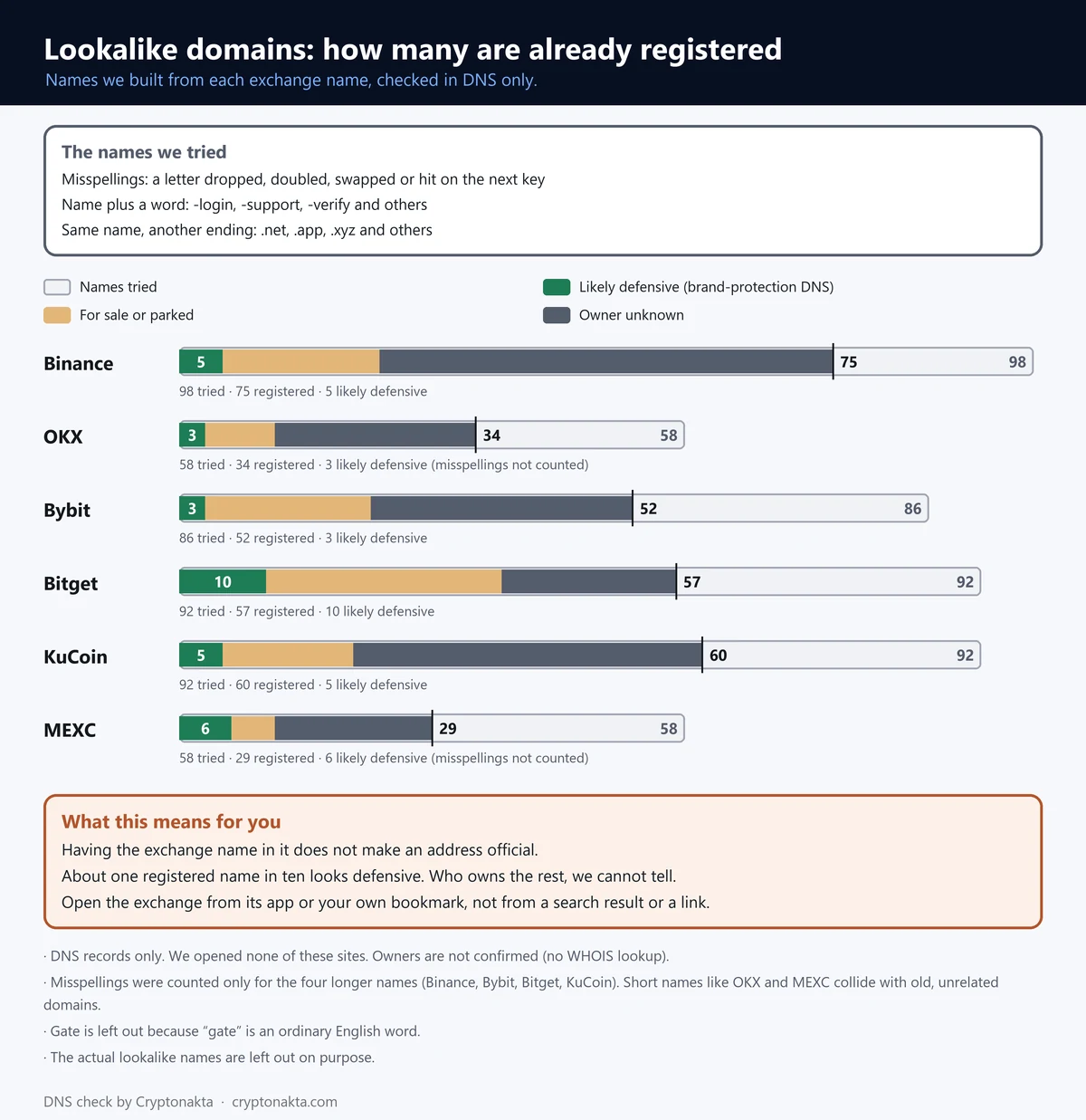
A lookalike domain is an address made to pass for the real one at a glance, such as a misspelling or the brand name plus a word. We built such names from six exchange names and checked which exist in public DNS.
Of the 484 addresses we counted, 307 were registered. For Binance, 37 of 40 one-letter misspellings were already taken. Registered does not mean phishing, and some of these are defensive buys by the exchanges themselves.
| Exchange name | Spelling variants (registered of tried) | Name + extra word | Same name, other ending | Likely defensive | Owner unknown |
|---|---|---|---|---|---|
| Binance | 37 of 40 | 23 of 40 | 15 of 18 | 5 | 52 |
| OKX | not counted (short name) | 22 of 40 | 12 of 18 | 3 | 23 |
| Bybit | 22 of 28 | 15 of 40 | 15 of 18 | 3 | 30 |
| Bitget | 32 of 34 | 11 of 40 | 14 of 18 | 10 | 20 |
| KuCoin | 33 of 34 | 10 of 40 | 17 of 18 | 5 | 40 |
| MEXC | not counted (short name) | 14 of 40 | 15 of 18 | 6 | 18 |
We built lookalike addresses from each exchange name. We only checked whether they exist in public DNS and did not visit any of them.
“Registered” is not proof of a phishing site, and we did not confirm owners. “Likely defensive” means brand-protection or large DNS name servers.
Spelling variants count only for the longer names. Variants of OKX and MEXC collide with unrelated older domains. Gate is left out because “gate” is an ordinary English word.
 View full size ↗
Judging by name servers, roughly one registered name in ten looked like a defensive buy. Having the exchange’s name in an address doesn’t make it official.
So don’t open an exchange from search results. The ads at the top can be bought by anyone, and copied help pages turn up there too. Use the app, or a bookmark you saved from an address you typed yourself.
The padlock by the address only means the connection is encrypted, and fake sites get one too. Whether an exchange itself is real is a separate question, covered in our guide to checking if an exchange is legit.
Clicked a phishing link? What to do depends on what you typed
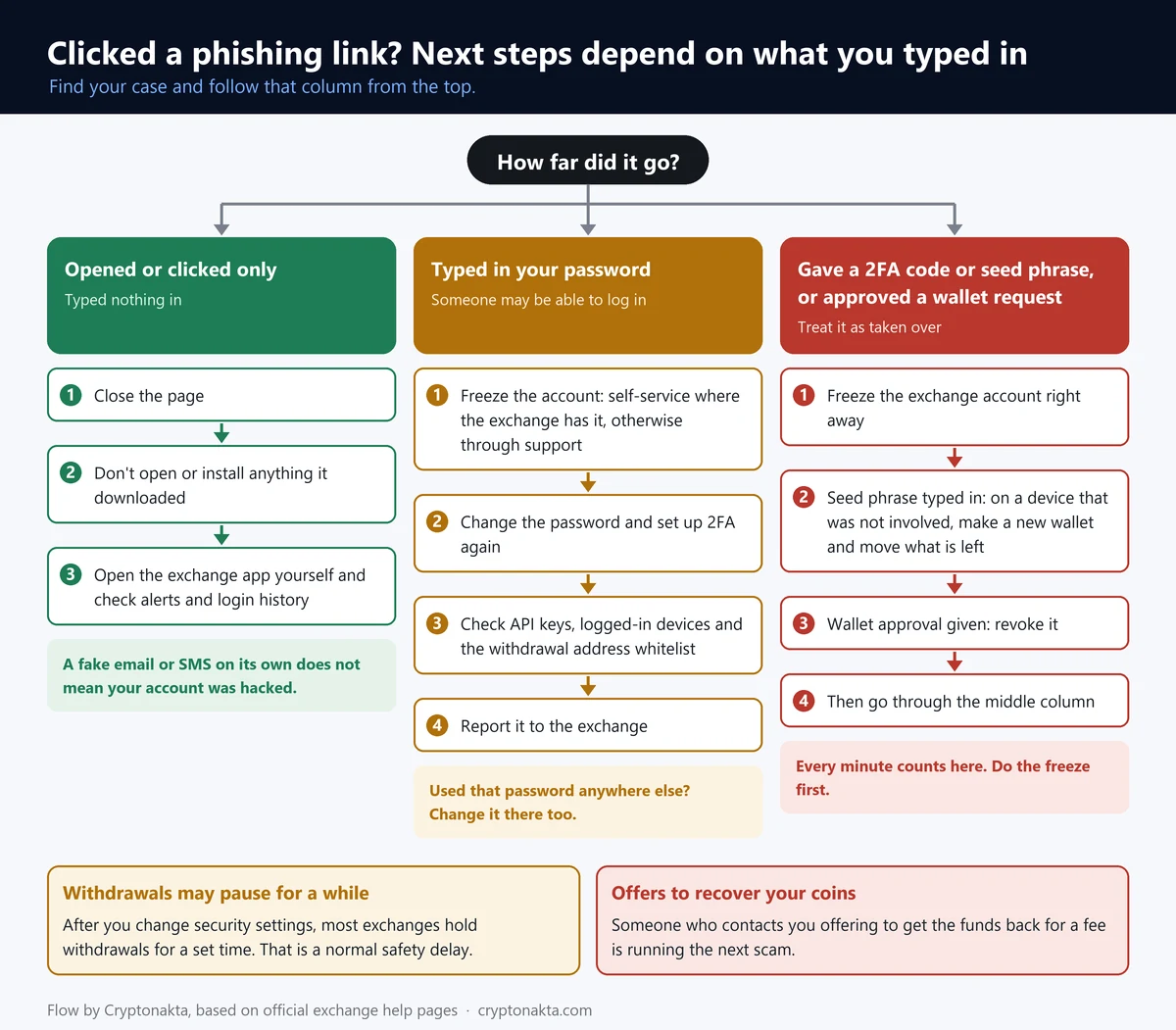
If you clicked a phishing link but typed nothing, close the page and check your account in the real app. If you entered your password, freeze the account from the real app first, then change the password and 2FA. If you entered a 2FA code or a seed phrase, do the same, faster.
 View full size ↗
You clicked and typed nothing. Also don’t open anything the page downloaded.
You typed your password. Assume someone else can log in. Start with a self-freeze, which locks your own account from the official app so nobody can trade or withdraw.
- Freeze the account in the real app, or through support.
- Change your password and set up 2FA again.
- Delete API keys you didn’t create, log out unknown devices and check your withdrawal address whitelist.
- Report it to the exchange’s support with screenshots.
- Change that password anywhere else you used it.
| Exchange | Freeze the account yourself | Withdrawal hold after a security change |
|---|---|---|
| Binance | Account › Account Management › Disable Account | After a 2FA reset: withdrawals, P2P selling and internal transfers off for up to 48 hours |
| OKX | User Center › Account settings › Security › Account management › Freeze account | 24 hours after changing the login password or any authentication method |
| Bybit | Account Info › Account Activities › Deactivate an Account* | 24 hours after changing your email (other changes: search summaries only)* |
| Bitget | No self-freeze menu in the help pages; ask support by ticket or live chat | 24 hours after changing or resetting the password or Google Authenticator* |
| KuCoin | Avatar › Account Security › Freeze Account | 24 hours after deleting a passkey, changing 2FA, phone or email, or unfreezing |
| Gate | Not found in official sources | 24 hours after setting up, changing or resetting any security setting |
| MEXC | Self-Services › Freeze Account* | 24 hours after changing the password or Google Authenticator* |
Hours are as each exchange’s help page states them. The hold after a security change is a brake on purpose. If someone else made the change, it buys you time.
* Starred cells come from search summaries of official pages. Those pages would not open for us, mostly Bybit’s help center.
After a security change, withdrawals pause for a while. That withdrawal hold is deliberate. On Binance it lasts up to 48 hours after a 2FA reset, and several others use 24 hours.
Anyone offering to lift the hold early, or to recover lost coins for a fee, is running the next scam. Our guide on getting scammed crypto back explains how those offers work.
You typed a 2FA code or your seed phrase. Freeze the exchange account right away, then work through the same list. A seed phrase controls a wallet, so treat that wallet as exposed and follow our guide to an exposed seed phrase. If the page had you approve a wallet request, revoke that approval too.
If you already see logins or withdrawals you didn’t make, our guide for a taken-over exchange account goes step by step.
What we measured ourselves in public DNS
We read the public DNS records ourselves on November 5, 2026, 14:10 UTC, through Google Public DNS. We read only mail and website records, opened no lookalike site and looked up no owners.
SPF is a public list of the servers allowed to send mail for a domain. DMARC tells receiving mailboxes what to do with mail that fails the check. All 8 main exchange domains we checked publish both. Of those, 4 ask mailboxes to refuse failing mail and 4 ask for the spam folder.
| Main domain | DMARC policy | What it asks receiving mailboxes | SPF ending |
|---|---|---|---|
| binance.com | p=quarantine | Send mail that fails the check to spam | -all: only listed servers may send |
| bitget.com | p=reject | Refuse mail that fails the check | -all: only listed servers may send |
| bybit.com | p=reject | Refuse mail that fails the check | -all: only listed servers may send |
| gate.com | p=reject | Refuse mail that fails the check | -all: only listed servers may send |
| gate.io | p=quarantine | Send mail that fails the check to spam | -all: only listed servers may send |
| kucoin.com | p=quarantine | Send mail that fails the check to spam | -all: only listed servers may send |
| mexc.com | p=reject | Refuse mail that fails the check | -all: only listed servers may send |
| okx.com | p=quarantine | Send mail that fails the check to spam | -all: only listed servers may send |
Main domains only, in alphabetical order. We read these public DNS records ourselves. DMARC and SPF say what the domain owner asks receiving mail servers to do. Each mailbox’s spam filter still makes the call. This is not a ranking of exchanges.
So a fake sent from the exact address of these domains has a hard time reaching an inbox. That’s why phishers register near-miss addresses, the kind we counted in the section on fake sites.
OKX warned in March 2023 about emails offering gift attachments or prize links. Gate warned in November 2025 about emails pushing a fake “Unigate Token (UGTT).” Binance announced that it had extended the code to SMS. Bitget Wallet’s blog warned in August 2026 about emails claiming “unusual login activity.”
After the Binance incident in late October 2026, security firms warned about fake “compensation” and “refund” messages. As those reports noted, Binance had not announced any claims process at that point. What happened is covered in our Binance withdrawals paused article.
My take on anti-phishing codes
Keep the anti-phishing code switched on, and lean on it for exchange email only. There it’s fast and strong. If an exchange email lacks your code, you have your answer in a second. For texts, websites and chats it tells you next to nothing.
Our DNS check changed how I read these messages. Exact exchange addresses are well covered by DMARC, so the fakes come from near-misses. Most one-letter misspellings of Binance already belong to someone, and few look like the exchange’s own defense. The exchanges’ own documents even disagree about texts.
When a message arrives, I check the code, then open the app, then run the official verification tool.
The claims I trust least are summaries saying the code ends phishing worries. Close behind come code generators, “support agents” who write first and compensation links after a big incident.
This site uses exchange referral codes. When you sign up with ours, we earn a commission. On Binance, signing up with our code gets you 10% of the spot trading fees you pay, back in USDC. Our Binance referral code guide explains the details.
Binance
Affiliate disclosure: some links are partner links. We may earn a commission at no extra cost to you. This is not investment advice.
Anti-phishing code questions people ask
- Binance FAQ · What Is an Anti-Phishing Code and How to Set It Up · checked 2026-11-05
- Binance Academy · What Is an Anti-Phishing Code? · checked 2026-11-05
- Binance FAQ · Protect Your Crypto from Phishing SMS with Anti-Phishing Code · checked 2026-11-05
- Binance Blog · Stay Safe From Smishing · checked 2026-11-05
- Binance Blog · Never share your anti-phishing code, even with Binance staff · checked 2026-11-05
- Binance Verify (official verification) · checked 2026-11-05
- Binance FAQ · What Binance Support will never ask you · checked 2026-11-05
- Binance FAQ · Examples of Phishing Emails (“All emails can be spoofed”) · checked 2026-11-05
- OKX Help · How can you protect yourself from a phishing attack? · checked 2026-11-05
- Bybit Help Center · How to set up the anti-phishing code · checked 2026-11-05
- Bitget Support · Set up or edit the anti-phishing code (website) · checked 2026-11-05
- Bitget Support · How to verify Bitget official channels and report suspicious links · checked 2026-11-05
- KuCoin Blog · Set up an anti-phishing code to protect your account · checked 2026-11-05
- Gate Learn · Gate anti-phishing code · checked 2026-11-05
- MEXC Support · How to set up the anti-phishing code · checked 2026-11-05
- RFC 7489 · DMARC (what p=reject and p=quarantine ask for) · checked 2026-11-05
- RFC 7208 · SPF (what -all means) · checked 2026-11-05
- Google Public DNS (the resolver we used to read DNS records) · checked 2026-11-05
Not financial advice. Exchange screens differ by region and app version, so check the official page before you act.
Next: what to do if someone is already inside your exchange account