Binance Maintenance | Is Binance Under Maintenance Today, Wallet Maintenance Meaning, Deposits Suspended
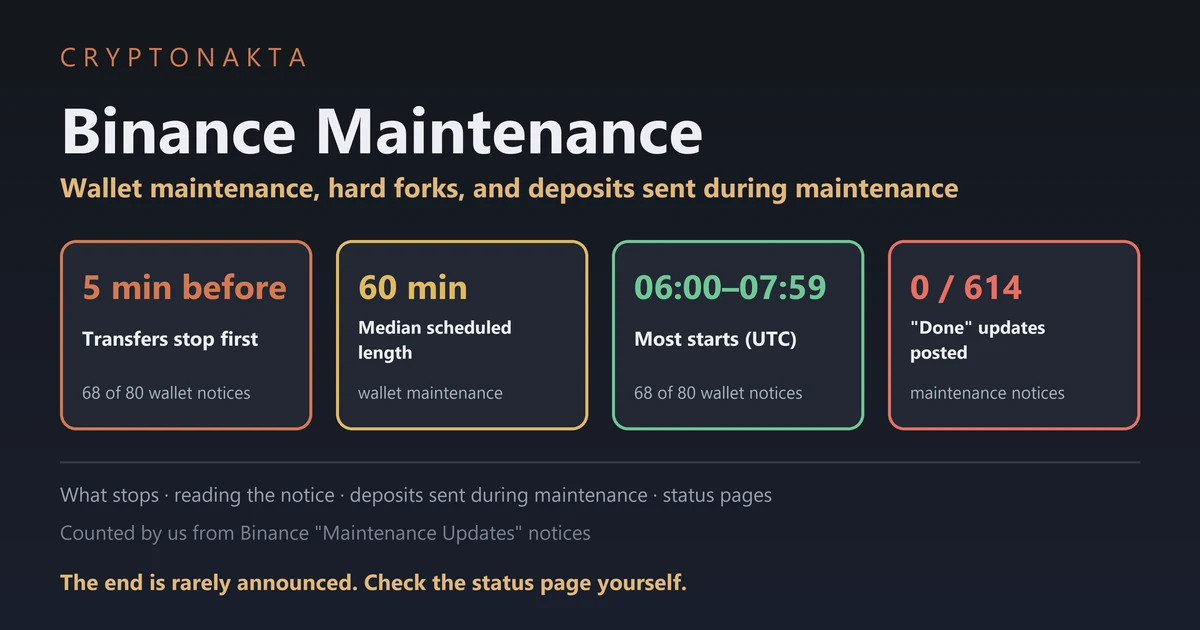
Binance maintenance comes in different scopes, and with wallet maintenance only one network’s deposits and withdrawals pause while trading keeps going. Read the notice for the scope and the start time. Then watch the status page, because Binance rarely posts anything when the work is done.
We counted every notice in Binance’s maintenance list ourselves and compared how other exchanges word the same situations. Where a page wouldn’t open for us, we say so.
In this guide (11)
Is Binance under maintenance today? How to check right nowWallet maintenance meaning: what stops and what keeps runningCan you still trade during Binance wallet maintenance?How to read a Binance maintenance notice and convert UTC to your timeHow long does Binance maintenance take, and when is it scheduled?Do you need to do anything for a Binance network upgrade or hard fork?Binance deposit suspended or stuck: what happens to coins you already sent?Binance withdrawal suspended for maintenance: what about one already in progress?Maintenance or a security incident? Read the notice titleMy take on Binance maintenance noticesWhat we counted in Binance’s maintenance notices
Is Binance under maintenance today? How to check right now
To check whether Binance is under maintenance right now, open its Deposit & Withdrawal Status page and tick “Show abnormal networks only”. Paused networks show up there, from wallet maintenance or a chain upgrade. With wallet maintenance, Binance has taken that network’s wallet offline for a while, and trading carries on.
Maintenance comes in different scopes, and plain wallet maintenance leaves trading alone. The notice gives the scope, the start time and the moment to stop depositing.
A notice saying the work is finished almost never comes, so check the status page yourself. Coins you already sent usually land after deposits reopen, but a coin sent while the notice had deposits blocked is not guaranteed to be credited on its own.
A status page is the exchange’s live list of which coins and networks are open for deposits and withdrawals. On Binance that’s the Deposit & Withdrawal Status page. A paused network also shows on the coin’s deposit screen, with a Set Reminder button that alerts you when it reopens.
| Exchange | Where to check status | Maintenance notices | Reopen alert button | Posts a “reopened” notice? | Evidence |
|---|---|---|---|---|---|
| Binance | Status page | Announcements | Set Reminder | No; reopens without a notice | A |
| OKX | Status page | Announcements | — | No; reopens without a notice | A |
| Bybit | Deposit/Withdrawal status page (address not confirmed)* | Announcements* | Set Alert | No; reopens without a notice | B |
| KuCoin | Deposit page and announcements | “System Maintenance” section (list address not confirmed) | — | Varies by notice | A |
| Gate | Each coin’s deposit page | Announcements | Set Reminder | Not stated | A |
| Bitget | No dedicated page found; announcements | “Maintenance or system updates” section (list address not confirmed)* | — | Yes, posts a reopening notice | C |
| MEXC | Status page | Announcements | Network Resumption Reminder | No; reopens without a notice | A |
Binance, OKX, MEXC and Bybit reopen without a separate notice; other exchanges differ, so the status page is the place to check.
Evidence: A = we read the official page. B = we only saw a search summary. C = no official sentence found.
* Starred cells come from search summaries of official pages that would not open for us.
We opened each page in this table ourselves on November 6, 2026. We found no separate status page for KuCoin, Gate or Bitget, so there you check the deposit screen or the announcements.
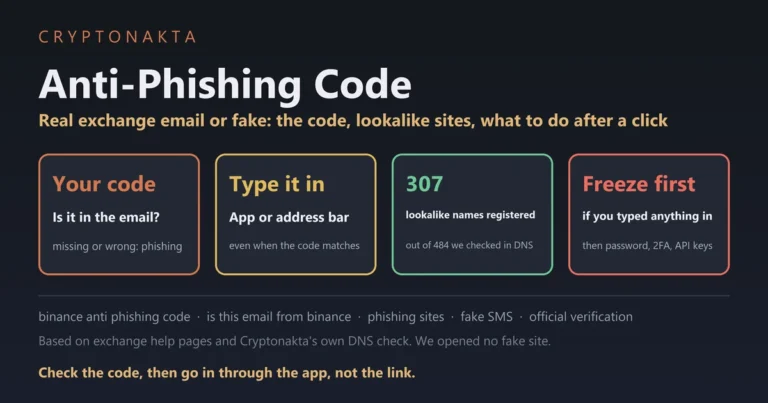
Nearly all of Binance’s wallet notices include the line “No further announcement will be posted”. Deposits reopen once the network is judged stable. So be wary of a text that says maintenance is over and asks you to log in through a link. Our anti-phishing code guide shows how to check one.
If the whole Binance app won’t load, look for a system upgrade notice in the announcements. If there’s none, the problem may be your connection or app version, and Binance support can confirm that.
We list the six exchanges below because each one shows in public where to check whether a network is open again. That’s the only reason they’re here, and it says nothing about how often they pause.
Binance

OKX

Bybit

KuCoin

Gate.io

Bitget

Affiliate disclosure: some links are partner links. We may earn a commission at no extra cost to you. This is not investment advice.
Wallet maintenance meaning: what stops and what keeps running
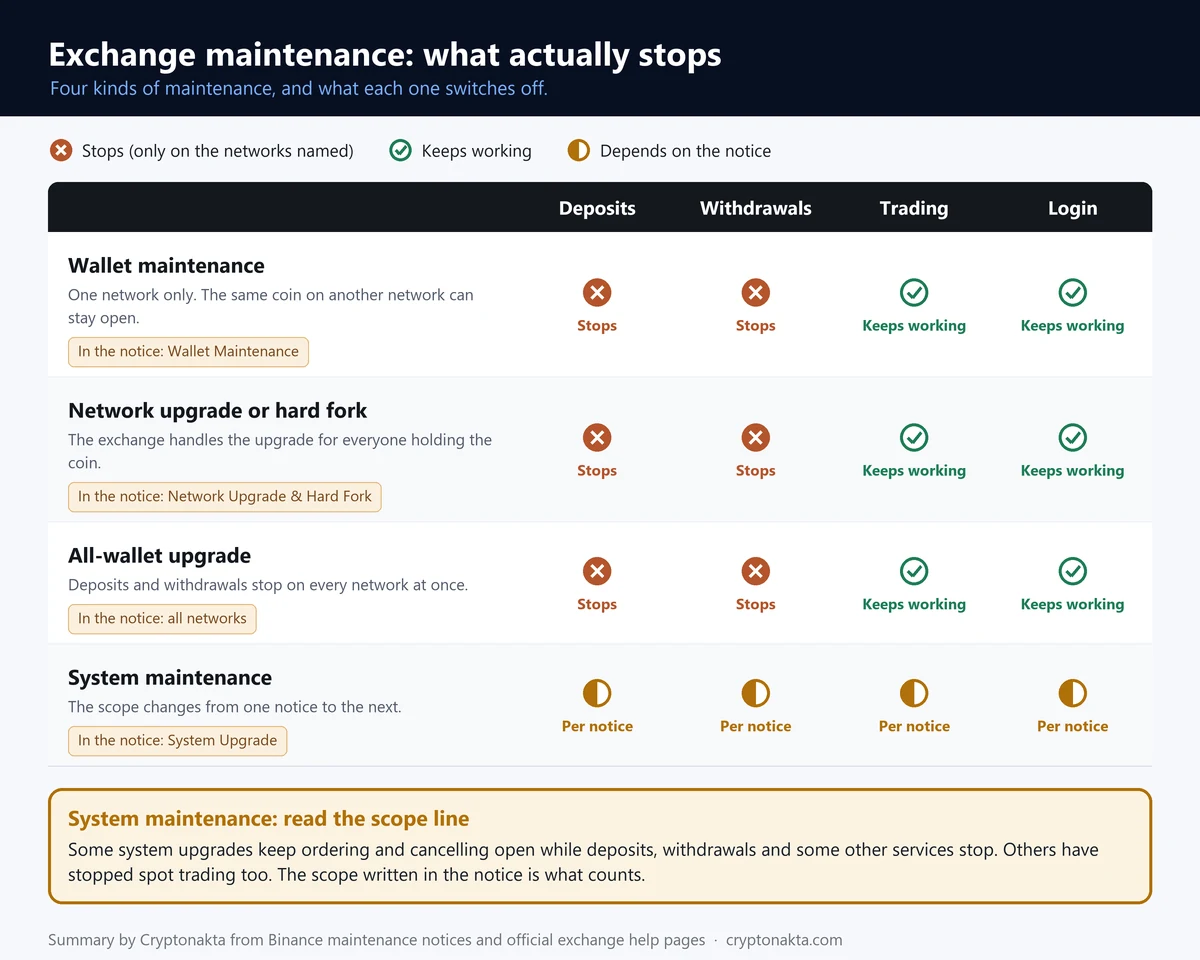
Wallet maintenance means an exchange has taken its wallet for one blockchain network offline for a while. Deposits and withdrawals on that network stop. Trading, your balance and your login work as normal.
Binance titles these notices “Wallet Maintenance for Ethereum Network (ETH)” and so on. A notice can also cover one of three other scopes.
A network upgrade is a change made by the blockchain’s own developers. When the change breaks compatibility with older software, it’s called a hard fork. Deposits and withdrawals pause for that chain and every token on it, and trading continues.
An all-network wallet upgrade pauses deposits and withdrawals on every network at once. When Binance and Bitget ran these, trading stayed open.
A system upgrade is work on the exchange’s core systems, and its scope changes from one notice to the next. Some let you keep placing orders. Others stop trading too.
| What is under maintenance | Deposits | Withdrawals | Trading | Login | Based on |
|---|---|---|---|---|---|
| Wallet maintenance on one network | ● stops | ● stops | ○ works | ○ works | Wording of 83 Binance wallet-maintenance notices (our count) |
| Network upgrade or hard fork | ● stops | ● stops | ○ works | ○ works | Wording of 364 Binance upgrade and hard-fork notices (our count) |
| Wallet maintenance on all networks | ● stops | ● stops | ○ works | ○ works | Binance all-network wallet upgrade notices; Bitget all-wallet upgrade notice (A) |
| System upgrade | ◐ per notice | ◐ per notice | ◐ per notice | ◐ per notice | Scope changed from one notice to the next (two Binance notices, one OKX notice, A) |
●: stops. ○: keeps working. ◐: depends on what that notice says.
Wallet maintenance stops deposits and withdrawals only on the network named in the notice. Other networks for the same coin usually stay open.
A system upgrade is the one to read line by line. Some kept order placing open, one closed spot trading, one closed everything.
 View full size ↗
Binance’s help page on wallet maintenance gives four reasons. Two are a software or hardware upgrade and a hard fork. The others are a congested network and a low hot wallet balance. A hot wallet is the online wallet an exchange pays withdrawals from, and refilling it across networks takes time.
In Binance’s maintenance list we counted 364 upgrade and hard fork notices against 87 for wallet maintenance. Most of these notices come from the chains themselves. A notice on its own says nothing bad about the exchange.
Can you still trade during Binance wallet maintenance?
Yes, you can still trade during Binance wallet maintenance and network upgrades. The notices say trading of the token “will not be impacted”. Only moving that coin in or out on the paused network has to wait.
77 of 83 Binance wallet maintenance notices say trading is not affected, and none says it stops. For upgrades and hard forks it’s 363 of 364.
Other exchanges word it the same way. OKX writes “Trading of the relevant tokens is not affected”. MAX (MaiCoin) says “All trading functions will remain operational”.
A system upgrade is the exception. One Binance system upgrade let you place and cancel orders, and another paused spot trading. During one OKX upgrade you couldn’t place, change or cancel orders at all. Read the scope line of that notice before you plan a trade around it.
If you need to move a coin now, look for another network that’s still open. The wallet or exchange on the other end has to support that network too. Our guide to sending crypto on the wrong network covers what happens when they don’t match. For USDT, our TRC20 vs ERC20 comparison helps you pick a network.
Searches for this topic often turn up maintenance margin, which is unrelated. Maintenance margin is a futures term and has nothing to do with exchange maintenance. It’s the minimum collateral a leveraged position needs to stay open. Our guide to isolated and cross margin explains how it works.
How to read a Binance maintenance notice and convert UTC to your time
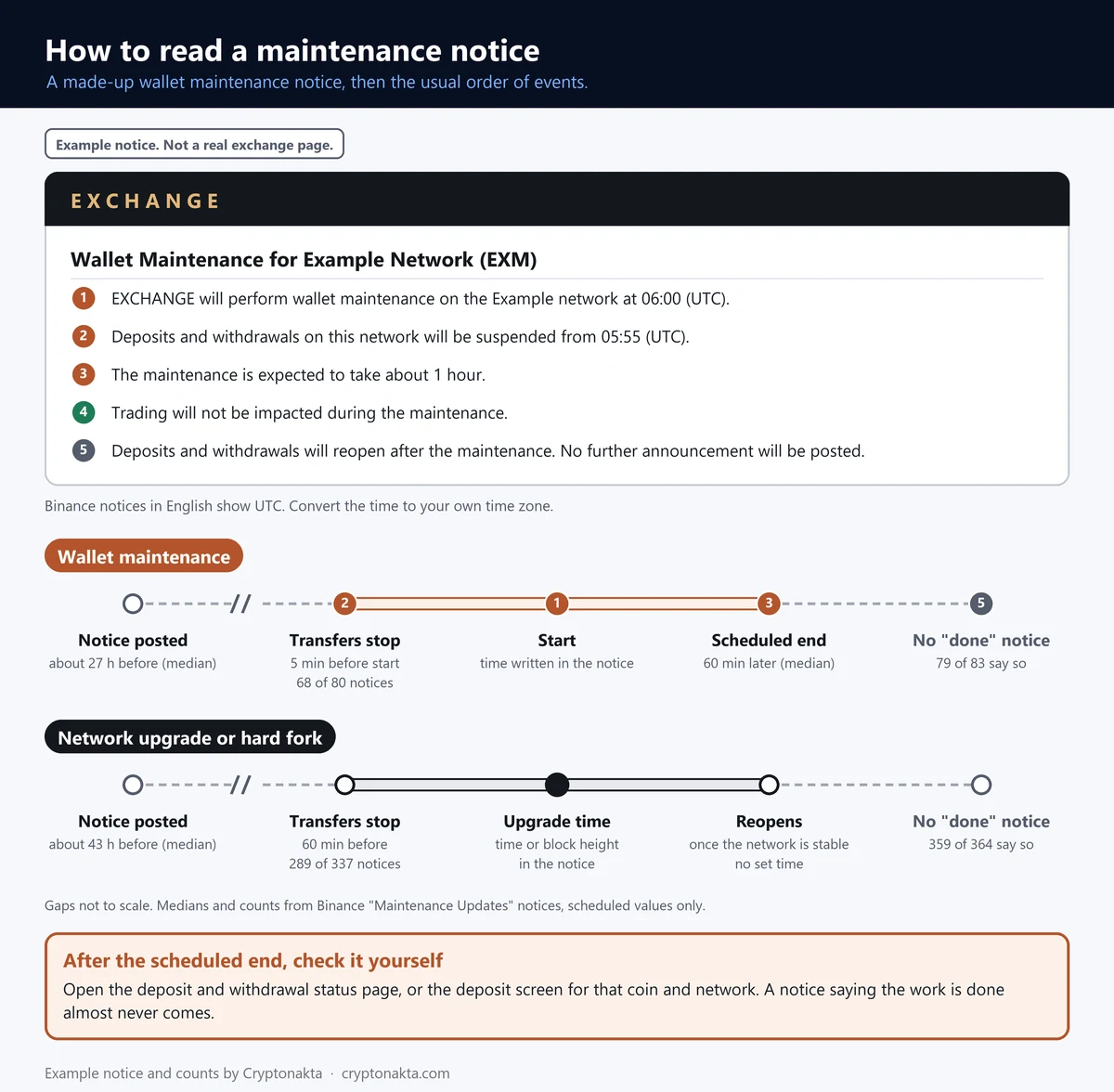
A Binance maintenance notice tells you the network, the start time in UTC and the planned length. UTC is Coordinated Universal Time, the world’s reference clock. Deposits and withdrawals often stop a little before the start, so convert that time to your own first.
Enter the time and type from the notice, and the converter shows the start, the stop and the scheduled end in your own time zone. The stop time uses the gap most common in Binance’s notices, so if your notice gives a different one, go with the notice. It can’t show when the work really ends, because Binance doesn’t publish that.
English Binance notices print times such as “08:00 (UTC)”. Binance shows the same notice in a different time zone depending on the language you read it in. The traditional Chinese version prints UTC+8, and the Russian version prints UTC+3. Check the label in brackets before you convert.
In Binance’s wallet maintenance notices, transfers usually stop five minutes before the start (68 of 80 notices with a start time). For hard forks the most common gap is one hour (289 of 337). These are the usual values, not a rule, so the notice in front of you decides.
Notices go up well ahead. The median wallet maintenance notice appeared 26.8 hours before the start, roughly a day. The shortest gap we found was 3 hours.
| Line in the notice | What it tells you |
|---|---|
| “Wallet Maintenance for … Network” in the title | Only that network pauses. Trading goes on. |
| “will be suspended starting from … (UTC)” | Transfers stop at this time, which can be earlier than the work itself. |
| The planned length | A plan made in advance. It can run over. |
| “The trading of token(s) … will not be impacted” | Buying and selling keep working. |
| “Binance will handle all technical requirements” | There’s nothing for you to do with your balance. |
| “No further announcement will be posted” | Nobody tells you it’s done. Check the status page. |
 View full size ↗
How long does Binance maintenance take, and when is it scheduled?
Most Binance wallet maintenance is scheduled for an hour or less. The median planned length in its notices is 1 hour. Those are planned figures, because Binance doesn’t say when the work really ended.
Every length we counted is the scheduled length from the notice. A scheduled length is the window the exchange books in advance. None of the 614 notices we read got a later update saying the work was done, so real durations can’t be measured from them.
| Scheduled length | Notices |
|---|---|
| 30 minutes or less | 5 of 82 |
| 31 to 60 minutes | 48 of 82 |
| Over 1 hour, up to 2 | 20 of 82 |
| Over 2 hours, up to 4 | 8 of 82 |
| More than 24 hours | 1 of 82 |
Lengths are what the notice planned. Binance rarely says when the work actually ended, so we could not measure real durations.
Median 1 hour. Three in four were 2 hours or less, nine in ten 174 minutes or less. The longest planned one ran 48 hours.
Binance has also posted extension notices when work ran over.
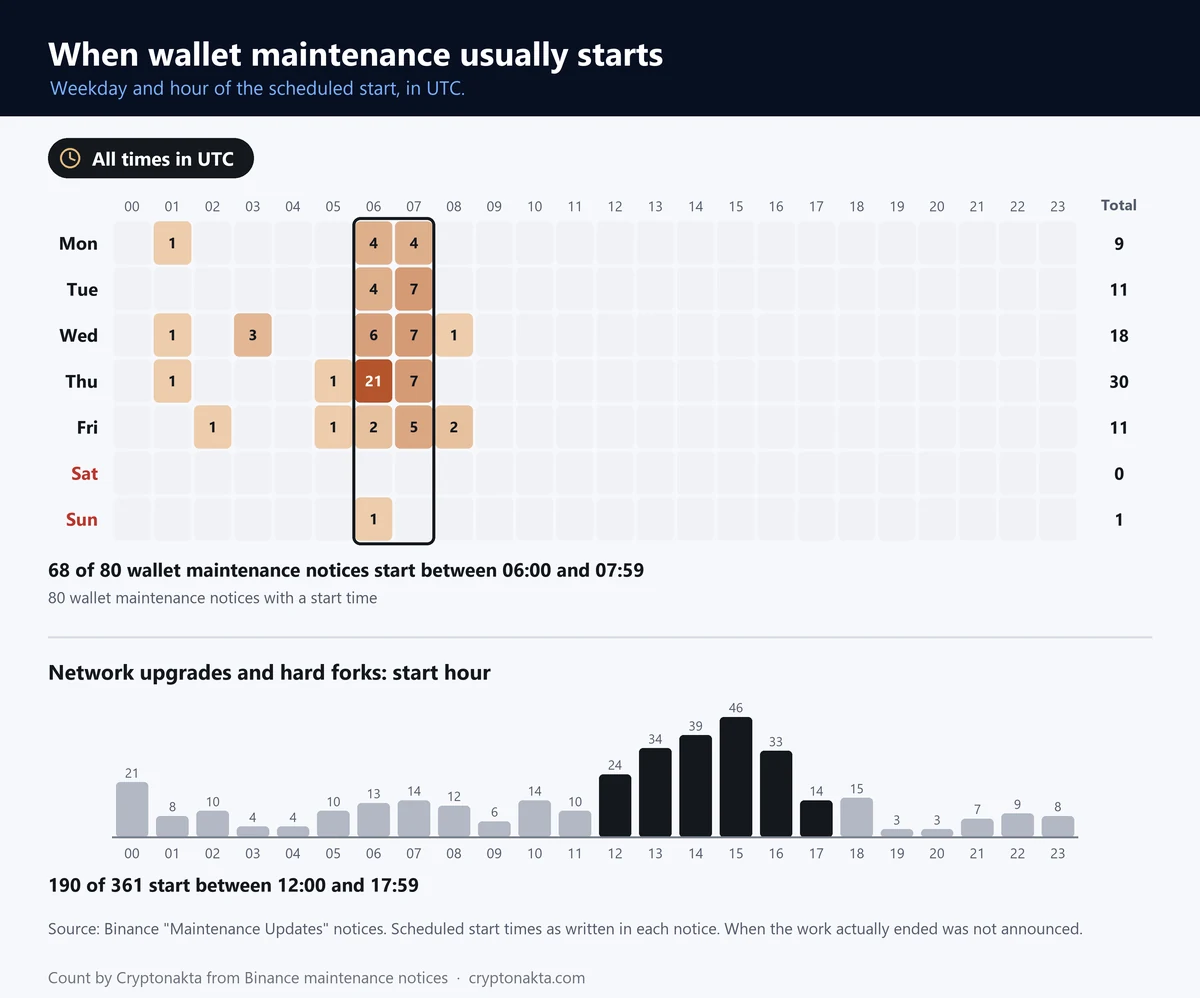
Start times bunch up. Of the 80 wallet maintenance notices with a start time, 68 began in the 06:00–07:59 UTC window. That’s 85%. Thursday is the busiest day, and not one started on a Saturday.
| Type | Most common start (UTC) | Starts by weekday | Weekend starts |
|---|---|---|---|
| Wallet maintenance | 06:00–07:59 · 68 of 80 | Mon 9 · Tue 11 · Wed 18 · Thu 30 · Fri 11 · Sat 0 · Sun 1 | 1 of 80 |
| Upgrade or hard fork | 12:00–17:59 · 190 of 361 | Mon 68 · Tue 77 · Wed 106 · Thu 73 · Fri 21 · Sat 5 · Sun 11 | 16 of 361 |
Start times as written in Binance notices, converted to UTC. Wallet maintenance: 80 notices with a start time. Upgrades and hard forks: 361.
This tells you when maintenance usually starts. It does not predict the next one.
 View full size ↗
Ethereum had the most wallet maintenance notices (22), followed by BNB Smart Chain (17) and Tron (15). None of this predicts the date of the next one.
Do you need to do anything for a Binance network upgrade or hard fork?
Usually you don’t need to do anything for a Binance network upgrade or hard fork. Binance pauses deposits and withdrawals on that chain and does the technical work for everyone holding the coin. Trading carries on.
The line “Binance will handle all technical requirements involved for all users” appears in 363 of 364 upgrade and hard fork notices. OKX’s fork notices say the same.
The pause starts earlier than with wallet maintenance. Deposits and withdrawals usually close one hour before the fork. The fork itself is often set by block height, the count of blocks the chain has produced so far. Blocks don’t arrive on a fixed clock, so the time in the notice is an estimate. We found 284 of 364 notices timed this way.
| In the notice | Wallet maintenance | Upgrade or hard fork |
|---|---|---|
| Notice posted before start (median) | 26.8 hours | 42.6 hours |
| Deposits and withdrawals stop before start (most common) | 5 minutes before: 68 of 80 | 1 hour before: 289 of 337 |
| Says trading is not affected | 77 of 83 | 363 of 364 |
| “No further announcement” or similar | 79 of 83 | 359 of 364 |
| “Binance will handle all technical requirements” | 41 of 83 | 363 of 364 |
| Timed by block height | 0 of 83 | 284 of 364 |
| Says your funds are safe | 0 of 83 | 0 of 364 |
| Says deposits sent during the pause will be credited | 0 of 83 | 0 of 364 |
Our count of the wording in Binance notices. “Before start” for a hard fork means before the fork time or block in the notice.
Not one notice said your funds are safe, and not one said deposits sent during the pause would be credited.
Will you get new coins from the fork? It depends on the fork, and the notice tells you. Some notices from KuCoin, OKX and MAX state plainly that no new token will be created. If a new token is planned, look for the distribution details in that same notice.
Forks follow the chain’s schedule, so their start times spread across the day. The busiest stretch in UTC was 12:00–17:59, with 190 of 361 starts. Convert the time before you send anything that day.
Binance deposit suspended or stuck: what happens to coins you already sent?
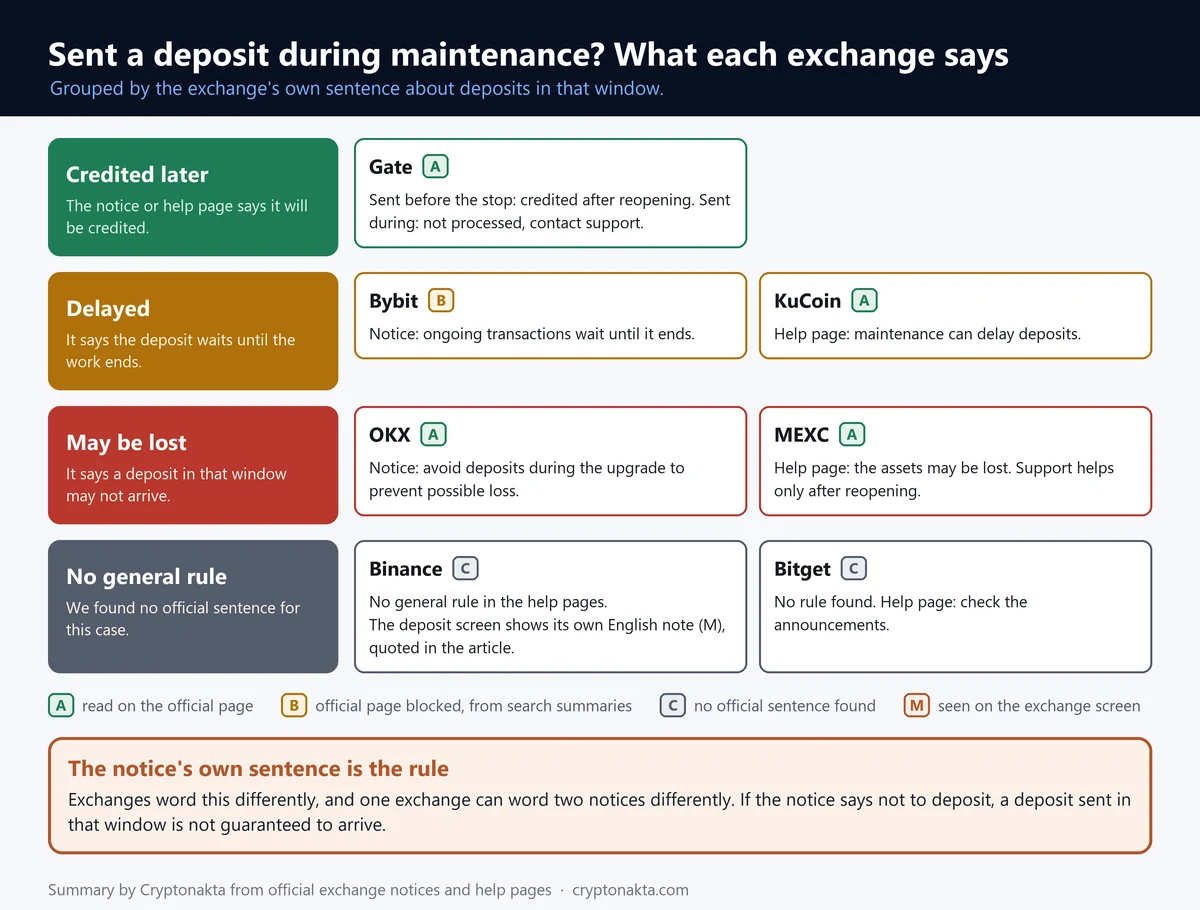
Coins sent to Binance during wallet maintenance often show up after deposits reopen. That isn’t a promise. If the notice told you to stop depositing and you sent anyway, nothing guarantees the deposit gets credited on its own.
Exchanges word this very differently, from “credited later” to “may be lost”. Binance’s help pages give no general rule at all.
Each line quotes one help page or notice. It is not a promise for every network or every pause.
The rule that holds everywhere: if the notice told you not to deposit, a coin sent in that window is not guaranteed to arrive on its own.
Evidence: A = we read the official page. B = we only saw a search summary. C = no official sentence found.
* Starred cells come from search summaries of official pages that would not open for us.
Binance’s deposit screen says something its notices don’t. On a network paused for maintenance, it showed us this: “Your funds in transit are safe once confirmed on the blockchain and will be credited shortly after deposits have resumed”. None of the Binance notices or help pages we read says that. No Binance notice we counted says your funds are safe, and this guide won’t say it either.
 View full size ↗
If you’ve already sent coins into a paused network, work through these steps.
- Find the TxID. A TxID is the transaction’s ID on the blockchain. Your sending wallet or exchange shows it in the withdrawal history. Our TxID guide shows where to look.
- Check it on a block explorer. If it’s confirmed there, the coins reached Binance’s address and are waiting on Binance’s side. If it’s still unconfirmed, the hold-up is with the sender. Our guide to a stuck transaction covers that case.
- Wait for the network to reopen. Watch the status page or set the reminder. MEXC says it can help with uncredited deposits “only after the deposit channel has resumed”.
- Still missing after it reopens? Contact support. Give them the TxID, the amount and the time you sent it. Our guide to a deposit that never arrived walks through the rest.
A stranger who offers to “recover” or “release” your deposit for a fee is not the exchange. Our crypto scams guide shows how that setup usually runs.
Binance withdrawal suspended for maintenance: what about one already in progress?
No exchange we checked publishes a general rule for a withdrawal caught by wallet maintenance. The closest lines, from Bitget and Bybit, both say to wait until the network reopens.
Bitget says “You can try it again once the service is resumed”. Bybit’s notice, which we saw only as a search summary, says ongoing transactions “will be delayed until the maintenance is concluded”.
Check your withdrawal history. If the request still shows a Cancel button, you can cancel it and send again on another open network. If there’s no Cancel button, wait for the network to reopen.
A withdrawal stuck on Processing for other reasons is a separate problem. Our guide to a withdrawal that’s still pending goes through those cases.
Wallet maintenance hits a whole network, so it shows on the status page and affects everyone. A withdrawal limit on your own account doesn’t show there, and it needs a different fix. Our guide to a frozen withdrawal covers that case.
Maintenance or a security incident? Read the notice title
Routine maintenance and a security-incident pause are different events, and the notice title tells you which one you’re looking at. Maintenance titles say “Wallet Maintenance” or “Network Upgrade & Hard Fork”. An incident title says “Security Incident”, often with “Recovery Update”.
The rest of the notice differs too. Maintenance is announced about a day ahead, with a planned length and a line saying trading isn’t affected. An incident pause comes without warning and has no planned length.
After an incident, exchanges tend to reopen withdrawals in stages. They go asset by asset and network by network, with an update for each stage. Wallet maintenance is simpler, since one network closes and the same network reopens.
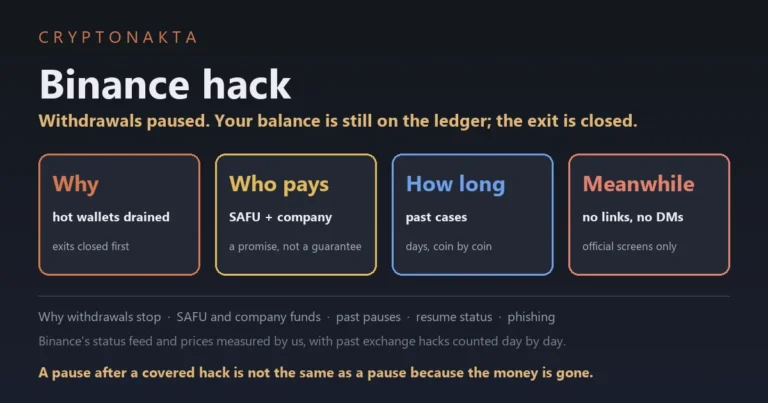
For what happened in Binance’s own incident, see our article on Binance withdrawals being paused.
My take on Binance maintenance notices
My take is that a Binance maintenance notice is mostly a timing problem, and the status page is the real answer.
Most notices are about the chain, not the exchange. Wallet maintenance keeps landing in the same two hours. No notice says the work is done, and none says your funds are safe. That leaves the status page as the only place that knows.
When a notice lands, I go in a fixed order. What’s the scope? Is it my network? When do transfers stop in my own time? Then I set the reminder and stop refreshing.
What I trust least are summaries claiming “anything you send during maintenance gets credited anyway”. I’m just as wary of messages saying maintenance is over, with a link to log in. And of articles that quote a planned length as if someone had timed it.
To be fair, plenty of people sent coins mid-maintenance and saw them arrive after the reopen. That’s real. I still wouldn’t lean on it when the notice itself said not to deposit.
One disclosure: this site uses exchange referral codes, and we earn a commission when you sign up with ours. On Binance, our code gets you back 10% of the spot trading fees you pay, in USDC. Our Binance referral code guide has the details.
Binance
Affiliate disclosure: some links are partner links. We may earn a commission at no extra cost to you. This is not investment advice.
What we counted in Binance’s maintenance notices
We collected every notice in Binance’s “Maintenance Updates” list on November 5, 2026, 17:08 UTC. There were 614 of them.
The oldest one still listed was posted on February 15, 2022 and the newest on October 29, 2026. That’s as far back as the list goes, not when Binance began doing maintenance.
We sorted each notice by its title, then read the times and key phrases in the body. To check the parser, we compared a random sample against the original notices by hand.
| Notice type | Notices (share) |
|---|---|
| Network upgrade or hard fork | 364 (59.3%) |
| Wallet maintenance | 87 (14.2%) |
| Network support added or ended | 65 (10.6%) |
| Token swap, merger or rebrand | 57 (9.3%) |
| System or service upgrade | 26 (4.2%) |
| Unplanned pause and reopening | 12 (2%) |
| Other | 3 (0.5%) |
Every notice in Binance’s “Maintenance Updates” list that was still online when we collected it, sorted by its title.
No notice carried an update saying the work was finished, which is why every length in this guide is a scheduled one.
We also read Binance’s public deposit status list once, without logging in. That’s where the screen text quoted earlier comes from. We left out the withdrawal side, because without an account those figures jumped around between calls. Other exchanges sort their announcements differently, so their notice counts can’t be compared with Binance’s.
The system upgrades mentioned earlier happened in different years. Binance’s spot system upgrade in 2021 paused spot trading and transfers. Its scheduled upgrade in 2024 kept orders open and stopped transfers five minutes before the start. OKX’s system upgrade in 2023 stopped placing, editing and cancelling orders.
After Binance’s security incident in late October 2026, withdrawals reopened in stages. They came back asset by asset and network by network. We confirmed this from the titles of Binance’s recovery updates. Reports differ on whether deposits stopped, so we won’t say either way. Our article on the paused withdrawals has the details.
Binance maintenance questions people ask
- Binance · Deposit & Withdrawal Status (each coin and network, real time) · checked 2026-11-06
- Binance Announcements · Maintenance Updates · checked 2026-11-06
- Binance FAQ · What Can I Do When Deposit/Withdrawal Is Suspended Due to Wallet Maintenance? · checked 2026-11-06
- Binance notice · Wallet Maintenance for Tron Network (TRX) · checked 2026-11-06
- Binance notice · Ethereum Network Upgrade & Hard Fork · checked 2026-11-06
- OKX Status (incidents, maintenance, deposit and withdrawal status) · checked 2026-11-06
- OKX notice · Bitcoin and Tron wallet maintenance · checked 2026-11-06
- Bybit Help Center · Set alerts for deposit/withdrawal suspension due to wallet maintenance · checked 2026-11-06
- Bitget Support · Why is my withdrawal restricted or suspended? · checked 2026-11-06
- KuCoin Support · Why hasn’t my crypto deposit arrived? · checked 2026-11-06
- MEXC Support · What to do when deposits/withdrawals are paused due to wallet maintenance · checked 2026-11-06
- MAX (MaiCoin) · Ethereum network hard fork notice · checked 2026-11-06
Not financial advice. Exchange screens differ by region and app version, so check the official page before you act.
Next: what to do if a deposit still hasn’t arrived after the network reopens