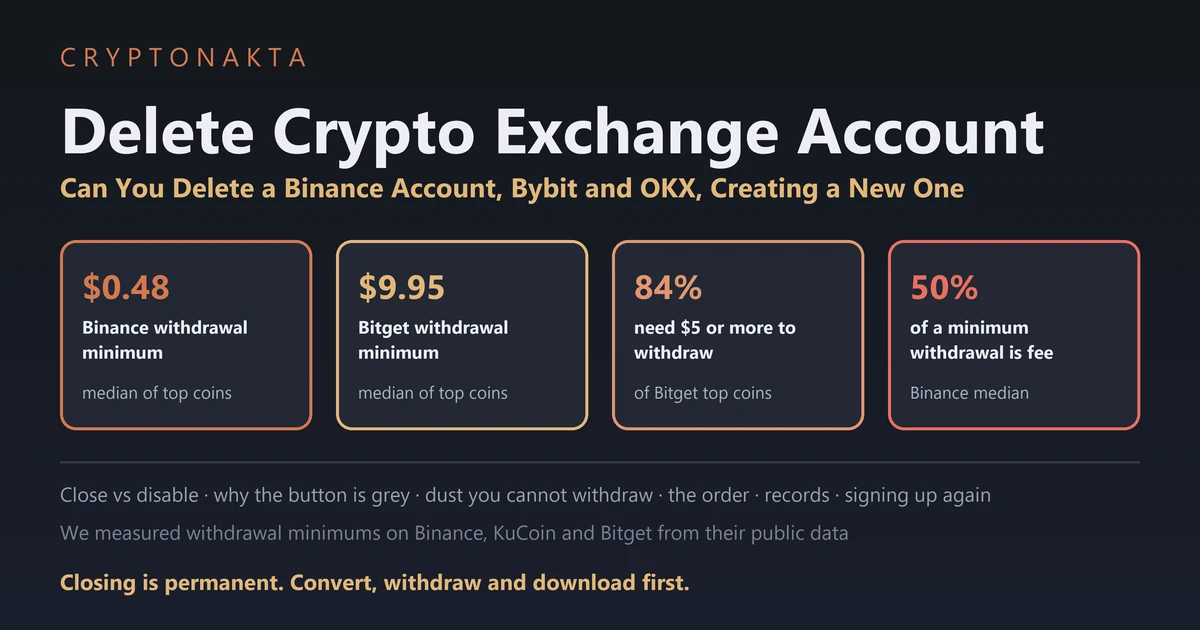
Delete Crypto Exchange Account | Can You Delete a Binance Account, Bybit and OKX, Creating a New One
You can close a crypto exchange account for good, but it can’t be undone, and the exchange keeps its records. Most exchanges want the account almost empty first. Crumbs below the withdrawal minimum can’t leave, so they have to be converted before closing works.
Maybe this started with a Binance email titled “Account Deactivation Notice.” That means the exchange is closing the account, with its own deadline. Check it in the app, not through the email.
In this guide (11)
Got a Binance account deactivation notice email? Check it, then empty the accountCan you delete a crypto exchange account permanently, or only disable it?Why can’t I delete my Binance account? What has to be empty firstHow do you clear a balance too small to withdraw?How to delete an exchange account step by step, on the app or the websiteWhat happens to your records after you delete a Binance account?Can I delete my Binance account and create a new one with the same email or ID?Should you delete your account to change your referral code?How to delete a Binance account without login or after losing 2FAWhat we measured, and what we couldn’tMy take after reading every close-account page
Got a Binance account deactivation notice email? Check it, then empty the account
A Binance “Account Deactivation Notice” means Binance is closing your account, which is different from you closing it. If it’s real, withdraw everything before the date in the email. Check it in the Binance app first, never through a link in the email.
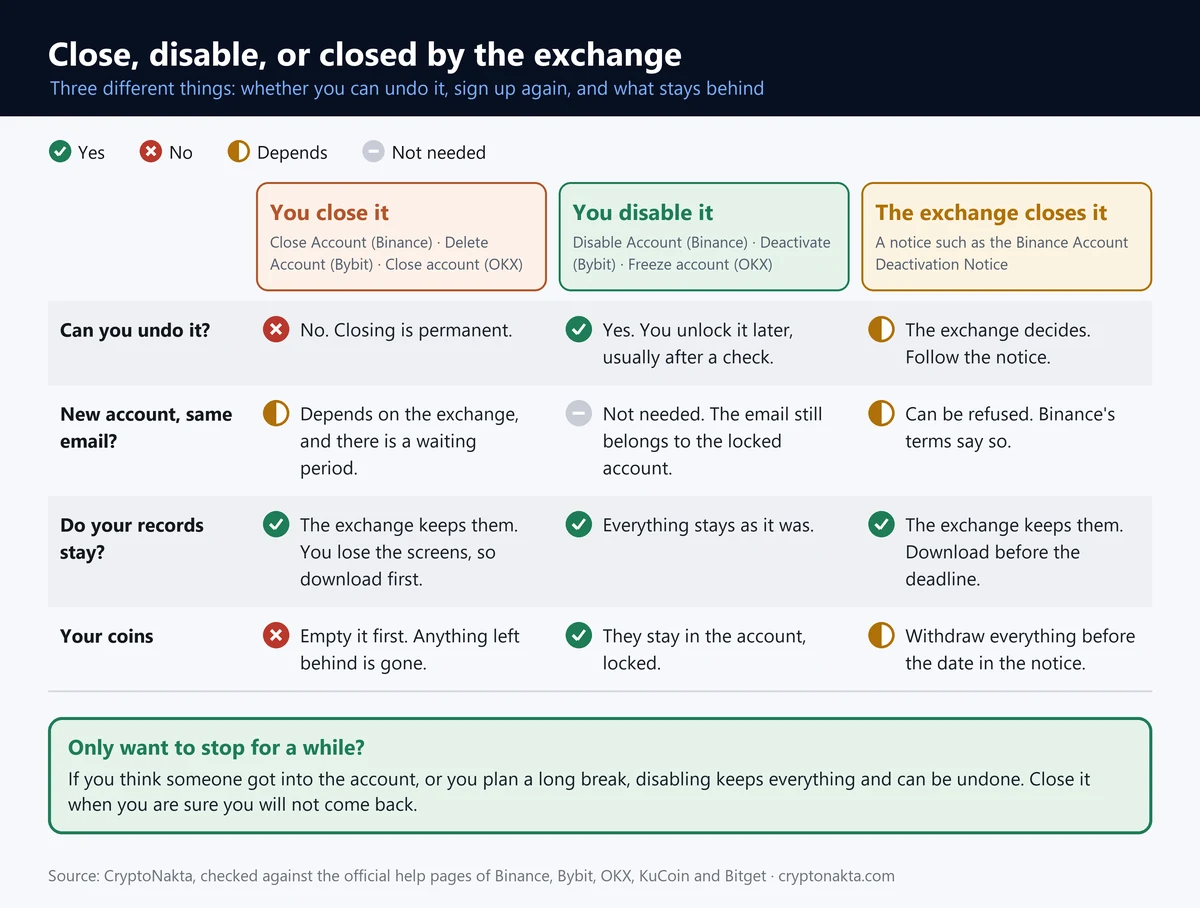
It helps to keep three words apart. To close or delete is your choice, and it’s final. To disable is your choice too, but it only locks the account. A deactivation notice is the exchange ending your account on a set date, sometimes without a reason.
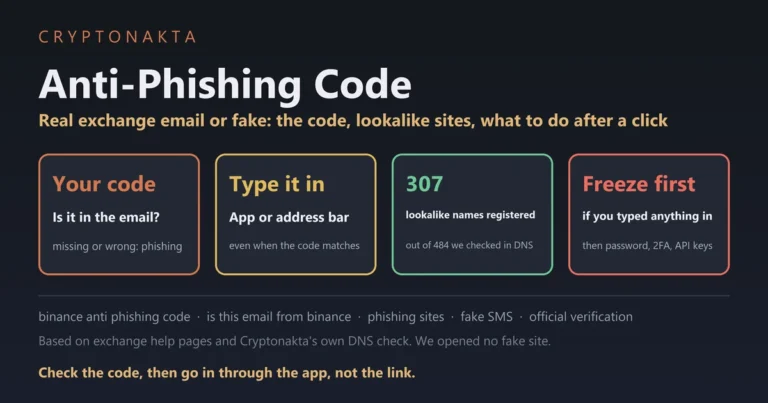
Phishing emails copy that same subject line. Check the notice inside the app, not through the link in the email. You can also check the sender on Binance Verify. If you set an anti-phishing code, real Binance emails show it.
If the notice is real, don’t deposit anything. Binance’s FAQ warns that new deposits may be lost. Move NFTs before coins, so you can still pay gas. Binance Pay transfers to other users won’t go through. Convert small balances to BNB, then withdraw the BNB. Repay loans before the date, or the collateral is sold at market price with a 2% fee per loan.
A balance left after the date may cost you or follow a different process. Treat the date in the notice as your real deadline.
Can you delete a crypto exchange account permanently, or only disable it?
Yes, you can delete a crypto exchange account permanently. Binance and OKX call it Close Account, and Bybit calls it Delete Account. Each also offers a pause that only locks the account, and a pause can be lifted.
Closing an account can’t be undone, and it isn’t the same as a pause. Binance says “Account closure is irreversible.” Anything left inside “will be lost and cannot be recovered.”
| Option | Undo? | Email or ID later |
|---|---|---|
| Binance Close Account | No | New ID check may wait 30 days or longer |
| Binance Disable Account | Yes | Still your account |
| Bybit Delete Account | No | Again after 24 hours, two times at most |
| Bybit Deactivate an Account | Yes, after 24 hours | Never for a new Bybit account |
| OKX Close account | No | Not during the cooling-off period |
| OKX Freeze account | Yes | Still your account |
Bybit’s two help pages seem to disagree about your email. They describe different actions. A deleted account’s email can sign up again, and a deactivated account’s email can’t.
 View full size ↗
Why can’t I delete my Binance account? What has to be empty first
Binance won’t close an account that holds more than 5 USD or has anything still running. That includes loans, a P2P order from the last 48 hours, Earn, margin debt and Futures funds. Active sub-accounts and an active Web3 wallet block it too.
That 5 USD line is Binance’s balance rule, the most you may leave behind. Bybit and MEXC use 5 USDT. Bitget wants every account empty. OKX says to withdraw what’s left, and KuCoin recommends it. None of the three names an amount.
| Exchange | Balance rule | Clear these first | Processing and cancelling | Basis |
|---|---|---|---|---|
| Binance | Over 5 USD: withdraw first; whatever stays behind is lost | open loan orders · a P2P order in the last 48 hours · Earn subscriptions · margin debt · assets in Futures · active sub-accounts · an active Web3 wallet (switch it to a private-key wallet) | Closes right after the security check; no processing time stated | Official page, read in full |
| Bybit | Main and sub-accounts together: 5 USDT or less (bonuses and coupons not counted) | debts, positions, active orders, disputes · Private Wealth Management · Bybit Card · copy trading · referral balance over 5 USDT · more than 20 sub-accounts · linked payment methods, Tax ID · Cloud or Keyless Wallet over 1 USD · 5 days after a recent P2P trade | No official wording found | Official page, read in full |
| OKX | No set amount; withdraw everything and ask support about amounts you cannot move | an authenticator app must be linked · open orders and pending items | No time stated; self-service closing can depend on account status | Official page, read in full |
| Bitget | No set amount; every account must be empty | pending withdrawals · open positions · trades in progress · savings and staking · Web3 wallet must be empty | Reviewed within 24 hours | Official page, read in full |
| KuCoin | No set amount; the help page recommends withdrawing everything first | closing positions is recommended; pending orders get cancelled | No official wording found | Official page, read in full |
| MEXC | Cannot be deleted if total assets exceed 5 USDT | identity check by customer service · no deposits or trades while it is processed | Up to 15 working days; “Cancel Request” while it is pending | Official page, read in full |
| Gate | No amount stated; the User Agreement says you can withdraw everything when you close | unpaid fees and debts are deducted | No official wording found | User Agreement only (no help article found) |
Each cell is what the exchange wrote in its own help page or terms (sources at the end). Rules change, so check the exchange’s own screen before you close.
Gate has no help article on closing an account that we could find, so its row comes from the User Agreement.
If the button won’t work, check the balance in every wallet first. Then look for running products. Then close each sub-account, an extra account under your main one. Binance wants a Web3 wallet turned into a private-key wallet.
Binance’s terms also block closing during a pending transaction or an open claim. An account under a freeze, hold or limit can’t be closed either. If withdrawals are frozen, read our frozen account guide.
How do you clear a balance too small to withdraw?
You can’t withdraw a coin when you hold less than its minimum withdrawal amount. So an account can refuse to close even after you’ve withdrawn all you could. Sweep the leftovers into one coin with the small balance tool, then withdraw that coin.
These crumbs are called dust. The checker shows a snapshot of settings we pulled from Binance, KuCoin and Bitget. It can’t see whether your receiving wallet takes that network. It doesn’t cover other exchanges, such as Bybit or OKX. What you type isn’t sent to our server.
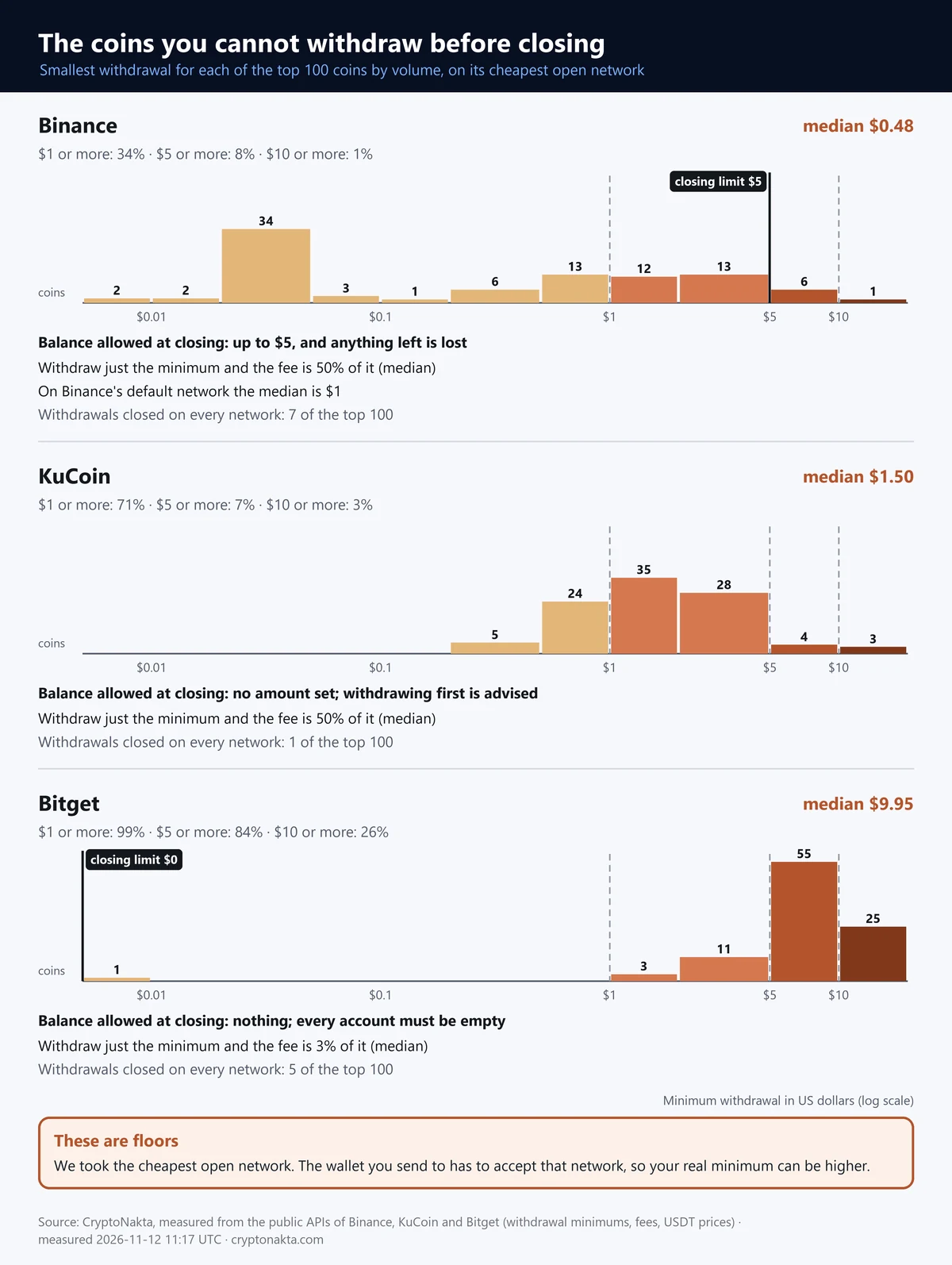
Across the top 100 coins, Binance’s cheapest network needed a median of $0.48 to withdraw. Its default network needed a median of $1.00, and KuCoin needed a median of $1.50. Bitget needed a median of $9.95, with 84% of coins at $5 or more and 26% at $10 or more. On Binance and KuCoin, withdraw only the minimum and about half goes to the fee. On Bitget the fee was a small slice.
| Exchange | Coins measured | Minimum to withdraw (median) | Coins needing $1 / $5 / $10 or more | Lost to the fee at the minimum (median) | Withdrawals closed on every network |
|---|---|---|---|---|---|
| Binance (cheapest network) | 93 of the top 100 | $0.48 | $1+: 34% · $5+: 8% · $10+: 1% | 50% | top 100: 7 · all USDT pairs: 67 of 518 |
| Binance (default network) | 87 of the top 100 | $1.00 | $1+: 51% · $5+: 9% · $10+: 1% | — | — |
| KuCoin | 99 of the top 100 | $1.50 | $1+: 71% · $5+: 7% · $10+: 3% | 50% | top 100: 1 · all USDT pairs: 5 of 804 |
| Bitget | 95 of the top 100 | $9.95 | $1+: 99% · $5+: 84% · $10+: 26% | 3% | top 100: 5 · all USDT pairs: 15 of 500 |
Minimum to withdraw = the larger of the exchange’s minimum withdrawal amount and its withdrawal fee, in dollars at the last USDT-pair price. For each coin we took the open network where that minimum is smallest. Default network = the network Binance’s withdrawal screen offers first (fee share not computed).
These are lower bounds. The place you send to has to accept that network, so your real minimum can be higher, and exchanges change these settings often.
Bybit, OKX, MEXC and Gate do not give the same data without an API key, so they are not in this table.
| Coin | Binance (cheapest network) | Binance (default network) | KuCoin | Bitget |
|---|---|---|---|---|
| BTC | $0.04 · fee $0.02 · BSC | $7.33 · fee $1.47 · BTC | $0.59 · fee $0.29 · BEP20 | $9.98 · fee $0.02 · BEP20 |
| ETH | $0.04 · fee $0.02 · BSC | $4.09 · fee $0.31 · ETH | $0.41 · fee $0.20 · Base | $4.99 · fee $0.10 · BASE |
| USDT | $1.00 · fee $0.01 · BSC | $1.00 · fee $0.01 · BSC | $1.00 · fee $0.50 · APT | $5.00 · fee $0.60 · ERC20 |
| SOL | $0.04 · fee $0.02 · BSC | $0.83 · fee $0.08 · SOL | $1.33 · fee $0.66 · SOL | $4.98 · fee $0.08 · SOL |
| XRP | $0.04 · fee $0.02 · BSC | $2.09 · fee $0.21 · XRP | $14.65 · fee $0.31 · XRP | $4.18 · fee $0.21 · XRP |
| TRX | $6.33 · fee $0.63 · TRX | $6.33 · fee $0.63 · TRX | $0.63 · fee $0.32 · TRC20 | $9.00 · fee $0.47 · TRX |
Each cell: minimum to withdraw · withdrawal fee · network, at the time we measured.
The cheapest network is often a version of the coin on another chain. Send it only if the receiving side accepts that exact network.
A dash means withdrawals were closed or the coin was outside the top 100 we measured.
Our measured minimums are lower bounds, since the receiving side must accept that network. Bitget wants every account empty, yet small amounts there can’t leave. So gather them with Bitget’s Convert small amount to BGB first. On Binance, dust under 5 USD is simply lost when you close. If the BNB you gather tops 5 USD, withdraw it first.
| Exchange | Feature (screen name) | What qualifies | How often | Fee |
|---|---|---|---|---|
| Binance | Small Amount Exchange → BNB, BTC, ETH, USDT, USDC… | Valued below 20 USDT | Once an hour | 2% (Alpha tokens 10%) |
| Bybit | Convert Small Balance → MNT, USDT, USDC | Worth less than 0.001 BTC; the API docs say under 10 USDT* | Once an hour | 2% |
| OKX | Easy convert → OKB, USDT, BTC, ETH | The same page says both “less than 0.001 BTC” and “below 10 USD” | No official wording found | Rate not stated; the fee shows in your history |
| Bitget | Convert small amount to BGB → BGB | Each token below 10 USDT | No official wording found | 2% |
| KuCoin | Convert to KCS → KCS | Token value below 5 USDT | Once every 24 hours | No official wording found |
| MEXC | Small Asset Conversion → MX | Each asset below 5 USDT | Up to 10 times in 24 hours | 0.2% |
| Gate | Convert Small Balance → GT | Web page: under 0.001 BTC; app page: under 0.00021 BTC | Once every 6 hours; daily cap 500 GT (web page) or 50 GT (app page) | 5% (web page; the app page does not say) |
Feature names are as they appear on the exchange’s screen or help page. Delisted tokens cannot be converted on any exchange that states a rule.
Where two official pages give different numbers, both are shown.
* Search excerpt only: we could not open the original page.
On Binance, 7 of the top 100 coins had withdrawals closed on every network. Sell or convert those. The small-balance tools don’t take delisted coins, as our delisted coin guide explains.
 View full size ↗
How to delete an exchange account step by step, on the app or the website
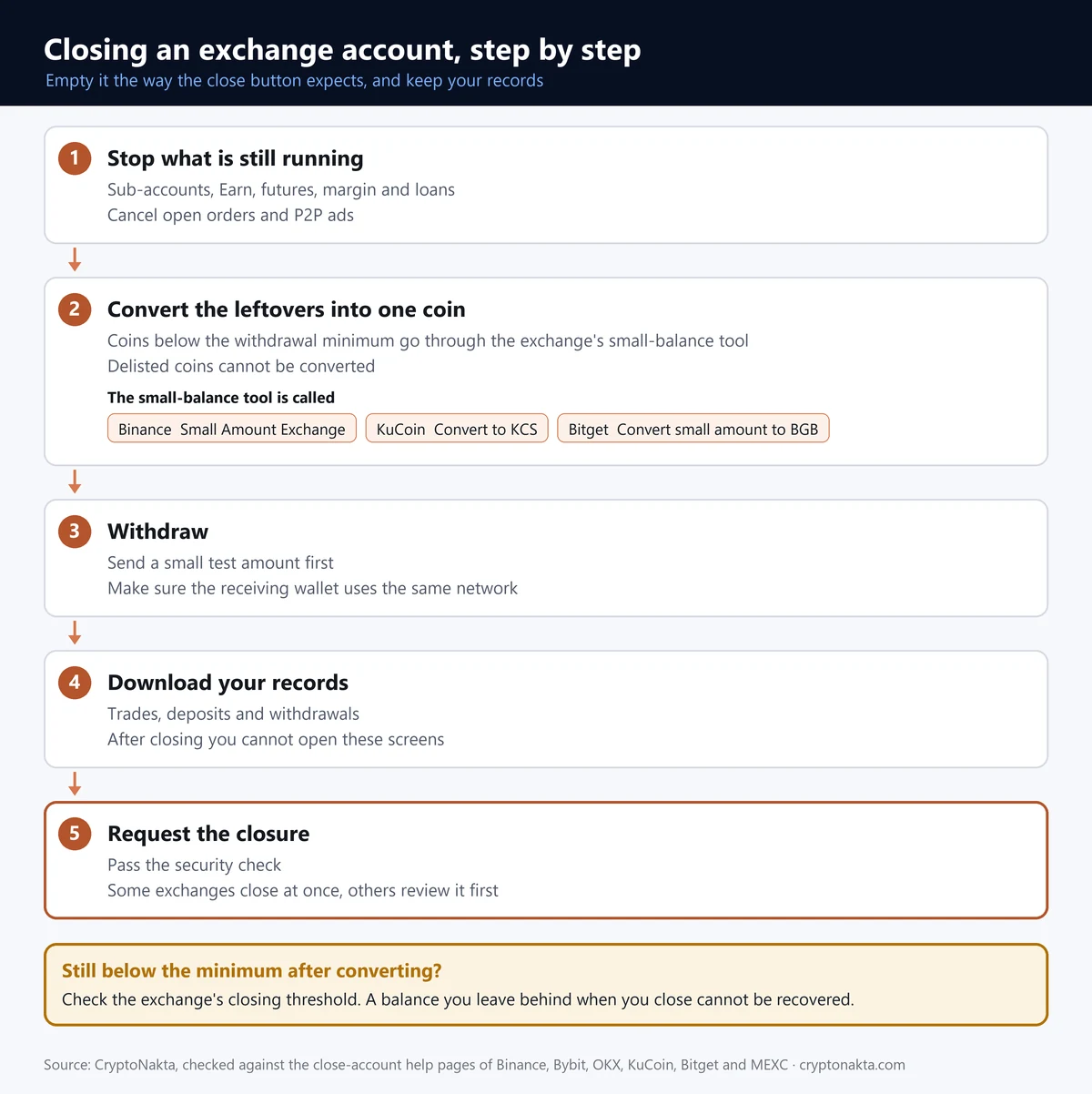
Close an exchange account from the inside out. Close sub-accounts and end anything still running, like Earn or loans. Cancel open orders and P2P ads. Then sweep dust, withdraw and save your records. Press Close last.
| Step | Check |
|---|---|
| Sub-accounts | Funds moved, each one closed |
| Earn, futures, margin, loans | Redeemed, closed, repaid |
| Open orders, P2P ads | Cancelled |
| Dust | Converted into one coin |
| Withdrawal | Small test first, right network |
| Records | History downloaded |
| Close | Reason, confirm, security check |
An open order is an unfilled buy or sell order, and it locks part of your balance. Pick a network the other side supports. That’s the blockchain the coins move on. Our wrong network guide and transfer fee comparison help here.
| Exchange | App | Website | Pause instead (reversible) |
|---|---|---|---|
| Binance | Account Center → Security → Manage Account → Close Account | Account → Security → Account Management → Close | Disable Account |
| Bybit | Same as the website (the help page does not split app and web) | Account → Delete Account → Confirm | Deactivate an Account |
| OKX | User Center → Account settings → Security → Close account | Security → Manage account → Close account | Freeze account |
| Bitget | Profile → Delete Account | Dashboard → My Profile → Close Account | Disable |
| KuCoin | Security Settings → Close Account | Account Security → Close Account | Freeze |
| MEXC | Security → Delete Account | No official wording found | No official wording found |
| Gate | Ask support (User Agreement); no self-service guide found | Ask support (User Agreement); no self-service guide found | No official wording found |
Menu names are the exchange’s own screen names from its help pages; your screen language may show different words.
Pause = a feature that locks the account so it can be reopened later. It is not closing.
Bitget says Delete Account in the app and Close Account on the web. MEXC’s help page shows only the app path. Menu names change with your app language.
Other exchanges add their own steps. OKX won’t close until an authenticator app is linked. Bybit counts sub-account balances toward its limit and wants any Bybit Card and copy trading closed first. Bitget reviews a request within 24 hours. MEXC takes up to 15 working days, and you can press Cancel Request meanwhile. Gate’s User Agreement says to ask support.
 View full size ↗
What happens to your records after you delete a Binance account?
Closing takes away your view of the account, not the exchange’s copy. Exchanges keep records for a set period after you leave. So download your history before you close.
Closing your account doesn’t make the exchange delete its records. That retention period is mostly set by law. One Bitget support article says “permanently deleted.” Its privacy notice says at least seven years, so we show both.
| Exchange | How long they keep data after you close | Your records after closing | Ask about your data |
|---|---|---|---|
| Binance | Kept for the legal retention period, then deleted (no number of years given) | Closed Account Service: email or phone code, no login; from 24 hours after closing | dpo@binance.com · Privacy Portal |
| Bybit | Kept for the legal retention period, then deleted (no number of years given) | History is no longer visible or downloadable; export it first | No official wording found |
| OKX | For as long as you are a customer, then a record-keeping period (no number of years given) | No official wording found | privacyoffice@okx.com (subject “PRIVACY REQUEST”) |
| Bitget | Privacy notice: at least 7 years after the relationship ends, dispute records up to 10 years (a support article says “permanently deleted”) | No official wording found | dpo@bitget.com |
| KuCoin | 2 years after closing; longer if a review or investigation is open | No access to data, trading history or API after closing | DataProtection@kucoin.com |
| MEXC | No official wording found | No official wording found | No official wording found |
| Gate | At least 6 years (ID, proof of address, transaction records), even after you leave | No official wording found | No official wording found |
“How long they keep data” is the exchange’s own wording. What disappears when you close is your view of the account; the exchange’s copy stays for that period.
Email addresses are as published on the exchanges’ privacy pages.
Binance’s Closed Account Service lets you get your history without logging in. People often search for it as the deleted account service. Use the closed account’s email or phone, from 24 hours after closing. For personal data requests, Binance lists dpo@binance.com. Bybit and KuCoin don’t show your history after closing.
Can I delete my Binance account and create a new one with the same email or ID?
You can usually open a new account later. But there’s a wait, and old limits follow you. Binance says a new account’s identity check “may be blocked for 30 days or longer.” Bybit allows a new sign-up after 24 hours, and Bitget after 30 days.
| Exchange | Wait before a new account | Same email or phone | Same identity (KYC) | Rewards and referrals |
|---|---|---|---|---|
| Binance | The new account’s identity check may be blocked for 30 days or longer | No official wording found | Having had an account suspended or terminated is a reason to refuse sign-up (Terms) | Lose eligibility for events and rewards; with a different referral relationship, lose referral rebates |
| Bybit | 24 hours after deletion | Same email or phone: up to 2 sign-ups (a deactivated account’s email or phone cannot be reused) | One set of KYC details verifies only one account | New-user rewards once only; if the old account was risk-flagged, the new one cannot get rewards; referral ties end |
| OKX | Cooling-off period, 7 days by default, for accounts that tried ID verification (can differ) | Not during the cooling-off period (phone, email or identity details) | One ID document, one verified account; an identity already on the platform cannot verify a new account | No official wording found |
| Bitget | After 30 days for the same phone number, email or ID | After 30 days | Same ID after 30 days; bank transfer with the same ID card is not available on a new account | No official wording found |
| KuCoin | No official wording found | No official wording found | One verified account per person* | No official wording found |
| MEXC | No official wording found | No official wording found | No official wording found | No official wording found |
| Gate | No official wording found | No official wording found | Multiple accounts are not allowed (User Agreement) | No official wording found |
These are the exchanges’ own rules for signing up again after closing. An exchange that says nothing here can still refuse a sign-up.
One person, one verified account is the basic rule wherever an exchange wrote it down.
* Search excerpt only: we could not open the original page.
A new account under the same identity doesn’t wipe the old account’s limits. Binance’s terms let it refuse anyone whose earlier account was suspended or terminated. Bybit says a new account can’t get rewards if the deleted one was flagged by its risk system.
KYC is the ID check. Bybit and OKX tie one identity to one verified account. OKX adds a cooling-off period before the same identity can sign up again. It’s 7 days by default. It also covers accounts whose verification was pending, failed or rejected. For a failed Binance check, see our verification guide.
Should you delete your account to change your referral code?
Closing an account to switch referral codes costs more than it returns. On Binance you lose referral rebates and event rewards. Your new identity check may wait 30 days or more. Bybit gives new-user rewards only once. Binance also lets you add a code within 30 days of sign-up, before your first deposit or trade.
We don’t recommend closing an account just to change your referral code. Your referral relationship links you to whoever’s code you used. Our guide to adding a code after sign-up shows where. Confirm the conditions on Binance’s screen. We use referral codes too, so we put the costs first.
How to delete a Binance account without login or after losing 2FA
If you can’t log in, get access back before you close anything. Binance, Bybit and OKX all end the close flow with a security check. Binance has “Security verification unavailable?” for resetting lost 2FA, the second code after your password.
| Situation | First step |
|---|---|
| Lost 2FA (Binance) | Reset it, then close |
| Can’t log in (Bybit) | Lock the account by email; this is not deletion |
| No authenticator (OKX) | Link one first |
| Verification failed | Closing does not clear it |
| Hacked | Lock first, then contact support |
After a Binance 2FA reset, withdrawals pause for up to 48 hours. Our 2FA guide covers the reset. If you were hacked, follow our hacked account guide. Fake support numbers show up in search, so check contacts on Binance Verify.
What we measured, and what we couldn’t
We pulled withdrawal settings for the top 100 coins from the public APIs of Binance, KuCoin and Bitget. The snapshot is from November 12, 2026, 11:17 UTC. For each coin we used the open network with the smallest minimum.
| What | Value |
|---|---|
| Measured at | November 12, 2026, 11:17 UTC |
| Source | Binance, KuCoin and Bitget public APIs (no key): withdrawal settings per coin and network, USDT-pair prices |
| Coins measured | top 100 USDT pairs by trading value; measured: Binance 93 · KuCoin 99 · Bitget 95 |
| USDT pairs listed | Binance 518 · KuCoin 804 · Bitget 500 |
| Minimum to withdraw | the larger of the minimum withdrawal amount and the fee, times the last USDT-pair price (USDT = $1); cheapest open network per coin |
| Binance default network | coins with an open default network: 87 |
| Withdrawals closed on every network (top 100 / all USDT pairs) | Binance 7 / 67 · KuCoin 1 / 5 · Bitget 5 / 15 |
| Not measured | Bybit · OKX · MEXC · Gate (the same data is not available without an API key) |
| Help pages and terms compared on | November 12, 2026 |
Values move whenever an exchange changes its withdrawal settings or prices change; read them as of November 12, 2026, 11:17 UTC.
They are lower bounds: the receiving side must accept the network we picked.
We measured only Binance, KuCoin and Bitget. Bybit, OKX, MEXC and Gate need an API key for this data. Rule pages we saw only as search excerpts carry an asterisk.
My take after reading every close-account page
The surprise was dust. Exchanges say to empty the account, yet on Bitget small amounts can’t leave. So go in order: convert dust, withdraw, save your history, then close.
Two things make me wary. One is an email saying your account will be shut that asks you to verify through a link. The other is advice that a fresh sign-up or a KYC reset wipes old limits. The official pages say otherwise.
Closing an unused account is a fair choice, since it’s one less login to leak. If you might return or only suspect a break-in, a pause fits better.
This site uses referral codes, and we earn a commission when you sign up with ours. With our Binance code, you get back 10% of the spot fees you pay. That’s why we don’t suggest closing to switch codes. If you’re moving, pick an exchange that states its balance rule in numbers. Then check it is legitimate.
Binance

Affiliate disclosure: some links are partner links. We may earn a commission at no extra cost to you. This is not investment advice.
CRYPTONAKTA
Questions people ask about deleting an exchange account
- Binance FAQ: how to close your account · checked November 12, 2026
- Bybit help: how to delete an account · checked November 12, 2026
- Bybit help: how to deactivate your account · checked November 12, 2026
- OKX help: how do I close my account (web) · checked November 12, 2026
- Bitget support: how to delete your account (website) · checked November 12, 2026
- KuCoin support: how to disable or close your account · checked November 12, 2026
- MEXC support: how to cancel your account · checked November 12, 2026
- Binance Privacy Portal · checked November 12, 2026
- Bitget Privacy Notice · checked November 12, 2026
- Gate User Agreement · checked November 12, 2026
- Binance FAQ: converting small balances · checked November 12, 2026
- Bitget support: converting small balances · checked November 12, 2026
- Binance FAQ: account deactivation notice · checked November 12, 2026
- Binance Closed Account Service · checked November 12, 2026
- Binance Verify · checked November 12, 2026
- Binance FAQ: resetting 2FA without account access · checked November 12, 2026
Not investment advice. Exchanges change their rules, so check the exchange’s own screen before you close.