You set a stop loss, it triggered, and nothing was sold
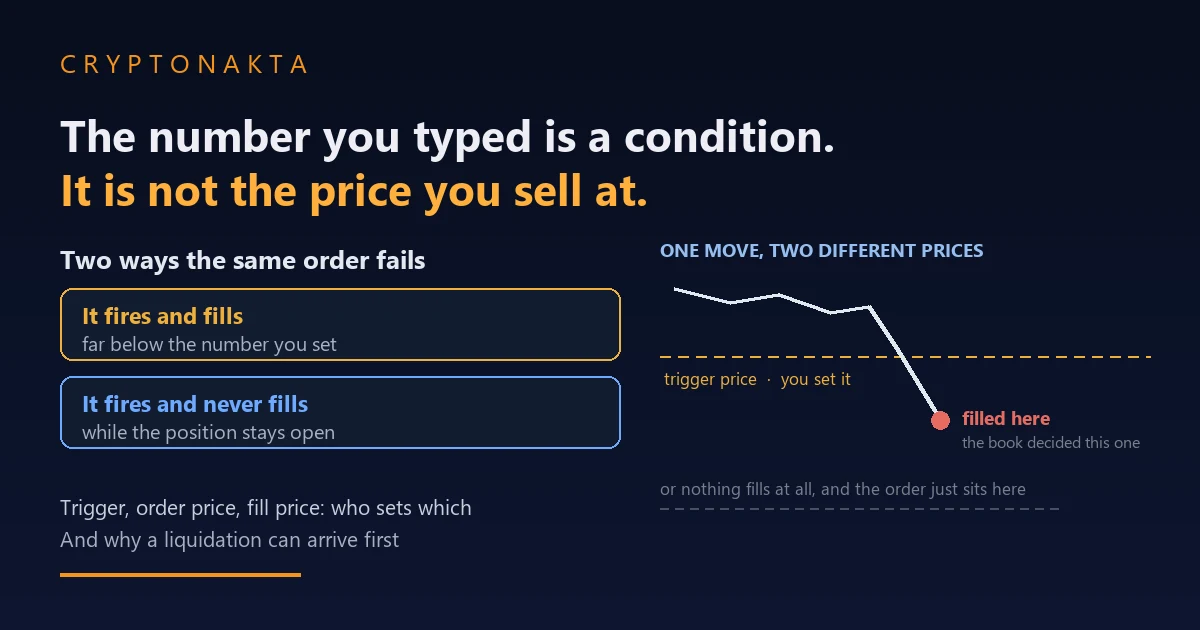
The number you type into a stop order is a condition for sending an order. The price you receive is decided somewhere else.
| The question people arrive with | What actually decides it |
|---|---|
| Did my stop fire? | The reference price the order was reading, which may not be the series on your chart |
| It fired, so why did nothing sell? | What fired is an ordinary order. Depth, queue position and the balance check all apply again |
| Will a stop limit order hold my price? | Yes, and that is also how it ends up selling nothing when the market passes it |
| Can a stop keep me out of liquidation? | No. Two separate procedures, and whichever reaches the position first decides the outcome |
1. Your stop triggered, and the position is still open
2. Which price the exchange is actually watching when it tests your condition
3. One click, three prices, and only two of them are yours
4. Same screen, different defaults: last price on one order, mark price on the next
5. It fired and nothing sold: what to check, and in what order
6. After the trigger: the same depth, the same queue, the same rules
7. The stop market order carries a tolerance, and it can leave a remainder
8. What each order type guarantees, and where each one fails
9. The checks that can cancel a stop order at the moment it fires
10. Liquidation is a separate procedure, and spot does not have one
11. Trailing stops follow a price recorded after you submit
12. Paired orders, and stops attached to only part of a position
13. What a stop order does, and what it does not do
14. Terms on the order ticket, defined once
A stop order involves up to two numbers you type and one you never see until it is over. The trigger price is a condition. The limit price, if the order has one, is a boundary. The fill price is produced by the order book at the moment the order arrives, and it is the only one of the three that describes what happened to your money. The order behaviour here comes from the exchanges’ own documentation, and nothing here tells you where to place a stop or whether to use one.
1. Your stop triggered, and the position is still open
You opened a position, you set a stop, and the market moved the way you did not want it to. Later you open the order history and the stop is marked as triggered. The position is still open. Nothing sold. No error message, nothing that looks broken.
The order did what it was built to do. The name reads as an instruction to sell, and the number saved on the order is a condition for submitting one. A stop order does not carry an instruction to sell at a price. It carries a condition: when the price the exchange is watching reaches this level, send an order to the book. Sending an order and completing a trade are two separate events, and this article is about what happens between them.
Nothing here says a stop order is useless. When the condition is met the order goes out immediately, at any hour, whether or not you are at the screen, and the exchange records the time it fired along with the settings behind it. Those are real advantages and they are worth having. The problem is only that people read the number they typed as a promise about the fill price, when that number is the condition for sending the order.
2. Which price the exchange is actually watching when it tests your condition
The chart clearly traded through your level and the order never fired. Or the opposite: your level looks untouched on the candles you were watching and the order fired anyway.
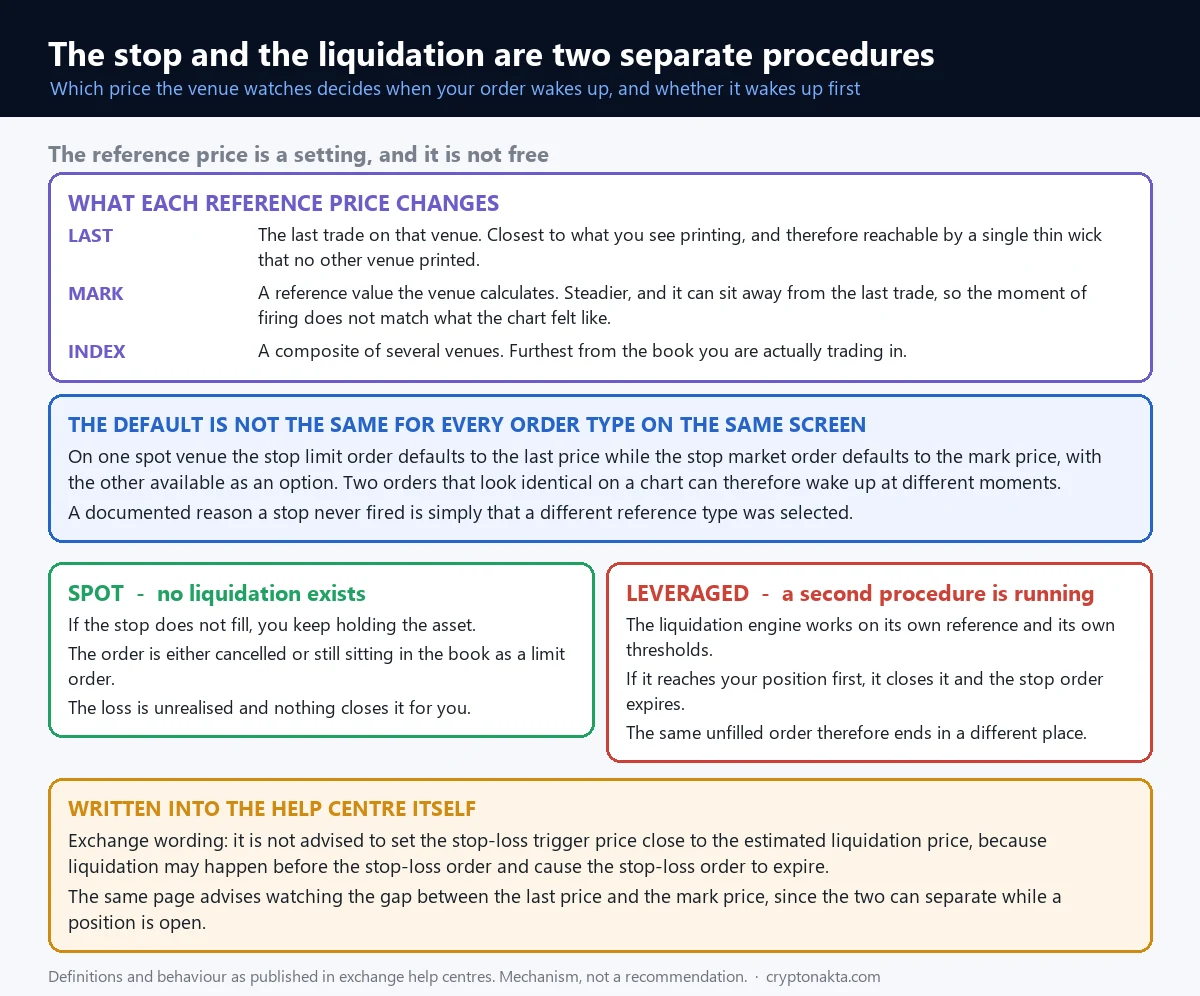
The condition on a stop order is not tested against the chart on your screen. It is tested against one specific price feed, chosen on the ticket, and there is usually more than one to choose from.
| Reference price | What it is | What you take on by choosing it |
|---|---|---|
| Last price | The most recent trade printed on that exchange | A single thin print in an illiquid moment is enough to meet the condition, even if nothing else traded there. |
| Mark price | A reference price built to reflect several markets rather than one book | It can sit away from the last trade you can see, so it fires earlier or later than the screen suggests. |
| Index price | A composite drawn from prices across multiple exchanges | It is the furthest of the three from the book you are personally trading in. |
Bybit offers all three on conditional orders and on position TP/SL. Binance futures lets the stop loss trigger read last price or mark price. OKX allows a reference type to be picked on trigger orders as well, and it lists the mismatch as the first item on its own page explaining why a TP or SL did not execute at the set price: the reference price type was different, so the condition was never actually met.
None of the three comes without a cost. Reading the last price means the condition tracks exactly what you see and also reacts to prints nobody else acted on. Reading the mark price means the condition ignores those prints and also stops matching the number on your chart, and reading the index price puts the condition on a series further still from the book you are trading in. Binance’s own futures documentation tells traders to keep watching the difference between last price and mark price for precisely this reason.
3. One click, three prices, and only two of them are yours
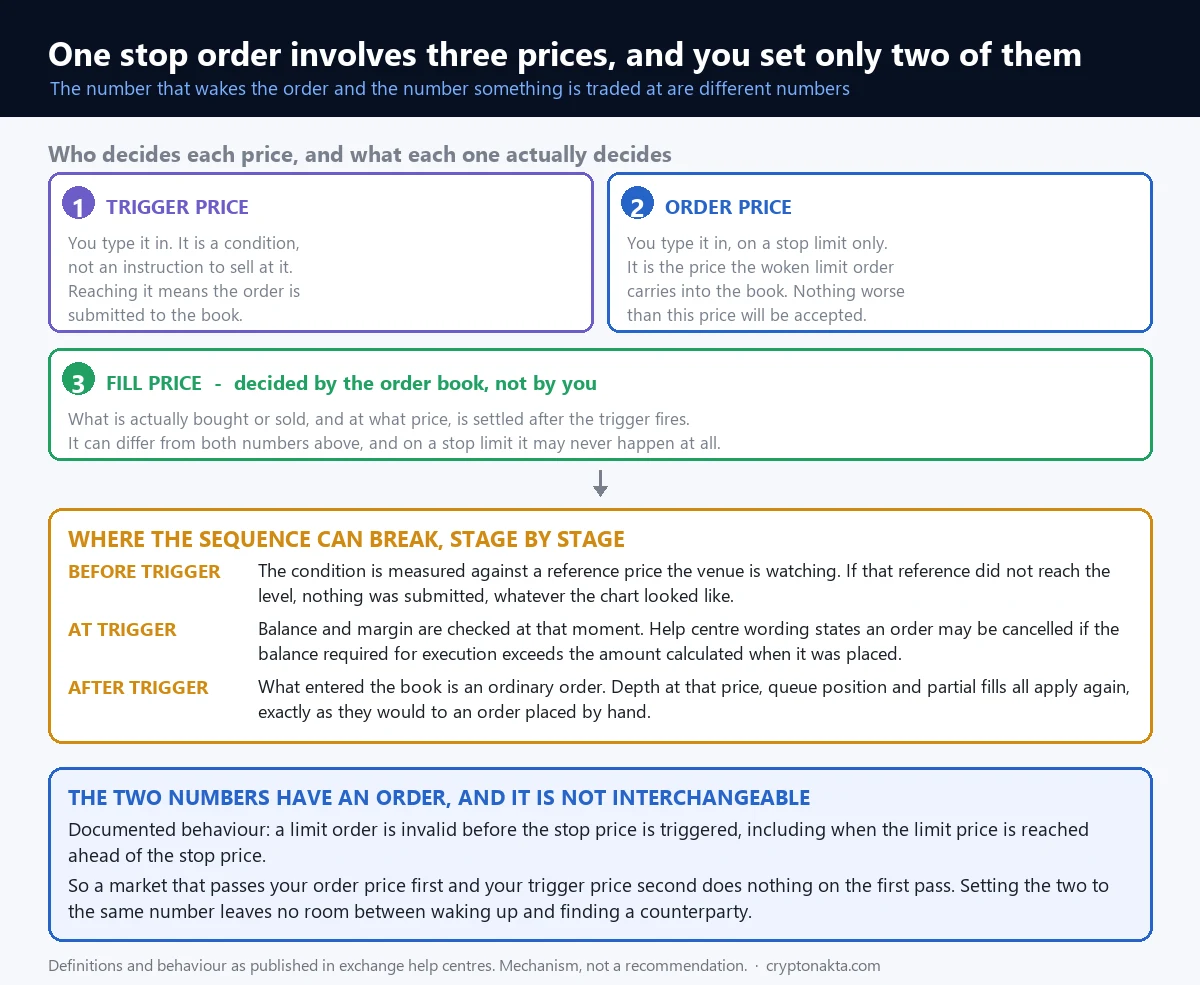
The reference price decides when the order gets submitted. It has nothing to say about the price you trade at, and that is a separate number again. Typing a stop feels like setting one number. Up to two of them are yours, and the order book sets the third.
| Number | Who sets it | What it decides |
|---|---|---|
| Trigger price (also called the stop price) | You type it | The moment the order is submitted to the book. It says nothing at all about the price you end up trading at. |
| Limit price | You type it, on a stop limit order only | The price the submitted order rests at. Nothing worse than this will trade for you. |
| Fill price | The order book decides | What actually changed hands. It can differ from the trigger price, and on a stop limit order it can never arrive at all. |
Binance states the relationship between the first two in one line on its stop limit help page: the stop price is the price that triggers the limit order, and the limit price is the price of the limit order that is triggered. Neither of those two numbers is the price at which a trade happens.
The third number is the one nobody types. A fill price comes from the orders resting on the other side of the book at that instant, and from how much size those orders carry. Two people can set the same trigger on the same pair and end up with different fills, because the book was not the same in the second each order arrived.
The two numbers you type run in a fixed order
Binance puts it plainly in its own documentation: a limit order is invalid before the stop price is triggered, including when the limit price is reached ahead of the stop price. The limit price is not a second condition and it is not watched. Until the trigger condition is met, the exchange is not looking at your limit price for any purpose whatsoever.
On a sell order with the trigger set below the limit price, price falls, passes the limit level and keeps going, and nothing happens, because the trigger has not been reached. Price then reaches the trigger, the order is submitted, and what arrives is a sell limit sitting above the current market. That order may or may not fill, depending on where the book is by then.
With the trigger above the limit price, the sequence runs differently. Price falls, reaches the trigger, and the sell limit that goes to the book sits below the current price. As long as the market is still trading at or above that limit, it trades. The gap between the two numbers is the amount of room the order has to work with once it exists.
Binance’s help page describes that second arrangement in its own guidance, calling it “safer” to place the stop a little above the limit for a sell and a little below the limit for a buy. When the two numbers are identical, the order arrives at the book at the very level the market is already leaving, and there may be nothing left on the other side by the time it is processed.
This article assumes you already know what a plain limit order and a plain market order do. If those two are still fuzzy, read the guide to crypto order types first, because everything after the trigger is just those two orders behaving the way they always behave.
4. Same screen, different defaults: last price on one order, mark price on the next
This is the detail that makes two orders on the same pair, placed the same day by the same person, behave differently. The default reference price is set per order type, so an order whose trigger settings you never opened is running on whatever the default for its type is, and switching order type on the same ticket can switch the price the condition reads.
What the venues offer
| Venue | Stop-family orders | Reference price selection |
|---|---|---|
| Binance spot | Stop limit, stop market, trailing stop, OCO | Stop limit defaults to last price, stop market defaults to mark price |
| Binance futures | Stop loss and take profit, in market or limit form | Last price or mark price |
| Bybit | Conditional market, conditional limit, position TP/SL | Last, index or mark price |
| OKX | Trigger orders and TP/SL | Several reference types, plus a 5% protection threshold |
Treat that table as a snapshot of screens and nothing more. What does not change is the structure underneath: a condition, a reference price the condition reads, an order that gets submitted, and a book that decides the rest. Order types visible on your ticket also vary by region, so check what your own account shows rather than what a screenshot shows.
If you want the wider tour of what sits on a single exchange ticket, the feature walkthrough covers it, and the exchange comparison covers who offers what.
Binance

Bybit

OKX

Gate.io

MEXC

KuCoin

Affiliate disclosure: some links are partner links. We may earn a commission at no extra cost to you. This is not investment advice.
5. It fired and nothing sold: what to check, and in what order
Something happened and the position is still open. Five different failures look the same from there, and each one is confirmed on a different screen. The reference price mismatch above is the first of them, and the sections after this one take the other four apart.
| What you see | What it usually means | Where to confirm |
|---|---|---|
| No trigger event recorded at all | The condition was tested against a reference price that never reached your level | The trigger settings saved on that order in the order history |
| Triggered, but no execution | The market passed the limit price and the order is still resting behind it | The open orders list, where the limit order should still be visible |
| Only part of the size sold | There was not enough resting size at that level, or your order lost the queue | The fills or trade history tab on that order, showing partial executions |
| The order disappeared | Canceled for insufficient balance or margin when it fired, or by a protection threshold | The cancel reason recorded on that order in the order history |
| Liquidated instead of stopped out | The liquidation procedure reached the position first and the stop expired | The liquidation record, and the expiry marker on the stop order itself |
Work through it in this order
Start with the order history entry for the stop itself and read the saved settings, not your memory of them: reference price type, trigger price, limit price if there is one, quantity, status. That single record settles the difference between never fired, fired and canceled, and fired and unfilled, which is most of the diagnosis.
If the status says it fired, check the open orders list next. A resting limit order there means the trigger worked and no size was available at your limit price, and it also means you still have a live order to deal with, which is a decision you have to make rather than a thing to leave running.
Only after those screens does it make sense to look at the chart, and by then you are checking one thing: what your reference price feed did, rather than what the candles on your default view did. Those are different series, and the order read only one of them.
6. After the trigger: the same depth, the same queue, the same rules
The trigger fires. From that instant the stop order stops being special. What arrives in the book is an ordinary order, and every rule that governs ordinary orders applies again from scratch.
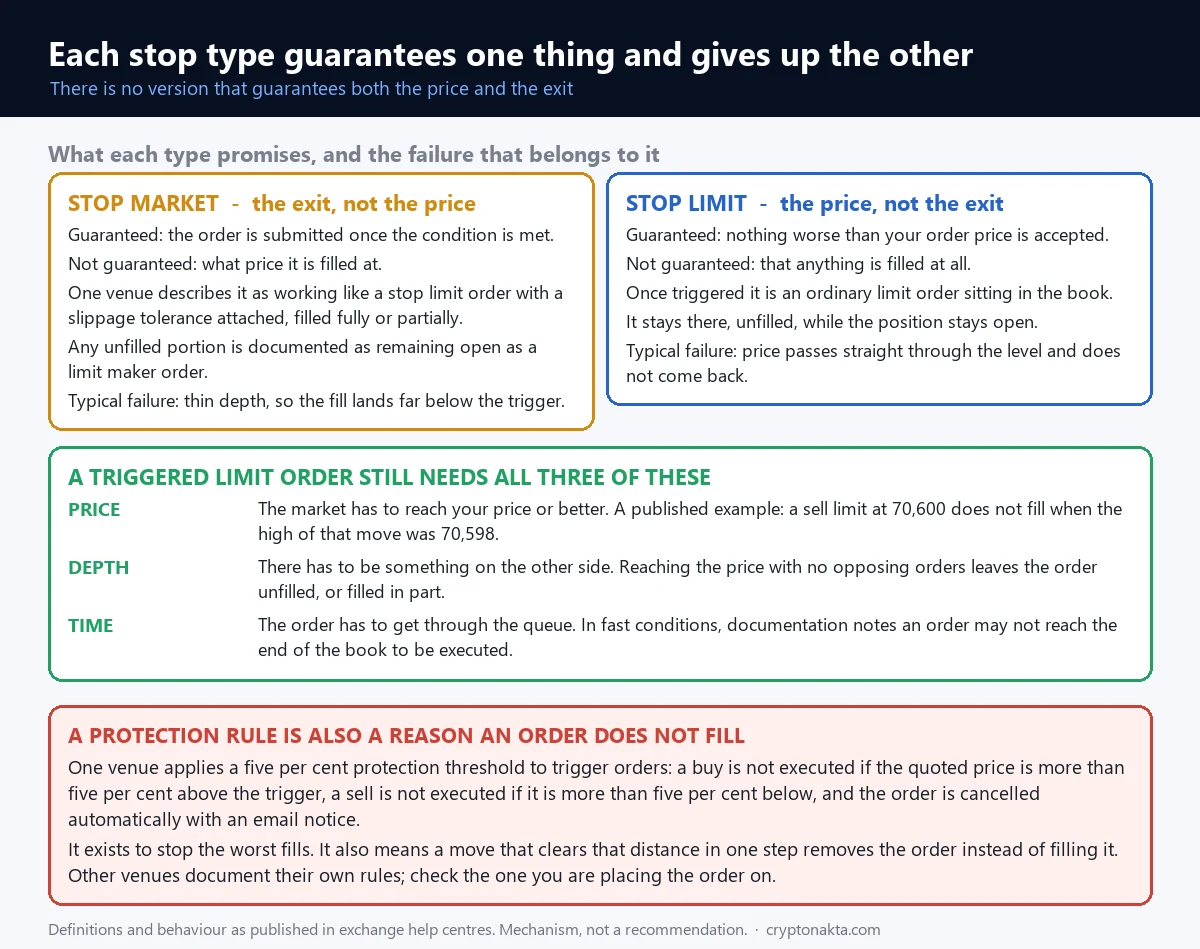
Binance lists three conditions for a limit order to fill, and they apply to a triggered stop limit exactly as they apply to one you placed by hand. First, the market price has to reach your limit price or something better. Second, there has to be enough liquidity, because a price being reached is not the same as size being available there. Third, there has to be enough time, since in a fast move an order may not get all the way through the book before the level is gone.
The example in their documentation covers the first of those three on its own. A sell limit sits at 70,600 USDT. The highest price traded in that window is 70,598 USDT. The market never reached the limit price, so nothing fills. Not partially, not eventually. The order keeps resting while the market goes elsewhere.
Queue position and partial fills
Order books match on price first and time second. When your triggered order joins a level, it joins behind everything already resting there. If the size on the other side runs out before your turn arrives, you get nothing, and if it runs out halfway through your order, you get part of it. OKX names both outcomes explicitly in its list of reasons a TP or SL did not execute at the set price: insufficient depth or volatility producing a partial fill, and losing out on price and time priority to other orders.
The stops sitting at the same levels as yours
People choose stop levels by reading the same chart features: just under a recent low, just above a recent high, round numbers. So the orders cluster in the same narrow bands. When several sell stops in one band meet their condition, most arrive as market or slippage-tolerant orders, they consume the bids resting there, and the price prints lower. That lower print meets the next band of triggers, which prints lower again.
That sequence says nothing about anyone’s intent. It only describes what the orders do: a batch of them arriving together uses up the size resting on the other side of that band, and the fills come from whatever is left underneath.
7. The stop market order carries a tolerance, and it can leave a remainder
The name suggests a market order with a condition attached. The documentation describes something more careful than that, and the difference matters when you work out why a fill landed where it did.
Binance describes its stop market order as designed to function similarly to a stop limit order by incorporating slippage tolerance. The order that reaches the book carries that tolerance with it, so it stops short of taking whatever price the book happens to offer. It fills fully or partially inside the tolerance, and then, in Binance’s own words, any unfilled portion will remain open as a limit maker order.
A stop market order can leave a leftover resting on the book. If you sold into a fast move and the tolerance was reached before your whole size was done, the rest stays on the book as a limit order at a price the market has already left, and until something trades against it that part of the position is still open.
Where slippage comes from
Slippage is the difference between the price quoted when the order went out and the price it actually traded at. It is not a fee and it is not a malfunction. It happens when the size you are selling is larger than the size resting at the best price, so the order works down through the next levels of the book until it is done.
In a thin book, or in a moment when many orders arrive together, the order works down through far more levels than it otherwise would. How far it goes is not knowable in advance.
Bybit’s own help page for conditional orders states two limits in short phrases. On the conditional market variant: no control over execution price. On conditional orders generally: no guarantee on order execution, as it is subject to market price movement and liquidity.
8. What each order type guarantees, and where each one fails
Put the two order types side by side and the question stops being which one is better. On one the price is fixed at your limit and a trade may never happen; on the other a trade usually happens with no guarantee on the price.
| Property | Stop market (conditional market) | Stop limit (conditional limit) |
|---|---|---|
| Firing when the condition is met | Yes | Yes |
| A trade actually happening | Usually, but no guarantee | No guarantee |
| The price you receive | No guarantee | Your limit price or better |
| Typical failure | Fills far away from the trigger price | Nothing fills at all and the position stays open |
| Leftover quantity | Remainder rests as a limit maker order (Binance) | Stays on the book as an ordinary limit order |
| Balance or margin short at the moment of firing | Can be canceled | Can be canceled |
A trigger is not a fill on either row of that table. What differs is which half of the outcome you keep control of. On a stop market order you decide when it fires and the book decides the price, and on a stop limit order you decide the price and the book decides whether a trade happens at all.
Two failure modes, not one problem
The stop market failure is visible immediately. A trade usually does happen, so what you see first is where it happened: a fill much worse than the number you typed, and a loss on the statement larger than the one you sketched when you placed the order.
A stop limit order may not fill at all, and that failure is invisible while it is happening. The order fired, so the history shows activity. The limit order is resting behind the market and it is not going to trade there. The position is still open the whole time, and if this is a leveraged position it is still moving.
Which failure is worse depends on what you were trading and what else you had open.
9. The checks that can cancel a stop order at the moment it fires
Firing is not the last checkpoint. At the instant the condition is met, the exchange runs the same validations it would run on any order you submitted by hand, and any of them can end the order right there.
The balance and margin check
Binance states it about its stop market order in a single clause: the order may be canceled if the required balance for execution exceeds the initially calculated balance. What execution needs is worked out again when the condition is met, and it is compared with the figure calculated when the order was saved. If the account cannot cover it at that moment, the order does not go out.
On spot this usually comes from the asset being locked somewhere else: an earn product, another wallet, another order, or an OCO leg holding it. On a leveraged account the same shortfall arrives through margin: the available margin at the moment of firing is not what it was when the order was placed, because the unrealised loss on the position has been consuming it. Whether that consumption is walled off inside one position or drawn from the whole account depends on your margin mode, which is covered in the isolated versus cross margin guide.
OKX lists a matching item among its reasons a TP or SL did not execute: exceeding a quantity limit, or insufficient margin at the moment of triggering.
The protection threshold
OKX documents a 5% protection threshold on its trigger orders. On a buy, the order does not execute if the quote is more than that above the trigger price. On a sell, it does not execute if the quote is more than that below the trigger price. Cross the threshold and the order is canceled automatically, with an email notification.
Read what that does in both directions. It keeps the order from filling far away from your trigger, which is the point of having it. It also means that in a move fast enough to jump straight past the threshold, the order is canceled at the exact moment it was supposed to work, and the position stays open with nothing attached to it.
10. Liquidation is a separate procedure, and spot does not have one
On a leveraged position there is a second process running that has nothing to do with your order. It has its own trigger, its own reference price and its own timing, and it does not wait for anything you placed.
Binance’s futures help page states the interaction directly: it is not advised to set the stop loss trigger price close to the estimated liquidation price, because liquidation may happen before the stop loss order and cause the stop loss order to expire. Two separate procedures, one arrives first, and the one that arrives second does not get to run.
The order of events matters more than either number on its own. If the stop condition is met first and the order fills, the position closes on your terms. If liquidation reaches the position first, it closes on the venue’s terms and your stop order is marked expired. In the order history they are completely different events with different records attached, which is the first thing to check when you are reconstructing what happened. The mechanics of the second one are covered in the guide to why positions get liquidated.
A stop order does not remove the liquidation procedure from a leveraged position. Which of the two reaches the position first depends on where the trigger sits, which reference price it reads, and how fast the move was.
Spot has no second process
| Spot | Leveraged | |
|---|---|---|
| If the order does not fill | You keep holding the asset | The position stays open and the loss keeps moving |
| Forced closing procedure | None | A separate liquidation procedure runs |
| Weight of the reference price choice | Affects when the order fires | Affects the timing, and the order in which the stop and the liquidation are reached |
| Cost of leaving it open | Whatever the asset does next | Whatever the asset does next, plus funding on a perpetual |
In spot, a stop that fires and does not fill leaves you holding the coin you already owned, with an order either canceled or resting on the book. That is unpleasant and it is not urgent, because nothing steps in to close it for you. If spot and leverage are still blurring together, the spot versus futures explainer separates them, and the buying side of spot is covered in the guide to buying bitcoin.
In a perpetual, the same unfilled order leaves an open position that keeps settling funding while it sits there, on top of whatever the price does next.
11. Trailing stops follow a price recorded after you submit
A trailing stop replaces the fixed trigger with a moving one. The number you type is a distance rather than a level, and the level gets recomputed as the market moves in your favour.
Binance’s spot implementation takes the distance as a trailing delta expressed in basis points. On the sell side, the exchange records the highest price reached after the order was submitted, and the condition is met when price falls from that recorded high by the distance you set. On the buy side it records the lowest price reached after submission and fires when price rises from there by your distance. The distance you can set has a minimum and a maximum, and both depend on the pair.
Two details that change how it behaves
The first is the word after. The tracking starts from the moment the order is submitted, not from where you entered the position and not from the high the market printed last week. If you attach a trailing stop after a move has already happened, the reference it is tracking begins wherever the market is now.
The second is what happens at the end. The trailing part only concerns the condition. When the condition is met, an ordinary order is submitted and everything from the earlier sections applies again: available depth, queue position, partial fills, the balance check. Binance’s spot trailing stop works through a limit order once it fires, so a non-fill remains entirely possible. Moving the trigger around does not change what happens after it is hit.
12. Paired orders, and stops attached to only part of a position
A few arrangements come up constantly on tickets, and each one is easy to misread as more complete than it is.
Paired orders
An OCO on Binance spot places a limit order and a stop limit order as one unit. When one of them triggers, the other is canceled. Bybit’s TP/SL works on the same principle on an open position: the take profit and the stop loss are attached together, and when one fires the other is canceled.
What the pairing gives you is the cancellation, which keeps both sides from acting and leaving you with an accidental position in the opposite direction. It says nothing about whether the side that fired went on to trade. If the stop leg fires into a market that has already moved past it, the take profit leg is now gone, the stop leg is resting unfilled, and the position is open with nothing attached to it. The canceled leg does not come back.
Stops attached to part of a position
Bybit lets a TP/SL apply either to the whole position or to the quantity of the current order. The two behave differently. Attached to the full position, one trigger closes everything. Attached to a partial quantity, it closes that quantity and leaves the rest exactly as it was, still open and still moving. The order you believed covered the whole position never covered that part of it.
This one shows up most often after somebody has added to a position in several pieces, since the total then runs larger than any single attachment covers. Each attached order stores the quantity it covers, and that stored value is what applies when it fires.
A bot or a copy trade does not place a stop for you
The same reasoning applies to anything that opens positions on your behalf. A grid bot runs the entry and exit rules of the grid, and it does not place a position-level stop unless you configure one, because that is not what a grid is. In copy trading, the exit conditions belong to whoever you are copying and to whatever the platform’s settings say, not to an assumption on your side. If you want a stop to exist, somebody has to place it, and every condition above then applies to it like any other order.
13. What a stop order does, and what it does not do
The whole of it in one table: the work a stop order does, and the work it does not do.
| It does | It does not |
|---|---|
| Submit an order the moment your condition is met, at any hour, without you watching | Sell at the number you typed |
| Execute without emotion entering the decision | Fix the size of the loss you will take |
| Leave a timestamped record of when it fired and the settings behind it | Create liquidity that is not present in the book |
| Get placed somewhere ahead of the liquidation price if that is what you want | Promise that it reaches the position before liquidation does |
Four things people say about stops that are not true
A stop market order will always get me out. It will not. It goes out with a slippage tolerance, it can fill in part, the remainder can rest as a limit maker order, and it can be canceled outright when the balance required at the moment of firing exceeds what the account has. Each of those is in Binance’s own documentation.
Setting a stop fixes my loss. What is fixed is the condition, meaning the level at which an order gets sent. The amount you actually lose depends on the fill, and the fill is produced by the book.
A stop keeps me from being liquidated. It does not, because the liquidation procedure runs on its own trigger and does not read what you attached to the position. When it gets there first, the order history holds a liquidation record and the stop order sits beside it marked expired.
It sells at the price I set. The price you set is the condition. The price you receive is whatever the other side of the book was offering at that moment, which on a stop limit order can be nothing at all.
None of this is an argument against using stops. An order that goes out the instant its condition is met does something a person watching a screen cannot do reliably. Knowing the mechanics is what lets you read the result correctly afterwards.
14. Terms on the order ticket, defined once
Nine words that appear on stop order tickets and in the help pages, each defined once, in the sense the exchanges use them. Everything above uses them in exactly this way.
Trigger price (stop price). The level that must be reached, on the chosen reference price, for the order to be submitted to the book. It carries no information about the price you will trade at.
Limit price. The price the submitted order rests at on a stop limit order. A boundary on how bad a fill you accept, and the reason a stop limit order can trade nothing.
Fill price (execution price). The price at which a trade actually happened. Produced by the book, not by the ticket.
Slippage. The distance between the price quoted when an order went out and the price it traded at. It comes from the order being larger than the size resting at the best price, so it works through deeper levels.
Mark price. A reference price built to reflect more than one market rather than the last print on a single book. Used for the trigger comparison on many order types, and truncated to the instrument’s price precision when applied.
Index price. A composite price drawn from several exchanges. The furthest of the three options from the book you are trading in.
Partial fill. An order that traded some of its quantity and still has the rest open. Easy to miss on a stop, because the position size changes and the order stays alive.
Price-time priority. The rule order books use to decide who trades first: better prices go ahead of worse ones, and among equal prices, whoever arrived earlier goes ahead. It is why an order sitting at exactly the right level can still be skipped.
Conditional order. The general name for any order that stays out of the book until a condition is met. Stop limit, stop market, trigger orders and position TP/SL are all forms of it.