Your Stop Order Triggered, Sold Nothing, and Worked Exactly as Designed
Limit, market, stop-limit, post only, IOC, FOK, OCO and trailing: what each one guarantees, what it quietly gives away, and why the book decides the price no matter which you press.
Six sentences that people repeat about order tickets, and what the matching engine is actually doing in each case. Every row opens into its own section below.
| What gets said | What the machinery does |
|---|---|
| “A market order fills at the price on the screen.” | It fills at whatever the book holds, level by level, until the quantity is complete. The average of those fills is your price, and the difference is absorbed silently. |
| “My limit order was first, so it should have filled.” | Orders are matched by best price, then by who arrived first at that price. Editing the price generally sends the order to the back of that queue. |
| “The maker fee is for professionals.” | Maker or taker is decided by the order, not by the account. Any resting limit order that is later matched is charged the maker side. |
| “My stop was in the book, ready to sell.” | A stop is a condition the venue holds. It has no queue position and nobody can see it. The real order is created at the instant it triggers. |
| “The stop triggered, so I am out of the trade.” | A stop-limit can trigger and leave a limit order resting unfilled behind a market that has already moved. Nothing was sold and the position is still open. |
| “The exchange rejected my order for no reason.” | Every symbol publishes a tick size, a step size, a minimum notional and a price band. A rejection is almost always one of those four. |
The line to carry out of here: you choose the order, the book chooses the price, and each order type just decides which of those two you are allowed to pin down.
1. The tabs on the ticket that most accounts never open
2. Two guarantees, and the rule that you only ever get one
3. What the book is doing while your limit order waits
4. A market order buys immediacy and pays for it in depth
5. Maker or taker is decided by the order, not by the account
6. What happens to the part that did not fill
7. A stop is a condition the venue holds, not an order in the book
8. Stop-limit and stop-market: choosing which failure you prefer
9. Which price the trigger watches, and when it is suppressed
10. Orders that watch each other: OCO, OTO, brackets and trailing
11. The five rules that get an order refused before the book sees it
12. What to check before pressing, and how to read the fills after
13. Glossary: fourteen terms that cover the whole ticket
Most accounts use two buttons on the order ticket and never open the tabs beside them. That is enough to trade, and it is also why a certain set of surprises keeps repeating: a purchase that averaged worse than the number on the screen, a sell order that sat there while the price came back, a stop that fired into a crash and sold nothing at all, an order the exchange refused with a message about notional value. None of those are platform faults. They are what the machinery does when it is given a particular instruction, and each one has a name written on a tab you have not pressed. This guide goes through the ticket one instruction at a time: what each type guarantees, what it quietly gives away, what the order book does with it, and what the exchange checks before it accepts it. If you are new to the difference between owning a coin and trading a contract on it, spot versus futures is the plainer ground, and the two costs that arrive without a button being pressed are covered in funding and liquidation.
1. The tabs on the ticket that most accounts never open
Open a trading screen on any venue and the ticket has the same anatomy. There is a side, buy or sell. There is a quantity. There is a price field that may or may not be editable. Above them sits a row of tabs, usually starting with limit and market, then continuing into stop-limit, stop-market, sometimes a bracket tool, sometimes a scheduled order. Underneath, in smaller type, are checkboxes: post only, reduce only, and a dropdown for time in force with three or four abbreviations in it.
That layout is not decoration. Each control removes one piece of discretion from you and hands it to the exchange, or takes one back. The whole ticket is a set of instructions about a single question: what should happen if the market does not do exactly what you assumed at the moment you pressed send.
- The price field answers what to do if the market is not where you want it. Fill anyway, or wait.
- Time in force answers what to do with the part of the order that could not be filled immediately. Keep it working, cancel it, or refuse the whole thing.
- Post only answers what to do if your order would trade instantly against something already resting. Trade, or withdraw.
- The conditional tabs answer what to do later, when a price you named is reached and you are not watching.
- Reduce only answers what the order is allowed to do to your position: shrink it, or also open a new one.
Nobody needs all of them. The point of knowing what each one does is narrower than that: when a fill comes back wrong, the explanation is nearly always sitting in one of these controls, set to a default you never chose. The rest of this guide unfolds them in the order the book itself imposes, starting with the trade-off that every single one of them is built on.
2. Two guarantees, and the rule that you only ever get one
An exchange does not sell you an asset. It matches your order against orders other people have already placed, which sit in a list called the order book. Everything else follows from that one fact, including the constraint that shapes the entire ticket.
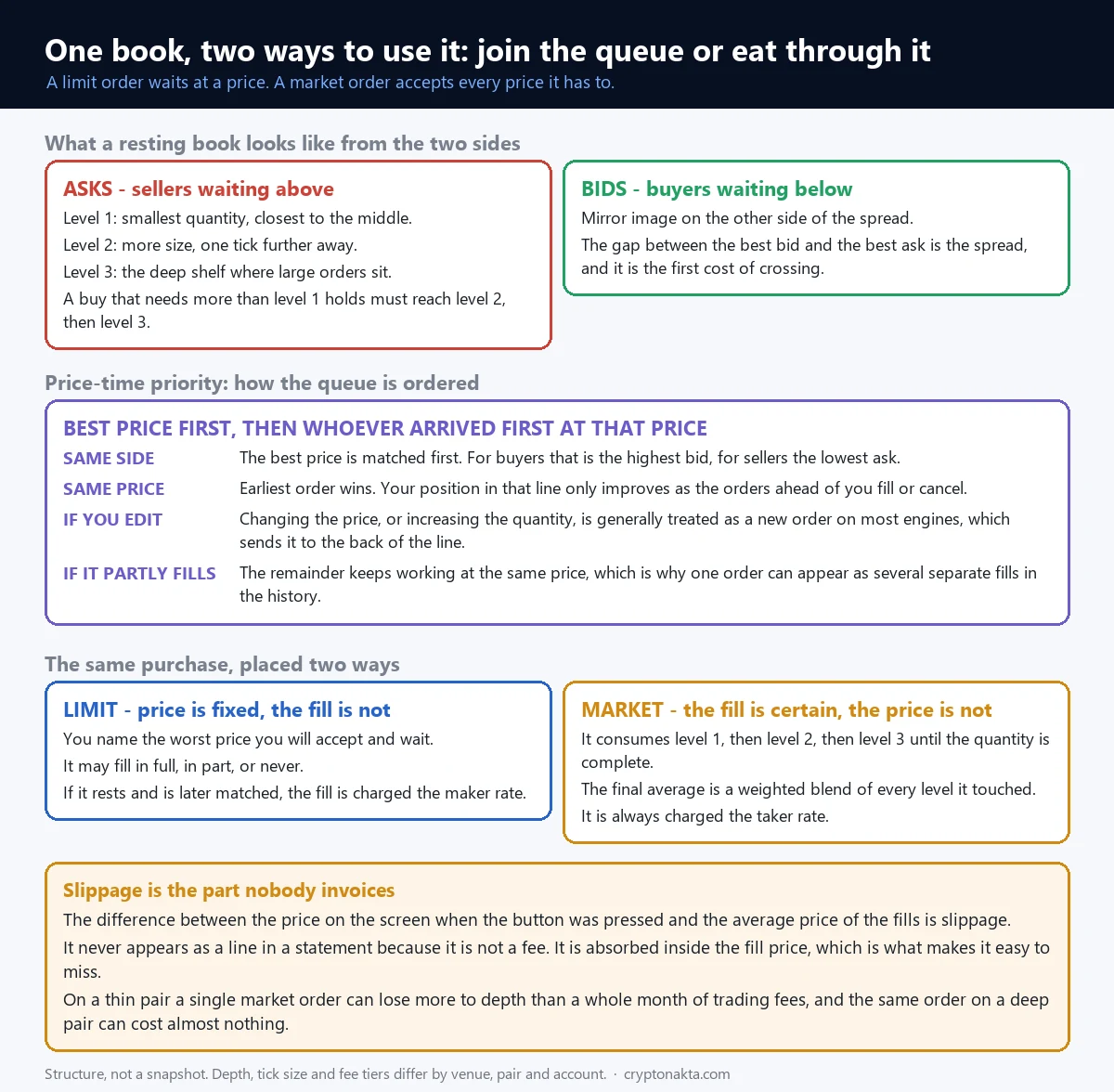
You can fix the price you pay, or you can fix the fact that the trade happens. You cannot fix both, because the second one depends on somebody else being willing to trade with you at that moment. A limit order pins the price and accepts that the trade may never occur. A market order pins the execution and accepts whatever price the book is holding. Every other type on the ticket is one of those two with an extra condition wrapped around it.
| Limit order | Market order | |
|---|---|---|
| What is fixed | The worst price you will accept | That the quantity gets filled now |
| What is open | Whether it fills at all, and when | What the average fill price turns out to be |
| Where it lives | Resting in the book, visible to everyone, holding a place in a queue | Nowhere. It exists for as long as it takes to consume the other side |
| Fee side | Maker, if it does not cross the book when placed | Taker, always |
| Typical failure | The price never comes back and nothing happens | The fill average lands further away than expected |
| What it is really for | Situations where the price matters more than the timing | Situations where being in or out matters more than the last fraction of a percent |
Read that table twice before reading anything about strategy, because the rest of the ticket is variations. Post only is a limit order that refuses to become a taker. A stop-market is a market order with a delay condition. An OCO is two orders that watch each other. Fill-or-kill is a market order with a pride problem. Once the trade-off is clear, none of the names are mysterious.
3. What the book is doing while your limit order waits
A limit order that does not fill immediately joins a queue, and the rules of that queue are public and mechanical. Matching engines work on price-time priority, sometimes called FIFO. Among orders on the same side, the best price is matched first: the highest bid for buyers, the lowest ask for sellers. Among orders sitting at the same price, the one that arrived earliest is matched first.
So a resting order has two coordinates. The first is its price level, which decides when it is eligible at all. The second is its place in line at that level, which decides whether it gets any of the volume that arrives. If two hundred units of selling hit a price level where you are third in line behind two orders of a hundred units each, none of it is yours.
Four consequences follow, and they explain most of the confusion about why a limit order behaved the way it did:
- Improving your price costs you your place. On most engines, changing the price of an order, or increasing its quantity, is treated as cancelling and re-entering. The order goes to the back of the line at the new level. Reducing quantity usually keeps the place.
- Partial fills leave the rest working. A single order can be matched against several incoming orders, so it can produce three or four fills at different moments, all at the same price. The remainder keeps its position in the queue.
- Volume ahead of you is not the same as volume at your price. The book display shows the total resting at each level, not how it is divided between participants or how long each one has been there.
- Cancelling is free in every sense except the one that matters. Nobody charges you, and you lose the place you had earned by waiting.
None of this applies to market orders, which never wait, and none of it applies to stop orders until they trigger, because they are not in the book at all. That distinction comes back later and it is the single most misunderstood thing on the ticket.
4. A market order buys immediacy and pays for it in depth
A market order does not have a price. It has a quantity and an instruction to obtain it now, which means walking through the resting orders on the other side from the best price outward until the quantity is complete.
Take an illustration with no numbers attached to any real market. Suppose the best ask can supply a fifth of the size you want. The next tick up holds another fifth. The rest is only available two ticks higher, on the shelf where a larger participant is resting. Your single order takes all three levels, and your fill is the weighted average of them, which sits above the price you were looking at when you pressed the button. The screen was not lying and the exchange did not cheat. The book simply did not hold enough size at the top for what you asked.
That gap between the displayed price and the achieved average is slippage, and its most important property is administrative rather than mathematical: it is absorbed inside the fill price, so nobody bills it. There is no line for it in a statement, no percentage in the fee schedule, no entry in a transaction history. Traders who track their trading fees carefully to the fourth decimal often have no idea what they are paying here, and on illiquid pairs it is the larger of the two numbers by a wide margin.
Depth also explains why the same order behaves completely differently on two venues, or on two pairs of the same asset. A pair with a deep book absorbs size with almost no movement. A thin pair moves several ticks on an order that would be invisible elsewhere. Before sending anything large relative to what is resting, the book display itself is the check: not the price at the top, but how much sits within a few ticks of it. Fee comparisons matter too, and they are laid out separately in exchange fees and in the cheapest way to buy guide, but no fee schedule rescues an order that eats four levels of a thin book.
5. Maker or taker is decided by the order, not by the account
Fee tables are published in two columns, maker and taker, and the difference between them is often larger than the difference between two fee tiers. What decides which column applies to a given fill is the order, not the account and not the asset.
An order that rests in the book and is later matched by somebody else provides liquidity and is charged the maker rate. An order that matches immediately against something already resting removes liquidity and is charged the taker rate. A market order is a taker by definition. A limit order is a maker only if its price does not cross the book at the instant it is placed: a buy limit above the best ask crosses, trades immediately, and pays the taker rate despite being a limit order.
| What you send | What happens on arrival | Fee side |
|---|---|---|
| Market order | Consumes resting orders immediately | Taker |
| Limit order priced away from the market | Rests in the book, waits | Maker, when it is eventually matched |
| Limit order priced across the spread | Matches instantly against what is resting | Taker, for the part that fills on arrival |
| Limit order with post only that would cross | The venue cancels it at placement | No fill, no fee |
| Stop-market after it triggers | Becomes a market order | Taker |
| Stop-limit after it triggers | Becomes an ordinary limit order in the book | Depends on whether that limit crosses when it lands |
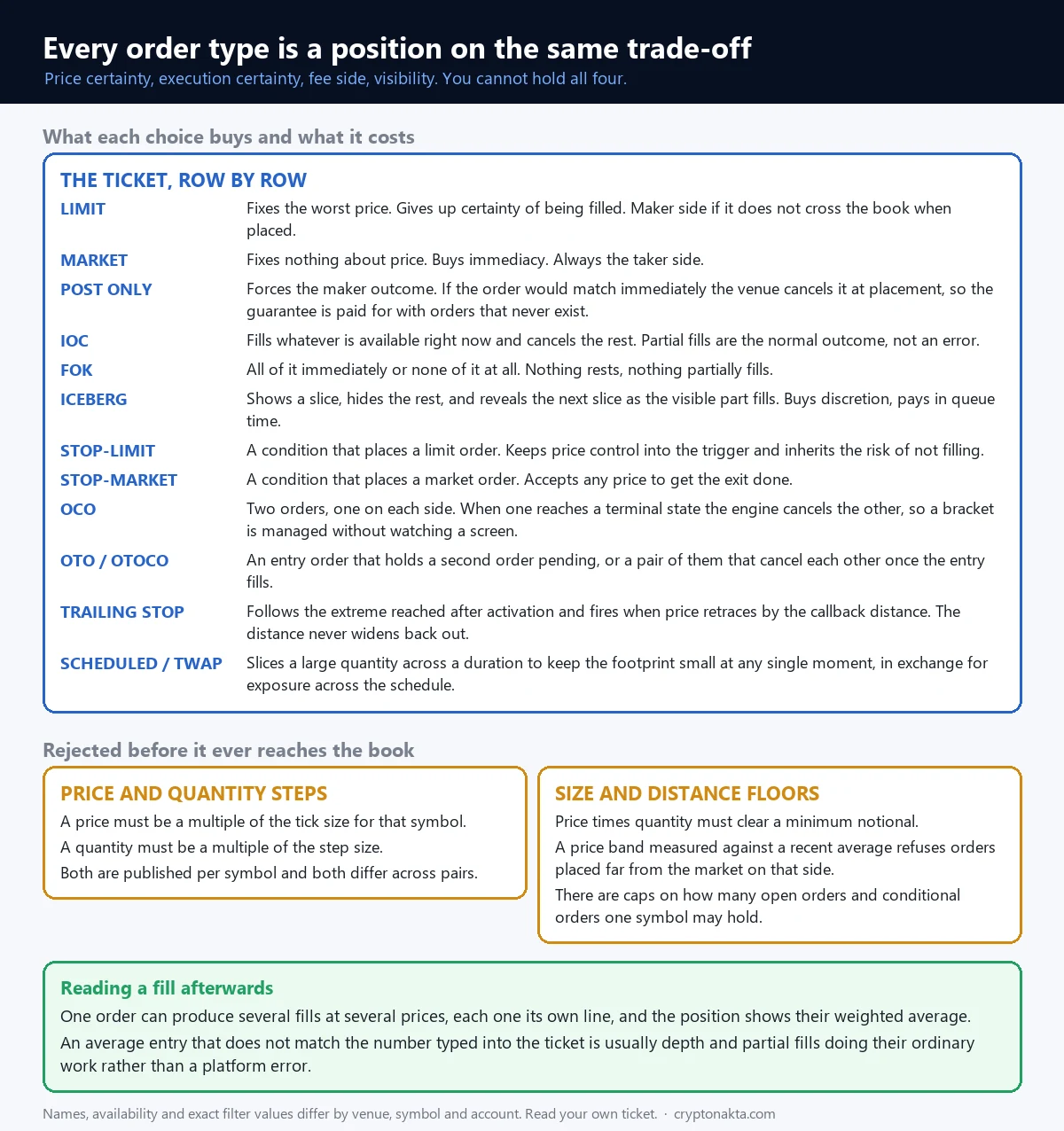
Post only exists to make the maker outcome enforceable. Binance documents that a post only order will exist as a maker order on the book and will never match with orders already resting, and that if the price would cause an immediate match, the system cancels the order at placement. That is the whole bargain: you are guaranteed never to pay the taker rate, and the price of the guarantee is that the order sometimes does not exist. Anyone who has set post only and then wondered why the order vanished from the list has met the second half of the deal. Combining post only with an instruction that demands immediate execution is self-contradictory, and venues reject or override the combination.
6. What happens to the part that did not fill
The time in force dropdown decides what happens to the part of the order that cannot be filled at the instant it arrives. Three abbreviations cover almost every ticket.
| Setting | Instruction | What you get | What it costs |
|---|---|---|---|
| GTC Good-Till-Cancel | Stay alive until filled or cancelled | The order works for as long as you leave it, accumulating queue priority | It can fill hours later in conditions you would not have chosen |
| IOC Immediate-Or-Cancel | Take what is available now, cancel the remainder | Fast, and it never leaves a resting footprint | Partial fills are the normal outcome, so the size you receive is not the size you asked for |
| FOK Fill-Or-Kill | All of it immediately, or none of it | Certainty that you never end up with half a position | In a thin book it simply does nothing, repeatedly |
Iceberg sits alongside these and answers a different question, which is not about time but about visibility. An iceberg order displays only a slice of its total size in the book and reveals the next slice as the visible one fills. Binance’s documentation gives the example of a large sell shown to the market in small increments, with the hidden portions moving onto the book as each visible portion executes. The purpose is to avoid announcing size to everyone watching the depth. The cost is time: each newly revealed slice joins the back of the queue at its price, behind whatever arrived while the previous slice was working. Binance also documents that iceberg quantities are not supported together with immediate-or-cancel or fill-or-kill, which makes sense, because hiding size only helps an order that intends to wait.
Defaults matter here more than most settings, because this dropdown is usually pre-filled and rarely inspected. An order behaving in a way that seems inexplicable, cancelling itself, or filling a fraction and disappearing, is often just doing exactly what the untouched default said.
7. A stop is a condition the venue holds, not an order in the book
Here is the mental model that causes the most damage: people picture a stop order sitting in the order book, waiting to sell, the way a limit order does. It is not there.
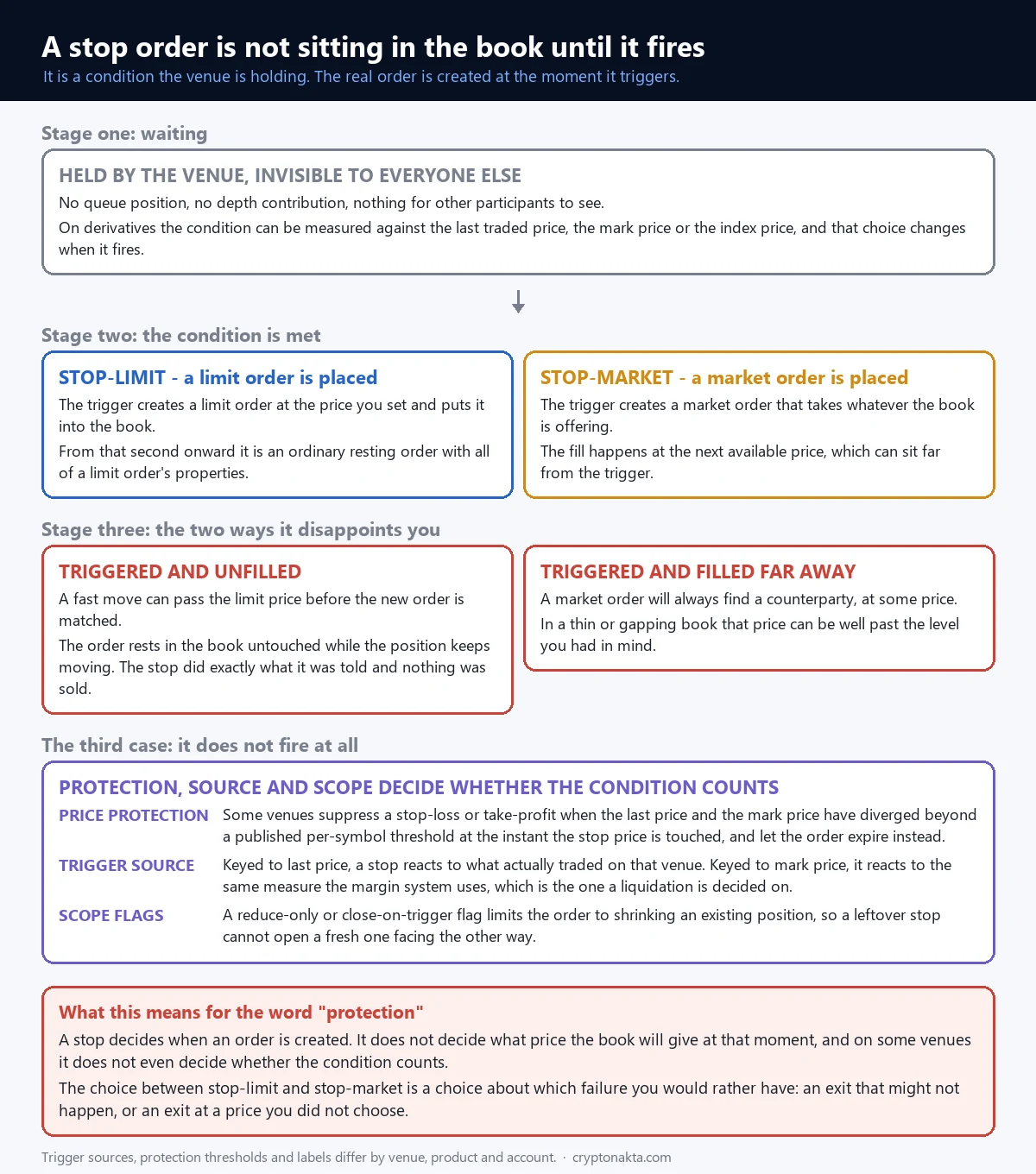
A stop is a condition held by the exchange. Nothing about it appears in the depth. No other participant can see it. It occupies no place in any queue and contributes nothing to liquidity. What exists is an instruction of the form: when a specified price is reached, create this order. Until that moment, there is no order.
The lifecycle has three stages, and each one can fail differently.
- Waiting. The venue watches a reference price. On derivatives you often get to choose which reference, and that choice changes the behaviour in ways covered two sections below.
- Triggering. The condition is met and the venue submits the real order at that instant. This is the first moment the market learns anything about your intention.
- Executing. The submitted order now behaves exactly like any other order of that type, with all of its properties and all of its ways of failing.
The reason this matters is that the third stage is where people assume a guarantee exists. There is no guarantee. A stop determines when an order is created. What price the book happens to be offering at that instant is a separate question, and the answer is decided by the same depth and queue mechanics as any other order. That gap between the condition and the fill is where the two classic disappointments live, and they are opposite in shape.
8. Stop-limit and stop-market: choosing which failure you prefer
When a stop triggers, it has to create something, and you choose in advance what that something is. Binance’s documentation describes the two forms directly: a stop-limit uses a stop price to trigger a limit order, which is then immediately placed on the order book, while a stop-market uses a stop price to trigger a market order, which is filled at the next available market price and may therefore differ from the stop price.
In calm conditions the difference is cosmetic. In the conditions that make people set stops in the first place, it decides everything.
| Stop-limit | Stop-market | |
|---|---|---|
| What the trigger creates | A limit order at the price you specified | A market order with no price |
| You control | The worst price you will accept | Only that the exit happens |
| In a fast move | The market can pass your limit before you are matched. The order rests, triggered and unfilled, while the position keeps moving | It fills, and possibly far from the trigger, because a market order accepts every level it has to |
| Silent failure | Yes. Everything looks correct and nothing was sold | No. You always know it happened, you may dislike the price |
| Fee side after triggering | Depends on whether the limit crosses when it lands | Taker |
Say that plainly, because it is the sentence people arrive at this article looking for. A stop-limit that triggers into a collapsing market does exactly what it was told: it places a limit order at your price. If the market is already three ticks below that price, the order sits there untouched. You were not sold out of the position at a bad price. You were not sold at all, and the position kept going. The software did not fail. The instruction contained a price floor and the market went under it.
The mirror image is equally real. A stop-market always finds a counterparty, because it accepts any price, and in a gapping book that price can be a long way from the number you typed. Neither type is safer in the abstract. They fail in opposite directions, and choosing between them is choosing which failure you would rather explain to yourself afterwards. On leveraged positions there is a third party to this decision, the margin engine, which is described in what actually triggers a liquidation.
9. Which price the trigger watches, and when it is suppressed
On derivatives, a price is not a single number. The last traded price is whatever most recently changed hands on that venue. The index price is built from spot markets elsewhere. The mark price is the venue’s fair value, and it is the one the margin system uses for unrealised profit and loss and for liquidations. Bybit exposes all three as trigger sources for conditional orders, and Binance documents that its stop price uses mark price by default with last price available as an alternative.
| Trigger source | What it reacts to | Practical consequence |
|---|---|---|
| Last price | Trades that actually printed on this venue | The trigger sits close to what you will realistically be filled at, and it also reacts to a single thin print that nobody else saw |
| Mark price | The venue’s fair value, smoothed against outside markets | It ignores local spikes, and it is the measure a liquidation is decided on, so a stop keyed here fires on the same yardstick as the margin engine |
| Index price | The composite of outside spot markets | The least sensitive to anything happening on this one venue |
There is a further wrinkle that produces a specific and infuriating experience: a stop that visibly should have fired and did not. Binance offers a price protection setting on stop-loss and take-profit orders, which suppresses the trigger when the last price and the mark price have diverged beyond a threshold published for that symbol at the instant the stop price is touched. The order expires instead of firing. The intention is to keep a distorted print from closing positions at prices that do not reflect fair value, and the documentation notes that orders submitted through the API are not covered by the setting.
Two further pieces of vocabulary belong here because they appear on the same panel. Take profit is the same machinery as a stop with the condition pointing the other way, and it comes in limit and market forms with the same trade-off. Reduce only, sometimes labelled close on trigger, restricts an order to shrinking an existing position. Without it, a conditional order left behind after a position is already closed can fire into an empty account and open a fresh position facing the opposite way, which is a genuinely common way to wake up holding something you never decided to hold.
10. Orders that watch each other: OCO, OTO, brackets and trailing
Everything so far has been one instruction at a time. Order lists let the matching engine hold several instructions that watch each other, which removes the need to be present when one of them resolves.
| Structure | How it is wired | What it is for |
|---|---|---|
| OCO One-Cancels-the-Other | Two orders placed together, one on each side of the current price. When one reaches a terminal state, the engine cancels the other. On Binance spot one leg is a take-profit or limit-maker order and the other a stop-loss order | Leaving a position with both an exit above and an exit below, without the risk of both executing |
| OTO One-Triggers-the-Other | A working order and a pending order. The pending one is only activated once the working one fills | Attaching a follow-up instruction to an entry that has not happened yet |
| OTOCO | An entry order that, once filled, activates an OCO pair above and below it | Placing an entry and its two exits in one action |
| Trailing stop | Follows the extreme price reached after activation and fires when price retraces from it by a set callback distance. Binance’s futures documentation puts the callback range at 0.1 to 10 percent and allows an optional activation price, with both conditions required before the resulting market order is issued | Following a move without deciding in advance where it ends |
| Scheduled or TWAP | Slices a large quantity across a defined duration and works the slices into the market at intervals. Binance’s futures implementation requires a duration between five minutes and twenty-four hours and applies notional limits and caps on concurrent algorithmic orders | Reducing footprint at any single moment, at the cost of exposure across the schedule |
The trailing stop deserves one caution, because its behaviour surprises people in a specific way. The trailing distance ratchets and never widens back out. Once the extreme has moved, the trigger has moved with it permanently, so a sharp retrace can hand it a fill considerably past the distance you had in mind. It locks a distance, and it does not lock a level.
All of these are conveniences rather than protections, and their availability differs by product, venue and account, which is also true of the wider feature set covered in the exchange feature map. Automation that decides sizing and timing for you is a different category again: recurring buys are covered in automatic accumulation and mirroring another account in copy trading.
11. The five rules that get an order refused before the book sees it
Some orders never reach the book at all. The venue checks them against per-symbol rules first, and if one of those rules is violated, the order is refused with a message that is usually technically accurate and completely opaque.
| Rule | What it requires | How it shows up |
|---|---|---|
| Tick size | The price must be a multiple of a published increment for that symbol | An order typed with one decimal too many is rejected, or silently rounded, depending on the venue |
| Step size | The quantity must be a multiple of a published increment | “Invalid quantity” on a number that looks perfectly reasonable |
| Minimum notional | Price multiplied by quantity must clear a floor | Small test orders are refused even though the balance covers them, which is the usual first encounter |
| Price band | The price must sit inside a range measured against a recent average, with separate limits for each side | A limit order placed far from the market is refused rather than resting there |
| Open order caps | A symbol allows only so many open orders, and separately so many conditional ones | The tenth or the two hundredth order fails while the first ones were fine |
None of these values are universal. They are published per symbol, they differ between venues, and they are revised. The useful takeaway is not a number to memorise, it is a habit: when an order is refused, read which of the five it was, because each has an obvious fix, and none of them indicate anything wrong with the account. A related check worth doing before funding anything at all is whether the venue itself deserves the deposit, which is what the legitimacy checklist is for.
12. What to check before pressing, and how to read the fills after
Two habits catch most of the surprises described above, and both take a couple of seconds.
- Look at the depth, not at the price. The number at the top of the book tells you where the last trade happened. The size resting within a few ticks tells you what your order will actually cost.
- Read the small controls before sending, not after. Time in force, post only, reduce only and the trigger source are usually on defaults nobody chose. When a fill comes back strange, that is the first place to look.
Afterwards, the fills themselves are worth reading properly. One order can produce several fills at several prices, each its own line in the history, and the position displays their weighted average. An average entry that does not match what you typed is usually depth and partial fills doing ordinary work rather than a platform error. On derivatives, remember that two more amounts arrive without any button being pressed: funding at each settlement, and, if the margin runs out, the forced close with its own fee.
Where you place these orders matters as well, because ticket design, available types and fee columns differ from venue to venue. The comparison lives in the exchange guide, and the cards below cover the accounts most readers of this site already use. If you are still at the stage of making a first purchase rather than managing orders, the buying walkthrough is the better starting point.
Binance

Bybit

Gate.io

Affiliate disclosure: some links are partner links. We may earn a commission at no extra cost to you. This is not investment advice.
13. Glossary: fourteen terms that cover the whole ticket
Fourteen terms that cover the whole ticket. Everything above is these words in sentences.
| Term | Meaning |
|---|---|
| Order book | The list of resting buy and sell orders at each price, which is what your order is matched against |
| Spread | The gap between the best bid and the best ask. Crossing it is the first cost of immediacy |
| Depth | How much quantity is resting near the top of the book. It decides what a market order costs |
| Price-time priority | The matching rule: best price first, then earliest arrival at that price |
| Maker | An order that rests in the book and is matched later, charged the maker rate |
| Taker | An order that matches immediately against resting liquidity, charged the taker rate |
| Post only | An instruction that cancels the order rather than let it become a taker |
| Slippage | The difference between the price you saw and the average you achieved. Absorbed in the fill, never invoiced |
| Time in force | What happens to the unfilled remainder: GTC keeps it, IOC cancels it, FOK refuses partial execution entirely |
| Iceberg | An order that displays only a slice of its size and reveals more as each slice fills |
| Stop price | The condition that causes an order to be created. Not itself an order |
| Trigger source | Which price the condition is measured against: last, mark or index |
| Reduce only | A flag restricting an order to shrinking an existing position rather than opening a new one |
| Notional | Price multiplied by quantity. Minimum notional filters, and fees, are calculated on it |
FAQ: the questions that follow a fill nobody expected
Compare exchanges: fees, order tickets and what to check first