Sent Crypto Without a Memo or Tag? Here’s Whether It’s Lost — and How to Get It Back (2026)
You sent XRP, XLM, TON or ATOM to an exchange and left the memo / destination tag blank. First: it’s usually recoverable, not burned. This honest guide shows exactly what a memo is, the four places your coins could have landed, the real recovery process on Binance and KuCoin (fees and timelines included), the exchange-to-exchange catch, when funds genuinely are lost, and the recovery scam waiting for you. June 2026.
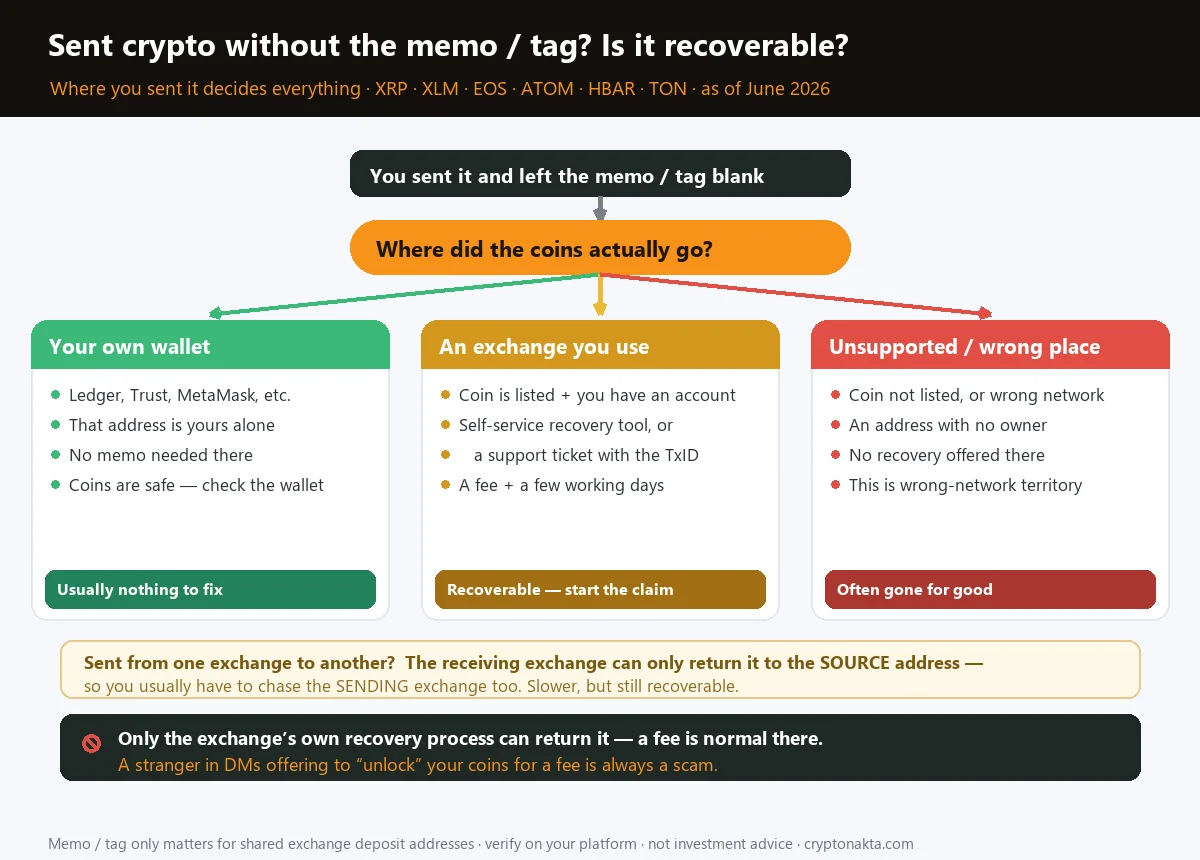
- Don’t panic — a missing memo/tag usually means your coins are recoverable, not gone. They landed in a shared exchange wallet without the label that says which account they belong to. What matters is where you sent them.
- Sent to your own wallet? Almost always fine. A personal address (Ledger, Trust, MetaMask) is yours alone, so no memo was ever needed — check the wallet, the coins are usually there.
- Sent to an exchange you use? Recoverable. Use the self-service recovery tool (Binance and KuCoin cover XRP, XLM, ATOM, INJ and more) or open a support ticket — with the TxID, amount and address. Expect a fee and a few working days.
- Sent exchange → exchange? Still recoverable, just slower: the receiver can only refund the source address, so you also chase the sending exchange. Keep every TxID.
- When it’s actually lost: if you used an unsupported coin or the wrong network (not just a missing memo), that’s a different, harder problem — see the wrong-network guide.
- Never pay a DM “unlocker.” The only real recovery is the exchange’s own tool/ticket, with a fee deducted from your recovered funds. Anyone asking you to send crypto first is a scam.
1. First: is it actually lost? (the one question that decides it)
2. What a memo / destination tag even is — and which coins use one
3. Case 1: you sent it to your own wallet
4. Case 2: you sent it to an exchange you use (recovery, fees, timeline)
5. Case 3: exchange → exchange (the source-address catch)
6. When it really is lost
7. How to never do it again
8. The recovery scam waiting for you
9. Where to hold and move coins
1. First: is it actually lost? (the one question that decides it)
Quick version: if you sent a coin like XRP, XLM, TON or ATOM to an exchange and left the memo (also called a destination tag) blank, take a breath — in most cases the money is not gone. It just landed in the exchange’s wallet without a label saying which account it belongs to. Whether you get it back, how fast, and how much hassle it is, all comes down to one thing: where you actually sent it.
| Where it went | What it means | What to do |
|---|---|---|
| Your own wallet (Ledger, Trust, MetaMask…) | That address is yours alone — no memo was ever needed | Usually nothing. Check the wallet; the coins are there |
| An exchange you have an account on | Shared deposit address — the memo was the label that got lost | Recoverable: self-service recovery or a support ticket + TxID |
| One exchange to another | Receiver can only refund the source address | Recoverable, but you also chase the sending exchange |
| An unsupported coin / wrong network | Different problem — the asset may be unreachable | See wrong-network recovery; often unrecoverable |
2. What a memo / destination tag even is — and which coins use one
First, what is this thing you forgot? A memo / destination tag is a short extra code you attach alongside the address on certain coins. It exists because of how exchanges receive deposits. Instead of giving every customer a unique address, an exchange often uses one shared deposit address (or a small handful) for a coin — and the memo is the label that tells it which customer a given deposit belongs to. No memo, and your coins arrive in that shared wallet with no name on them.
This only applies to a specific group of coins — the ones built to carry that extra field:
| Coin | What it’s called | Format |
|---|---|---|
| XRP (XRP Ledger) | Destination Tag | Numbers only |
| XLM (Stellar) | Memo | Letters or numbers |
| EOS | Memo | Letters or numbers |
| ATOM (Cosmos) + many Cosmos chains (TIA, INJ, KAVA…) | Memo | Letters or numbers |
| HBAR (Hedera) | Memo | Letters or numbers |
| TON (Toncoin) | Memo / Comment | Letters or numbers |
3. Case 1: you sent it to your own wallet
Case 1 — you sent it to your own personal wallet (and left the memo blank). This is the happy case, and the one people panic about needlessly. A self-custody wallet — Ledger, Trezor, Trust Wallet, MetaMask, Phantom — gives you an address that is uniquely yours. There’s no shared pool to sort, so there’s nothing for a memo to disambiguate. For XRP, Stellar and most chains, a personal wallet will simply credit the coins to your balance whether or not you added a tag.
So: open the receiving wallet and check the balance (you may need to “add” or enable the token so it shows up). In the large majority of cases the coins are already sitting there. If you’re unsure whether a wallet needed a tag, its support page will say — but most self-custody wallets state plainly that a destination tag is optional for receiving. New to wallets? Start with our wallet guide.
4. Case 2: you sent it to an exchange you use (recovery, fees, timeline)
Case 2 — you sent it to an exchange you have an account on. This is the classic missing-memo situation, and the good news is that it is usually recoverable. Your coins are sitting in the exchange’s shared wallet; they just weren’t auto-credited because the label was missing. Most major exchanges have a defined process to find and return them. There are two routes, depending on the coin:
| Route | When it applies | What to expect |
|---|---|---|
| Self-service recovery tool | For supported coins — Binance and KuCoin both list which coins qualify (XRP, XLM, ATOM, INJ, TIA and more) | You submit the TxID, address and amount; the tool verifies and credits you. A fee applies (e.g. Binance has charged ~5% or a flat “Smart Retrieval” fee; KuCoin charges a service fee), typically up to ~5–14 working days |
| Support ticket | For coins not covered by self-service | You open a ticket with the full transaction details; support checks whether it can be recovered and replies by email |
Whichever route, you’ll need the same evidence: the TxID (transaction hash), the exact amount, the address you sent to, and the rough time. Copy-paste them — a single mistyped character can stop the tool from matching your deposit on-chain. Then be patient: recovery is manual work behind the scenes, so days, not minutes, is normal.
5. Case 3: exchange → exchange (the source-address catch)
Case 3 — you sent from one exchange to another (e.g. Binance → KuCoin) and forgot the memo. Still recoverable, just with an extra step, because of one rule that trips everyone up: a receiving exchange can typically only return a no-memo deposit to the source address it came from — and that source address belongs to the sending exchange, not to you.
So the chain of events is: you ask the receiving exchange to recover and refund the deposit → they send it back to the sending exchange’s wallet (again, with no memo of its own) → now you have to ask the sending exchange to locate that return and credit your account. Two tickets, two waits. Annoying, but the funds are not lost — they’re just bouncing between two custodians who each need you to prove it’s yours (TxID, amount, timestamps for both legs).
6. When it really is lost
Now the honest part: there are cases where a “missing memo” story is really a different, harder problem, and pretending otherwise would set you up for false hope.
- Unsupported coin or wrong network. If you didn’t just forget a memo but actually sent the coin on a network the destination doesn’t support — say, the right address but the wrong chain — that’s not a memo issue at all. That’s the wrong-network scenario, and it ranges from “recoverable for a fee” to “permanently gone,” depending on the platforms involved.
- An address with no owner. If the memo was needed and the receiving platform offers no recovery process, the deposit can sit unattributed with no path back.
- Wrong memo pointing at someone else. Rare, but if you typed a valid memo that happens to belong to another user, recovery depends entirely on the exchange’s goodwill and policy.
7. How to never do it again
Once it’s sorted, here’s how to make sure it never happens again — these habits cost seconds and save days:
- Copy the memo and the address in the same breath. On a coin that needs a memo, the exchange shows both fields together for a reason. Fill both, every time, before you hit send.
- Never reuse an old memo. Tags can change. Always copy the current one from the deposit screen for this deposit, not a screenshot from last month.
- Send a tiny test first for any new address-and-memo pair or a large amount. A small test deposit that credits correctly is cheap insurance.
- Watch for the “Memo is required” warning. Good wallets and exchanges now pop a warning if you leave a required tag blank — don’t click past it.
- Prefer a clean deposit flow. Some exchanges make the memo unmissable and have fast, transparent recovery if something slips. That matters more than people think.
8. The recovery scam waiting for you
One warning that deserves its own section, because the missing-memo panic is exactly when people get robbed a second time. The moment you post “I forgot my XRP tag, help!” in a public group or comment section, scammers appear within minutes.
- A “support agent” DMs you first. Real support does not slide into your DMs — you open a ticket through the official app or site.
- They offer to “unlock,” “release” or “recover” your coins for an upfront fee sent to their wallet. The exchange’s real recovery fee is deducted from your recovered amount — you never send crypto to a person to get a refund.
- They share a “recovery website” or ask for your seed phrase, password or 2FA. Any of those = instant theft. Learn the patterns in our crypto scams guide.
9. Where to hold and move coins
You can’t un-send a transaction, but you can choose platforms that make the memo hard to miss and offer fast, transparent recovery when something does slip. If you’re setting up where to hold and move coins, these are the exchanges whose deposit flow and support we keep checked — a referral code at sign-up also applies fee benefits:
Binance

Bybit
OKX

KuCoin

Gate.io
Affiliate disclosure: some links are partner links. We may earn a commission at no extra cost to you. This is not investment advice.