What Is a TXID: How to Find It, Confirmations Needed, Transfer Time
You sent crypto to another exchange and it hasn’t shown up. Support wants the TXID. What is that, where do you find it, and how long is this supposed to take?
I wanted real answers, so I checked for myself. I pulled the deposit confirmation numbers that three big exchanges publish. I timed blocks on the major chains and went through a couple of weeks of bitcoin blocks. Every measured number below says when I measured it.
In this article (14)
What is a TXID in crypto?What a TXID looks like on each networkHow to find your TXID on Binance, Bybit, OKX or a wallet appWhich block explorer do you paste the TXID into?How to read a transaction page on Etherscan or TronscanNo TXID yet? What an empty TXID field meansWhat are confirmations, and why do exchanges wait for them?When is a transaction final? Each chain has its own ruleHow many confirmations does each exchange need? I compared threeHow long does a crypto transfer take?Why bitcoin confirmations don’t take exactly 10 minutesBitcoin transaction pending for days? Fees, the mempool, RBF and CPFPFake TXIDs and screenshots: how to check a payment yourselfMy take: what measuring it myself taught me
 View full size ↗
What is a TXID in crypto?
A TXID (transaction ID) is the unique ID of one transaction on a blockchain. Every transfer sent to a blockchain gets its own, and no two are the same. You’ll also see it called a transaction hash, a tx hash or just a hash. On Solana, explorers call it the signature.
It’s a long string of letters and numbers. You paste it into a block explorer, which is a public website that shows what’s recorded on a blockchain. The explorer then pulls up that one transfer. It shows the sending and receiving addresses, the amount and whether it’s confirmed yet.
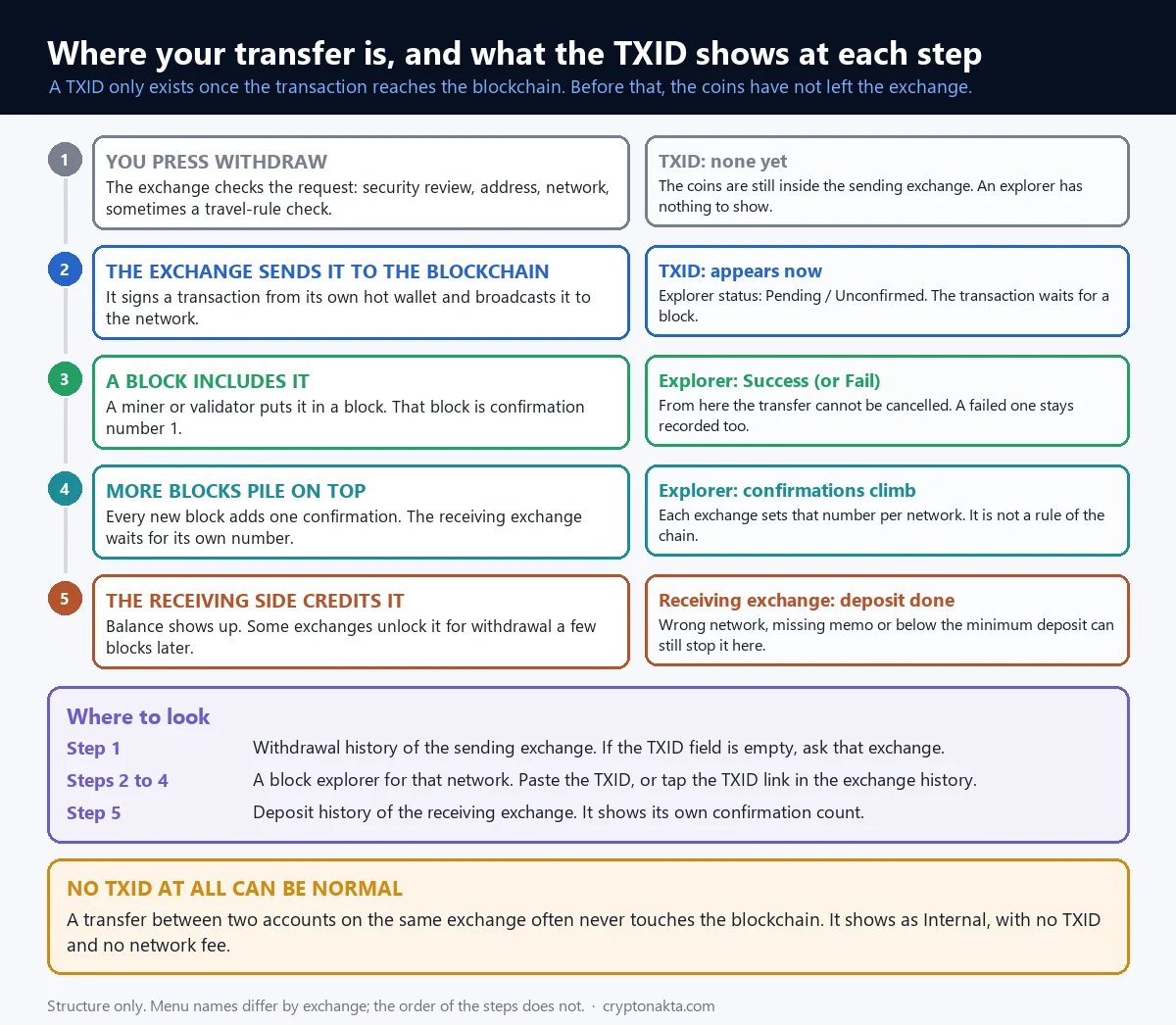
The TXID only exists once your exchange or wallet actually sends the transaction out to the network. Before that, there’s nothing on any blockchain to look up. So an empty TXID field in your withdrawal history isn’t an error. Your coins just haven’t left the exchange yet.
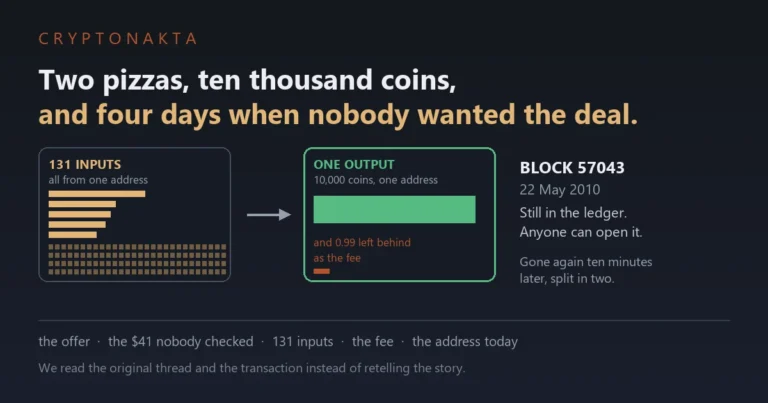
Here’s a real one that has been on the bitcoin blockchain since 2010. Laszlo Hanyecz paid 10,000 BTC for two pizzas that May. This is the TXID of his payment.
a1075db55d416d3ca199f55b6084e2115b9345e16c5cf302fc80e9d5fbf5d48d
Paste it into any bitcoin explorer and it still opens. It’s the only real transaction I use as an example here. The full story is in our Bitcoin Pizza Day article.
So what do you actually do with a TXID? Mostly four things.
- Check that a withdrawal really left the exchange.
- Watch how many confirmations a deposit has so far.
- Give it to support when a deposit is missing.
- Check a payment that someone says they sent you.
What a TXID looks like on each network
TXIDs don’t all look the same. The shape depends on the blockchain. On October 4, 2026, I pulled real transaction hashes from the newest block on each major chain. I only looked at their length and characters. I didn’t keep the hashes.
| Network | What the TXID looks like | Explorers people use |
|---|---|---|
| Bitcoin, Litecoin, Dogecoin | 64 characters of 0–9 and a–f, no 0x in front | mempool.space, blockstream.info, litecoinspace.org, blockchair.com |
| Ethereum, BNB Smart Chain, Polygon, Arbitrum, OP, Avalanche C-Chain | 0x plus 64 hex characters (66 in total) | etherscan.io, bscscan.com, polygonscan.com, arbiscan.io, optimistic.etherscan.io |
| Tron (TRC20) | 64 hex characters, no 0x | tronscan.org |
| XRP Ledger | 64 hex characters, usually in capitals | xrpscan.com, livenet.xrpl.org, bithomp.com |
| Solana | 87 or 88 base58 characters, labeled Signature | solscan.io, explorer.solana.com |
| TON | 64 hex characters, or 44 base64 characters | tonviewer.com, tonscan.org |
See the overlap? A 64-character hex string could be bitcoin, Tron or XRP. A string that starts with 0x could be any of six EVM chains. So you can’t tell the network from the TXID alone.
Go by the network name in your history instead. That’s the label you chose when sending, like ERC20 or TRC20. Paste the hash into that network’s explorer. Put an ERC20 hash into Tronscan and you’ll just get a “not found” page.
The same coin can travel on several networks, and USDT is the classic case. If you’re not sure which one you used, our USDT ERC20 vs TRC20 guide shows how to tell. And if the coins went out on a network the other side doesn’t support, that’s a different problem. See sent crypto on the wrong network.
Solana has one quirk. It has no separate transaction ID. The first signature on the transaction is its ID, so explorers label it Signature.
How to find your TXID on Binance, Bybit, OKX or a wallet app
The exchanges I checked all keep the TXID in their deposit and withdrawal history. The menu names differ, though. This is where each one puts it, according to its own help pages.
| Exchange | Where the TXID is | Transfers inside the exchange |
|---|---|---|
| Binance | Web: Wallet → Overview → Transaction History, then the TxID column. App: Assets → Spot → Transaction History, then tap the transfer. | No TxID. The field shows [Internal]. No fee, and it arrives right away. |
| Bybit | Assets → your Spot or Funding account → History → Deposit/Withdraw tab. For a deposit, tap Details. | Internal withdrawals have no TXID. |
| OKX | Web: the Deposit/Withdraw page → View history. App: Assets → the History icon at the top right. | OKX says internal transfers may not have an on-chain TxID. |
Using a wallet app or another exchange? I didn’t check the Coinbase, MetaMask or Trust Wallet menus myself. So I won’t guess at button names. Open the transfer in your activity or history list. Look for a field called Transaction hash, Tx hash or Transaction ID. A link to an explorer there opens the same page you’d get by pasting the hash.
Waiting on a deposit from someone else? The TXID shows up on the sending side first. Ask the sender for the TXID from their withdrawal history. If you sent it yourself from another exchange, it’s in that exchange’s withdrawal record.
Moving coins between two accounts on the same exchange is an internal transfer. The exchange just updates its own records, and nothing goes on a blockchain. That’s why Binance shows [Internal] where the TxID would be. Bybit says its internal withdrawals have no TXID, and OKX says they may not have one. That’s normal. There’s nothing for an explorer to show.
Which block explorer do you paste the TXID into?
The quickest way is to click the TxID in your exchange history. The exchange links it to an explorer for that network. Binance lists those links in its public data. For BNB Smart Chain it points to bsctrace.com, for example.
You can also do it by hand with the explorers in the table above. Bitcoin has no foundation, so it has no official explorer. Sites like mempool.space and blockstream.info are run by third parties and widely used. For many chains at once, blockchair.com and oklink.com both work.
Doing a TXID lookup by hand takes four steps.
- Copy the whole TXID from your history. Don’t retype it.
- Check the network name next to it, such as ERC20, TRC20, BEP20 or SOL.
- Open that network’s explorer and paste the TXID into the search bar.
- Read the status, the confirmations and the receiving address.
Got a “not found” page? Run through these before you worry.
- You’re on the wrong network’s explorer. Check the network name in your history again.
- A character got lost while copying, or a space came along with it.
- The withdrawal has no real TXID yet. It’s still inside the exchange.
- On TON, your wallet may show a message hash that differs from the transaction hash. Open your own address on the explorer and find the transfer in its list instead.
One more thing. A TXID proves that a transaction exists. It doesn’t prove that it went to you. For that you need to read the page itself.
How to read a transaction page on Etherscan or Tronscan
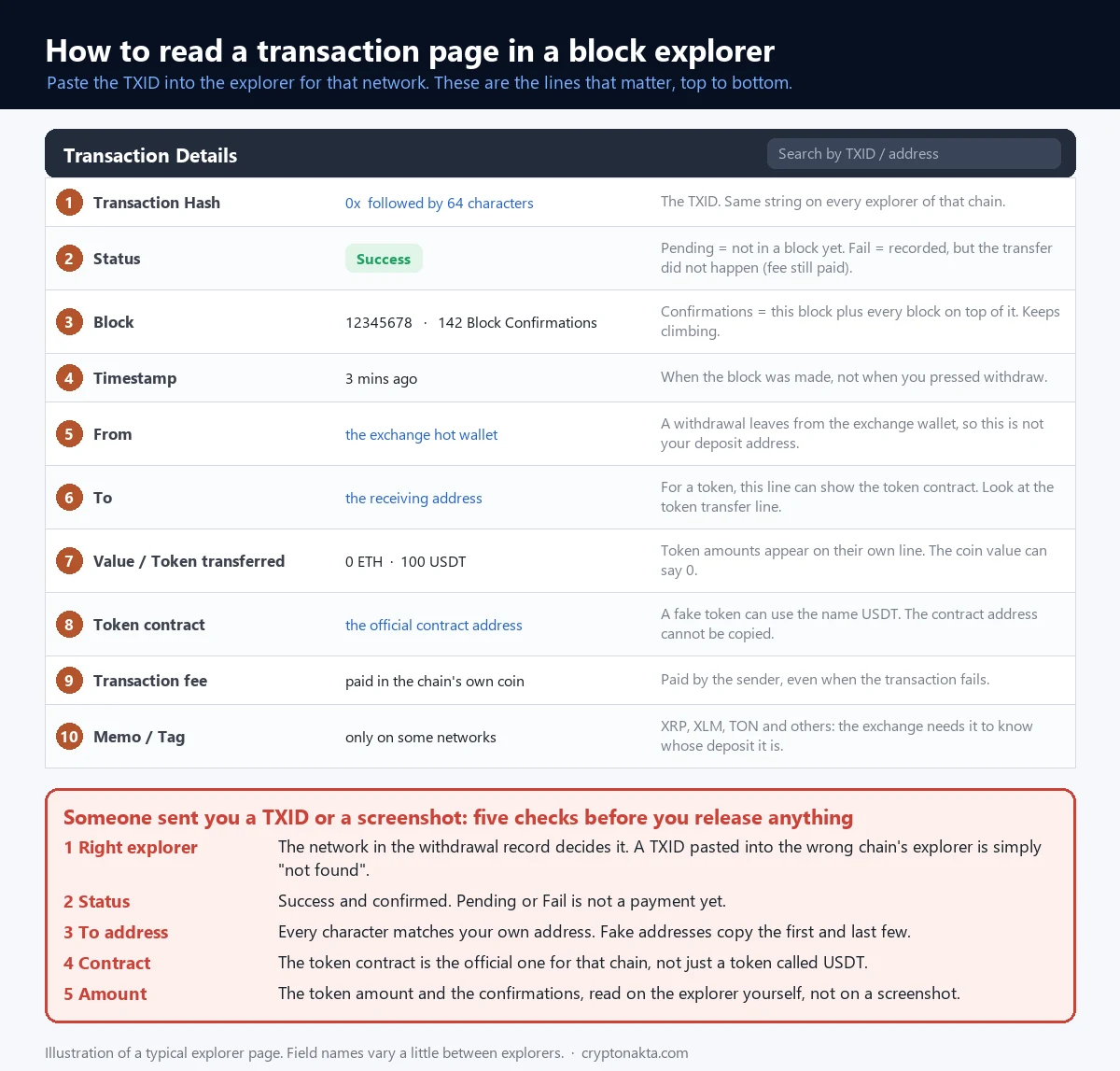
Once the page opens, you’ll see a stack of fields. Etherscan, Tronscan and bitcoin explorers each lay them out differently. The fields mean the same thing everywhere, though.
- Transaction hash. It should match what you pasted.
- Status. Whether the transfer went through. The table below explains each label.
- Block and confirmations. Which block it’s in, and how many confirmations it has so far.
- Timestamp. When that block was made.
- From. The sending address. On an exchange withdrawal, this is usually the exchange’s hot wallet, an address it keeps online to pay out withdrawals. It won’t match your own deposit address, and that’s fine.
- To. The receiving address. It has to be the one you meant to send to.
- Value and tokens. A USDT transfer on Ethereum shows 0 ETH as its main value. The USDT amount sits on a separate Token Transfers (ERC-20) line.
- Token contract. This is the token’s contract address, the on-chain address that defines the token. It tells you which token really moved.
- Fee. What the sender paid the network. On Ethereum it’s the gas fee, explained in our crypto gas fees guide.
- Memo or tag. Some networks use one, such as XRP, TON or Stellar. The receiving exchange uses it to tell whose deposit it is.
Here’s what each status label means on Etherscan and Tronscan.
| What the page says | What it means |
|---|---|
| Pending (Etherscan) | Not in a block yet. The network may be busy, or the fee may be too low. |
| Success | It’s in a block and the transfer went through. |
| Fail or Failed | It’s recorded, but the transfer didn’t happen. The amount stays with the sender. The gas fee is still charged. |
| Dropped | Nodes dropped it before it got into a block. It won’t confirm unless it’s broadcast again. |
| Dropped & Replaced | A newer transaction from the same address with the same nonce (the sender’s transaction counter) took its place, usually with a higher fee. |
| Tronscan: CONFIRMED with SUCCESS | Final on Tron, and the funds reached the receiving address. |
| Tronscan: CONFIRMED with FAIL | The record is final, but the funds did not reach the receiving address. |
| Tronscan: UNCONFIRMED | Not final on Tron yet. |
Watch the Tronscan pair closely. CONFIRMED only says the record is final. You also need SUCCESS to know the funds arrived.
Now the trap. Success on the explorer does not mean the money is in your exchange balance yet. The receiving exchange still waits for its own number of confirmations. The memo, the network and the minimum deposit amount also have to be right. If all of that checks out and it’s still missing, go through why a crypto deposit isn’t credited.
A missing memo or tag is its own case. If you left it out, see sent crypto without a memo or tag.
 View full size ↗
No TXID yet? What an empty TXID field means
If there’s no TXID yet, the exchange hasn’t sent your coins to the blockchain. Your coins are still inside the exchange. There’s nothing to find on an explorer at this point. And an internal transfer never gets a TXID at all.
Bybit’s help page lays the steps out clearly. A withdrawal there moves through four statuses.
- Under Review. The system checks the request before processing it.
- Withdrawal in Progress. The exchange is processing it.
- Sent. The coins have left your Bybit account and are waiting for blockchain confirmation.
- Withdrawal Completed. Done.
The first two come before any TXID exists. A request can also end up Canceled or Rejected. OKX’s help page says a TxID exists only for transactions submitted to a blockchain.
So what do you do while the field is empty? Mostly, you wait. Withdrawals can sit in review for different reasons. Some exchanges also check sender and receiver details under the Travel Rule. That step can slow a transfer down.
How long is too long? I can’t give you a number for this part. Exchanges don’t publish how long their review takes, and it wasn’t something I could measure. If it’s dragging on, our guide on why a withdrawal is still pending covers when to contact support.
Once the TXID shows up, the transaction is out on the network. After it lands in a block, the exchange can’t pull it back. From here on, the explorer is where you watch it.
What are confirmations, and why do exchanges wait for them?
Each confirmation is one block. The block that holds your transaction is the first. Every new block after it adds one more. So 12 confirmations means your block plus eleven on top of it.
Before it’s in any block, your transaction has zero confirmations. It waits in the mempool, the list of unconfirmed transactions that each node keeps in memory. Miners or validators pick transactions from there to build the next block.
Why not credit a deposit the moment it appears? With zero confirmations, the sender could still try to spend the same coins twice. Even the newest block now and then gets replaced by a competing one. That’s called a reorg. Each block stacked on top makes a reversal less likely.
Where does the famous six-confirmation rule come from? Section 11 of the bitcoin whitepaper works out the odds of an attacker catching up. With 10% of the mining power, the attacker’s chance falls below 0.1% at 5 blocks. Six blocks became the norm for large payments, about an hour of blocks on average.
The Bitcoin Wiki points out that the 10% and the 0.1% are both arbitrary choices. It also says merchants and exchanges should set their own threshold. They do, and their numbers are all over the place.
Confirmations also never stop counting. The pizza payment from 2010 sits in block 57,043. I checked the chain on October 4, 2026. The newest bitcoin block then was 969,832. That gave the pizza payment 912,790 confirmations, and every new block adds one.
When is a transaction final? Each chain has its own rule
Bitcoin never declares a transaction final. Each new block just makes a reversal less likely. Many newer chains work differently. They have a point after which a block can’t be reversed. That’s finality, and those blocks get labeled finalized or solidified.
I asked public nodes on each chain how far their final block sat behind the newest one. I did that three times in each of two runs on October 4, 2026. The table shows the range I saw, next to the rule each chain documents.
| Chain | The rule, from the chain’s own docs | Gap between the final block and the newest one (measured October 4, 2026) |
|---|---|---|
| Ethereum | Slots of 12 seconds, 32 slots per epoch. A checkpoint is justified when two-thirds of staked ETH vote for it. It turns finalized once the next one is justified. That’s about 12.8 minutes on paper, and ethereum.org says about 15. | finalized: 65–80 blocks (13–16 minutes). safe: 34–49 blocks. |
| Tron | 27 Super Representatives take turns making a block every 3 seconds. Once 19 different ones have built on top, the block is solidified. That usually takes about a minute. | 18–20 blocks (54–60 seconds) |
| Solana | processed → confirmed (more than two-thirds of stake voted) → finalized | 26–29 slots (6.9–7.7 seconds) |
| BNB Smart Chain | Fast finality. If two-thirds of validators vote, a block is final within two blocks. | 0–2 blocks |
| Polygon PoS | Milestones make blocks final within 2 to 5 seconds. | 1–2 blocks (1.0–3.0 seconds) |
| Arbitrum One | Final only once the Ethereum data behind it is final. | 3,149–3,936 blocks (14–19 minutes) |
| OP Mainnet | Same idea. OP’s docs say finalized typically takes 15 to 30 minutes. | 608–645 blocks (20–22 minutes) |
| XRP Ledger | A new ledger closes about every 3 to 5 seconds. A validated ledger never changes. | not measured |
| Bitcoin, Litecoin, Dogecoin | No final tag. Each block on top makes a reversal less likely. | no tag to measure |
This ties in with the exchange numbers. Binance makes an ETH deposit withdrawable after 64 confirmations. At the 12.04 seconds per block I measured, that’s about 13 minutes. KuCoin’s top number for ETH is also 64. Both sit right around Ethereum’s own finality time.
Tron shows the opposite. A Tron block is solidified after 19 producers build on it. Yet Binance credits USDT on TRC20 after 1 confirmation, and Bitget after 3. So exchanges don’t always wait for a chain’s finality.
Arbitrum and OP make blocks fast. Those blocks still take many minutes to become final, because they wait on Ethereum. A quick block time doesn’t always mean a quick deposit.
How many confirmations does each exchange need? I compared three
This is the part that surprised me most. I pulled the deposit confirmation numbers that Binance, Bitget and KuCoin publish through their public APIs. I pulled them twice on October 4, 2026, at 10:55 and 11:24 UTC, and the two pulls matched exactly.
Each exchange reports them a little differently. Binance gives two numbers. The first is when the deposit shows in your balance. The second is when you can withdraw it again.
Bitget gives one number, the confirmations it needs to credit a deposit. KuCoin also publishes two numbers. Its docs don’t say what each one means, so I show KuCoin as a range.
Confirmations needed per deposit network, from each exchange’s public API on October 4, 2026.
| Deposit network | Binance: shows in balance | Binance: withdrawable | Bitget | KuCoin (range) |
|---|---|---|---|---|
| Bitcoin (BTC) | 1 | 2 | 1 | 1–3 |
| ETH (ERC20) | 6 | 64 | 12 | 12–64 |
| USDT (ERC20) | 6 | 64 | 12 | 12–64 |
| USDT (TRC20) | 1 | 1 | 3 | 3 |
| TRX (Tron) | 1 | 1 | 3 | 3 |
| BNB (BEP20) | 1 | 1 | 15 | 15–60 |
| SOL (Solana) | 1 | 1 | 32 | 200 |
| USDT (Solana) | 1 | 1 | 5 | 200 |
| XRP | 1 | 1 | 10 | 12 |
| Litecoin (LTC) | 3 | 15 | 3 | 12–18 |
| Dogecoin (DOGE) | 6 | 36 | 6 | 12–36 |
| Cardano (ADA) | 30 | 30 | 40 | 30 |
| USDT (Arbitrum) | 120 | 120 | 12 | 120–1,900 |
| ETH (Optimism) | 25 | 100 | 50 | 100–500 |
| POL (Polygon) | 200 | 300 | 60 | 200–300 |
| AVAX (C-Chain) | 12 | 12 | 60 | 32 |
| USDT (TON) | 1 | 1 | 10 | 1 |
| Stellar (XLM) | 1 | 1 | 1 | 1 |
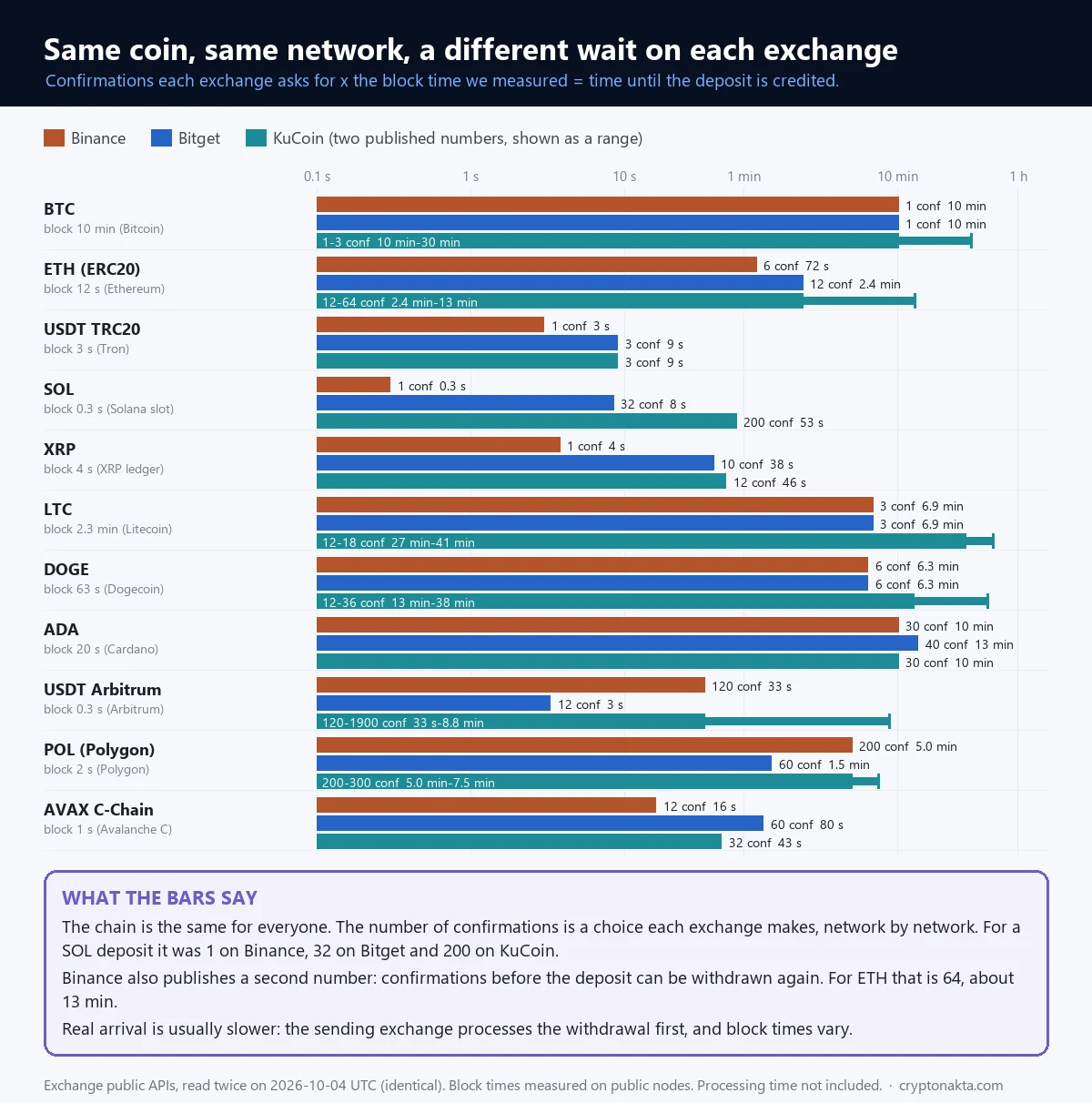
Look at SOL. Binance credits a SOL deposit after 1 confirmation. Bitget wants 32. KuCoin’s number is 200. It’s the same coin on the same network. The only thing that changes is where you send it.
USDT on Arbitrum flips the order. Bitget asks for 12 confirmations while Binance asks for 120. KuCoin’s range runs from 120 to 1,900. Stellar is the only network in my list where all three ask for the same number.
So the rule is simple. The receiving exchange decides how many confirmations it needs, not the blockchain. These numbers can also change. Before you send, check the exact number on the deposit page of the exchange you’re sending to.
Binance’s two numbers matter for bitcoin too. A BTC deposit shows in your balance after 1 confirmation. You can only withdraw it again after 2. Binance’s own FAQ says the same.
Binance, Bitget and KuCoin are the three whose numbers I pulled. Bybit is the exchange whose withdrawal steps I walked through above.
Binance

Bybit

KuCoin

Bitget

Affiliate disclosure: some links are partner links. We may earn a commission at no extra cost to you. This is not investment advice.
How long does a crypto transfer take?
Once the TXID exists, the math is short.
Wait time ≈ confirmations the receiving exchange needs × the chain’s time per block
Here’s a real case. Bitget wants 12 confirmations for an ETH deposit. Ethereum made a block every 12.04 seconds when I measured. So that deposit needs about 2.4 minutes once it’s on the chain.
Confirmations times block time is only an estimate, for two reasons. Block times bounce around, and bitcoin’s are especially uneven. The exchange’s own processing isn’t in this math at all. The numbers in the table are what I measured on October 4, 2026.
| Deposit network | Block time I measured | Binance (shows in balance) | Bitget | KuCoin |
|---|---|---|---|---|
| Bitcoin (BTC) | 10.0 min | 10 min | 10 min | 10 min to 30 min |
| ETH (ERC20) | 12.04 s | 72 s | 2.4 min | 2.4 min to 13 min |
| USDT (TRC20) | 3.00 s | 3.0 s | 9.0 s | 9.0 s |
| BNB (BEP20) | 0.45 s | 0.5 s | 6.8 s | 6.8 s to 27 s |
| SOL (Solana) | 0.27 s | 0.3 s | 8.5 s | 53 s |
| USDT (Solana) | 0.27 s | 0.3 s | 1.3 s | 53 s |
| XRP | 3.80 s | 3.8 s | 38 s | 46 s |
| Litecoin (LTC) | 2.3 min | 6.9 min | 6.9 min | 27 min to 41 min |
| Dogecoin (DOGE) | 63.44 s | 6.3 min | 6.3 min | 13 min to 38 min |
| Cardano (ADA) | 20.14 s | 10 min | 13 min | 10 min |
| USDT (Arbitrum) | 0.28 s | 33 s | 3.3 s | 33 s to 8.8 min |
| ETH (Optimism) | 2.00 s | 50 s | 1.7 min | 3.3 min to 17 min |
| POL (Polygon) | 1.50 s | 5.0 min | 1.5 min | 5.0 min to 7.5 min |
| AVAX (C-Chain) | 1.33 s | 16 s | 80 s | 43 s |
| USDT (TON) | 0.41 s | 0.4 s | 4.1 s | 0.4 s |
| Stellar (XLM) | 5.00 s | 5.0 s | 5.0 s | 5.0 s |
A few rows stand out. On TRC20, USDT lands at Binance after about 3.0 seconds of chain time, and at Bitget after about 9.0 seconds. On ERC20 the same USDT needs 72 seconds at Binance before it shows up. It needs 13 minutes before you can withdraw it again.
SOL shows how much the same deposit can vary. It takes about 0.3 seconds at Binance and 8.5 seconds at Bitget. At KuCoin it’s about 53 seconds.
Bitcoin needs 1 confirmation at Binance, 1 at Bitget and 1–3 at KuCoin. One block takes 10 minutes on average.
So why did your transfer take far longer than the table says? The time before the TXID existed isn’t in here. Neither is the time the receiving exchange takes after the last confirmation. I couldn’t measure either one. If the gap is big, start with why a withdrawal stays pending on the sending side.
Picking a network for your next transfer? Our comparison of transfer fees between exchanges covers what each route costs.
 View full size ↗
Why bitcoin confirmations don’t take exactly 10 minutes
Bitcoin aims for one block every 10 minutes. The network adjusts the mining difficulty every 2,016 blocks to hold that pace. Finding a block is random, though. So the real gaps jump around a lot.
I wanted to see how much. My sample is the most recent 2,016 bitcoin blocks as of October 4, 2026. I pulled their timestamps from two explorers, mempool.emzy.de and blockstream.info. Every single one matched.
| What I measured | Result |
|---|---|
| Blocks checked | 2,016 (heights 967,817 to 969,832) |
| Average gap between blocks | 10.03 minutes |
| Median gap | 6.97 minutes |
| Next block within 2 minutes | 18.1% of gaps |
| Gaps over 30 minutes | 106 gaps, 5.3% (pure chance predicts about 5.0%) |
| Gaps over 60 minutes | 5 |
| Longest gap | 68.7 minutes |
| Later block with an earlier timestamp | 54 times |
| Six confirmations, median wait | 56.3 minutes |
| Six confirmations, fastest | 9.8 minutes |
| Six confirmations, slowest tenth | 95.8 minutes or more |
| Six confirmations over 90 minutes | 13.1% of the time |
| Six confirmations, longest | 179.4 minutes |
The average gap came out at 10.03 minutes, right on target. The median was only 6.97 minutes. Most gaps are short. A few long ones pull the average up.
Gaps over 30 minutes made up 5.3% of the sample. If blocks arrive purely by chance, you’d expect about 5.0%. So those long waits don’t mean anything is broken. That’s just how chance works.
For six confirmations, the median wait was 56.3 minutes. That matches the usual “about an hour” rule of thumb. One wait in ten took 95.8 minutes or more, though. The longest took 179.4 minutes, close to 3 hours. The fastest took 9.8 minutes.
One odd detail. In 54 cases, a block carried an earlier timestamp than the block before it. Miners set that timestamp themselves. So read block times as rough, and don’t trust them to the minute.
Litecoin behaves the same way at a faster pace. Its target is 2.5 minutes. Over its last 2,016 blocks I measured an average of 137.4 seconds and a median of 99 seconds. The longest gap was 21.1 minutes.
Bitcoin transaction pending for days? Fees, the mempool, RBF and CPFP
A bitcoin transaction with no confirmations sits in the mempool of every node that has it. Miners fill blocks with the transactions that pay the highest fee rate. That rate is measured in sat/vB, which means satoshis per virtual byte of transaction size. Pay too little and you can wait a long time.
How low is too low? That depends on the day. This is what the fee picture looked like in my 2,016-block sample and in the mempool on October 4, 2026.
| What I measured | Value |
|---|---|
| Blocks that included a transaction paying under 1 sat/vB | 59.4% |
| Blocks whose cheapest transaction paid 2 sat/vB or less | 87.3% |
| Median fee rate inside a block, typical block | 1.0 sat/vB |
| Same, top tenth of blocks | 3.0 sat/vB or more |
| Same, highest block | 9 sat/vB |
| Unconfirmed transactions in the mempool | 79,836 |
| Mempool size | 41.6 vMB |
| Share of that space paying under 1 sat/vB | 98.8% |
| Lowest fee rate waiting in the mempool | 0.1 sat/vB |
| Suggested fee, fastest tier | 1 sat/vB |
So the network was quiet that day. Almost all of the mempool, by size, paid under 1 sat/vB. Paying just 1 sat/vB put a transaction in the fastest tier. Busy days look very different, so check the current numbers before you send.
What if a transaction waits for days? Bitcoin Core drops an unconfirmed transaction from its mempool after 14 days by default. Its default mempool limit is 300 MB. Since version 29.1 (September 2025), its default minimum relay fee has been 0.1 sat/vB, down from 1.
Those are node defaults, not network rules. Each node can set its own. A wallet can also rebroadcast the same transaction, which puts it back in the mempool. So don’t count on it vanishing after two weeks on its own.
There are two ways to push a stuck bitcoin transaction along. Ethereum has its own version.
- RBF (replace-by-fee). The sender broadcasts a new version that spends the same coins with a higher fee. Since Bitcoin Core 28.0, nodes accept that swap by default, even without the old opt-in flag.
- CPFP (child pays for parent). Someone spends an output of the stuck transaction in a new one with a high fee. To collect that fee, a miner has to include both. The receiver can do this too.
- On Ethereum. Send a new transaction from the same address with the same nonce and more gas. The old one then shows as Dropped & Replaced.
You can only raise the fee if your wallet supports RBF or CPFP. If the coins came from an exchange withdrawal, the exchange picked the fee and you can’t change it from the sending side. If they’re landing in your own wallet and it supports CPFP, you can push them from there. Otherwise, ask the exchange’s support. Our pending withdrawal guide covers what to send them.
Fake TXIDs and screenshots: how to check a payment yourself
This matters most when you sell crypto or goods to a stranger. That could be a P2P trade, an OTC deal or a marketplace sale. The buyer sends a screenshot or a TXID and says they’ve paid. A screenshot or a TXID string on its own proves nothing. Only what you see on the explorer yourself counts.
Binance’s P2P help page puts it plainly. Don’t release crypto based only on screenshots from the other side. Do your own check, in this order.
- Open the explorer for that network yourself. Don’t click a link the other person sent.
- Check the status. It should say Success, or CONFIRMED and SUCCESS on Tronscan.
- Compare the To address with your own address, character by character. The first and last few characters aren’t enough.
- Check the token contract against the official address in the table below.
- Check the amount and the number of confirmations.
Why the contract check? A token can be named USDT and still be worthless. TronLink warns about exactly this. The fake uses the same name with a different contract address. Only the contract address tells the real token apart.
These are the USDT contracts from Tether’s own list of supported networks.
| Network | USDT contract address |
|---|---|
| Ethereum (ERC20) | 0xdAC17F958D2ee523a2206206994597C13D831ec7 |
| Tron (TRC20) | TR7NHqjeKQxGTCi8q8ZY4pL8otSzgjLj6t |
| Solana | Es9vMFrzaCERmJfrF4H2FYD4KCoNkY11McCe8BenwNYB |
| TON | EQCxE6mUtQJKFnGfaROTKOt1lZbDiiX1kCixRv7Nw2Id_sDs |
| BNB Smart Chain (BEP20) | Not on Tether’s list. The token people call USDT there is 0x55d398326f99059fF775485246999027B3197955. BscScan labels it Binance-Peg BSC-USD. |
Another trick targets your own transaction history. It’s called address poisoning. An attacker sends a tiny or zero-value transfer to you from an address that looks like one you use. The first and last few characters match.
Later you copy that address from your history and send money to the attacker by mistake. Etherscan hides zero-value token transfers by default. When they do show, they’re grayed out with a warning icon.
You may also hear about USDT that shows up and then vanishes after a while. I couldn’t find an official Tether or exchange page that warns about it by name. What I can say is how the chain works. A completed blockchain transfer doesn’t disappear later. If the explorer shows Success with the right contract and your address, the tokens are there.
For more tricks like these, see our crypto scams guide. If you sell on P2P, also read what to do when a P2P sale gets your bank account frozen.
Is it safe to give someone your TXID?
Yes, for the most part. Sharing a TXID can’t move your coins. It’s a public record that anyone can already look up. Support teams ask for it all the time.
It does reveal things. Anyone with your TXID can see your address and the amount. They also see the address on the other side, and they can browse your address’s other transactions. Addresses don’t show names on their own. But once someone ties an address to you, that history is open to them.
Three things are different. Your seed phrase, your private keys and your 2FA codes give control of your wallet or account. Never share those. A TXID gives nobody control of anything.
Watch for this one. Someone gets hold of your TXID, then says your deposit is on hold and a fee will release it. That’s a scam. If it has already happened, read can scammed crypto be recovered before you pay anyone.
My take: what measuring it myself taught me
The biggest thing I learned is how much of your wait the exchange decides. The same SOL deposit needs 1 confirmation at Binance, 32 at Bitget and 200 at KuCoin. Nothing about Solana changes between those three. Only the exchange’s rule does.
The second is that bitcoin’s 10 minutes is an average and nothing more. Half the gaps in my sample were under 6.97 minutes. Yet one six-confirmation wait took close to 3 hours. And on the day I measured, the mempool sat almost entirely under 1 sat/vB. When a bitcoin transfer is slow, I’d look at the fee and plain chance first.
Who is this for? Someone sending coins between exchanges for the first time. Someone getting paid in crypto through P2P or a private sale. And anyone staring at a deposit that hasn’t landed yet.
What do I trust least? A person who sends only a screenshot or a TXID string and says they’ve already paid. Also any message saying your deposit is stuck and a fee will free it. Both take a minute to check on an explorer.
To be fair to the exchanges, big confirmation numbers exist for a reason. Recent blocks do get replaced now and then. A double spend costs the exchange real money. For large deposits, being careful is reasonable, and a longer wait is what that care costs.
This site uses affiliate links for some exchanges, including the cards in this article. We may earn a commission if you sign up through them. That doesn’t change the confirmation counts above, which come straight from each exchange’s public data.