Wallet Getting Drained? How to Revoke Token Approvals and Save What’s Left
An emergency triage for a malicious approval: what to do first, and the second scam waiting for you while you panic.
| If… | Then your priority is |
|---|---|
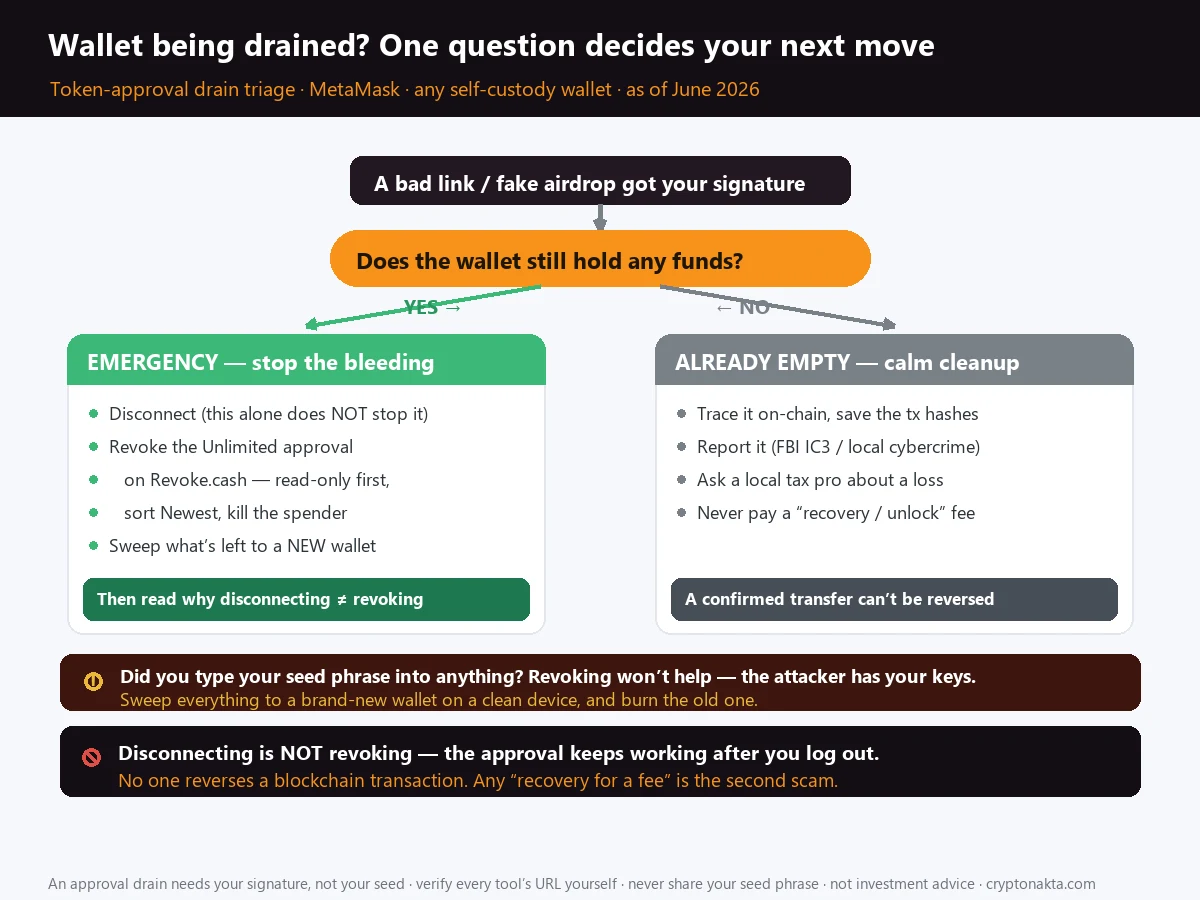
| Wallet still has funds | Disconnect → revoke the risky/unlimited approval (Revoke.cash, read-only first) → sweep what’s left to a new wallet. |
| Your seed phrase / private key may have leaked | Revoking won’t help. The attacker has your keys. Move everything to a brand-new wallet now. |
| Wallet is already empty | Trace it on-chain, report it to your country’s cybercrime authority, ask a local tax pro about a loss write-off, and never pay a recovery service. |
| Two facts to hold onto | Disconnecting is not revoking. Revoking stops future theft but can’t undo a drain. |
1. Right now, one question decides everything: is your wallet already empty, or not yet?
2. The 60-second emergency triage to run before you read anything else
3. Why a single approval can drain you forever: how allowances and unlimited approvals actually work
4. The mistake that empties wallets even after people log out: disconnecting is NOT revoking
5. Revoking, told straight: it stops future draining, can’t undo a drain, and costs gas
6. Doing it for real in Revoke.cash: read-only first, sort Newest to Oldest, kill the Unlimited spenders
7. Other ways to revoke: Etherscan and BscScan approval checkers, and in-wallet revoke
8. When revoking is useless: if your seed phrase or key leaked, sweep everything to a new wallet
9. Hardware wallets are not a magic shield: they faithfully sign the malicious approval you click
10. The second scam that hits while you panic: fake revoke.cash clones and recovery services
11. If it’s already drained: trace it on-chain, report to FBI IC3, claim the loss, never pay for recovery
12. Where to put what’s left: a fresh-seed wallet, or an exchange with no approvals to drain
13. Never end up here again: exact-amount approvals, periodic audits, revoke after every dApp
14. Related reading: the rest of the transfer-safety and wallet-security cluster
If your wallet might be draining right now, you don’t have time for theory. This guide is built as a triage: one question up top decides everything, then the exact steps to revoke a dangerous token approval, the trap that keeps emptying wallets even after people log out, and the recovery scam that targets you the moment you’re panicking. Verified facts only, because this is your money.
1. Right now, one question decides everything: is your wallet already empty, or not yet?
Read the next sentence before you do anything else. There are only two situations you can be in right now, and they need opposite reactions, so you have to know which one is yours before you touch a single button.
Either your wallet still has a balance in it, or it is already at zero. That fork decides the whole rest of this page.
| Your situation | How urgent | What to do |
|---|---|---|
| Wallet still holds funds | Emergency | Disconnect from the dApp, revoke the risky approval, then move what’s left to a brand-new wallet. |
| You think your seed phrase or private key leaked | Top emergency | Revoking won’t help. The attacker has your keys. Move everything to a fresh wallet now. |
| Wallet is already empty | After the fact | Accept the loss, trace it on-chain, report it to your country’s cybercrime authority, and never pay a recovery service. |
2. The 60-second emergency triage to run before you read anything else
This is the version you run when there’s no time to learn how any of it works. Do it in order, top to bottom.
- Don’t sign anything. If a wallet pop-up is asking you to confirm a transaction or a signature right now, reject it. A drainer needs your approval to move tokens. Stop giving it.
- Disconnect the wallet from the site you were using when this started. In MetaMask: the connected-sites icon, then disconnect. (Read the warning later. This alone does not stop the theft. It’s just the first switch to flip.)
- Open the real Revoke.cash. Type
revoke.cashyourself or use a saved bookmark. Never click a “revoke now” link from a DM, a tweet, or a search ad. - Paste your address in read-only mode and look for any Unlimited approval to a contract you don’t recognize. Sort the list Newest first.
- Revoke the dangerous one. This costs a little gas. It stops future draining of that token.
- Sweep what’s left to a new wallet with a brand-new seed phrase. Do this for certain if you ever typed your seed into anything. Send the assets, not the keys.
3. Why a single approval can drain you forever: how allowances and unlimited approvals actually work
A DeFi app can’t touch your tokens on its own. When you use a swap, a staking pool, or an NFT mint, at some point you sign an approval. That’s a small on-chain permission saying “this contract is allowed to move up to X of this token for me.”
Under the hood an ERC-20 token tracks three things: approve (you grant permission), allowance (how much is permitted), and transferFrom (the contract actually moves the tokens). The allowance is the dangerous bit. It does not expire. It does not reset when you close the tab or disconnect. It sits on the blockchain, live, until you go back and manually set it to zero.
Now look at how that turns into a trap. To save you from re-approving every single time, most apps ask for an unlimited approval by default. With a legitimate app that’s usually fine. The danger shows up with a malicious contract, the kind hiding behind a fake airdrop claim or a “connect to verify” button. There, a single unlimited approval is one signature that lets the contract empty that token in full, whenever it likes, with no expiry. It never has to ask you again, and you never get a second warning. One signature is enough, and after that the contract drains on a schedule you don’t control.
That’s why drainers don’t need your seed phrase. They just need you to click “approve” on one poisoned transaction. The Inferno Drainer kit alone hit more than 30,000 victims and stole over $9M this way, and contracts it deployed back in 2023 were still active and draining wallets into 2025.
4. The mistake that empties wallets even after people log out: disconnecting is NOT revoking
A lot of people lose money even after they think they got out. Something feels wrong, they panic, they hit Disconnect in their wallet, and they relax. The wallet keeps draining while they relax.
Disconnecting only tells the site to stop reading your address. That’s all it does. It’s a privacy switch and nothing more. The approval you signed earlier lives on the blockchain as a separate thing, and it doesn’t care whether the site is connected. The malicious contract can call transferFrom on your tokens whether you’re “connected” or sitting with the app closed.
| Action | What it actually does | Stops the theft? |
|---|---|---|
| Disconnect from dApp | Site stops seeing your address | No. The approval still works |
| Revoke the approval | Sets the allowance back to zero | Yes, for future draining |
| Sweep to a new wallet | Moves what’s left out of reach | Yes. The only fix if your seed leaked |
So: disconnecting is fine as step one, but if you stop there you’ve done nothing. The action that matters is the revoke.
5. Revoking, told straight: it stops future draining, can’t undo a drain, and costs gas
Let me be straight about what revoking can and can’t do, because a lot of people expect the wrong thing and then make a worse decision out of disappointment.
- It does not undo a transfer. Whatever already left your wallet is gone. The blockchain has no rewind button, and no one can reverse a confirmed transaction. Revoking closes the door; it doesn’t bring back what already walked out.
- It only stops future draining. If a malicious contract still has a live allowance, revoking cancels its right to keep coming back for more. That’s the whole job.
- It costs gas. A revoke is itself an on-chain transaction. On Ethereum that’s a few dollars depending on congestion; on cheaper chains it’s pennies. There’s an ugly edge case here. If a drainer already took everything including your gas token, you may not have enough left to pay for the revoke. In that case the revoke matters less anyway, because there’s nothing left in that wallet to protect. Your real job becomes making sure your seed is safe and never using that address again.
6. Doing it for real in Revoke.cash: read-only first, sort Newest to Oldest, kill the Unlimited spenders
Revoke.cash is the tool most people reach for, and for good reason: it’s free, it’s open-source (you can read the code on GitHub under RevokeCash), and it covers 100-plus EVM networks plus Solana. Here’s the careful way to use it.
- Get there safely. Type
revoke.cashinto the address bar yourself, or use a bookmark you saved on a calm day. Drainers buy lookalike domains and Google/Bing ads on exactly this search term, so the top result is not always the real site. - Use read-only mode first. Paste your wallet address into the search box. You don’t need to connect anything to see your approvals. This alone shows you every contract that currently has permission over your tokens.
- Sort Newest to Oldest. The approval that’s draining you is almost always one of the most recent ones, the one you signed minutes or hours ago through that bad link. Putting newest at the top makes the culprit jump out.
- Hunt the Unlimited ones. Look down the “Amount” column. An approval that reads Unlimited to a contract you don’t recognize is the prime suspect. Those are the ones that can empty a token in full.
- Revoke it. Now you connect your wallet, click Revoke on that entry, and confirm the (small) gas transaction. Repeat for any other suspicious unlimited approvals.
Permit and Permit2 approvals (EIP-2612) are signed off-chain, so they cost no gas and leave a lighter footprint. That’s exactly why drainers love them. In 2025 a single Permit-signature theft hit $6.5M, and Permit-based attacks made up 38% of the large ($1M+) losses. Revoke.cash shows these under signatures/Permit2; cancel any you don’t recognize.7. Other ways to revoke: Etherscan and BscScan approval checkers, and in-wallet revoke
Revoke.cash isn’t the only door. If you’d rather work inside tools you already trust, you have options. It’s worth knowing them in case one site is down or you’re on a chain it handles oddly.
| Tool | Coverage | Notes |
|---|---|---|
| Revoke.cash | 100+ EVM + Solana | Free, open-source, read-only lookup, zero-value revoke tx |
| Etherscan / BscScan / Polygonscan “Token Approvals” | That chain | Connect to Web3, then click Revoke per approval |
| MetaMask Portfolio (built-in) | Ethereum, Polygon, BNB Chain | Revoke from inside MetaMask itself |
| OKX Wallet / Binance Web3 Wallet | Multi-chain self-custody | OKX Wallet shows full approval history; manage and revoke in-app |
The block-explorer route (Etherscan’s “Token Approval Checker”, BscScan’s equivalent) is handy because you already trust the explorer’s URL and it’s chain-specific, so there’s no ambiguity about which network you’re cleaning. The flow is the same idea: find the approval, connect, revoke.
8. When revoking is useless: if your seed phrase or key leaked, sweep everything to a new wallet
Everything above only helps if the attacker has approvals and nothing more. If your seed phrase or private key got out, revoking is a waste of time and gas, and you need to know that before you spend either.
Think about what a seed phrase is. It’s the master key to every account in that wallet, on every chain, forever. If a fake “wallet validation” page tricked you into typing your twelve or twenty-four words, or you stored them in a screenshot or cloud note that got stolen, the attacker can recreate your entire wallet on their own device. They don’t need your approval for anything. They can sign whatever they want, including revoking your revokes.
So in that scenario there is exactly one move. Sweep everything to a brand-new wallet with a brand-new seed phrase, generated on a clean device, and never use the compromised seed again. Move your tokens out faster than they can, accept that you’re racing, and treat that old address as burned.
9. Hardware wallets are not a magic shield: they faithfully sign the malicious approval you click
People buy a hardware wallet, think they’re untouchable, and approve a malicious transaction anyway. Then they’re shocked it drained.
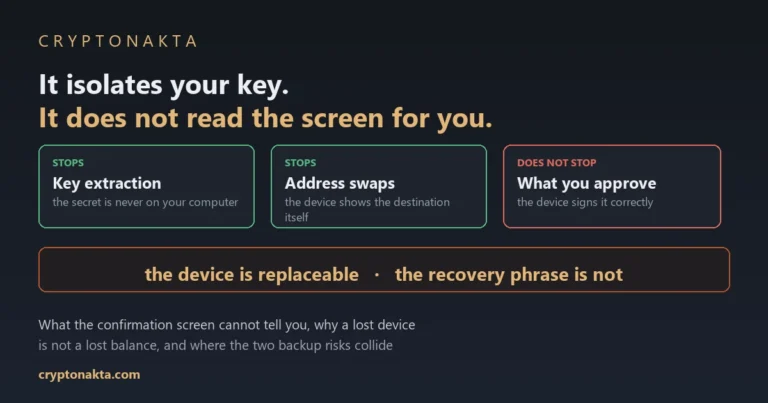
A hardware wallet protects one specific thing: it keeps your private key off your internet-connected computer, so malware can’t read it. That’s genuinely valuable. It does not read transactions for you, though, and it does not judge whether a contract is evil. If a phishing site hands your Ledger or Trezor a malicious approval and you press the physical button to confirm, the device signs it faithfully, because confirming is exactly what you told it to do.
So a hardware wallet stops a key-theft attack. It does not stop an approval-phishing attack, because in that attack you are the one approving. What protects you here is reading the transaction before you approve it, and never approving contracts you reached through a random link. The hardware can’t do that part for you.
10. The second scam that hits while you panic: fake revoke.cash clones and recovery services
Your panic is its own attack surface. The moment your wallet gets drained, a second wave of scammers is waiting specifically for people in your exact state of mind.
It works like this. Drainers register lookalike domains, slightly misspelled versions of revoke.cash and the big wallet brands, and buy search ads on terms like “revoke.cash” and “MetaMask wallet drained.” They flood Twitter/X and Telegram with urgent “SECURITY ALERT: revoke now” posts linking to clone sites. You arrive panicking, you click the loudest “fix it” link, and you get drained a second time. This isn’t theoretical. In January 2025 a fake Arbitrum governance proposal spread on X, and people who “voted” actually signed a drainer approval. Over $8M gone.
Then come the “recovery” and “unlock” services. They promise to get your money back, or to unfreeze your wallet, and at some point they ask for your seed phrase, your private key, or an upfront payment. Every single one of those is a scam. A real tool never needs your seed phrase. Nobody can reverse a blockchain transaction for a fee. An advance-fee “recovery service” is just the same drainer wearing a helpful mask.
11. If it’s already drained: trace it on-chain, report to FBI IC3, claim the loss, never pay for recovery
If you’ve confirmed the wallet is already empty, switch out of panic mode. The emergency is over; what’s left is calm, methodical cleanup. It won’t feel satisfying, but each step has a point.
- Trace it on-chain. Open the wallet on a block explorer (Etherscan, etc.), find the draining transaction, and note where your funds went, meaning the receiving address and any contract involved. Save the transaction hashes. This is the evidence trail.
- Report it to the right authority where you live. File a cybercrime complaint with whichever body handles this in your country, and give them the transaction hashes, the receiving address, the phishing URL that started it, and the name of the protocol or token that was impersonated. In the United States that body is the FBI’s Internet Crime Complaint Center (ic3.gov); elsewhere it will be your national police cybercrime unit or financial regulator. Send the phishing site to the real protocol’s team too, since they can often get the domain pulled down before it catches the next person.
- Ask whether you can write the loss off on your taxes. How a stolen-crypto loss is treated depends entirely on your country’s tax rules, so the honest answer is to check with a local tax professional or a reputable crypto-tax tool for your jurisdiction. In some places theft of crypto can be claimed as a loss; in others the rules are tighter. It won’t bring the money back, but where it applies it can soften the hit, and you already pulled your transaction records in step one.
- Do not pay for recovery. Re-read the previous section if you’re tempted. Nobody reverses a confirmed blockchain transaction. Every “we’ll get it back for a fee” offer is the second robbery.
12. Where to put what’s left: a fresh-seed wallet, or an exchange with no approvals to drain
Once the bleeding stops, the question is where to park what survived. You’ve got two honest options, and they suit different people.
A fresh self-custody wallet suits you if you want to keep being your own bank. Generate a new seed phrase on a clean device, write it on paper, and never type it online. This is the right call if you intend to keep using DeFi. Just start from zero: new wallet, new seed, and treat approvals like a loaded tool from now on.
A reputable custodial exchange is the other option, and here’s the part worth understanding. On Coinbase, Kraken, Binance, OKX, or Bybit, your funds sit in the exchange’s custody. There is no allowance, no approve, no contract you can accidentally grant. The whole approval mechanism doesn’t exist on a custodial account, so there’s simply nothing for a drainer to phish. For someone who just got burned by an approval and doesn’t run DeFi day-to-day, parking funds on a serious exchange is the lowest-stress place to let the dust settle.
That isn’t a magic shield. Exchanges carry their own risks, like account access and platform risk, and that’s a separate conversation. Against this specific attack, though, a custodial account gives a drainer nothing to work with.
Binance

Bybit

OKX

KuCoin

Gate.io

If you’re setting up an exchange account as your safe harbor, the practical path is: open the account, finish ID verification (KYC), turn on app-based 2FA, then transfer your surviving funds in from your wallet. (Some exchanges also offer their own self-custody Web3 wallet with a built-in approval manager, like Binance Web3 Wallet or OKX Wallet, if you want both worlds under one login.)
13. Never end up here again: exact-amount approvals, periodic audits, revoke after every dApp
You don’t want to be back on this page in six months. The habits that prevent a repeat are small and dull, which is exactly why they work.
- Approve exact amounts, not “Unlimited.” When a dApp asks for an approval, many wallets let you edit the amount. Set it to what the transaction actually needs. If a malicious contract ever gets through, it can only take that capped amount, not your whole balance.
- Audit your approvals on a schedule. Once a month, paste your address into Revoke.cash in read-only mode and look at what still has permission over your tokens. Kill anything you no longer use.
- Revoke after you’re done with a dApp. Used a swap once and don’t plan to return? Revoke the approval when you leave. An approval you don’t need is just risk sitting there for free.
- Slow down on “urgent” anything. Fake airdrops, “claim before it expires,” surprise governance votes, support DMs: urgency is the drainer’s favorite tool because it stops you from reading what you’re signing. Real opportunities survive you taking five minutes.
14. Related reading: the rest of the transfer-safety and wallet-security cluster
A drained wallet is rarely the only thing going wrong, and the transfer-safety questions next to it trip up the same beginners. If your problem turned out to be something other than a malicious approval, start here:
- Sent crypto to the wrong network: the funds aren’t stolen, they’re stuck, and whether you can recover them depends on the chain.
- Why is my withdrawal still pending? For when a transfer hangs and you’re not sure if it’s the exchange or the chain.
- Sent crypto without the memo/tag: the missing-memo deposit problem and how exchanges handle it.
- Crypto deposit not credited: money left one side but never showed up on the other.
- Withdrawal frozen / account locked: for when it isn’t one transfer but your whole account that’s restricted.
This page is also the first of a wallet-security series. The companion pieces build on the same triage logic you just used here: what to do if your seed phrase itself was exposed, and the honest answer to “I got scammed, can I recover it?”
Frequently asked questions
revoke.cash yourself or use a bookmark, since drainers run lookalike clones and search ads).approve, the allowance sits on the blockchain and never expires on its own. ‘Unlimited’ approval means one signature lets that contract move that token in full, any time, until you manually set the allowance back to zero. Closing the tab or disconnecting changes nothing.