Giving a Bot Your API Key: What Each Permission Switch Actually Opens
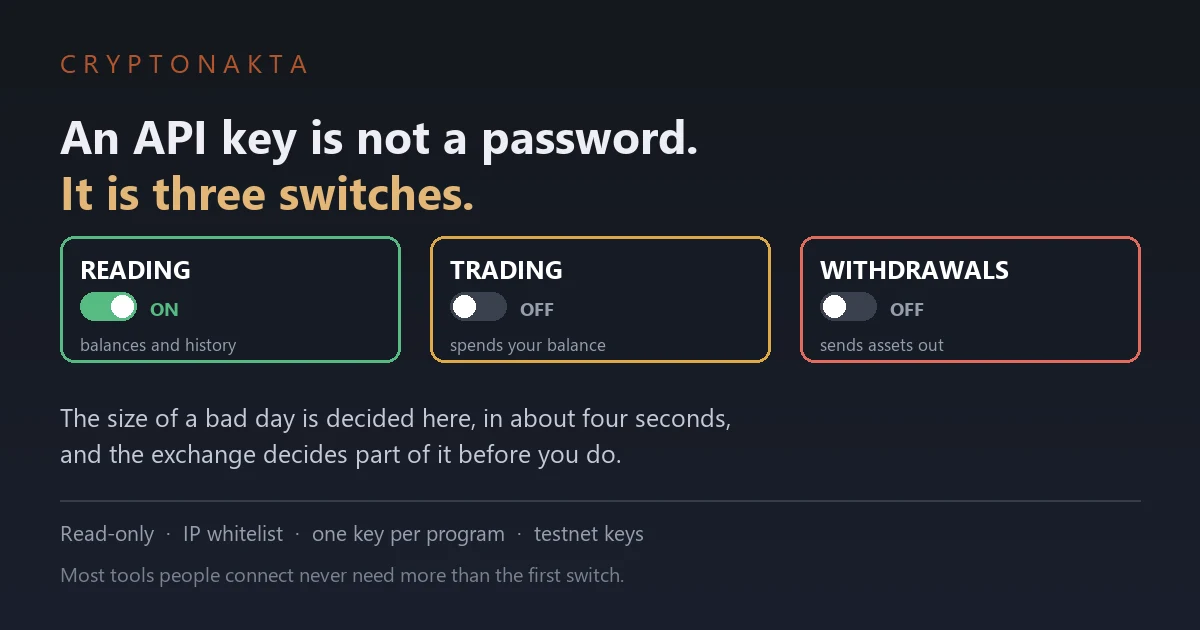
An API key is a bundle of switches rather than a password. The dangerous ones are gated on whether you pinned an address, and the exchange checks that first.
| Question | Short answer |
|---|---|
| Is an API key a password? | No. It is a bundle of switches, and you decide which ones are on. |
| How many switches are there? | At least three that matter: reading, trading, and withdrawals. |
| Which one should a tracking app get? | Reading only. Most tools never need more than that. |
| Can money leave without the withdrawal switch? | Yes. Trading permission alone can drain a balance. |
| What actually decides my permissions? | Whether you pinned an IP address. The exchange gates the dangerous switches on it. |
| My key was leaked. Is that covered here? | No, that is a different article. This one is about the state before that. |
1. A key is a bundle of switches, not a password
2. Pinning an address decides what you may switch on
3. Withdrawals off is not the same as harmless
4. What the two platforms actually publish
5. Matching permissions to what the tool does
6. One program, one key
7. The whitelist, and whose address goes in it
8. Keeping practice keys away from real ones
9. The order to follow before you press create
10. Five beliefs that cost people money
11. Where the account lives
12. How I decide in practice
A tool asks for an API key and the setup guide says to tick a few boxes. Those boxes are the whole decision, and they are usually ticked in about four seconds by someone who has never been told what the third one does. This is what each switch opens, and why the exchange decides some of it before you do.
1. A key is a bundle of switches, not a password
Someone asks for your API key. A portfolio tracker, a tax tool, a trading bot, a friend who wrote a script.
The honest answer to “is it safe” is that the question is pointed at the wrong thing. It is not one credential with one level of access.
Three terms, then nothing else technical
An API key is a credential you generate so an outside program can act on your exchange account without logging in. No password prompt, no second factor, every time.
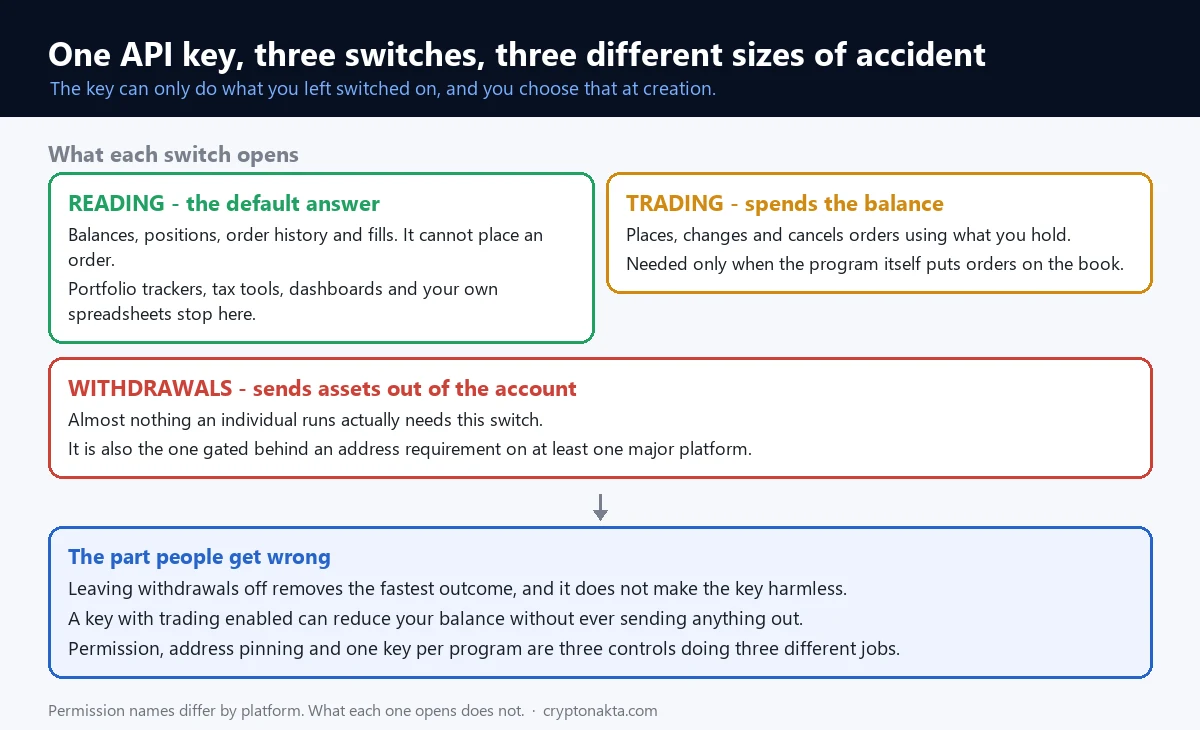
Permissions are the switches attached to that key. The exchange lets you turn them on separately, and the key can only do what is switched on.
An IP whitelist is a list of network addresses allowed to use the key. Requests from anywhere else are refused even when the key is correct.
What the switches actually are
| Switch | What it allows | Who genuinely needs it |
|---|---|---|
| Reading | See balances, positions, order history, fills | Trackers, tax tools, dashboards, spreadsheets |
| Trading | Place, modify and cancel orders on your balance | Bots and automation that actually trade |
| Withdrawals | Send assets out of the account | Almost nothing an individual runs |
Most people asking the question only need the first row. That is the single most useful sentence here.
Why “is it safe” has no yes or no
A read-only key handed to a badly run service leaks your balance history. Unpleasant, not expensive.
The same service holding a key with trading switched on is a different size of problem entirely. You decided which one it was at creation time, in about four seconds.
Why this matters more than it used to
Connecting an outside program to an exchange used to be a developer activity. Now a tax tool, a phone app and a spreadsheet template all ask for the same thing.
The audience changed and the screen did not. It still presents the switches the way it always did, to people who have not been told what they mean.
That gap is the whole reason this article exists. None of it is difficult once the three switches are named.
2. Pinning an address decides what you may switch on
Here is the part that reorders the rest. You do not freely pick your permissions.
The exchange looks at whether you pinned an IP address first, and that answer limits what you are allowed to switch on.
What the documentation says
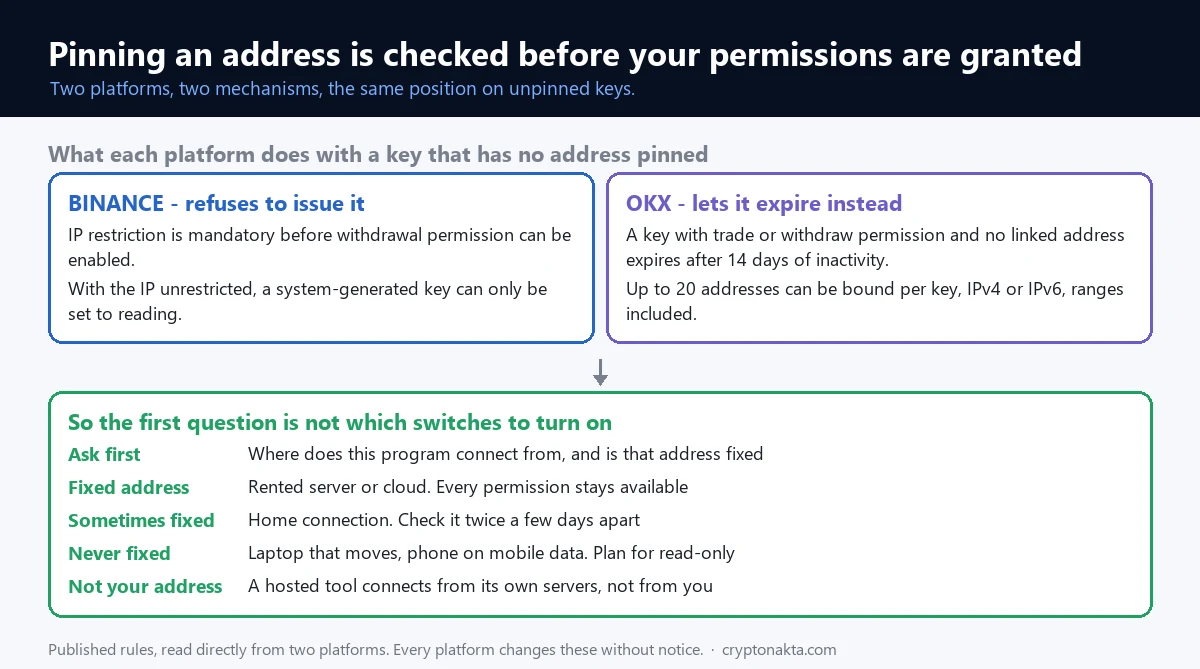
Binance’s support pages put it plainly. Adding IP access restrictions is mandatory to enable withdrawal permission, and a system-generated key can only be set to reading if your IP is unrestricted.
Read the second half again. With no IP pinned, the read-only setting is not a recommendation. It is the only thing available.
A different platform, the same conclusion
OKX does not block it the same way. Its developer documentation covers keys that hold trade or withdraw permissions without being linked to an address. Those expire after fourteen days of inactivity. The same page allows up to twenty addresses per key.
So one venue refuses to issue the permission and the other quietly lets it die. The mechanism differs. The position does not.
Why this is worth knowing before you start
People usually meet this rule as an error message, halfway through setting up a bot, and read it as the exchange being awkward.
It is not awkwardness. Two independent platforms decided that unpinned keys with real power are the thing to prevent, and they built the screen around that.
Which means the practical first question is not which switches to turn on. It is whether the machine running this program has an address you can pin.
3. Withdrawals off is not the same as harmless
The common plan is to leave withdrawals off and treat everything else as low stakes. The first half is right. The second half is where people get hurt.
Trading permission moves money too
A key that can trade can spend your balance. It does not need to send anything out of the account to leave you with less than you started with.
That has happened at scale. A breach at a trading bot service exposed a large number of exchange keys. The losses that followed came from unauthorised trading rather than withdrawals. What that looked like is in an exchange account that has been taken over.
The mechanics of how a bad fill happens at all are in order types and why positions get liquidated. This article stays on the switch.
So what does leaving withdrawals off actually buy
It removes the fastest and most complete outcome. Assets cannot be sent to an address that is not yours.
It does not make the key harmless, and it is not a substitute for pinning an IP. Those are two separate controls doing two separate jobs.
The useful way to think about the trading switch
Ask what the program does when it is working correctly. If the answer never includes placing an order, it does not need the switch, no matter what its setup guide says.
Plenty of tools request more than they use, because asking once is easier than asking twice. That is a reason to check rather than a reason to panic.
4. What the two platforms actually publish
These are the published rules on the two platforms whose documentation was read directly for this article, checked in September 2026. Other venues word it differently, so read your own screen.
| Rule | Binance | OKX |
|---|---|---|
| Permission split | Reading and withdrawals switched separately | Read, trade, withdraw |
| Withdrawals without a pinned IP | Not available. IP restriction is mandatory | Allowed to exist, but expires |
| Unpinned key with trade or withdraw | System key limited to reading | Expires after 14 days of inactivity |
| Addresses per key | Whitelist required for withdrawals | Up to 20, IPv4 or IPv6, ranges allowed |
| Credential pieces | Key and secret, or a key you generate yourself | Key, secret and a passphrase you choose |
Figures checked September 2026 and set by each platform. Treat them as the shape of the rule rather than as constants.
The credential is not always two pieces
On one platform a system-generated key is a key and a secret. Keys you generate yourself use a different scheme and you hold the private half.
On the other, there is a third piece: a passphrase you chose at creation, required on every request alongside the key and secret.
The practical consequence is small but it catches people. If you stored two strings and the program asks for three, nothing is broken. You are on a platform that uses three.
What none of them store
The secret is shown once, at creation. No exchange will show it again, and support cannot retrieve it.
So a lost secret is not a recovery problem. It is a delete-and-make-a-new-one problem, which is a much better problem to have.
5. Matching permissions to what the tool does
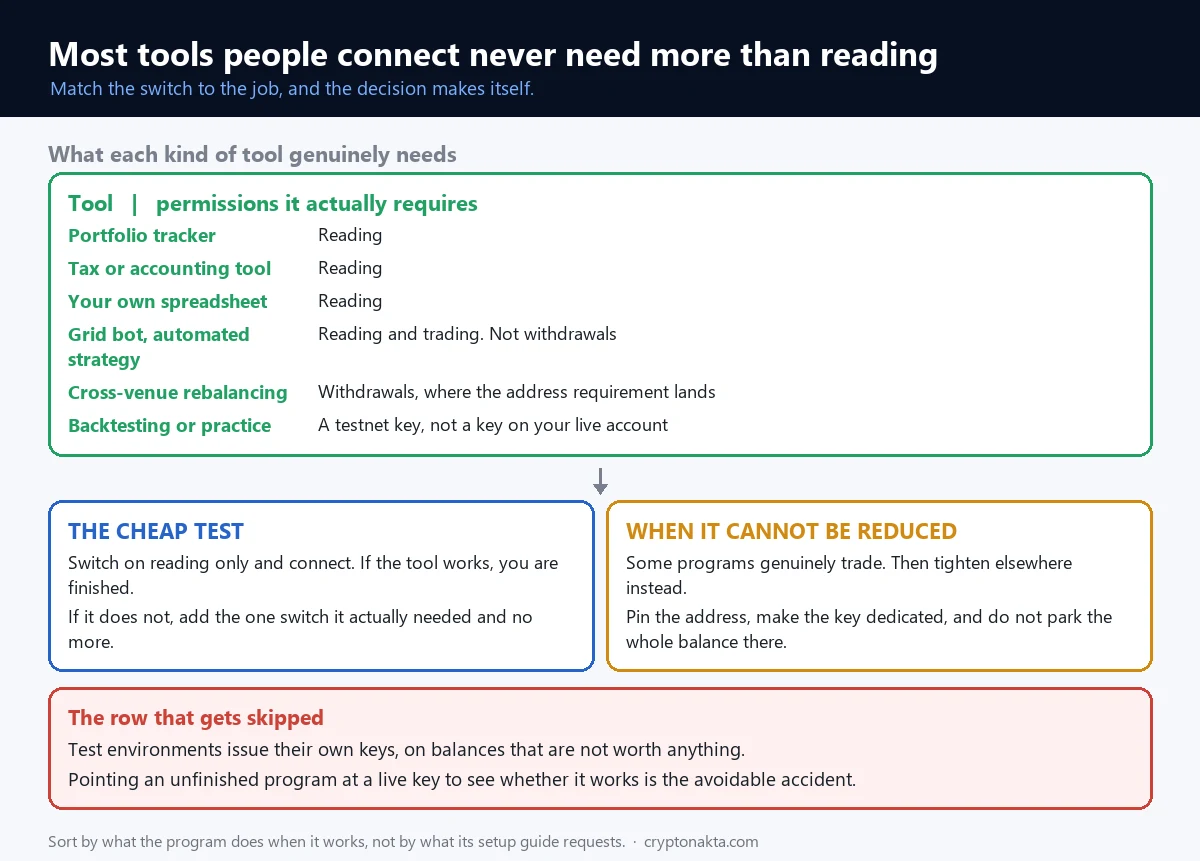
Sort the tools by what they do when working correctly, and the permission answers itself.
| What you are connecting | Permissions it genuinely needs |
|---|---|
| Portfolio tracker, balance dashboard | Reading |
| Tax or accounting tool pulling history | Reading |
| A spreadsheet you wrote yourself | Reading |
| Grid bot, automated strategy, copy tool | Reading and trading. Not withdrawals |
| Something that moves funds between venues for you | Withdrawals, which is where the IP requirement lands |
| Backtesting or practice | A testnet key, which is not a key on your real account |
The last row gets skipped a lot. Test environments issue their own keys, and using a live key to practise is the avoidable version of this whole subject.
When a bot asks for withdrawals
Some legitimate setups genuinely need it, mostly ones that rebalance across venues. Most do not.
If a strategy tool asks for it, the question worth asking is which feature uses it. A clear answer is fine. No answer is an answer.
What a continuously running strategy actually does is set out in the grid trading bot, and withdrawing is not on that list.
If you are still choosing where to run any of this, the comparison is in choosing a crypto exchange. The checks that matter before depositing anywhere are in how to tell if an exchange is legitimate.
6. One program, one key
One key for everything is convenient until the day it is not. The alternative costs about a minute.
One program, one key
Give each tool its own key, named after the tool. Then the day something looks wrong, you delete one key and one program stops working.
With a shared key you face a worse choice: delete it and break everything at once, or leave it alive while you work out which tool leaked.
Delete rather than disable
Keys accumulate. A service you tried for a week two years ago is still holding a working credential unless you removed it.
The exchanges treat idle keys as a problem too. That is what the fourteen day inactivity expiry above is doing.
The habit worth having is a calendar reminder, not a policy. Open the API management page occasionally and delete what you no longer recognise.
Where the secret lives
Not in a chat message, not in a screenshot, not in a repository. Those three account for most of the accidental leaks that are nobody’s fault in particular.
A password manager entry is enough. It is the same storage problem as a recovery phrase, with one difference. An API key can be replaced in thirty seconds, so when in doubt you replace it.
Naming keys so the list stays usable
Most platforms let you label a key. Use the name of the program, not a date or a number.
A year later the label is the only thing telling you whether a key is still in use. A key called “test” is a key you will never feel confident deleting.
If you already have unlabelled keys, the safe move is deleting them and recreating what you actually need. Something breaking is how you discover what was using it.
7. The whitelist, and whose address goes in it
Pinning an address sounds like a task for someone with a server. Often it is simpler than that.
What you are actually pinning
The whitelist holds the address the program connects from, not the address of your own laptop or phone unless the program runs there.
A bot running on a rented server has one fixed address, which is the easy case. A bot running on your home connection has whatever address your provider hands out, which may change.
That difference is why the same feature feels trivial to one person and impossible to another. It is not about skill.
When your address moves
Some providers give a stable address for months. Some change it weekly. You find out by checking twice a few days apart rather than by guessing.
If it moves, there are two realistic options. Run the program somewhere with a fixed address, or accept read-only and do the trading part another way.
What is not an option on at least one major platform is keeping withdrawal permission without pinning anything. The screen simply will not issue it.
Ranges, and why the limit exists
Whitelists usually accept several addresses, and network ranges as well as single addresses. That covers the normal case of a program moving between two machines.
They are capped rather than unlimited, because a whitelist covering everything is the same as no whitelist. The cap is the feature working as intended.
Reading the whitelist field
| Where the program runs | Does it have a fixed address | What that leaves you |
|---|---|---|
| Rented server or cloud instance | Yes, one that does not move | Every permission the platform offers |
| A machine at a company or campus | Usually, and often a range | Same, if you can get the range from whoever runs the network |
| Home connection, provider assigns it | Sometimes stable for months, sometimes not | Check it twice before relying on it |
| Laptop that moves between networks | No | Read-only, or move the program somewhere fixed |
| Phone on mobile data | No, it changes constantly | Read-only |
The bottom two rows are the ones people fight against. The screen is not being difficult there, it is telling you that this program cannot be pinned.
A mistake worth naming
People sometimes paste their own home address into the whitelist for a key that a hosted service will use. Then the service cannot connect and the key looks broken.
It is not broken. The whitelist wants the address of whatever machine sends the requests, and for a hosted tool that is the provider’s server, not you.
Any tool that expects a key will publish the addresses it connects from. If it does not publish them, that is a fact worth weighing before you hand over anything.
8. Keeping practice keys away from real ones
Two accounts get confused constantly, and mixing them is the most common way a careful person still ends up exposed.
Testnet keys are not your keys
Test environments are separate systems with separate balances that are not worth anything. They issue their own keys.
A key made there cannot touch your real balance, which is exactly why you use it while a strategy is unfinished.
The mistake is the reverse: pointing a half-finished program at a live key to see whether it works. It works, and that is the problem.
Spot and derivatives are often separate switches
Many platforms split trading permission by product, so a key that can trade spot cannot necessarily open a futures position.
That split is useful. If your program only trades spot, leaving the derivatives switch off costs you nothing and removes the outcome where a bug opens leveraged positions.
What those products differ on is covered in spot versus futures, and what leverage does to a position is in isolated and cross margin.
One more separation worth keeping
A key that trades does not need to be the key that reads. If a dashboard and a bot both want access, two keys with different switches are strictly better than one key with both.
9. The order to follow before you press create
The whole thing collapses into a short order. It takes under a minute once you have done it twice.
Before you press create
- Name the key after the program that will hold it. A list of keys called “key1” is a list you cannot audit later.
- Decide the permissions from what the program does, not from what its setup guide requests. Reading covers more tools than people expect.
- Find out the address the program connects from before you start, because on at least one platform this decides which switches you are allowed.
- Pin that address if you have one. If the program runs on a connection that changes, plan for read-only instead.
- Leave withdrawals off unless a specific feature you use needs it and you can name that feature.
- Store the secret once, properly. It is shown a single time and cannot be retrieved afterwards.
- Run it small first. Same logic as a test transfer: confirm the thing behaves before it handles size.
And afterwards
Keep the list short. When you stop using a tool, delete its key that day rather than adding it to a mental list.
If something already looks wrong, this is not the article for it. Start at an account that has been taken over, and if you have lost access to your second factor as well, losing 2FA covers what is locked and what is not.
What this order is protecting against
Steps two and five keep the size of a bad day small. They decide what a leaked key could do, before anything leaks.
Step three and four decide whether you get those permissions at all, which is the part most people meet as a surprise halfway through.
Step six is the one that causes avoidable panic later. The secret appears once and people assume they can find it again.
10. Five beliefs that cost people money
Five beliefs cause most of the avoidable exposure. All of them sound sensible.
| What people believe | What the screen actually does |
|---|---|
| Withdrawals off means the key is safe | Trading permission alone can spend the balance. The two controls do different jobs |
| I choose my permissions freely | Whether you pinned an IP is checked first, and on one platform an unpinned system key is limited to reading |
| An IP whitelist is only for advanced users | It is mandatory for withdrawal permission on one of the two platforms read for this article |
| One key is easier to manage | It is, until you need to revoke one tool and find you can only revoke all of them |
| A key I stopped using is harmless | It works until deleted. Platforms expire idle unpinned keys precisely because of this |
One more that is half true
People say a read-only key cannot hurt you. Mostly right.
What it still exposes is your position history and balance sizes, which is information somebody can use in a targeted approach. The usual shape of those approaches is in how crypto scams work.
So read-only is the correct default rather than a guarantee. It limits the damage instead of removing the question.
11. Where the account lives
Where the account lives decides which of these screens you get. The permission model, the whitelist rules and the wording all come with the platform.
These are places where this kind of setup is common. Their API screens differ, so treat the descriptions below as a starting point and read your own.
Binance

OKX

Bybit

KuCoin

Affiliate disclosure: some links are partner links. We may earn a commission at no extra cost to you. This is not investment advice.
If custody rather than automation is what you are weighing, the alternative is in what a crypto wallet is. What a hardware device does and does not stop is in what a hardware wallet protects.
12. How I decide in practice
My own rule is short, and it comes from the permission screen rather than from a threat model.
What I do, in order
I start from what the program does when it works, and I turn on nothing else. That single habit removes most of the decisions.
I make a key per tool and name it after the tool. It costs thirty seconds and it means a bad day is a one-line fix instead of a rebuild.
I do not switch on withdrawals. Not as a principle, but because I have never run something where I could name the feature that needed it. If I did, I would pin an address first, because on one platform I would have no choice anyway.
Where I think the common advice is wrong
The standard framing is “protect your API key like a password”. It is well meant and it teaches the wrong instinct, because it suggests the risk is about how well you hide a string.
Most of the outcome is decided before you hide anything, at the moment you choose the switches. A well-hidden key with trading enabled is worse than a carelessly stored read-only one.
The part I am least sure about
I do not know how well the average tracking service stores what you give it, and neither does anyone else outside those companies. That is the uncomfortable centre of this subject.
What I am confident about is the shape. Permissions are separate, the dangerous ones are gated on pinning an address, and the secret is shown once. Those held on both platforms whose documentation I read, and they are what I would still teach if every screen were redrawn.
A reasonable objection
Someone could say this is a lot of care for a tracker that just reads balances. Fair enough, and for a read-only key I would not argue.
The care is priced for the other rows in the table. The problem is that the same screen issues both, and the four seconds where you decide which one you are making do not feel different at the time.
Frequently asked questions
Read next: what happens when an exchange account is taken over