Binance Verification Failed: ID Rejected, Face Verification Not Working, How Long It Takes, No KYC
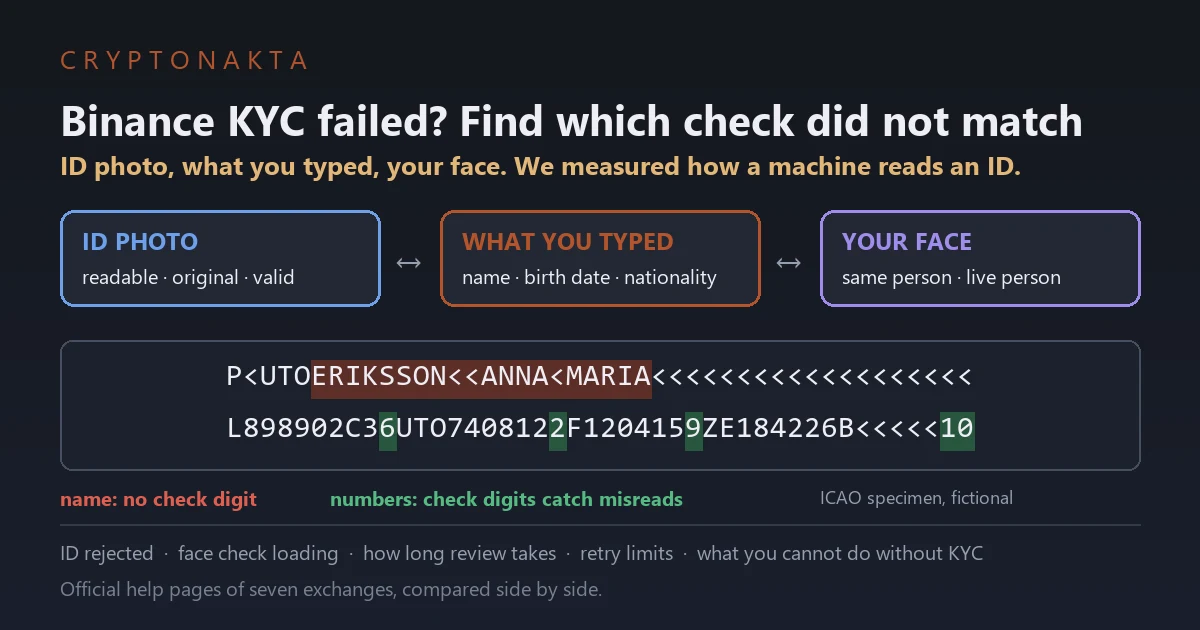
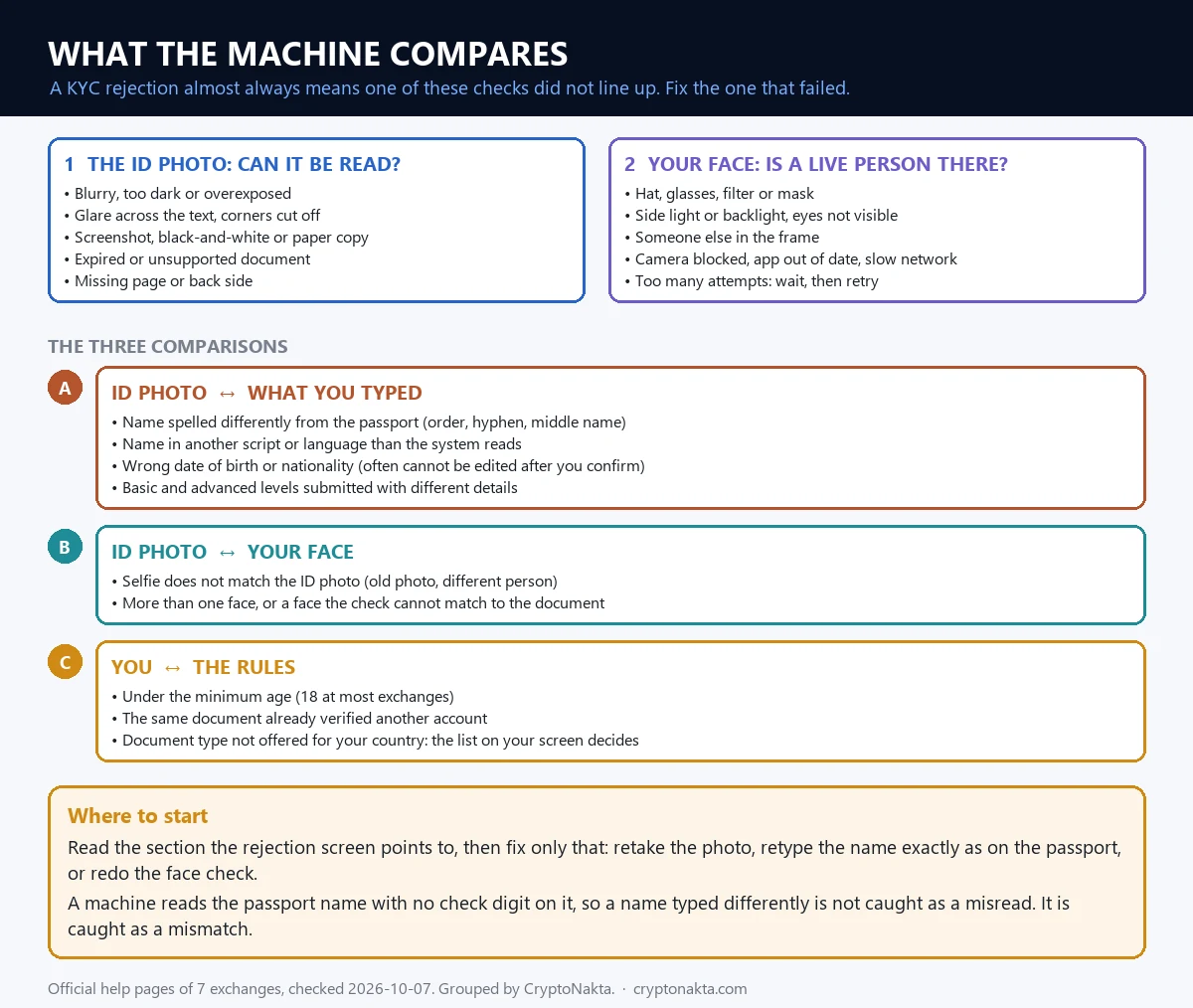
Binance verification fails when one of three checks doesn’t match: the photo of your ID, the details you typed, or your face on camera. Software does much of the comparing, and it is pickier than your eyes. The fix depends on which of the three went wrong.
I wanted to see how picky. So I drew fake passport lines in the official ICAO format and damaged them with blur, shake, glare and tilt. Then I fed them to a free open-source text reader. A thin strip of glare ruined most reads. Light blur did something sneakier. It let names come out wrong while the passport’s own error checks said everything was fine.
In this article (14)
Why does Binance verification fail?What does Binance read off your passport or ID card?KYC rejected due to name mismatch: the field nothing double-checksBinance KYC levels and requirements, including proof of addressHow blurry is too blurry? I ran fake passports through an OCR readerHow to retake your ID photo for BinanceBinance facial verification failed or stuck on loadingThree different face checks on Binance, passkeys includedHow long does Binance take to verify identity?Bybit, OKX and Bitget KYC compared with BinanceWrong name, wrong nationality or an expired ID: fixing it on BinanceWhat happens if you don’t do KYC on Binance?Is Binance KYC safe? Fake verification texts and rented accountsMy take: what testing it myself taught me
 View full size ↗
Why does Binance verification fail?
Binance verification fails when its system can’t match three things: the photo of your ID, the details you typed, and your live face on camera. Every rejection message on Binance’s screen points to one of those three. Find the one that broke, and you know what to redo.
KYC means “know your customer.” It is the identity check an exchange runs to confirm who owns each account. Exchanges have a legal duty to know their customers. That’s all the background you need for fixing a failed check.
A rejection may not come from a person reading your file. It can come from software comparing the photo, your typed details and your face, and finding something that doesn’t line up. Which pair failed decides the fix.
- The ID photo. Is it readable, original, complete and still valid?
- Your typed details against the ID. Do the name, birth date and nationality match?
- Your face against the ID photo. Same person, live, and alone on camera?
Binance doesn’t publish one list of rejection reasons. When a check fails, it shows “Verification rejected. Please review the following sections:” and points at the part to redo.
| Binance message or problem | Which check failed | What to do |
|---|---|---|
| Image is blurry, please re-upload | ID photo: can the text be read? | Hold still and tap to focus. |
| Image has missing corners, please re-upload | ID photo: is the whole card there? | Keep all four corners in the frame. |
| Image is overexposed / Image is too dark | ID photo: can the text be read? | Use soft daylight from the side. |
| Please upload a color photo | ID photo: is it the original? | Photograph the real card in color. No copies. |
| Expired document | ID photo: is it valid? | Use an ID that hasn’t expired. |
| Details don’t match the ID | Typed details vs the ID | Match the ID letter for letter. |
| Identification failed. Please make sure it’s you | Your face vs the ID photo | Good light, no hat or glasses, face centered. |
| Identification failed. Please make sure no one else is in the frame | Your face: one live person? | Do it alone in the room. |
If the screen gives no clear reason, go in the table’s order. Photo first, then typed details, then face.
What does Binance read off your passport or ID card?
Binance doesn’t say how its software reads IDs, but a passport has two kinds of text. One is the printed page you can see. The other is the two lines of letters and chevrons at the bottom. Software trusts those lines because every passport prints them the same way.
That zone is called the MRZ, short for machine readable zone. The format comes from ICAO, the UN agency for air travel, in a document called Doc 9303. Each passport line has exactly 44 characters. Here is ICAO’s own made-up sample, a woman named Anna Maria Eriksson from the fictional state of Utopia:
P<UTOERIKSSON<<ANNA<MARIA<<<<<<<<<<<<<<<<<<<L898902C36UTO7408122F1204159ZE184226B<<<<<10
The chevrons (<) are fillers. They stand for spaces and empty slots. This is what each slot holds:
| Line | Positions | What it holds | ICAO sample | Protected by a check digit? |
|---|---|---|---|---|
| Line 1 | 1 to 2 | Document type | P< | No |
| Line 1 | 3 to 5 | Issuing country | UTO | No |
| Line 1 | 6 to 44 | Name (surname, then given names) | ERIKSSON<<ANNA<MARIA<<<<<<<<<<<<<<<<<<< | No, none at all |
| Line 2 | 1 to 9 | Passport number | L898902C3 | Yes |
| Line 2 | 10 | Check digit | 6 | n/a |
| Line 2 | 11 to 13 | Nationality | UTO | No |
| Line 2 | 14 to 19 | Date of birth (YYMMDD) | 740812 | Yes |
| Line 2 | 20 | Check digit | 2 | n/a |
| Line 2 | 21 | Sex | F | No |
| Line 2 | 22 to 27 | Expiry date (YYMMDD) | 120415 | Yes |
| Line 2 | 28 | Check digit | 9 | n/a |
| Line 2 | 29 to 42 | Optional personal number | ZE184226B<<<<< | Yes |
| Line 2 | 43 | Check digit | 1 | n/a |
| Line 2 | 44 | Overall check digit | 0 | n/a |
Look at the last column. The numbers and dates each get a check digit. A check digit is one extra number worked out from the digits next to it. If the software misreads a digit, the math stops adding up. Then it knows the read went wrong.
The math takes ten seconds. Take the birth date 740812. Multiply each digit by 7, 3, 1, then repeat those weights. Add up the results and keep the remainder after dividing by 10.
| Digit of the birth date | 7 | 4 | 0 | 8 | 1 | 2 |
|---|---|---|---|---|---|---|
| Weight | 7 | 3 | 1 | 7 | 3 | 1 |
| Digit times weight | 49 | 12 | 0 | 56 | 3 | 2 |
| Sum, then remainder after dividing by 10 | 122, remainder 2. The passport prints 2 right after the birth date. | |||||
Position 20 of the sample’s second line is a 2, so the math checks out. Now say the software misreads one digit. That digit moves by 1 to 9, and 7, 3 or 1 times that is never a multiple of 10. So the remainder always changes, and the software sees the mistake.
ID cards with an MRZ have three shorter lines, with the name on the third. So your name can be cut in a different spot on your ID card than on your passport. Newer passports may start with PP instead of P<, after a 2026 ICAO update. My test used the older sample.
KYC rejected due to name mismatch: the field nothing double-checks
A name mismatch can get your ID rejected on Binance, and the passport format shows why. The name is the one part of the machine readable lines with no check digit. If software misreads a letter, nothing flags it except the name you typed.
Go back to the table above. The name field is 39 characters long and no check digit covers any of it. ICAO says it plainly in Doc 9303: “names in the MRZ may not appear in the same form as in the VIZ.” The VIZ, or visual inspection zone, is the printed part of the page.
So your passport can hold two versions of your name. The printed one can carry accents and apostrophes. The machine one only uses capital letters A to Z, with the surname first.
| Printed on the photo page | In the machine readable lines | What changed |
|---|---|---|
| ERIKSSON, ANNA MARIA | ERIKSSON<<ANNA<MARIA | Comma becomes two chevrons. Spaces become one. |
| D’ARTAGNAN | DARTAGNAN | The apostrophe is dropped and the letters close up. |
| MARIE-ELISE | MARIE<ELISE | The hyphen turns into a chevron. |
| VILARCHAO FERNANDEZ, JOSE RAMON | VILARCHAO<FERNANDEZ<<JOSE<RAMON | Two surnames stay in front, before the double chevron. |
| Ñ, Ü and other marked letters | N or NXX, UE or UXX or U | Accents go. ICAO allows more than one spelling. |
ICAO even lists 16 ways to write Mohammed in Latin letters. Long names get cut at 39 characters, and the last slot then holds a letter instead of a filler. If your name is long, the machine line may end mid-name.
What does this mean on Binance? The name box says “Full Name (exactly as shown on your ID).” The form has [First Name], Middle Name(s) and [Last Name]. Its hints say that if your passport has only one name, you put it in [Last Name] and type a hyphen in [First Name]. They also say two given names both go in [First Name]. Follow the hint your own form shows.
The habits that cause trouble are small. People drop a middle name, type a nickname or swap the name order. Bitget even lists “missing middle names or different languages” as a rejection reason.
The safest rule is boring. Copy the printed name on the ID you upload, letter for letter, in the same order. If your ID shows your name in a local script only, Binance treats switching to an English-language passport as a valid reason to update your identity later.
Binance KYC levels and requirements, including proof of address
Binance KYC has two levels for personal accounts, [Verified] and [Verified Plus]. [Verified] needs an ID, a face check and your personal details, and every new user needs it before depositing or trading. [Verified Plus] adds proof of address.
[Verified] is the level your profile shows once Binance has checked your ID and face. The flow asks for these, in order:
- Where you live, who issued your ID, and the ID type.
- Photos of the ID, front and back.
- The [Liveness Check], which is the face scan.
- Your personal details to confirm. After you confirm, you can’t change them.
Most people can pick a passport, an ID card or a driver’s license. The ID types you can pick depend on where you live, so the list on your own verification screen is the one that counts. Binance doesn’t print a fixed list of withdrawal limits per level in its FAQ. It sends you to the [Identification] page for the current numbers.
[Verified Plus] is the address step. Binance’s screen text says it is mainly for Binance Card or higher fiat limits.
Proof of address is a recent document that shows your name and your home address. Binance’s rules for it are specific. It must be in your name and match the account owner. It must show your name, your home address, the issue date and who issued it. The address must match the one you typed.
| Binance accepts | Binance does not accept |
|---|---|
| Utility bills such as power or water | Payslips and job contracts |
| Internet, landline or TV bills | Streaming service bills |
| Bank, credit card or investment statements | A phone bill on its own (a few places allow it) |
| Letters from a government office | Medical bills |
| A national ID or residence permit with your address, if it isn’t the ID you used for identity | Anything sent to a P.O. box, or a black-and-white photocopy |
Binance’s rules point to three likely causes when proof of address fails. The document is too old. Binance’s default is six months, longer if the document itself says so, and shorter in some regions. The address on it doesn’t match what you typed. Or the document type isn’t on the list.
Shoot it in portrait mode with all four corners in view. One thing surprised me. The “last three months” rule isn’t a global standard. Each exchange sets its own, and Binance’s default is longer than Bybit’s or Bitget’s.
How blurry is too blurry? I ran fake passports through an OCR reader
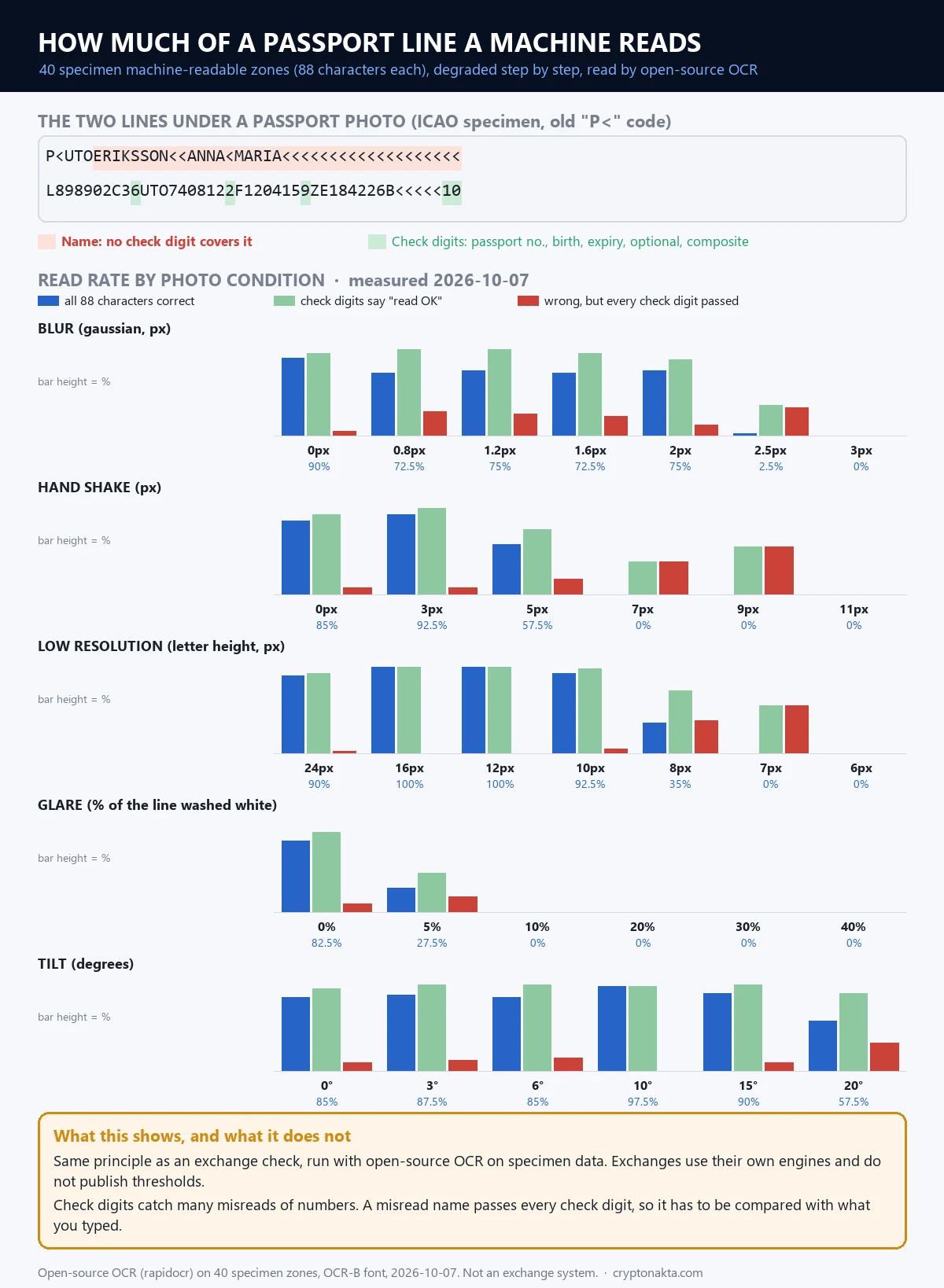
In my test on October 7, 2026, an open-source OCR reader got all 88 characters of a passport’s machine readable lines right about 75% of the time, up to 2 pixels of blur. At 2.5 pixels it dropped to 2.5%. Glare was worse. Washing out just 5% of the line cut perfect reads to 27.5%.
Here is what I did. I made 40 fake passport MRZs from ICAO’s sample and made-up names, drew them in OCR-B, the passport font, and damaged them step by step. Even clean lines scored only 82.5% to 90%, since a general OCR engine isn’t tuned for passports.
This is my own test with an open-source engine on fake samples. It is not the system Binance uses, and exchanges don’t publish how they decide. Read it as a sense of scale.
Measured on October 7, 2026, with rapidocr on 40 sample passports per step. Original text height was 24 px.
| Damage | Step | All 88 characters right | All 5 check digits passed | Wrong, yet every check digit passed |
|---|---|---|---|---|
| Blur | 0 px | 90% | 95% | 5% |
| Blur | 0.8 px | 72.5% | 100% | 27.5% |
| Blur | 2 px | 75% | 87.5% | 12.5% |
| Blur | 2.5 px | 2.5% | 35% | 32.5% |
| Hand shake | 3 px | 92.5% | 100% | 7.5% |
| Hand shake | 5 px | 57.5% | 75% | 17.5% |
| Hand shake | 7 px | 0% | 37.5% | 37.5% |
| Text height | 10 px | 92.5% | 97.5% | 5% |
| Text height | 8 px | 35% | 72.5% | 37.5% |
| Text height | 7 px | 0% | 55% | 55% |
| Glare (share of line washed out) | 5% | 27.5% | 45% | 17.5% |
| Glare (share of line washed out) | 10% | 0% | 0% | 0% |
| Tilt | 15° | 90% | 100% | 10% |
| Tilt | 20° | 57.5% | 90% | 32.5% |
Glare did the most damage. With 5% of the line washed out, full reads fell to 27.5%. At 10%, they hit 0%. Check digits failed too, so a system can at least tell it couldn’t read the line.
Blur held, then broke. Up to 2 pixels of blur, about 75% of reads stayed perfect. Half a pixel more and only 2.5% did. Hand shake was similar. It was fine at 3 pixels and fell to 0% at 7.
Small text worked until it didn’t. At 10 pixels tall, 92.5% of lines read perfectly. At 8 pixels, 35%. Tilt mattered less. At 15 degrees, 90% were still perfect.
The quiet failure surprised me most. At 0.8 pixels of blur, a level you might not notice, all five check digits passed 100% of the time. Yet 27.5% of the reads were still wrong, and every one of them had the name wrong. Three real outputs from that run:
CHEN<<TA<WEIwas read asHEN<<TA<WEILIN<<YI<HSUANwas read asLN<<YI<HSUANSMITH<<JOHN<PAULwas read asSMTH<<JOHN<PAUL
Thin letters like I and J dropped out, and sometimes the first letter went missing. The numbers on the second line read fine, so every check digit passed. The software had no way to know the name was wrong. Only a comparison with what you typed could catch it.
 View full size ↗
How to retake your ID photo for Binance
To retake your ID photo for Binance, shoot the original card on a plain surface, in soft even light, with all four corners in the frame and the phone held still. Then zoom in and check that you can read the bottom lines before you submit.
My test points at glare first, then blur, then tiny text. Here is the order I’d follow:
- Use the original. Not a screenshot, a scan of a copy, or a black-and-white print. Binance asks for a color photo. Bybit lists screenshots and paper copies among its rejection reasons.
- Take it out of the sleeve. Binance’s tips say to remove the ID from any holder or cover, to avoid reflections and blur.
- Use a plain, dark background. Binance suggests a solid color.
- Kill the glare. Don’t put a lamp straight above the card. Use daylight from a window, off to one side. If you see a white spot on the screen, tilt the card a little. In my test, a 15 degree tilt still read fine.
- Fill the frame, corners in. Get close enough that the text is big, but keep all four corners visible. In my test, text that came out too small failed fast.
- Hold still and focus. Rest your elbows on the table and tap the card on screen to focus.
- Check before you send. Zoom into the photo. If you can’t read every letter of your name in the bottom lines, the software will likely struggle too.
- Upload both sides of an ID card. Binance asks for the front and the back.
If the system can’t find your details on the photo, Binance’s flow lets you tap [Try again] to retake it, or [Choose another document type]. A passport is a good second choice, since it always has the two machine readable lines.
One more rule from Binance: don’t refresh or quit the app while the process runs.
Binance facial verification failed or stuck on loading
Binance facial verification can fail because the camera can’t see your whole face clearly, the light comes from behind or the side, or the app has no camera access. A screen stuck on “Loading, please wait” has no help page of its own, so the fixes are the general ones Binance lists for face checks.
In KYC, the face step is called the Liveness Check. It checks that a live person is in front of the camera, not a photo or a screen. It may ask you to nod, turn your head left and right, open and close your mouth, or blink.
Binance’s own rules are short. No hat, glasses or filters. Good light. Whole face centered, eyes open.
NIST, the US standards lab, reported in 2019 that much of the remaining face recognition error came from ageing, injury and poor image quality. Head angle was the hardest part. So look straight at the lens and keep your chin level. If your ID photo is old, Binance may ask for an extra selfie first. That’s normal.
When the scan won’t start or hangs on loading, Binance’s messages suggest this:
- Update the Binance app to the latest version.
- Clear the cache and try again against a plain background.
- On the web, refresh the page, check the browser’s camera setting, or restart the browser. Use Safari or Chrome.
- Switch to a better network, or try another phone.
- If it says a request is already in process, wait a few minutes before you try again.
Check camera access too. On Android, go to Settings, then Apps, then Binance, then Permissions, then Camera. On an iPhone, go to Settings, then Binance, then Camera.
Do the scan alone. Binance’s FAQ says that if other people are caught on camera during face verification, the account’s withdrawal function can be suspended. Getting it back means sending a video with everyone who appeared.
There is also a cap on tries. The screen says “You have reached the maximum number of face verification attempts” and tells you to contact support. Binance doesn’t publish the number. If the scan keeps failing because of your device, Binance has a manual appeal. Tap [Withdraw appeal] on the withdrawal page warning, or [Appeal] in the app. If neither button shows, contact support.
Three different face checks on Binance, passkeys included
Binance can ask for your face in three separate ways. One is the Liveness Check during KYC. Another is a security face check that can appear later. The third is a passkey, where your own phone checks your Face ID or fingerprint. The KYC selfie, the security face check and a passkey are three different things.
If you passed KYC months ago and get a face prompt on a withdrawal, your KYC hasn’t failed. It’s the second kind of check.
| Face check | When you see it | What it compares | Can you switch it off? |
|---|---|---|---|
| [Liveness Check] in KYC | Once, while you verify | Your live face against your ID photo | No. It is part of [Verified]. |
| Security Facial Verification | Later, for example on an NFT withdrawal or a 2FA reset | Your face against the photo saved at KYC | No. The screen says it cannot be skipped. |
| Passkey with Face ID or fingerprint | Log-in and 2FA, if you added one | Nothing on Binance’s side. Your phone checks you and sends pass or fail. | Yes. You can delete it. |
Facial Verification is Binance’s security face check. It compares your face with the reference photo saved during KYC. You can’t use it without finishing KYC first. Binance’s screen text says it “cannot be skipped.” Its FAQ confirms one place it appears, which is NFT withdrawals. Screen text also shows it inside the 2FA reset flow.
A passkey is a way to sign in that lives on your phone. Your face or fingerprint never leaves the device. Binance said in a July 2025 blog post that it only receives a pass or fail. You can delete a passkey.
One setting needs care. If you turn on “Must verify using passkey” and then lose your passkeys, you can’t log in. Binance says to switch it off before you change phones or reinstall the app.
If a face prompt appears because you lost your 2FA device, that’s a separate problem. This guide covers it: lost 2FA and what gets locked.
How long does Binance take to verify identity?
Binance says identity documents are usually reviewed within 48 hours, and some cases take longer. Its face-check screen says most accounts clear within two hours, with delays of up to three days. These review times are the ranges the exchanges publish, not promises.
The status on your [Identification] page tells you where you are. [Under Review] and [Pending] mean the file is in the queue. [Rejected] or [Verification Failed] means something needs redoing. [Verify Now] means you haven’t started.
Binance’s screen text says [Verified Plus] is usually done within 60 minutes, yet its FAQ says proof of address can take one to two working days. The result comes by notification.
The worst move while you wait is to submit again and again. OKX says it directly. If the page shows Submitted or Under review and there’s no new task, don’t send the same information again. Binance gives no sign that resending helps either.
What about retry limits? Binance’s global help pages don’t give a daily number. A limit of 10 attempts in 24 hours, followed by a 24-hour wait, shows up in some regional versions, such as Binance Japan’s FAQ. Face scans have a cap too, but Binance doesn’t say what it is.
Contact support once the published window has clearly passed, when you hit the attempts message, or when the rejection gives no reason you can act on.
If the thing stuck is a withdrawal rather than your KYC, that’s a different queue. This guide explains it: why a withdrawal stays pending.
Bybit, OKX and Bitget KYC compared with Binance
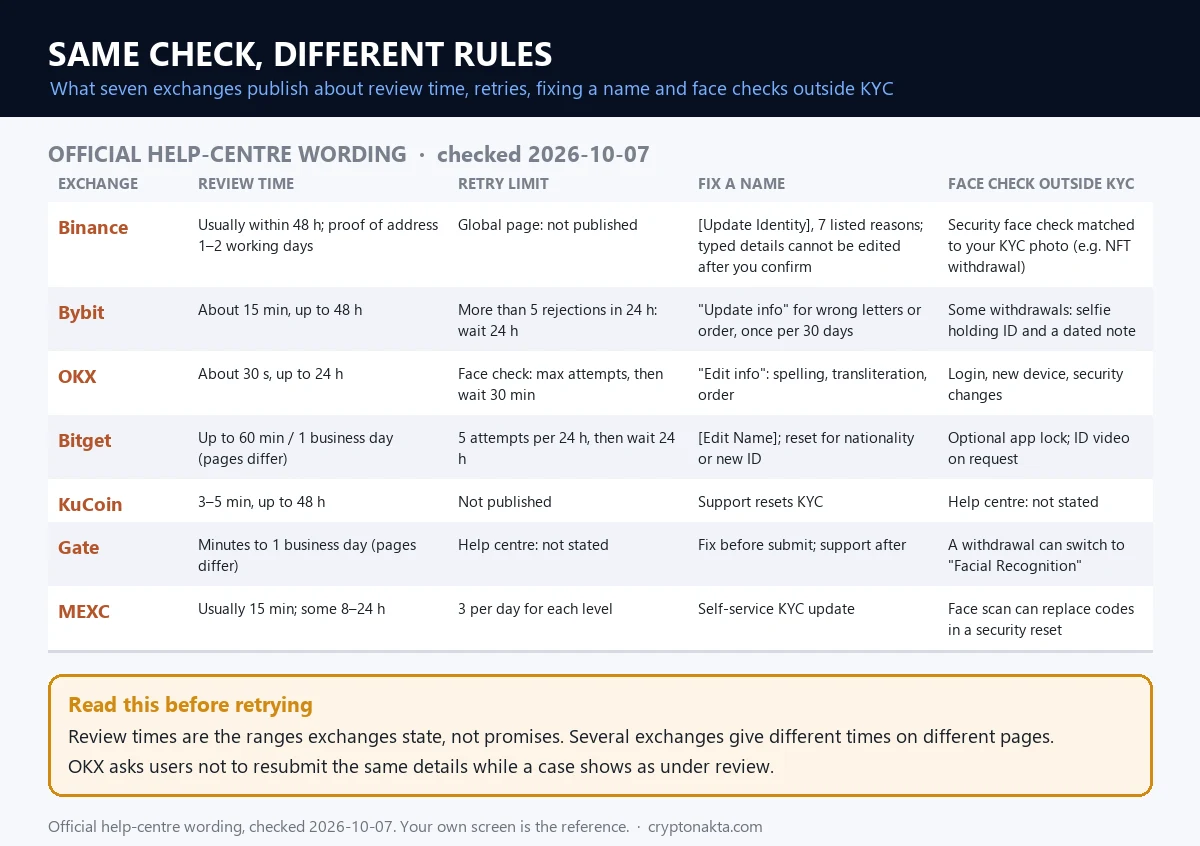
Bybit, OKX and Bitget all ask for an ID and a face scan, just as Binance does. They differ in the review times they quote, the retry limits they publish and how you fix a wrong name. I checked each exchange’s help pages on October 7, 2026.
Checked October 7, 2026. These pages change, so treat the table as a snapshot.
| Exchange | Review time it states | Retry limit it publishes | Fixing a wrong name | Face checks outside KYC |
|---|---|---|---|---|
| Binance | Usually within 48 hours, sometimes longer | No daily number in the global help pages | [Update Identity] for listed reasons, otherwise support | Security Facial Verification, for example on NFT withdrawals |
| Bybit | About 15 minutes, up to 48 hours | Over 5 denials in 24 hours: wait 24 hours. Face scan: 30 minutes. | Update info, once every 30 days | Selfie with your ID and a handwritten date on some withdrawals |
| OKX | About 30 seconds, up to 24 hours with extra review | Face scan: after the maximum attempts message, wait 30 minutes | Edit info, once every 180 days (US help page) | New-device log-ins, security changes, large withdrawals if you set that |
| Bitget | Up to 60 minutes on one page, 1 business day on another | 5 tries in 24 hours, then a 24-hour wait | [Edit Name]. Reset Identity Verification for a new nationality or ID. | Optional face lock on the app |
| KuCoin | 3 to 5 minutes, up to 48 hours | Not published | Reset through support | Not in the help pages I read |
| Gate | Three ranges on three pages, minutes to 48 hours | Not in the help pages I read | Not in the help pages I read | Withdrawal status can switch to Facial Recognition |
| MEXC | Usually 15 minutes, some take 8 to 24 hours | 3 per day for each level | KYC Verification Update after Advanced | Not in the help pages I read |
Exchanges even contradict themselves. Bitget and Gate quote different times on different pages. A few other rules stood out. OKX lets one identity verify only one account. MEXC allows two. Gate holds withdrawals for 24 hours after your first KYC.
These are the four I compared most closely. More are in the exchange comparison, with notes on Bybit and OKX.
Binance
Bybit
OKX
Bitget
Affiliate disclosure: some links are partner links. We may earn a commission at no extra cost to you. This is not investment advice.
 View full size ↗
Wrong name, wrong nationality or an expired ID: fixing it on Binance
On Binance, you can’t freely edit your name, birth date or nationality once you confirm them. To change them later, you go to [Identification] and use [Update Identity]. It only works for the reasons Binance lists. Anything else goes to customer support.
Binance’s guide says it plainly: “You won’t be able to change it once confirmed.” The confirm button is your last chance to fix a typo on your own.
[Update Identity] accepts seven reasons:
- Your document has expired.
- Your name has changed.
- Your ID number has changed.
- Your nationality has changed.
- A fiat payment channel needs different documents.
- You want your name in a language the system can read, such as an English-language passport instead of a local ID.
- Binance Card needs different documents.
In the app, tap the home icon, then [>], then [Verifications], then [Update Identity]. On the web, open the [Identification] page. If your address is the only thing that changed, use [Modify Proof of Address] instead.
Updating has a cost. From the moment you ask to update, the account goes into “Withdrawal Only” until the new documents pass. Binance’s screen text adds that a reset disables deposits and trading until then, with no promised end date. It also says you can’t reset if you verified in the past 15 days. If you updated in the past 30 days, it asks you not to do it again so soon.
What if you typed the wrong nationality or name at the very start? Binance’s public help pages have no process for that. So a “KYC reset” means [Update Identity] or customer support. The help pages describe no way to simply erase your verification.
Two things are never allowed. You can’t move a verified account to another person. You can’t swap your ID for another person’s ID. Other exchanges offer more self-service, as the table above shows.
What happens if you don’t do KYC on Binance?
Without KYC, a new Binance account can’t deposit or trade. Older accounts that never finished [Verified] are set to “Withdraw Only.” That covers withdrawing, cancelling orders, closing positions and redeeming. If you skipped the face step during KYC, Binance also limits how much you can withdraw.
The age limit is 18. Binance’s terms say you must be at least 18, or the age of majority where you live if that’s higher.
Each person gets one verified personal account. Binance’s FAQ says that if you already have one, you can’t verify a second. You can open up to five sub-accounts under it instead.
Your verified name follows you into P2P. Binance’s P2P rules say the name on your bank account must match your verified name on Binance. If it doesn’t, the seller refunds you and your P2P function can be suspended. More on that in P2P sales and frozen bank accounts.
Other exchanges draw the line in different places. OKX says you need verification to withdraw at all. Bitget stopped withdrawals for accounts below its first verification level from July 20, 2024. Bybit still lets unverified accounts withdraw up to 20,000 USDT a day and 100,000 a month, but blocks most trading and deposits.
If your withdrawals are frozen for a reason other than KYC, start here: withdrawal frozen or account locked.
Is Binance KYC safe? Fake verification texts and rented accounts
Binance KYC itself is the normal identity check, done inside the official app. The risk is fake “verify your account” messages, a common way to steal accounts. Start any verification only from the Binance app, or by typing binance.com yourself.
Binance’s FAQ describes a real case. Users got texts with a link to “verify or upgrade” their accounts. It was phishing. Those fake texts can even land in the same thread as Binance’s real 2FA codes.
None of the big exchanges I checked asks you to send ID photos, codes or a shared screen through a text link, a call or a DM. Binance’s FAQ says, “Anyone calling you and claiming to be from Binance is a scammer.” Its terms say never to allow remote access or screen sharing. They add that Binance never asks for your password or 2FA codes.
Binance gives you tools to check. You can add an anti-phishing code to texts. You can paste a link, email, phone number or Telegram handle into Binance Verify at binance.com/official-verification, even without an account. Binance also warns about fake police messages that ask you to send money to “verify” your identity.
Then there are the ads. “KYC done for you,” “instant pass,” “rent out your verified account for cash.” They exist, and the outcome is spelled out in the exchanges’ terms. Binance says an account is for one person only, and one account used by several people can be suspended or closed. KuCoin bans lending, renting or transferring accounts. Bitget suspends accounts that buy or sell KYC details right away.
Renting out your account also leaves your name on whatever the renter does with it, and your identity can be reused by the people renting it. If something already went wrong, these guides help: account hacked, common crypto scams, getting scammed crypto back and checking that an exchange is real.
My take: what testing it myself taught me
My take after testing it: when Binance verification fails, start with the two cheapest fixes. Retake the ID photo cleanly, and type your name exactly as the ID prints it. Software reads a slightly bad photo far worse than your eyes do, and it can’t catch a misread name by itself.
Before the test, I thought blur would matter most. Glare broke more reads. Light blur did something worse. It left names wrong while every check digit passed, and then only your typed name can catch the error.
Where to start when you’re rejected:
- Read which section the rejection screen points to.
- Retake the photo using the steps above.
- Compare your typed name with the ID, letter by letter.
- Only then work on the face scan.
The part I trust least is everything outside the app. That means KYC agents, “instant pass” offers and texts asking you to re-verify through a link. None of them can do anything you can’t do in the app yourself.
There is a fair counterpoint. If your photo is clean and your name matches and you still keep failing, stop retrying. OKX even asks you not to resend the same information during a review. File the appeal or open a support chat and let a person look at it.
This site uses affiliate links for some exchanges, including the cards above. We may earn a commission if you sign up through them. That doesn’t change any fact here. The rules come from the exchanges’ own help pages, and the reading test is mine.
Binance verification questions people ask
- Binance: How to Complete Identity Verification, checked 2026-10-07
- Binance: How to update identity verification, checked 2026-10-07
- Binance: Proof of address requirements, checked 2026-10-07
- Binance: Facial verification appeal, checked 2026-10-07
- Binance: Phishing text messages, checked 2026-10-07
- Binance Verify, checked 2026-10-07
- Binance Terms of Use, checked 2026-10-07
- Bybit: Common reasons for KYC failures, checked 2026-10-07
- OKX: Why did my account verification fail, checked 2026-10-07
- Bitget: Identity verification attempts and review, checked 2026-10-07
- ICAO Doc 9303 Part 3: names, check digits, checked 2026-10-07
- ICAO Doc 9303 Part 4: passport MRZ, checked 2026-10-07
This guide explains how verification works. It is not legal or financial advice, and exchange screens change, so go by your own verification page.