How to Contact Binance Support: Live Chat, Email, Customer Service Number, Plus Bybit, OKX and 4 More Exchanges
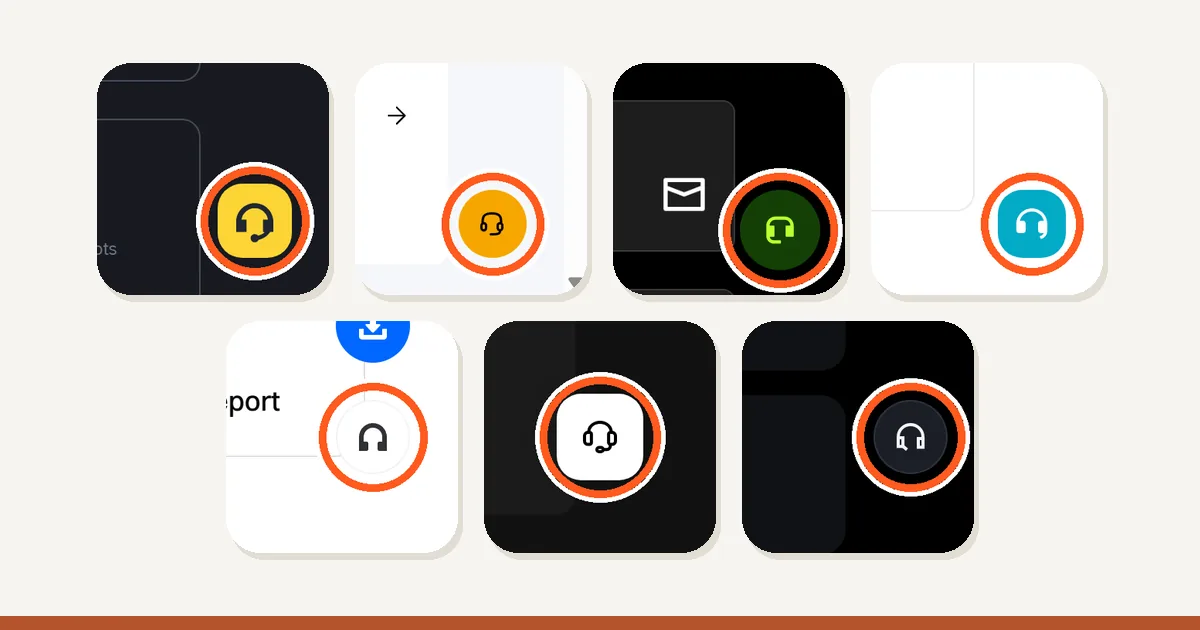
We opened the help centers of seven exchanges and pressed the support button on each. On 7 of 7 it sits in the same spot: a headset icon on the right edge of the screen, near the bottom. None lists a phone number in its help center. So the way to reach Binance support is the live chat on the official site or app. A “Binance customer service number” from a search result is not in Binance’s help pages.
Press the icon and 7 of 7 show two buttons: log in, or continue as a guest. In most of them a bot answers first. Below are the screens, the official wording for reaching a human, and what to do when nobody replies.
In this article (14)
Does Binance have a customer service number or a support email?Where is the Binance live chat button? (website and app)How to contact Binance support through live chat, step by stepCan you contact Binance without logging in?How to talk to a live agent instead of the botFake Binance support: how to check a call, email or DMBybit support: live chat, Submit Case and the contact number questionOKX customer service, plus Bitget, Gate, KuCoin and MEXCSupport is not answering? What to do nextWhat to write so you only explain it onceBinance customer service hours and languages: is chat really 24/7?What you find when you search for a Binance support phone numberProblems you can fix without a support ticketHow we checked the seven help centers
Does Binance have a customer service number or a support email?
No. Binance has no customer service phone number. Its help pages state that support is only available on the official Binance website. They add that anyone calling you by phone and claiming to be from Binance is a scammer.
None of the other six lists a number in its help center either. Only 2 of 7, Binance and KuCoin, state outright that their support does not phone you. MEXC’s wording is conditional: it says it never calls without a reason or unless you contacted it first. The other four simply list no number.
Email is a little better, with 3 of 7 publishing a support email address: Bitget, Gate and MEXC. Binance publishes only send-only addresses, the kind you cannot write back to.
| Exchange | Ticket form | Support email | Phone |
|---|---|---|---|
| Binance | None (chat is the support channel) | None published (only send-only addresses are listed) | None. They write that anyone phoning you as Binance is a scammer |
| Bybit | Submit Case | Not confirmed | No number in the help center |
| OKX | Not confirmed | Not confirmed | No number in the help center |
| Bitget | Support ticket page | support@bitget.com | No number in the help center |
| Gate | The “Submit Ticket” button opens an email | support@gate.com | No number in the help center |
| KuCoin | Submit a Ticket | Not confirmed | None. They write that unsolicited calls are scams |
| MEXC | Submit a Ticket | service@mexc.com (listed for emergencies such as theft) | No number in the help center |
Only what each exchange spells out in its own help pages. “Not confirmed” means we could not find it in official docs, not that it does not exist. Check an address on the exchange’s own site before you use it.
A number you find through search is not in any of these help centers, so nothing backs it up. If a page is not on the exchange’s own domain, do not call the number on it.
If a call comes to you, hang up first. Binance and KuCoin say a call like that is a scam. Binance, Bybit, OKX, Gate and MEXC take phone numbers on their verification pages, so you can check the caller’s number there.
Before you use any phone number or email address, check it again on the exchange’s own website.
Where is the Binance live chat button? (website and app)
Look at the right edge of the screen, near the bottom. The support button is a headset icon, and we found it there on 7 of 7 help centers.
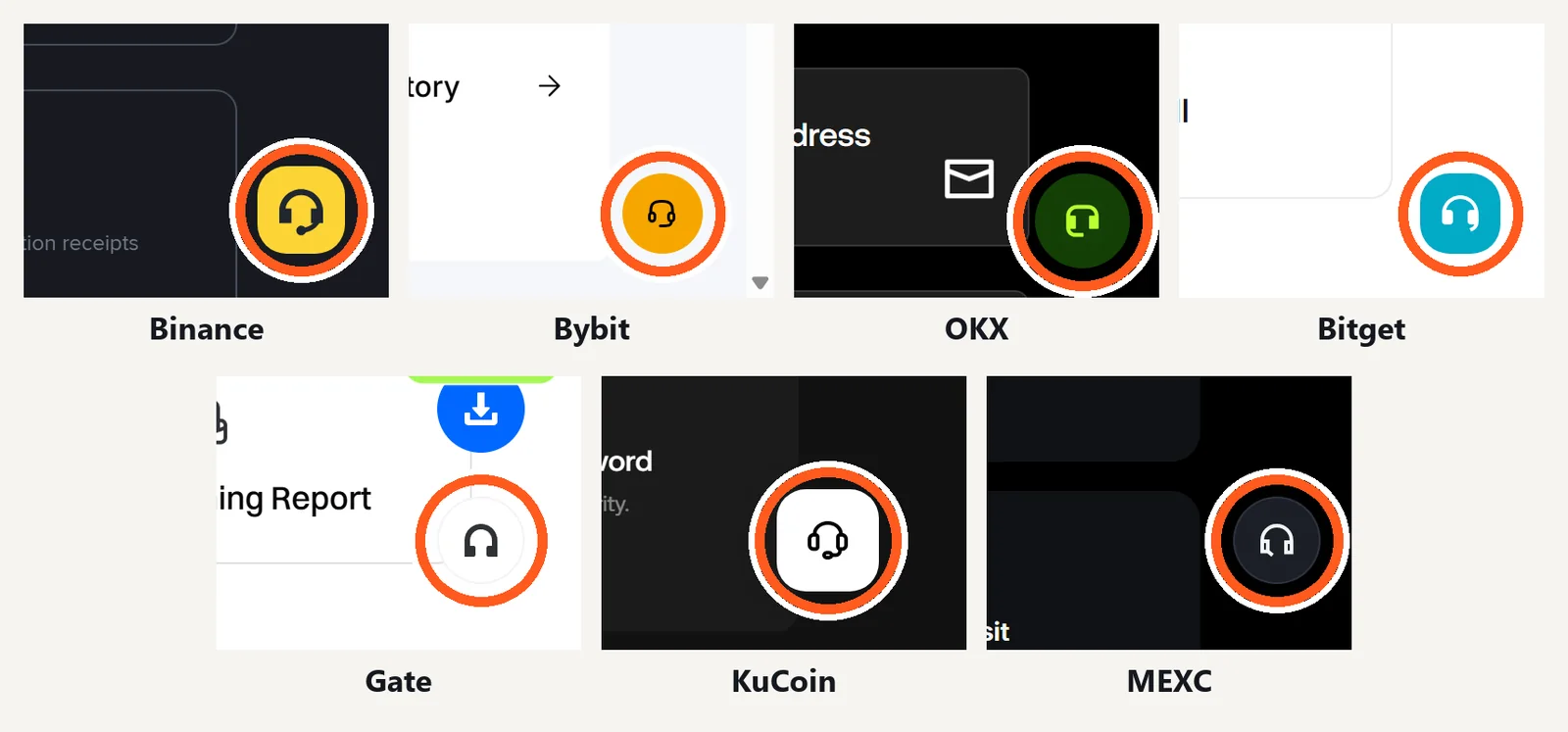
| Exchange | Where the button sits | Log-in button | Guest button |
|---|---|---|---|
| Binance | bottom-right corner | “Log In (Recommended)” | “Continue as Visitor” |
| Bybit | bottom-right corner | “Log In” | “Proceed as Guest” |
| OKX | bottom-right corner | “Log in” | “Continue as guest” |
| Bitget | bottom-right corner | “Log in” | “Continue as visitor” |
| Gate | right edge, lower part | “Login (Recommended)” | “Continue as Guest” |
| KuCoin | bottom-right corner | “Log In (Recommended)” | “Continue as Guest” |
| MEXC | right edge, lower part | “Log In” | “Continue as Guest” |
Every button is a headset icon. The labels are copied from the screens we captured, on a desktop window 1366 pixels wide, with the help center home page open.
On a phone browser the button is not in the same place at every exchange. This is the mobile website, not the app.
| Exchange | Support button on a phone browser |
|---|---|
| Binance | No floating button. A chat support card further down the page |
| Bybit | Floating headset button at the lower right |
| OKX | Floating headset button at the lower right |
| Bitget | Headset icon in the top bar |
| Gate | Not found on the first screen |
| KuCoin | Floating headset button at the lower right |
| MEXC | Floating headset button at the lower right |
What we saw with the help center home page open in a browser 390 pixels wide. App-install banners and sign-in prompts covering the bottom of the screen were closed first.
Press it and a small window opens. The same two choices appeared on 7 of 7: a log-in button and a guest button.
In the apps the button is somewhere else. We did not capture app screens, so these paths come from the official help pages.
- Binance: the [Support] icon on the home screen.
- OKX: the main menu icon at the upper left, then Get help.
- MEXC: the headset button at the top right of the home screen.
For the Bybit and Gate apps we could not confirm a path in the official docs.
How to contact Binance support through live chat, step by step
Open the Binance Help Center and press the yellow headset icon in the bottom-right corner. The live chat starts from the window it opens.
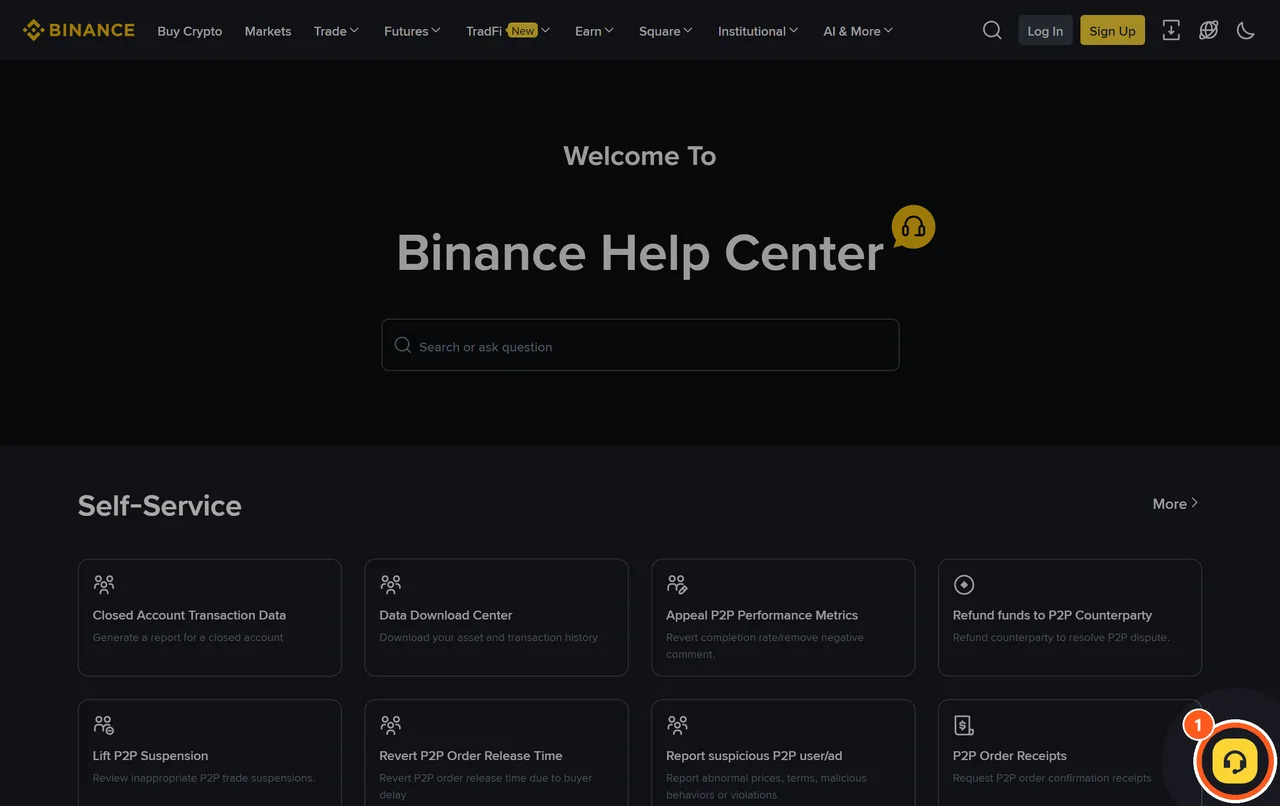
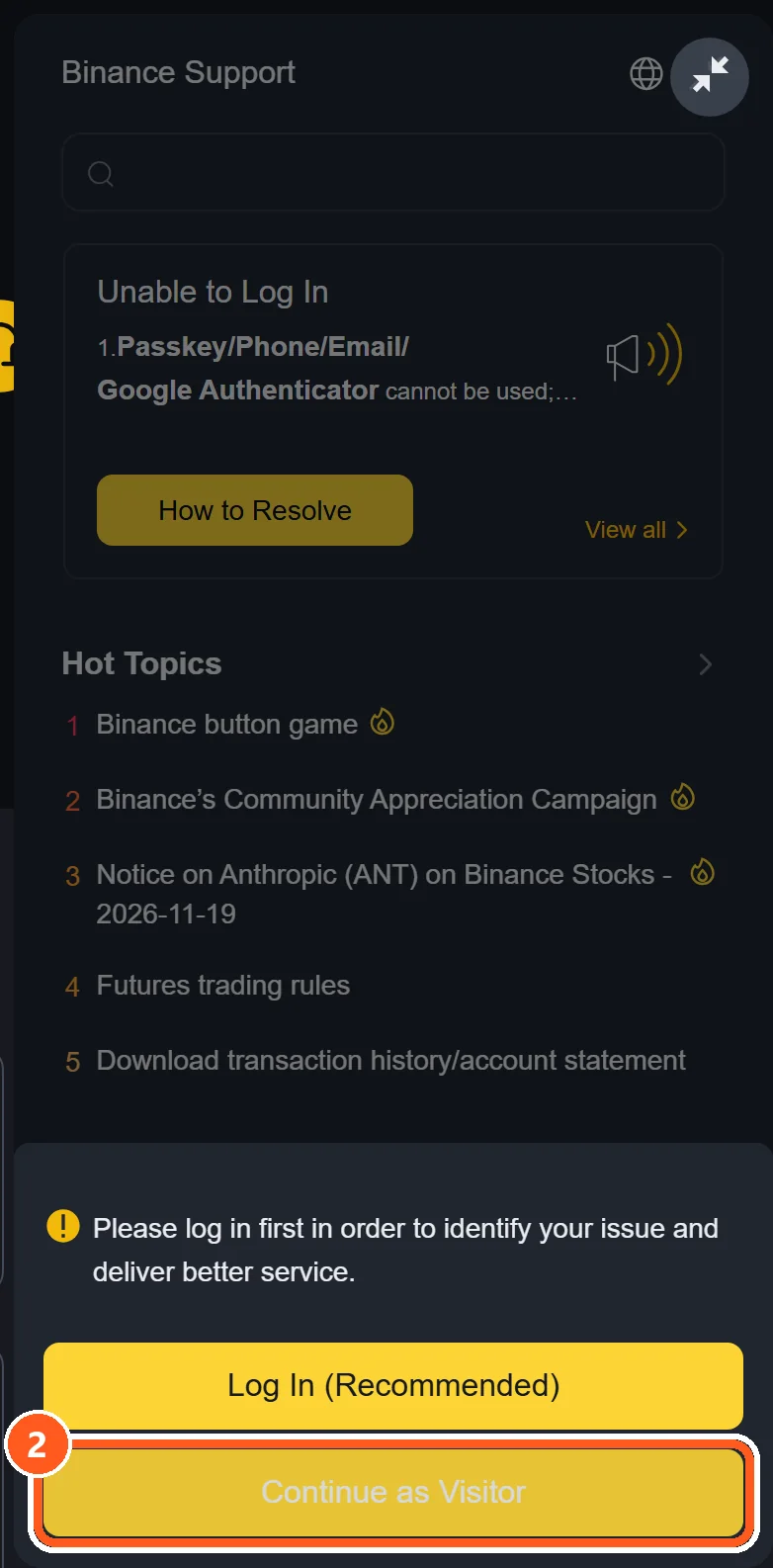
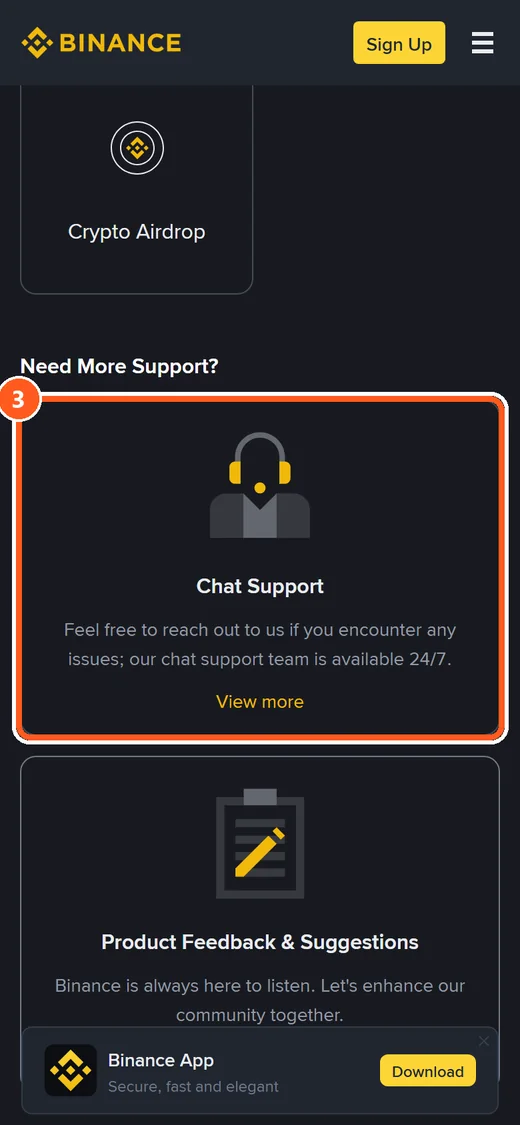
① The headset button on the Binance Help Center. ② “Log In (Recommended)” and “Continue as Visitor”. ③ On a phone browser there is no floating button. Scroll down to the chat support card.
- Press the headset icon (①).
- Choose “Log In (Recommended)” or “Continue as Visitor” (②).
- If the suggested answers do not fit, press [Get Support] and type your question.
As a visitor you are asked for an email address or phone number before the chat starts. We stopped at that screen.
A bot answers first. To reach a person, Binance gives two routes. Press [Customer Service]. Or press [Unresolved], then [Not relevant], then [Yes, transfer to Customer Service].
Its visitor guide gives this order: [Get Support], [Start Chat as Visitor], type “Customer support”, then [Transfer to Customer Service]. These are the English labels. A page in another language may show them translated.
You can close the window after you send your question. Binance notifies you when an agent is assigned. Reply within 24 hours and you keep your place in the queue.
Binance lists no separate form for written requests, often called tickets. The chat is the support channel, at binance.com/en/chat.
Can you contact Binance without logging in?
Yes. Every chat window we opened has a guest button under the log-in button, so you can contact Binance without logging in. On 5 of 7 the guest route first asks how to reach you, with an email address or a phone number.
| Exchange | What a guest is asked first |
|---|---|
| Binance | Email address or phone number |
| Bybit | Email address plus a code sent to it |
| OKX | Country or region of residence |
| Bitget | Email address |
| Gate | Nothing (straight to the bot) |
| KuCoin | Email address |
| MEXC | Email address |
This is what appeared after pressing the guest button without logging in. We entered no email or phone number and did not go past that screen.
Still, every window we opened puts log-in first. Gate explains that logging in lets agents see your account information.
The guest route is for when you cannot log in at all, such as a lost authenticator app or a forgotten password. If you are asked for an email, give the one your account is registered with.
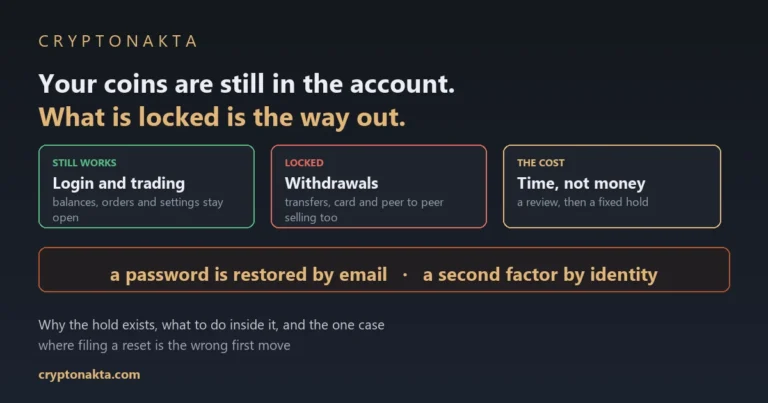
Lost the device that shows your two-factor authentication (2FA) code, the 6-digit code you type at log-in? Read what a lost 2FA device locks first. If someone else got into the account, start with what to do when an exchange account is hacked.
How to talk to a live agent instead of the bot
Press the button or type the phrase the exchange itself names for handing a chat to a person. The table lists them.
| Exchange | How to reach a human agent (as the official docs put it) |
|---|---|
| Binance | Press [Customer Service], or go [Unresolved] → [Not relevant] → [Yes, transfer to Customer Service] |
| Bybit | The bot offers options such as “Submit Case” or “Connect to a Live Agent” |
| OKX | No button name in the docs. If the AI assistant cannot solve it, the chat is handed to a human agent who can see the earlier messages |
| Bitget | Button name not found in the official docs |
| Gate | Type Live Support in the chat and send it; a “Connect to Live Support” button appears |
| KuCoin | No button name in the docs. They state a “Live Agent/Ticket service” that runs around the clock |
| MEXC | [Live Chat] on the web, the headset button at the top right in the app |
Button names are quoted from each exchange’s English help pages. We pressed nothing beyond the guest button and did not connect to an agent ourselves.
OKX and KuCoin describe the handoff without naming a button. For Bitget we could not find the button name, so we print none.
On OKX, the human support agent who takes over can read your earlier messages, so you do not explain it twice. MEXC warns that you may have to queue at busy times.
As a guest we went only as far as the first question, and we did not connect to a human agent. On a page in another language, the labels may differ.
Fake Binance support: how to check a call, email or DM
Check the contact on the exchange’s own verification page before you reply. All seven have one, and on 5 of 7 it also takes phone numbers.
| Exchange | Official verification page | What you can check |
|---|---|---|
| Binance | Binance Verify | URL, email, phone number, Telegram, social accounts |
| Bybit | Authenticity Check | Phone number, email, URL |
| OKX | Channel verification | Phone number, email ending (the part after @), Telegram, X, website and more |
| Bitget | Official Verification Channel | Email, website, social accounts |
| Gate | Official Verification Channel | Domain, email, phone number |
| KuCoin | Official Verification Center | Wallet address, email, Telegram ID, X account, website |
| MEXC | MEXC Verify | URL, email, phone number, X, Telegram |
Based on the wording on each verification page. We did not run any lookups ourselves.
The exchanges also say what their staff never ask for. If a “support agent” asks for something on this list, stop and treat it as a scam.
| What they say they never ask for | Who says it |
|---|---|
| Passwords or verification codes | OKX, Bitget, Gate, KuCoin and MEXC. Binance says “any sensitive information” |
| Seed phrase (wallet recovery words) or private key | Bybit, OKX, Bitget, Gate and KuCoin |
| Sending coins or money | Binance, Bybit, OKX, Bitget, Gate and KuCoin |
| Installing an app | Gate |
| Sharing your screen | OKX |
From each exchange’s own help pages.
A result that says “official” is not the end of it. Bybit warns that a sender address is easy to forge. A verification page that answers “official” does not prove the message you received is real.
One habit covers every case. If someone reached you first by call, text or direct message, end it. Then open the chat yourself from the official site or app.
An anti-phishing code makes fake emails easier to spot. If money has already left, read whether scammed crypto can be recovered.
Bybit support: live chat, Submit Case and the contact number question
Bybit gives you two ways in: the live chat behind the headset icon at the bottom right, and a form called Submit Case.
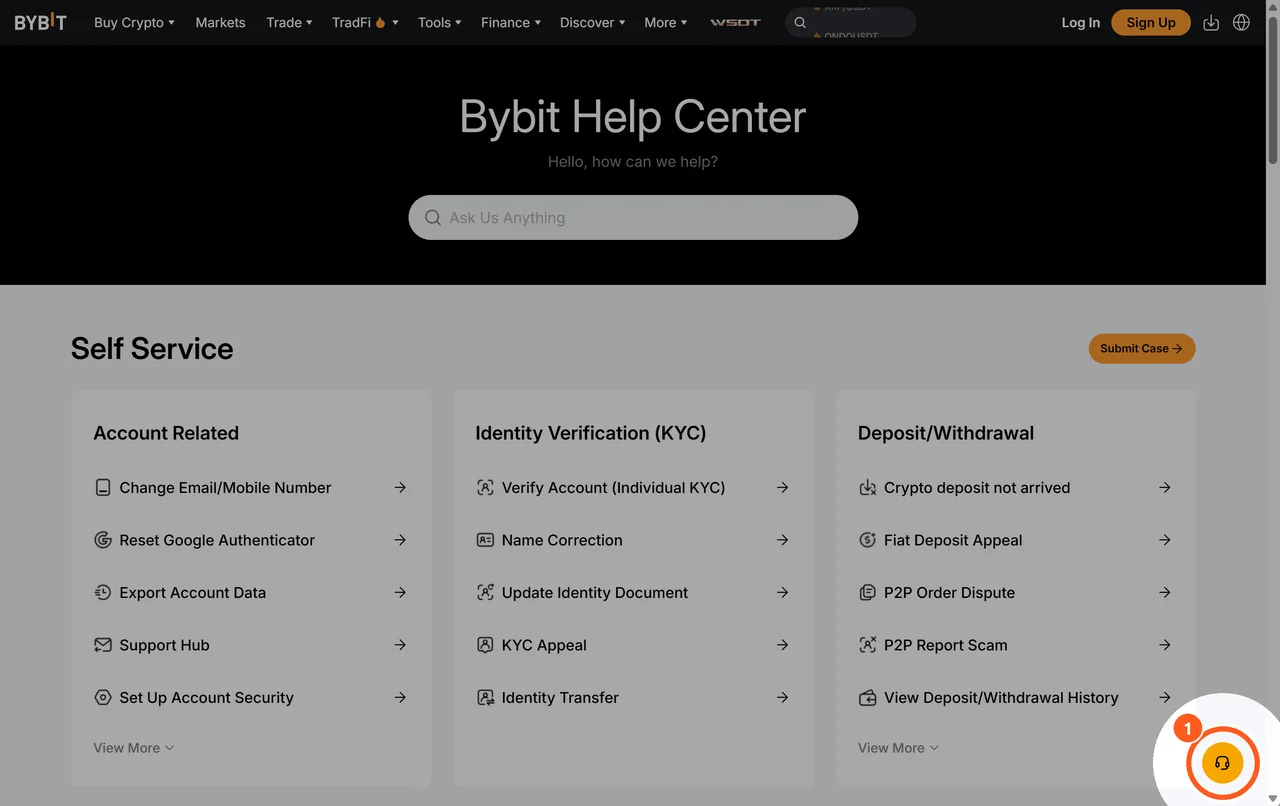
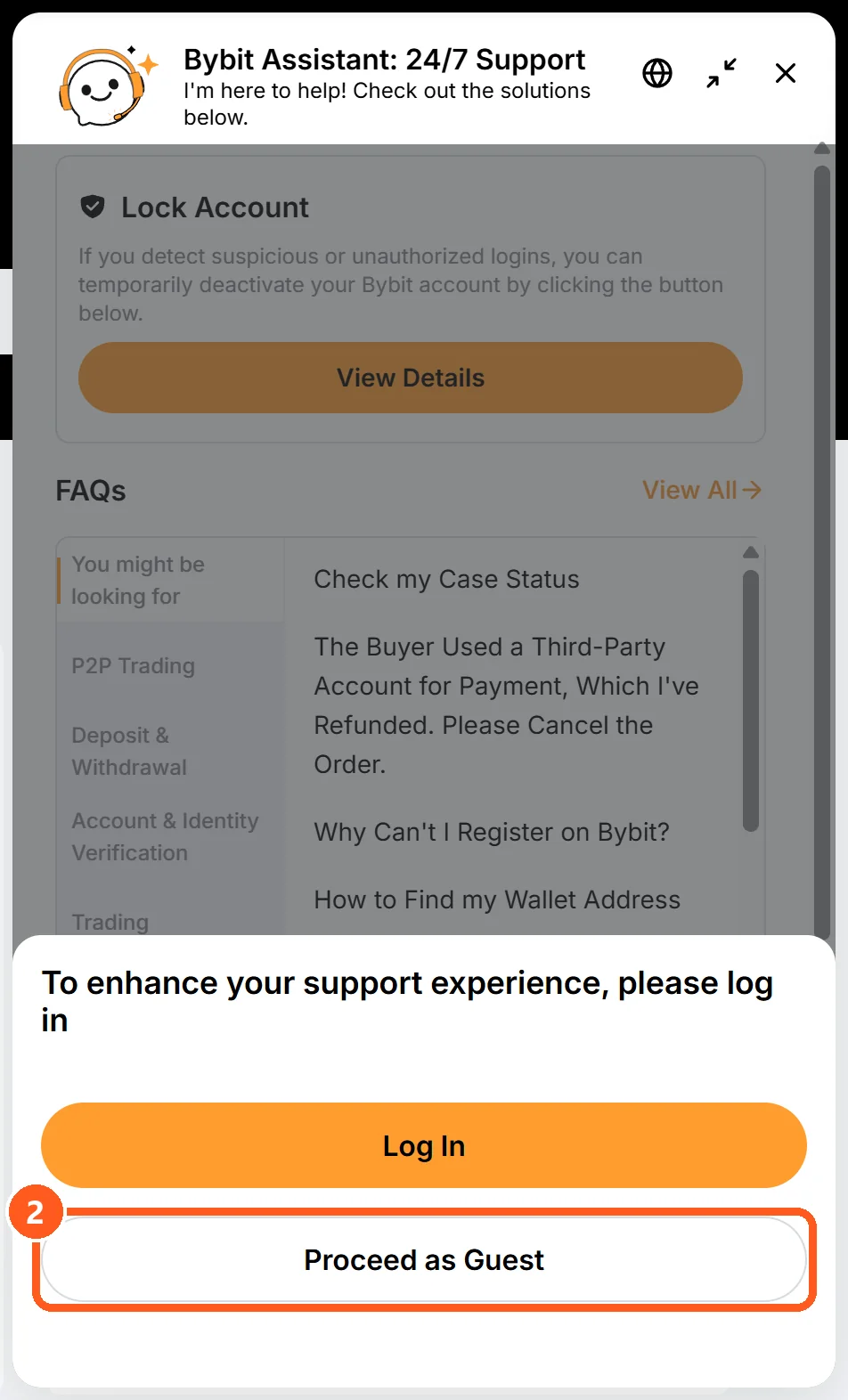
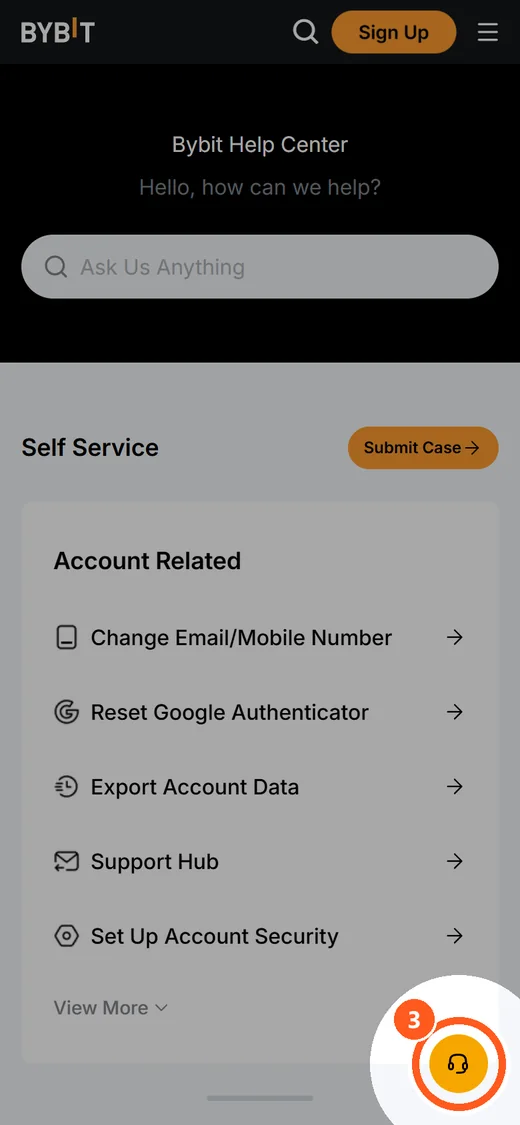
① The headset button on the Bybit Help Center. ② “Log In” and “Proceed as Guest”. ③ On a phone browser the same headset button floats at the lower right.
The chat window shows “Log In” and “Proceed as Guest”. As a guest you are asked for an email address and a code sent to it. A bot answers. When a case needs a specialist, it offers options such as Submit Case or Connect to a Live Agent.
The Submit Case form opens without logging in. It asks for an email and a code, and your UID (account ID number) is optional. Bybit then emails a case number.
Bybit says the team answers a case within 3 to 7 working days, and that duplicate requests may delay the reply. You follow a case in Support Hub, in the help center.
On the contact number: none is listed in Bybit’s help center, and we could not confirm a support email either. If a caller claims to be Bybit, enter the number in Bybit’s Authenticity Check.
OKX customer service, plus Bitget, Gate, KuCoin and MEXC
The other five follow the same pattern. What changes is what a guest is asked and how you reach a person.
OKX customer service
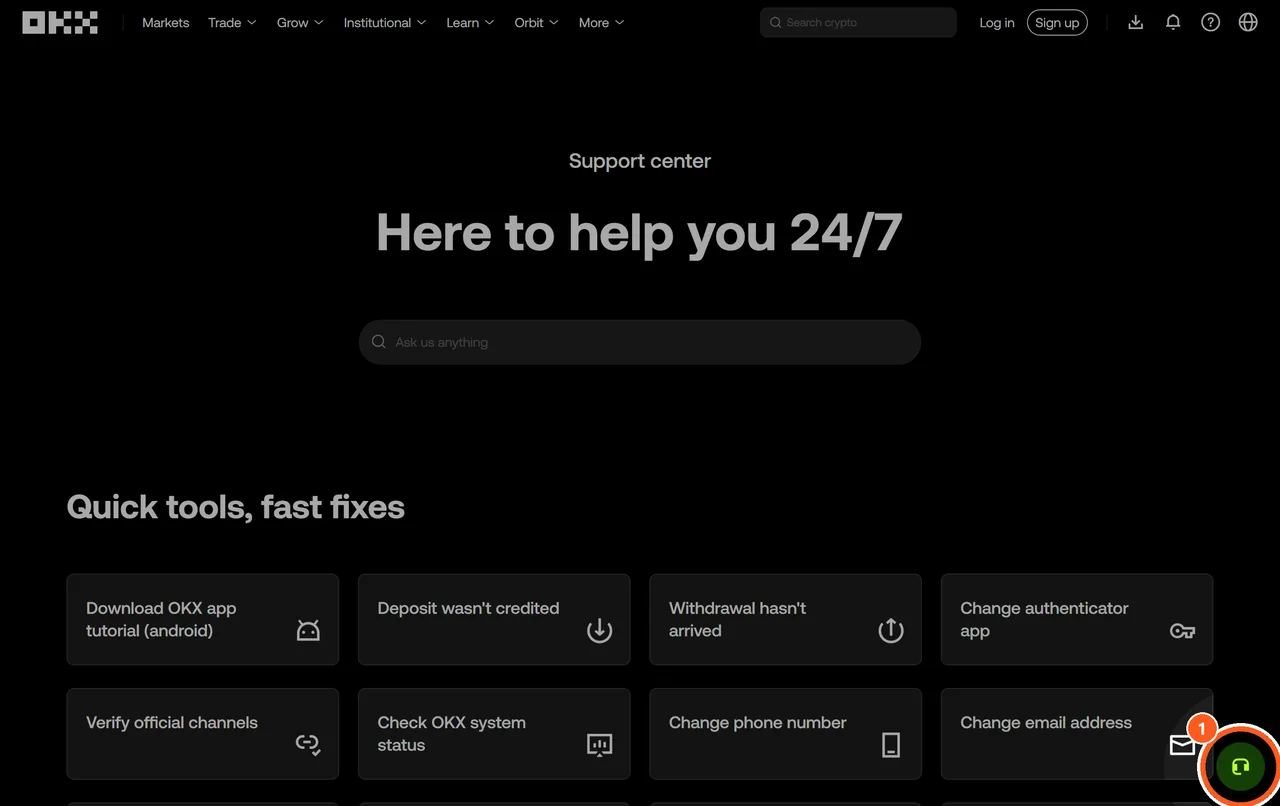
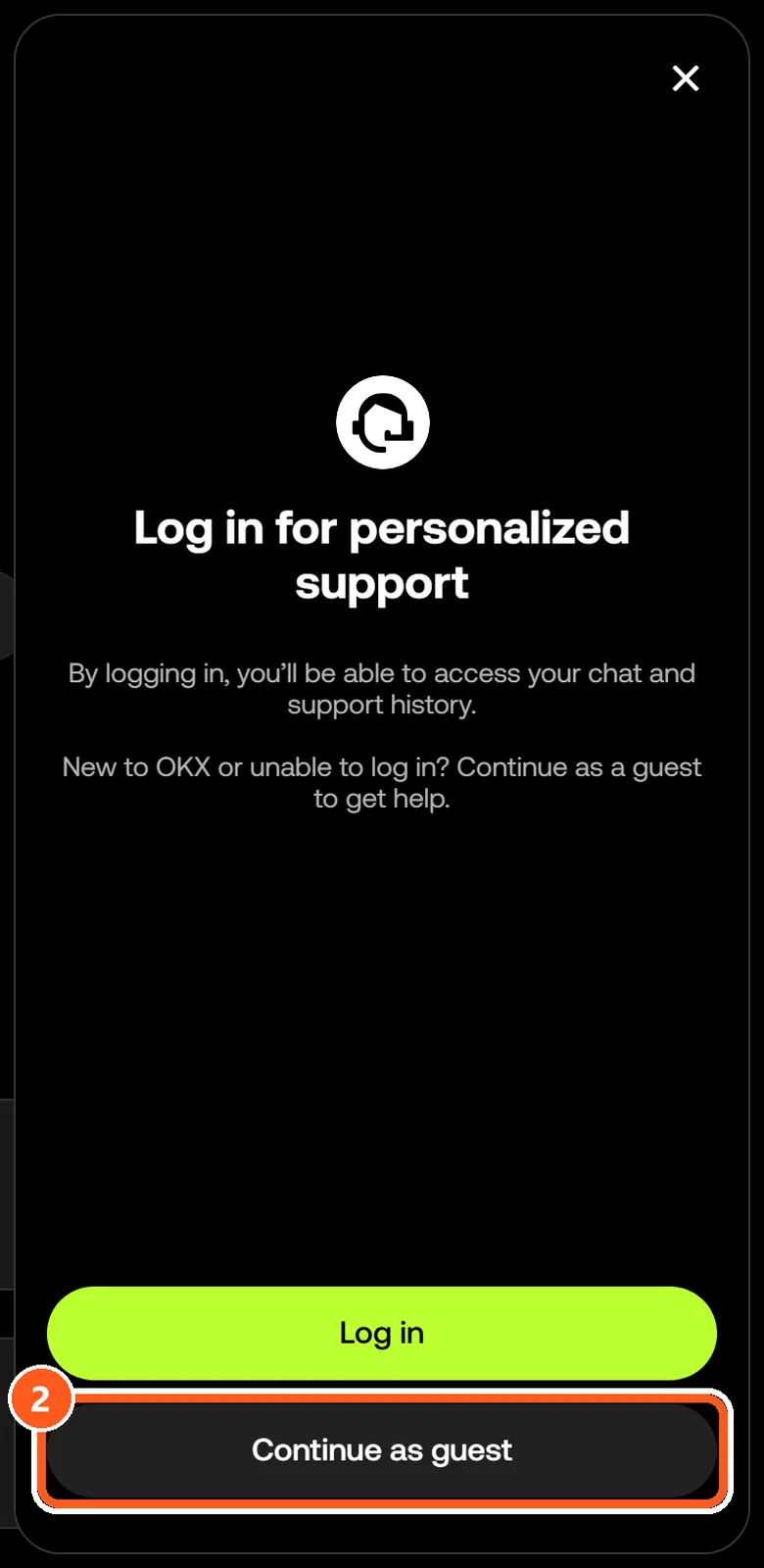
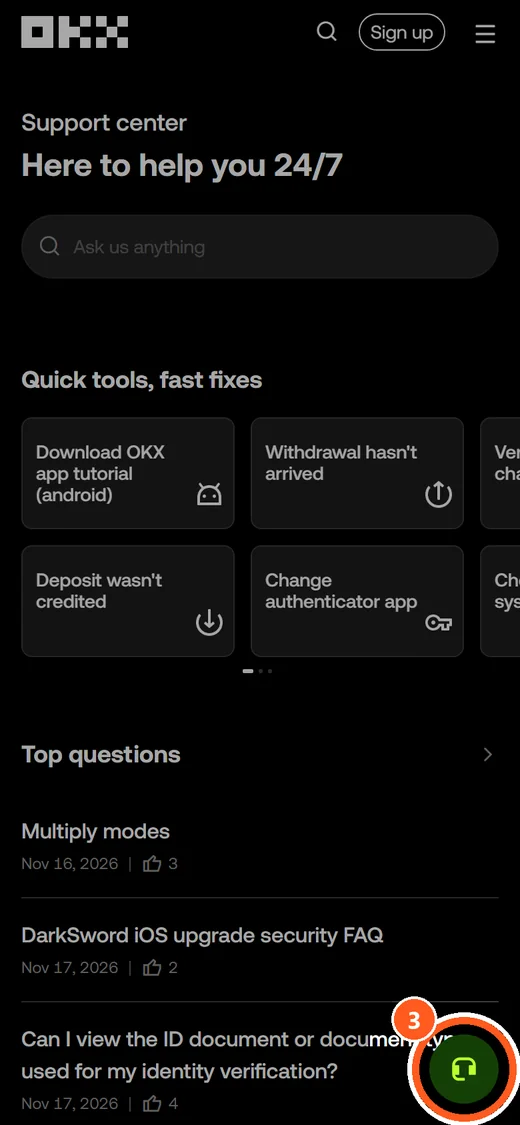
① The headset button on the OKX support center. ② “Log in” and “Continue as guest”. ③ On a phone browser the same headset button floats at the lower right.
OKX asks guests something different: their country or region of residence. If the AI assistant cannot solve the problem, OKX may pass the chat to a person. Past requests are under “Check support tickets” in its support center.
Bitget support
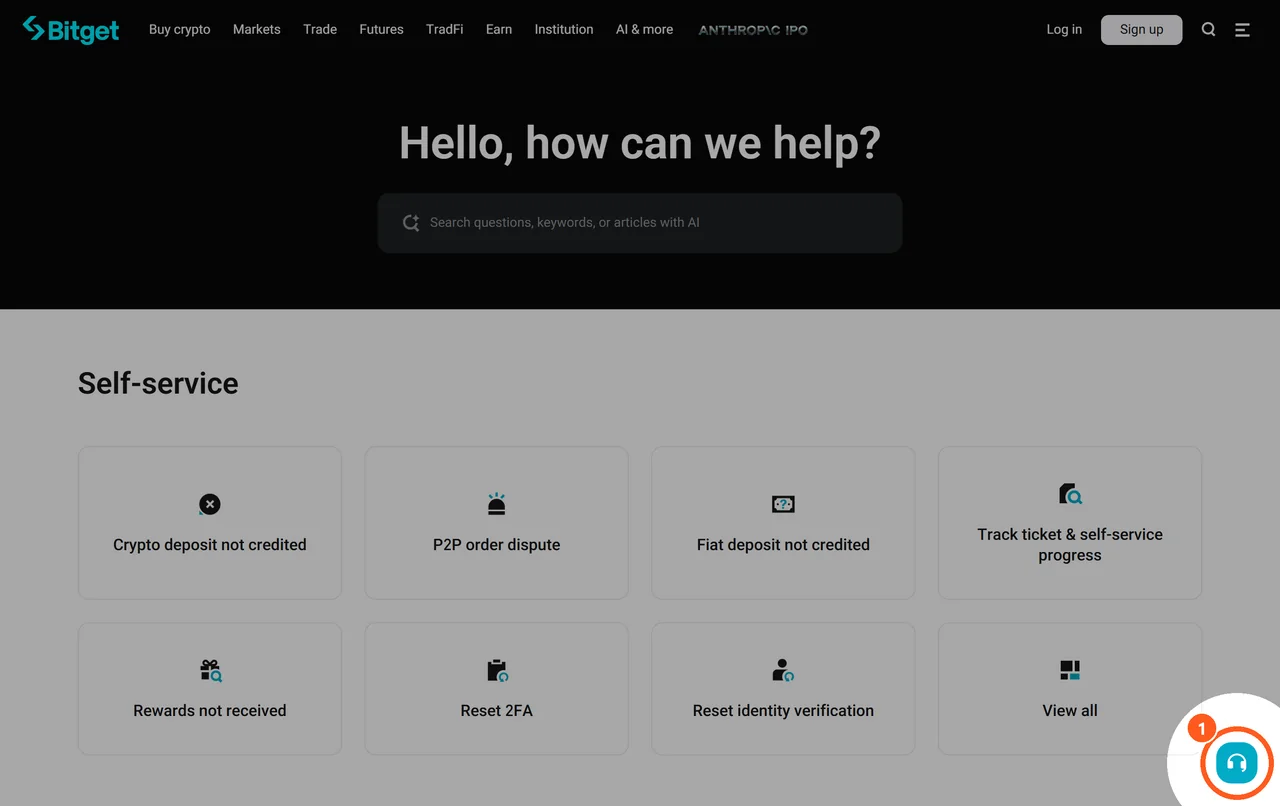
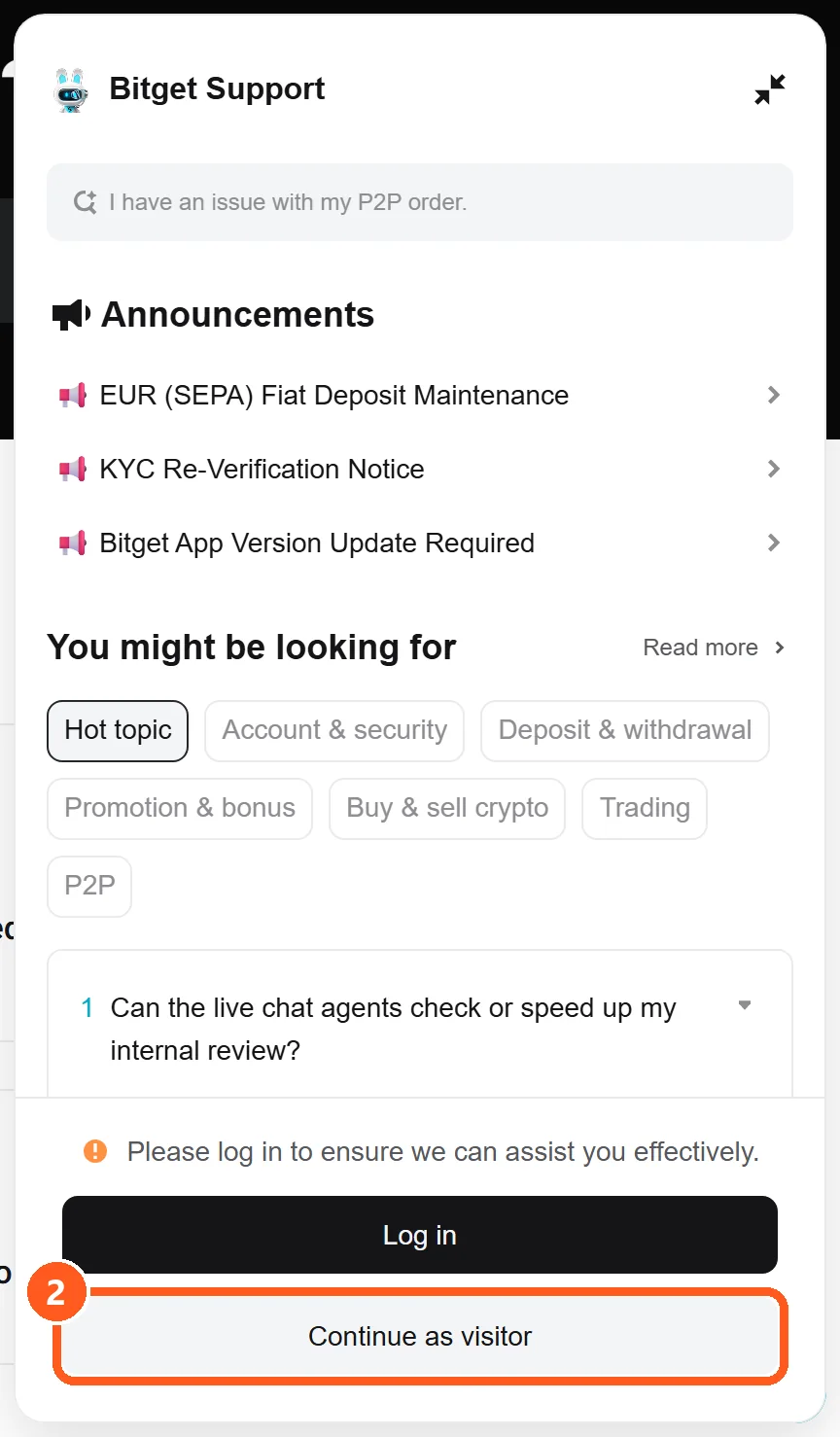
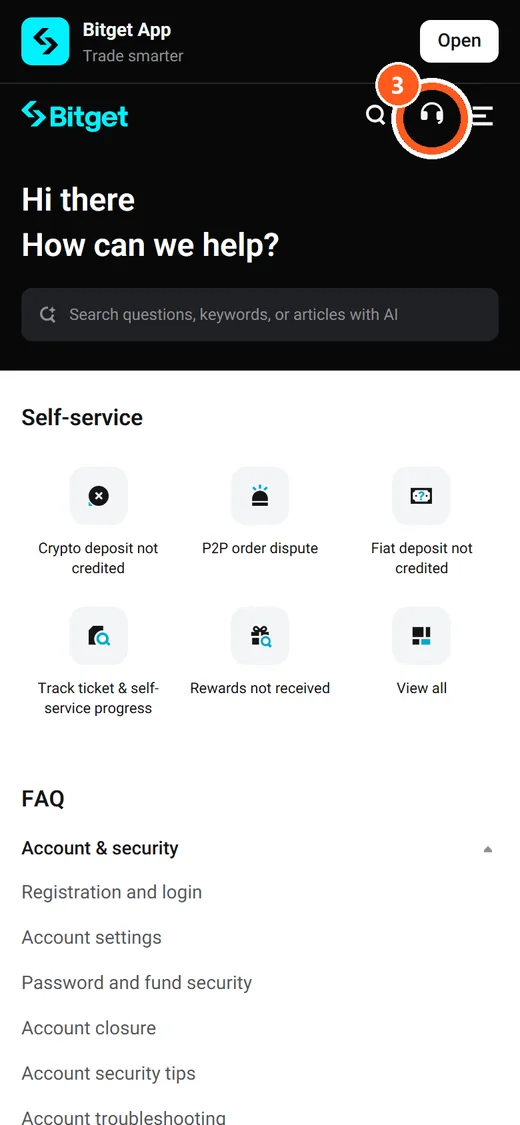
① The headset button on the Bitget support center. ② “Log in” and “Continue as visitor”. ③ On a phone browser it is the headset icon in the top bar.
Bitget’s guest button leads to an email field. You can also file a ticket without logging in, once that email is verified. Ticket emails from Bitget cannot be replied to, so put extra details on the ticket page.
Gate support

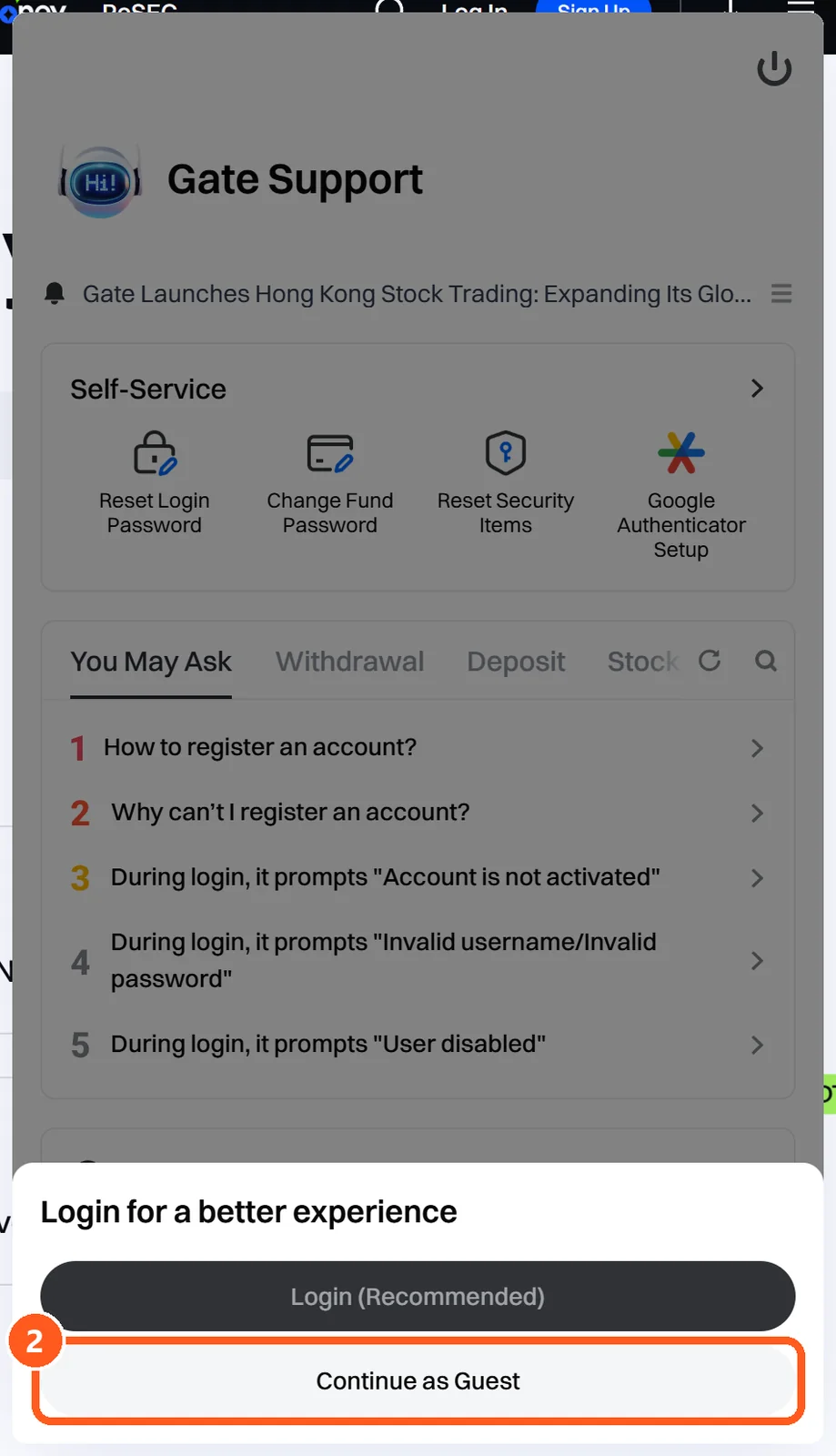
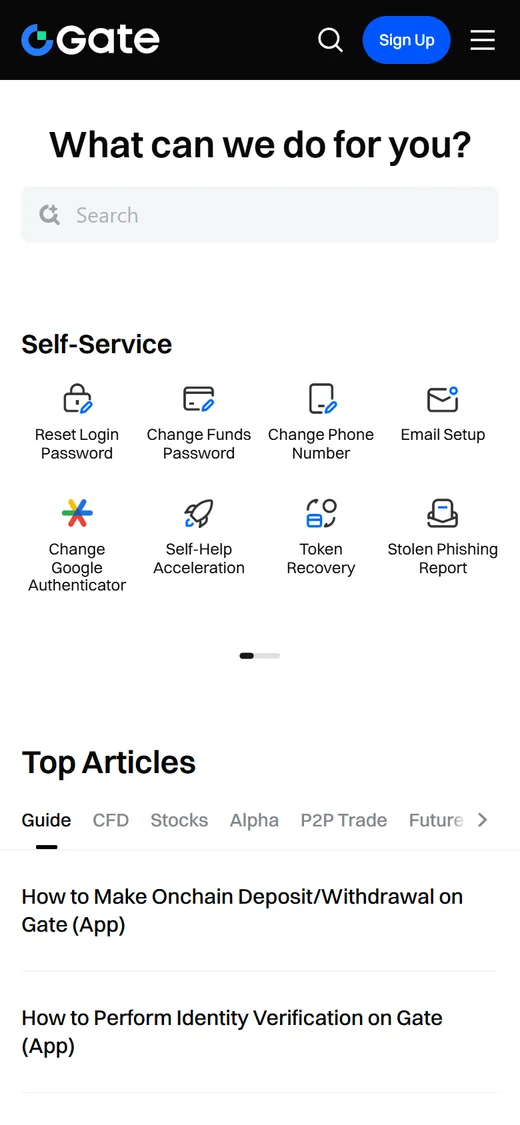
① The headset button on the Gate Help Center. ② “Login (Recommended)” and “Continue as Guest”. ③ On a phone browser we found no support button on the first screen.
Gate’s icon sits a little higher up the right edge. Its guest button asked us for nothing and opened the bot window straight away. To get a person, Gate says to type Live Support, send it, then press “Connect to Live Support”.
KuCoin support
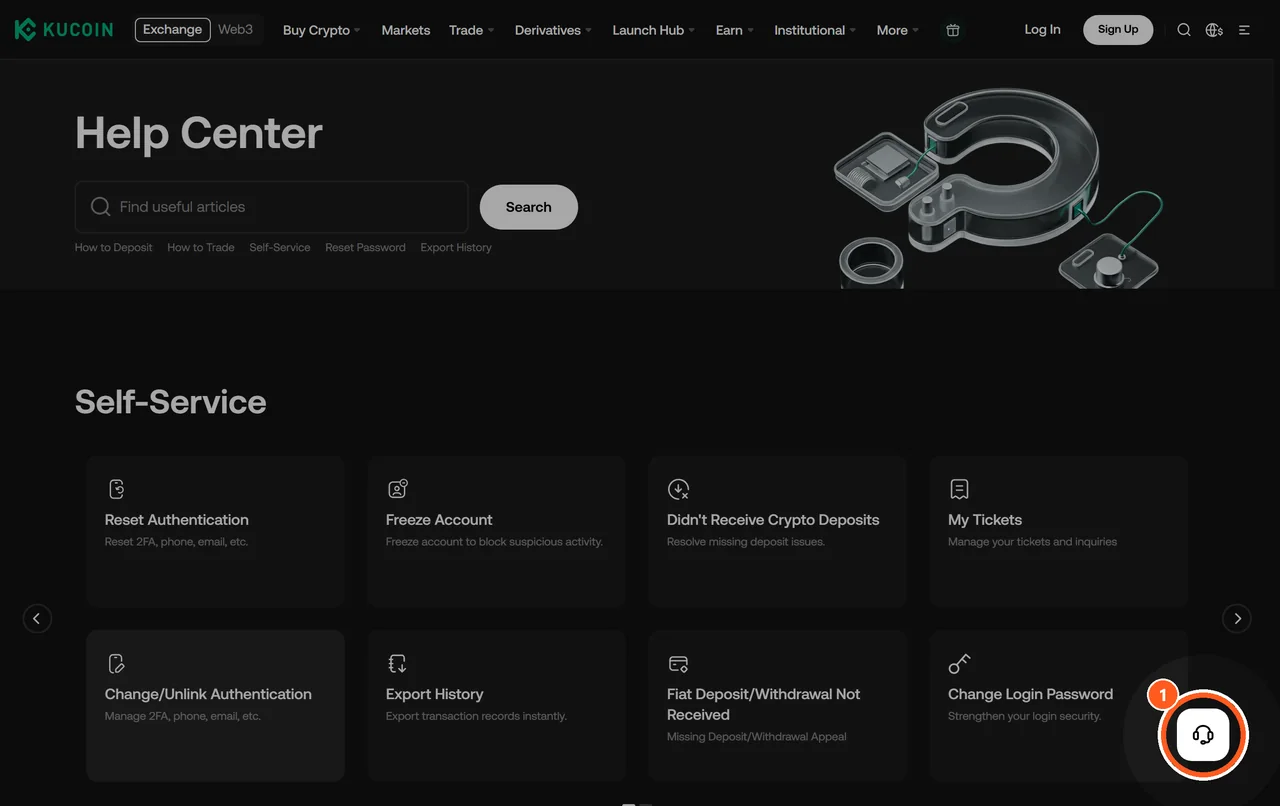
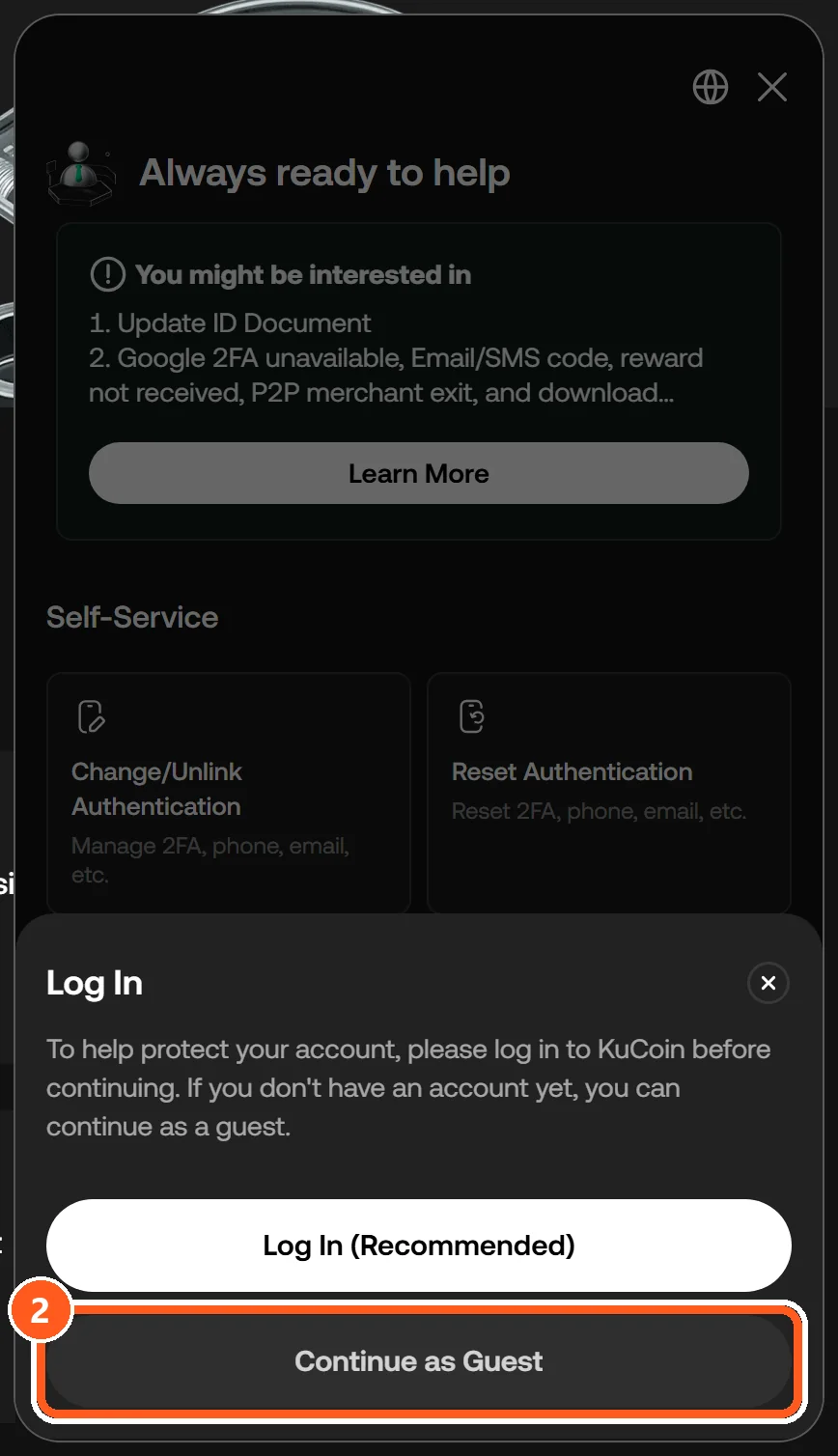
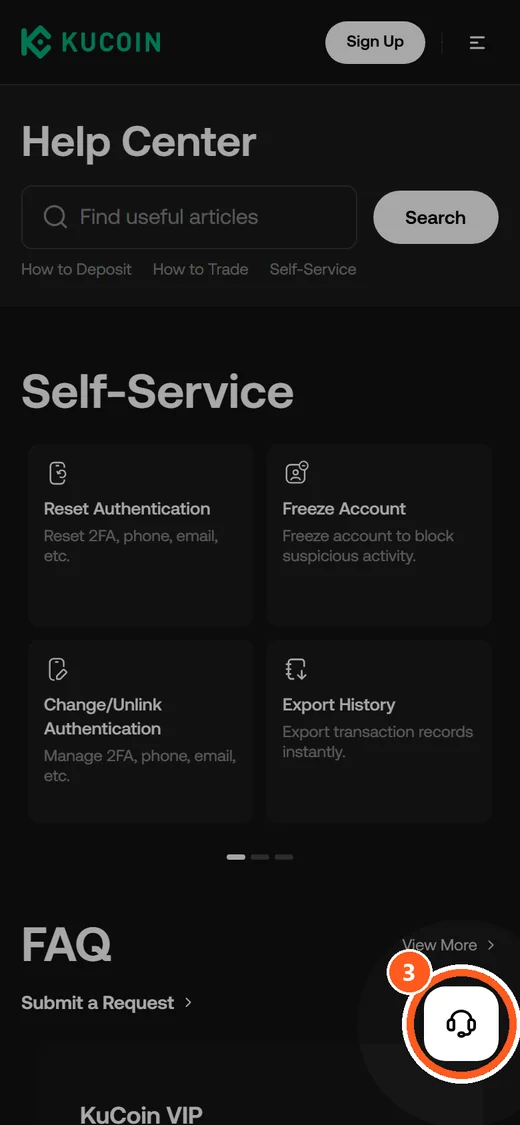
① The headset button on the KuCoin Help Center. ② “Log In (Recommended)” and “Continue as Guest”. ③ On a phone browser the same headset button floats at the lower right.
KuCoin wants an email address from guests. Its help pages say the chat bot also offers a “7*24 hours Live Agent/Ticket service”. KuCoin adds that its customer service contacts you only through the chat in its app, never by phone call or text message.
MEXC support

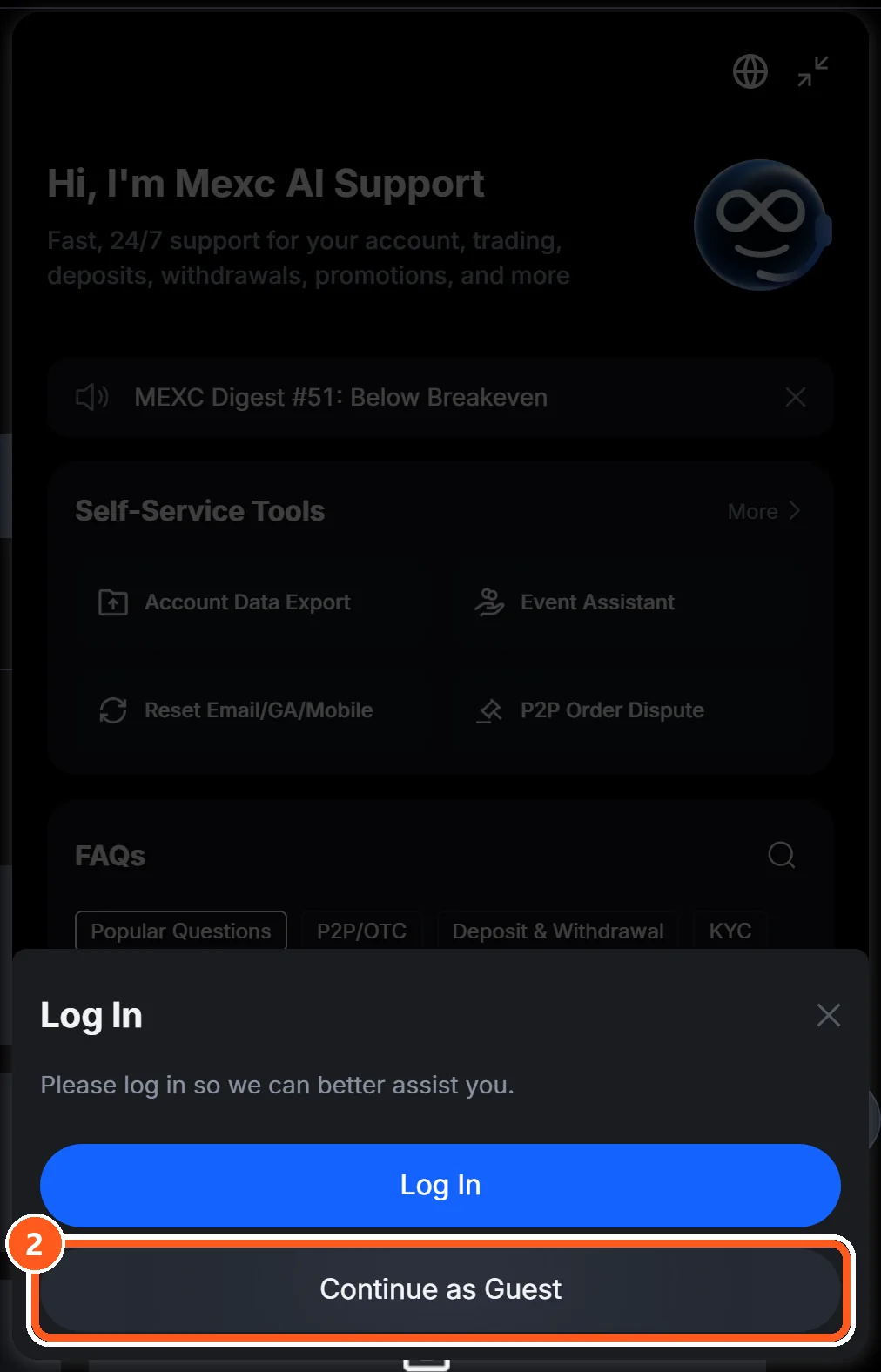
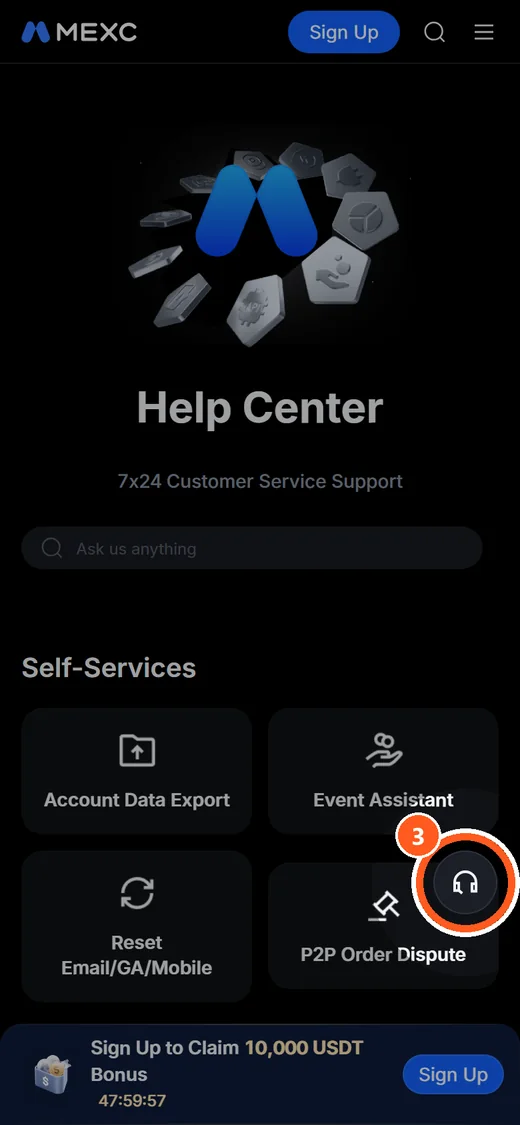
① The headset button on the MEXC Help Center. ② “Log In” and “Continue as Guest”. ③ On a phone browser the same headset button floats at the lower right.
MEXC asks guests to verify an email address for updates on the question. If the bot cannot answer, press [Live Chat] on the web. When we opened the chat, a notice said official MEXC text messages never include links or phone numbers.
Support is not answering? What to do next
Stay with the case you already have and keep its number. Do not open a second request for the same problem: Bybit writes that duplicates may delay the response.
| Channel | What the official docs say about time |
|---|---|
| Binance chat | You may close the window after sending your question. Reply within 24 hours and you keep your place in the queue |
| Binance formal complaint | A written acknowledgement with a reference number within two business days. A final response is aimed at 30 business days, and Binance says it will try to answer within 60 |
| Bybit case form | A reply within 3 to 7 working days. Submitting the same case more than once may slow it down |
| First chat reply, all seven | We found no official sentence promising a reply within a set number of minutes |
The day counts in the table cover a case form and a formal complaint. A first reply in chat is a different wait. We did not time any chat replies, and we found no official sentence that promises an answer within minutes.
If your Binance chat was closed, reply in the same thread to ask again. Binance says that works even when the conversation is marked “Solved”.
Do the answers repeat? Add what your first message left out, such as the transaction ID (TXID) or the exact time.
If chat does not settle it, Binance has a formal complaint process, filed through the Support Center or the chat. The table shows its time frames. We found no written process like it for the other six.
Some waits are not about customer support at all. A withdrawal can be pending for a routine review. The network can be paused for maintenance. Or the account may be restricted.
What to write so you only explain it once
Collect your details before you open the chat. Have these six ready.
- Your account ID number (UID)
- The transaction ID (TXID), the long code for that one transfer
- The coin and the network
- The amount
- The date and time
- A screenshot of what you see
The builder above turns those details into a message to paste into the chat. Pick the exchange and the problem, then fill in what you have. It adds the UTC time next to yours. It also warns you if you paste a wallet address where the TXID goes. Nothing you type is sent to our server.
Several items come from the exchanges’ own forms. For a missing deposit, Binance’s recovery form and OKX’s deposit tool both work from the TXID, the coin and the network. Binance asks you to use that form only for transfers that show as confirmed on the blockchain and still have not arrived after 1 hour.
Never put your password, a verification code or your seed phrase in a support message.
Not sure which code is the TXID? See what a TXID is and where to find it. For deposits, start with a deposit that has not been credited.
Binance customer service hours and languages: is chat really 24/7?
Binance says its chat support team is available 24/7, so there are no opening hours to plan around. That tells you the chat is open. It does not say how fast a person replies.
Bybit, OKX, Bitget, KuCoin and MEXC also write 24/7 or 7×24 on their support pages. For Gate we did not find that sentence.
Language is a separate question. All seven help centers opened in English. We also tried three other language addresses. Traditional Chinese pages loaded on 7 of 7, Russian on 6 of 7 and Korean on 0 of 7.
| Exchange | Korean pages | Traditional Chinese pages | Russian pages |
|---|---|---|---|
| Binance | Redirects to English | Yes | Yes |
| Bybit | Redirects to English | Yes | Yes |
| OKX | Page not found | Yes | Yes |
| Bitget | Redirects to English | Yes | Redirects to English |
| Gate | Page not found | Yes | Yes |
| KuCoin | Redirects to English | Yes | Yes |
| MEXC | Redirects to English | Yes | Yes |
What actually loaded when we opened each help center’s language-specific address from South Korea. This is the language of the pages, not the language agents answer in. Results can differ from another location.
That is page language. We found no exchange that lists the languages its agents answer in.
Binance says to choose your language before you enter the chat. Once an agent is connected, you cannot change it. If yours is not offered, Binance asks you to write in English and use a translation tool for the reply.
What you find when you search for a Binance support phone number
You find real help pages mixed with pages built only to show you a phone number. No exchange lists those numbers in its help pages.
They follow a pattern. The page sits on a site with no link to crypto, such as a note-sharing service or a free blog builder. The number is in the title, with labels like “toll free” or “live person”. The text promises refunds or account recovery by phone.
Some copy a whole help center, chat and email buttons included. So read the domain before you read the page.
A similar name can also turn up near the top: Binance.US is a separate service with its own help pages, and this guide is about binance.com.
Social media has its own version. Post about a stuck withdrawal, and accounts with “support” in their names may message you first. Binance says its support never reaches out first on unofficial channels such as phone or social media.
None of the seven lists a support address at a free email provider either.
Problems you can fix without a support ticket
Many common problems can be sorted out before any agent joins. Start with the page that matches yours.
| If you are stuck on | Read this first |
|---|---|
| A deposit that has not arrived | Crypto deposit not credited |
| A withdrawal that stays pending | Why a withdrawal is still pending |
| Coins sent on the wrong network | Sent crypto on the wrong network |
| A transfer without a memo or tag | Sent crypto without a memo or tag |
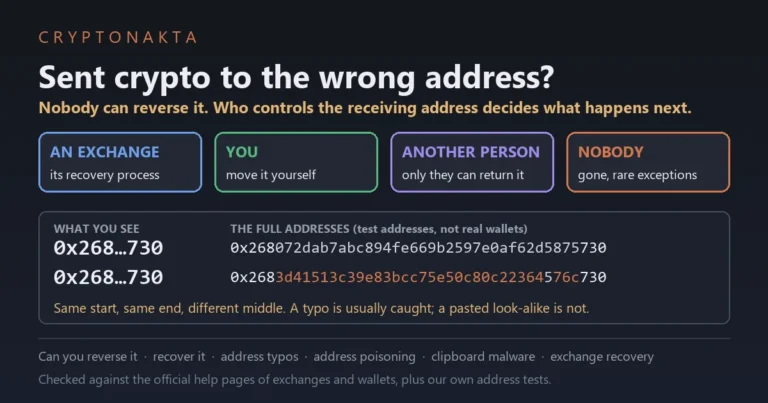
| Coins sent to the wrong address | Sent crypto to the wrong address |
| A failed ID check on Binance | Binance verification failed |
| A lost 2FA device | Lost 2FA: what is locked |
| A referral code you forgot to enter | Referral code after registration |
On that last row: KuCoin’s support center has a “Link Referrer” request for adding a referrer after sign-up. An anti-phishing code can also spare you a ticket later, since it marks real exchange emails.
No account yet, or opening one at a second exchange? Here is Binance with our referral code.
Binance
Affiliate disclosure: some links are partner links. We may earn a commission at no extra cost to you. This is not investment advice.
How we checked the seven help centers
We opened each help center in a desktop browser without logging in. We pressed the support button, then the guest button.
| What | How |
|---|---|
| Button location and chat window | We opened the seven help centers in a browser and captured them. Not logged in. Desktop window 1366 pixels wide |
| Phone browser view | The same help center home pages in a browser set to a phone width of 390 pixels. Not the app |
| What a guest is asked | We pressed only as far as the guest button. No email or phone number entered |
| Page language | We opened the Korean, Traditional Chinese and Russian addresses and recorded which address and language actually loaded |
| Human agents, reply times, email, phone | Each exchange’s official help pages. We did not talk to agents or time any replies |
| Where we connected from | South Korea |
Captured on November 19, 2026. The screens are from the day we captured them, and an exchange can move a button at any time.
We connected from South Korea, and the page language can differ from another location. To repeat it, open the help center addresses in the source list and press the headset icon.
Exchange support questions
- Binance: How to Use Binance Support?
- Binance: How to Contact Binance Support as a Visitor?
- Binance: How to Identify Fake Binance Support Phone Numbers?
- Binance: How to raise a complaint?
- Binance Verify
- Bybit Help Center: Submit Case
- Bybit: Authenticity Check
- OKX: Support center
- OKX: Channel verification
- Bitget: Support Center
- Bitget: Official Verification Channel
- Gate: Help Center
- Gate: Official Verification Channel
- KuCoin: Help Center
- KuCoin: Official Verification Center
- MEXC: Help Center
- MEXC Verify
Buttons, addresses and policies change, so check the exchange’s own site before you act. We did not test how well any support team answers. Nothing here is investment advice.
Next: set an anti-phishing code so fake support emails stand out